



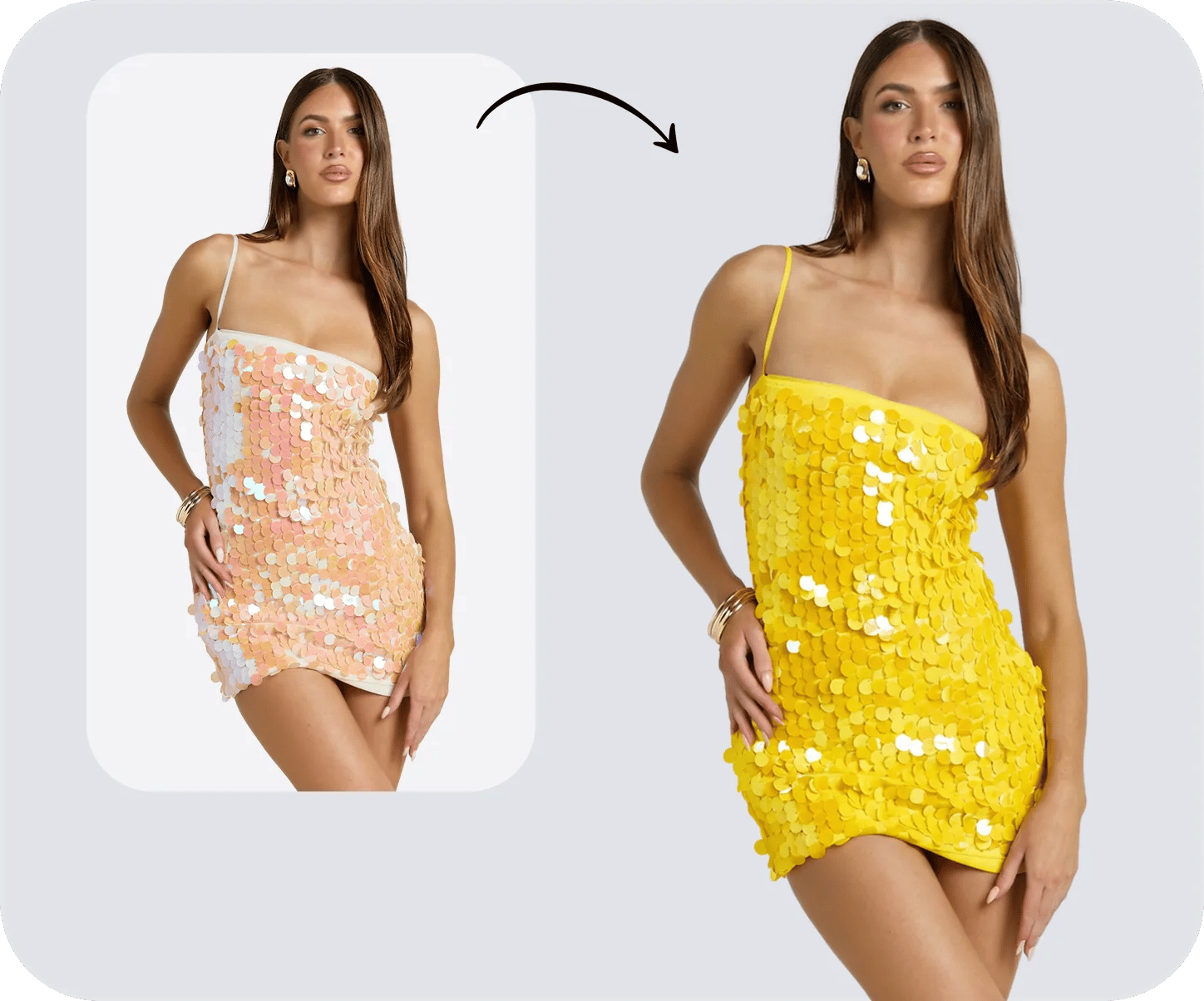

An apparel seller may receive one approved supplier photo while the remaining color samples are still in production. The product page, variant selector and campaign calendar can still require a complete image set before those samples arrive.
AI recolor software can create those variants from one source image, but generation speed is only part of the decision. The export must still represent the SKU: embroidery, trim, fabric shading and overlapping pieces need to remain consistent, and the file must be large enough and clean enough for the intended sales channel.
We tested that workflow with an embroidered lavender anarkali and metallic-thread dupatta. Six products received the same source image and the same target color, #C23535. We then reviewed the exported result, watermark rules, generation cost and batch workflow from the perspective of a seller preparing listing images.
Best AI recolor tools: quick comparison
We ran all six on August 3, 2026 using the free access or trial available to a new account. Each product received the same source file and target hex through its normal workflow. The comparison emphasizes product-detail preservation and whether the test export was usable without an added watermark.
| Tool | Visual match to #C23535 | Kept the embroidery? | Test-access export | Cost per image | Seller verdict |
|---|---|---|---|---|---|
| Snappyit | Closest visual match in this test | Yes, relief intact | Clean file, no watermark | 1 credit per generation | Best fit for detailed apparel in this test |
| Photoroom | Close, but visually darker | Kept, but gold turned silver | No watermark, counts against export cap | Metered AI credits | Best fit for an all-in-one editing workflow |
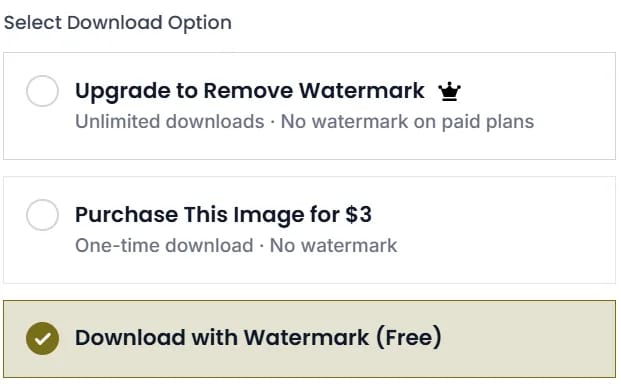
| Modelia | Close by visual review | Kept, but gold turned silver | Watermarked — $3/image to remove | 3 credits | Good detail, but the clean export costs extra |
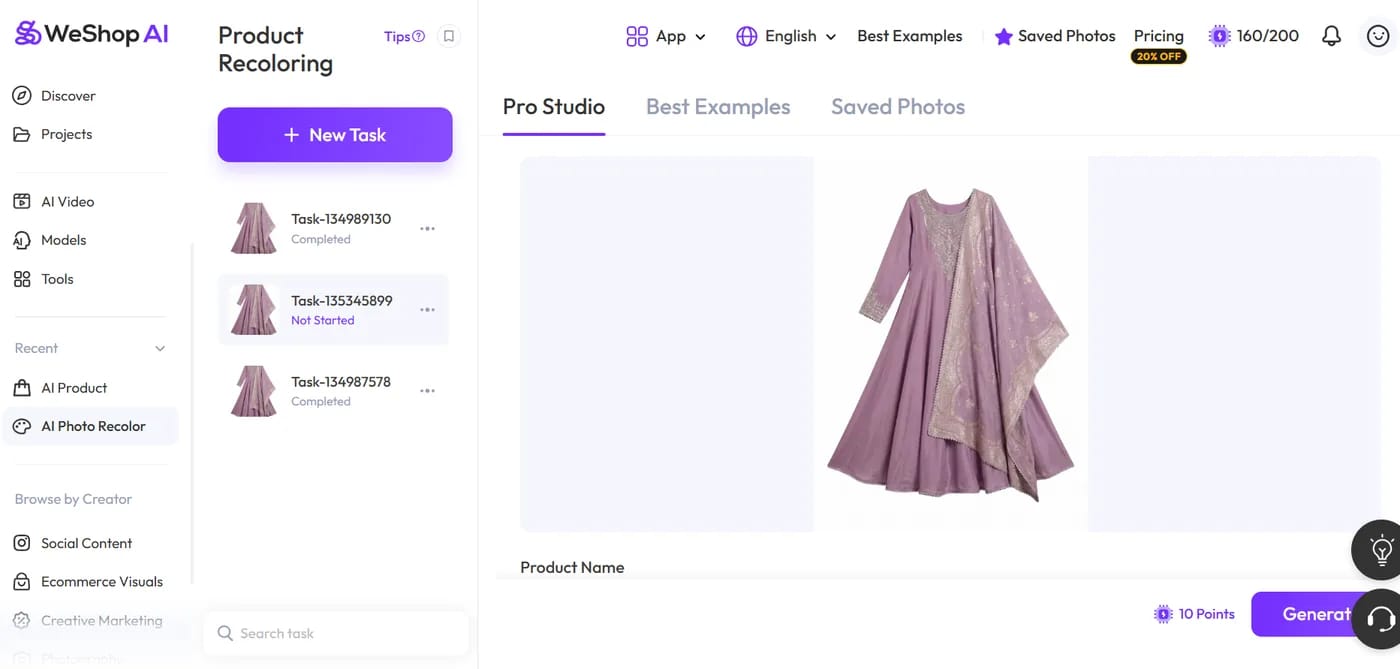
| WeShop AI | Close on the third attempt | Yes on attempt 3, wiped flat on attempt 1 | Clean file | 10 points × 3 attempts = 30 | Usable after iteration; budget for retries |
| SellerPic | Close on the base fabric | No — embroidery went tone-on-tone | Watermarked across the whole image | 1 credit | Better suited to solid-color garments |
| Canva | No — came back coral | Yes, untouched | Clean file | Not metered | Useful for social design, not listing color accuracy |
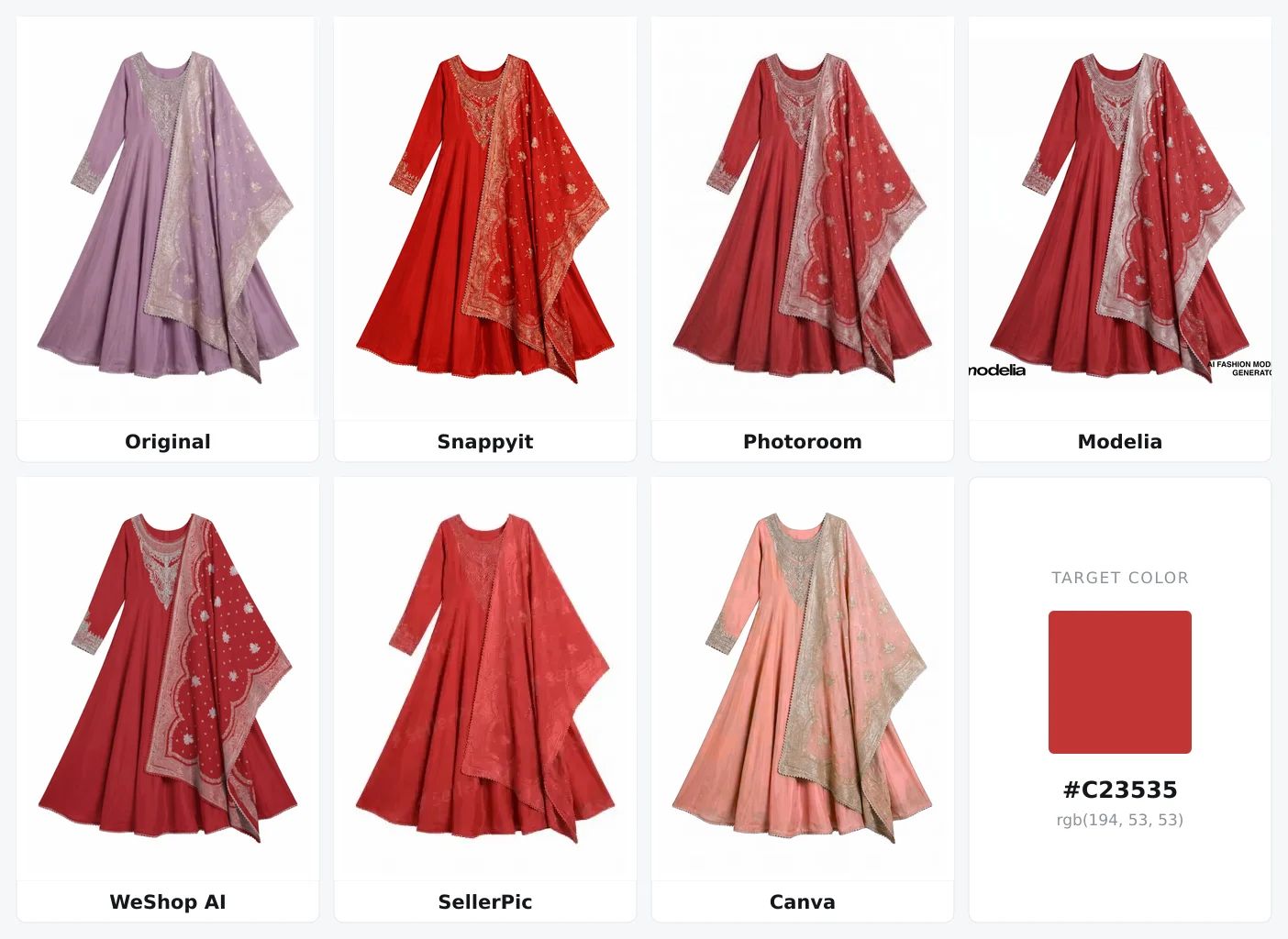
Plan information comes from vendor pricing pages checked on August 3–4, 2026; generation costs shown in the tested interfaces are documented in the tool cards below. The seller verdict summarizes this single-garment test rather than a universal product score.
Review the dupatta border first. Four results either shifted the metallic gold toward silver or blended it into the surrounding fabric. Then compare the base fabric with the shared target swatch, remembering that this is a visual review rather than instrumented color measurement.
- Snappyit produced the closest visual match to the shared target while keeping the metallic embroidery readable. The gold work on the dupatta border still catches light against the new red instead of being flattened into the fabric.
- Export rules change the value of test access. SellerPic tiled its logo across the test export, and Modelia added two marks unless we paid $3 for a clean download. Snappyit's signup credits produced a watermark-free file that could be reviewed at listing size.
- Budget by attempts, not only by downloaded images. WeShop AI produced a usable result on the third attempt. For catalog planning, include failed generations in the expected cost and turnaround.
- SellerPic changed both the base fabric and the embroidery. The gold stitching became tone-on-tone red, so the exported image no longer represented that detail of the SKU.
- Canva used palette substitution rather than a generative garment pass. With
#C23535as the target, the result appeared coral and showed uneven tonal areas through the skirt folds. The embroidery remained unchanged because it was outside the substituted color range.
How We Tested AI Recolor Tools
A seller does not approve a colorway from a feature list. The listing image still has to match the SKU when a shopper zooms in, so this test follows one difficult product from upload to export and records the failures that could affect a product page.
One controlled garment, six tools, one hex. Everything below rests on a single source file: an embroidered lavender anarkali with a matching metallic-thread dupatta, recolored to #C23535. We picked it because it breaks three things at once that a plain cotton tee never would:
- Metallic embroidery. The neckline panel, cuffs and the wide dupatta border are gold thread over fabric. A model that treats the garment as one flat region will drag that thread along with the base color — and once the gold is gone, the dress in the photo is no longer the dress in the box.
- Two separate pieces in one silhouette. Kurta and dupatta overlap. Several tools recolored one and left the other, which is the same failure you'd get on a jacket-and-lining or a dress-with-sash SKU.
- Sheer layering and deep drape. The dupatta is semi-transparent where it falls over the skirt, so the shading has to survive the pass or the whole thing turns into a flat cutout.
We used the free access or trial available to a new account and attempted to download every result. This reflects how a seller normally shortlists software before buying a seat. Two tools added watermarks to the export; those marks remain visible because they affect whether the test file can be used in a listing.
Every case used the same source image and the same target color, #C23535. We did not use a color picker, spectrophotometer or Delta E tool to score the outputs. Color-match comments are visual judgments from the exported images. Where a product accepted written instructions, we asked it to recolor the garment while preserving the embroidery; swatch-only products received the same hex value through their available workflow.
What we reviewed. We used five practical checks that affect whether a seller can publish the result:
- Visual color match — does the exported garment look close to the shared target, and do the original shadows still describe the fabric?
- Detail preservation — embroidery relief, metallic thread, weave, stitching, drape shadows.
- Staying in its lane — does it recolor the whole garment, and does the color leak onto trim, hardware, labels or the background?
- Cost per usable image — not the headline price. Credits per run times the number of runs it took, plus whatever it costs to get the file out without a watermark.
- Batch and volume handling — what happens at 100+ SKUs.
The table reports a seller-oriented verdict instead of a numerical score. Every result shown below is straight from the tested workflow: no manual retouching, and any watermark or failed detail remains visible. Because the sample is one embroidered garment and one target color, treat the ranking as a shortlist for similar apparel rather than a universal benchmark.
Editorial disclosure: Snappyit publishes this guide and is included in the comparison. The same source image, target color and review checks were applied to all six products.
Best AI Recolor Software
1. Snappyit — Color Change for apparel and products
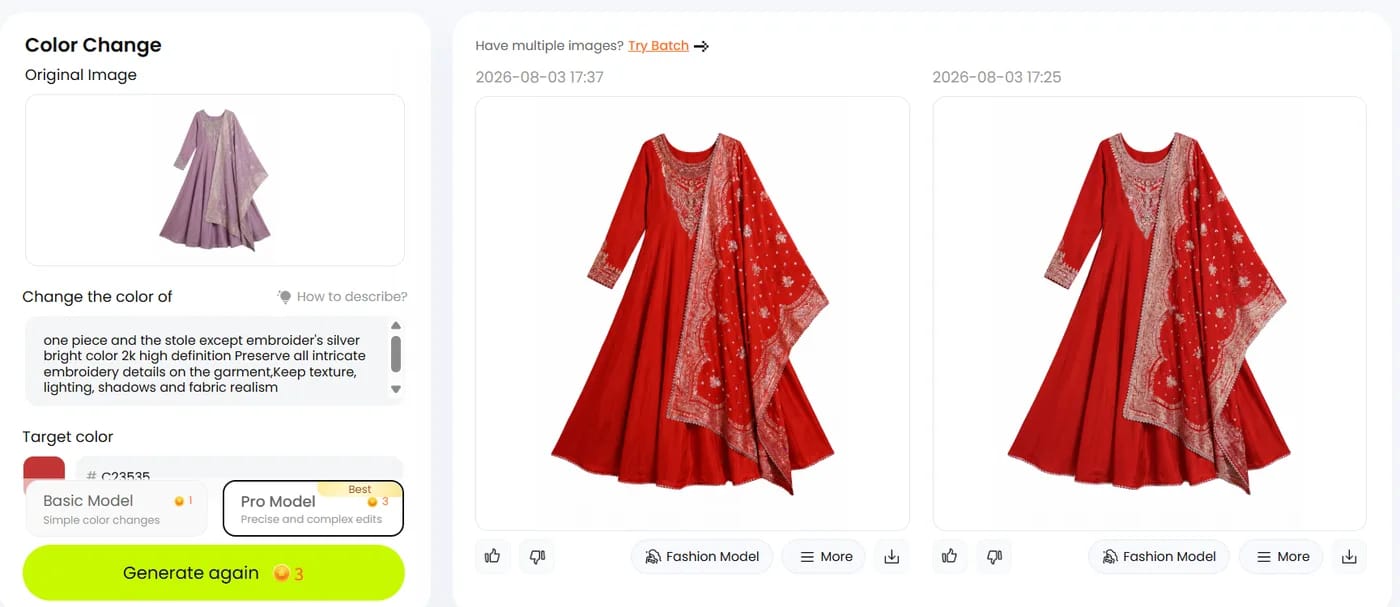
#C23535. The tested Color Change generation cost 1 credit, and previous runs remain in the workspace for comparison.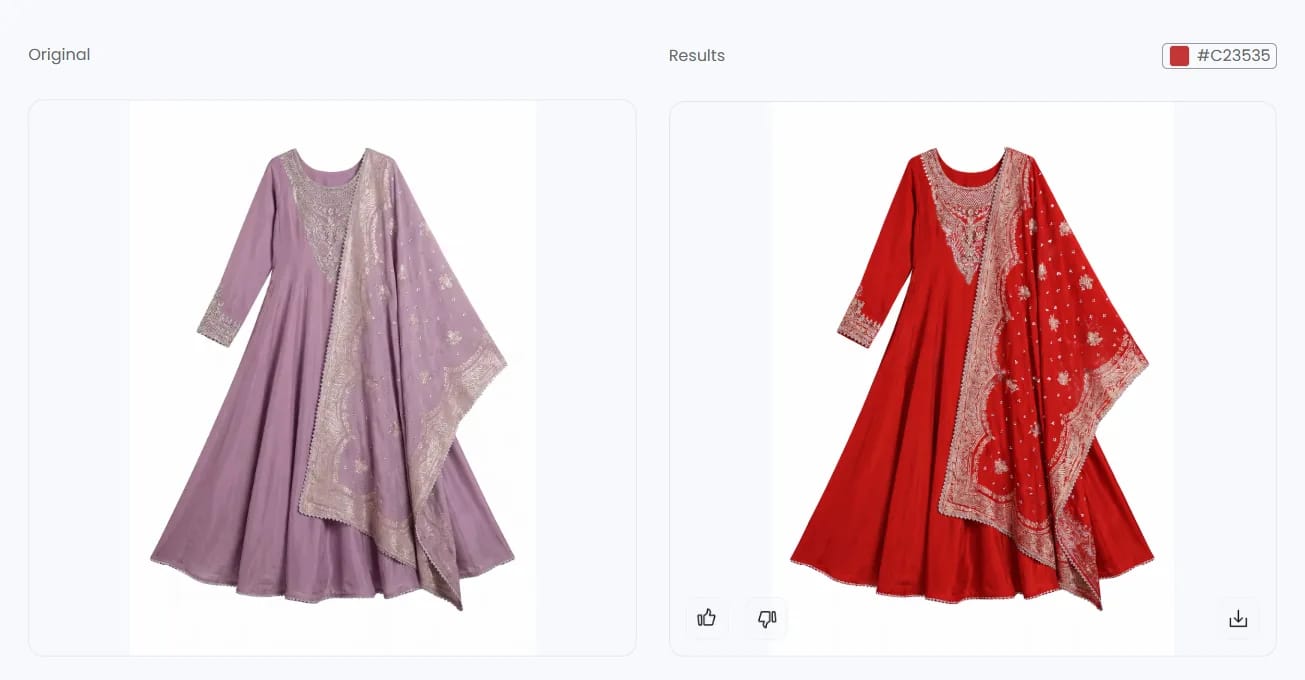
#C23535 as the target.
- ColorIt was the closest visual match to the shared target in this test, while the fold shadows continued to describe the skirt's drape.
- DetailThe dupatta's woven border pattern, the neckline panel and the cuff bands all survive as distinct thread work.
- RegionKurta and dupatta both recolored in one pass — no half-changed garment.
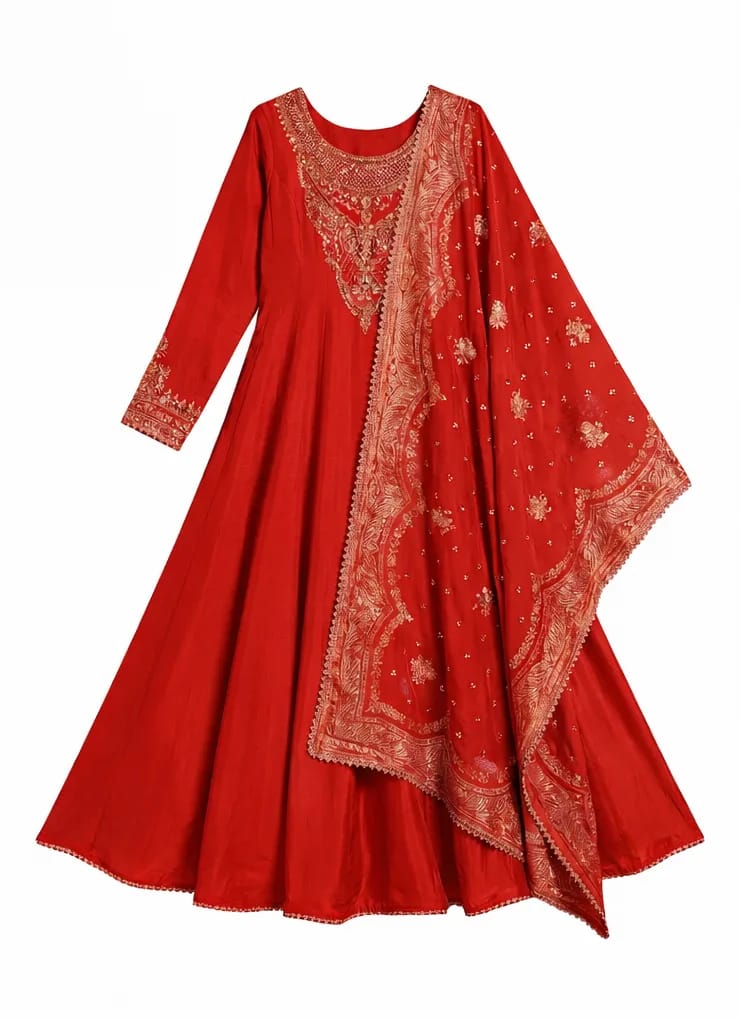

- The closest visual match in this test also kept the metallic embroidery readable. For a listing where the gold thread is part of the SKU, that made the result easier to approve without manual repair.
- The test export was clean. The signup credits produced a watermark-free file, so the result could be reviewed at listing size. Two products in this comparison required payment for a clean export.
- Credit cost is visible before generation. The tested Color Change workflow showed 1 credit per run, which makes it easier to estimate a catalog batch before starting it.
- Credits roll over for six months instead of expiring monthly — the difference matters if your catalog work is seasonal rather than steady.
- Accepts a written instruction alongside the hex, allowing the seller to identify the garment pieces to change and the trim, texture, lighting and shadows to preserve.
- One credit pool covers the rest of the apparel toolkit, so recolor isn't a separate line item.
- The exclusion instruction is a hint, not a mask. We asked it to leave the embroidery and the gold thread still shifted warm to match the new red — it kept its structure and its metallic sheen, but it isn't the original gold. If you need the trim held to an exact original color, check that region before publishing.
- General editing coverage is limited. The product is more focused on clothing and accessories than on broad photo-editing tasks.
- A paid subscription is required after the trial. On annual billing, the three paid tiers are equivalent to $8.20, $18.90 and $34.90 per month; choose against normal monthly generation volume rather than the launch-month peak.
- Tuned for products and apparel — for non-product recolor work like interior design or automotive paint, a general-purpose model will serve you better.
2. Photoroom — Recolor inside a full ecommerce editor
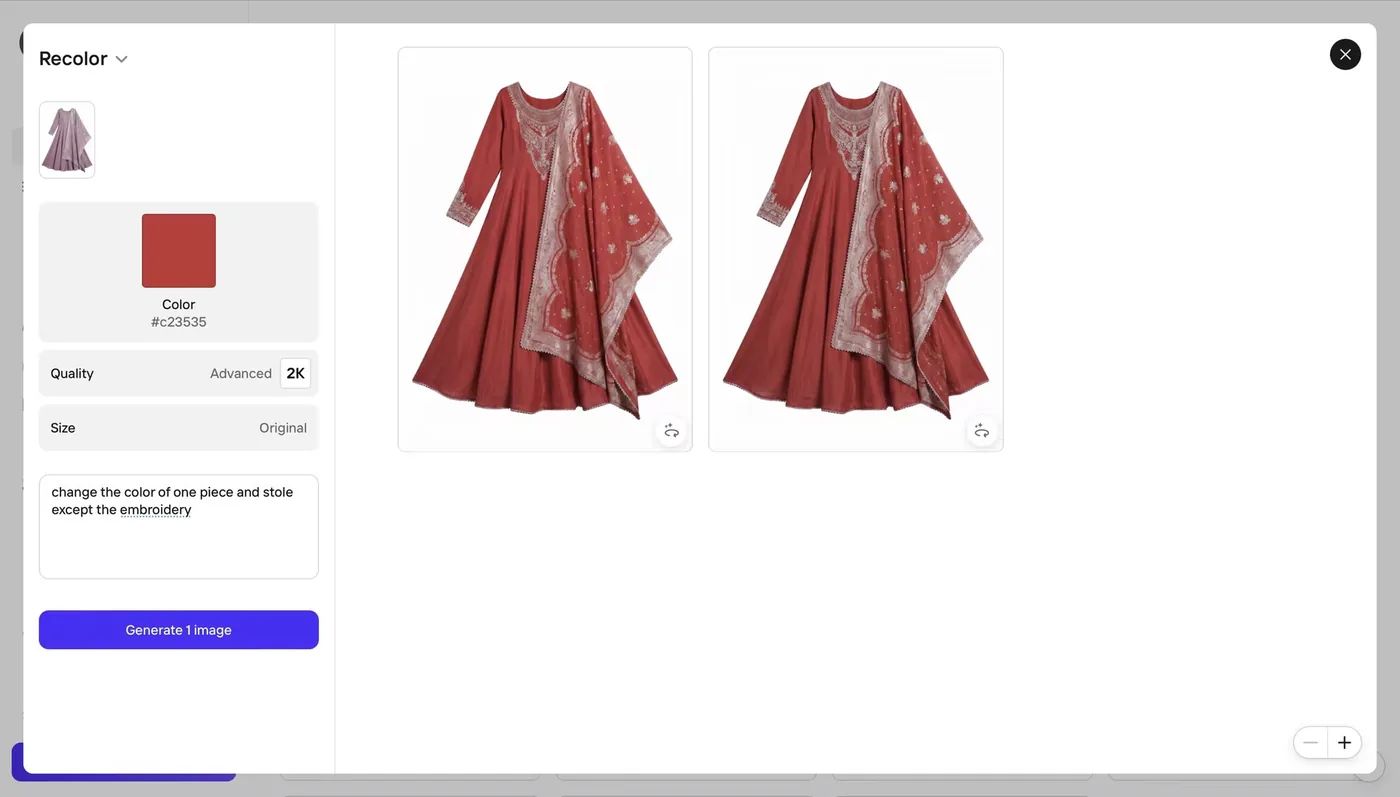
#c23535) and a written instruction, and lets you set output quality before generating — we ran Advanced / 2K at original size. One click returned two variants to choose between.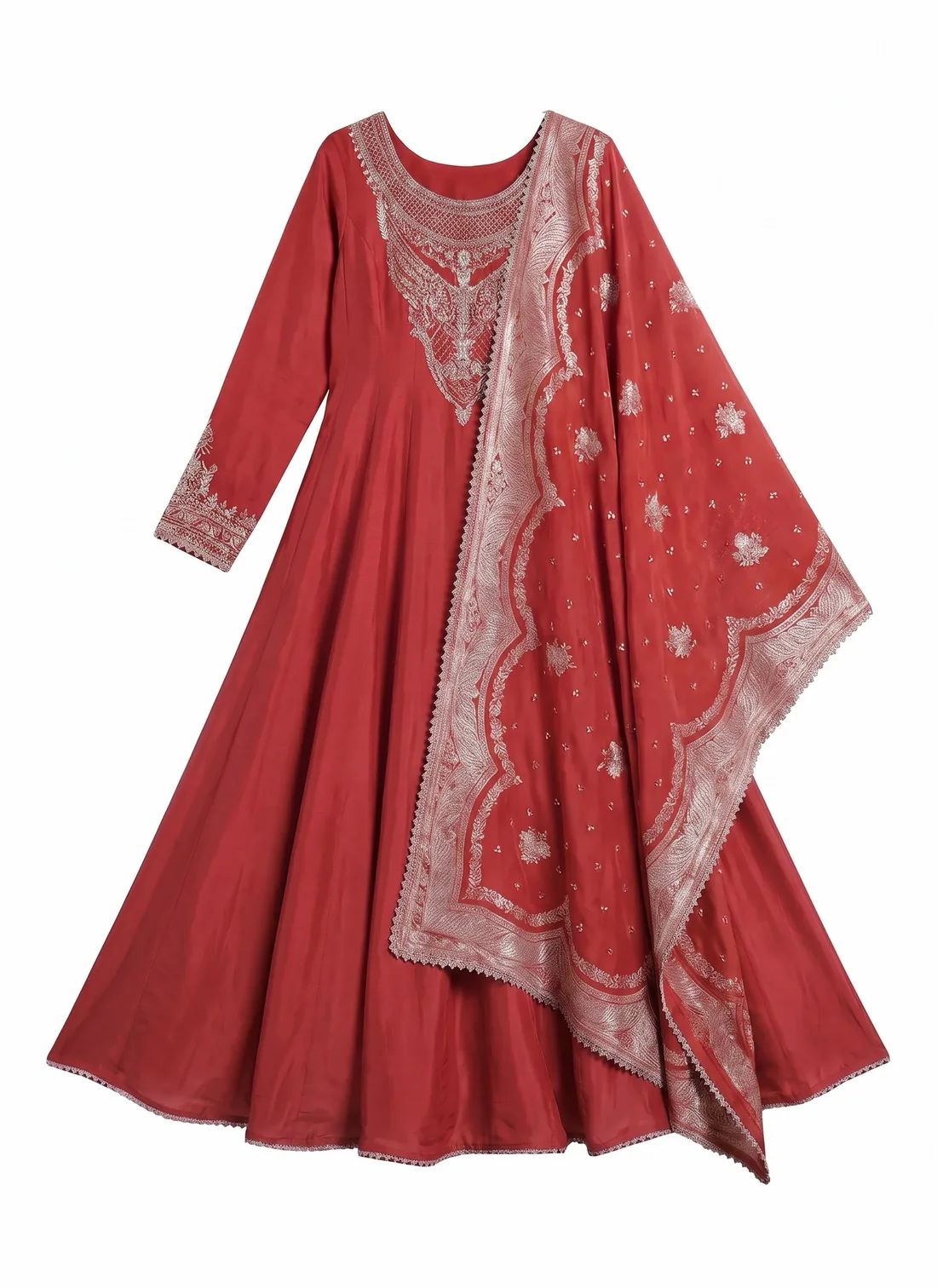
- DetailBest-preserved embroidery in the test after Snappyit — the scalloped dupatta border, the sequin scatter and the cuff bands all still read as separate thread work.
- MetalThe stitching structure remained, but the gold thread appeared silver. That color change would need correction or disclosure on a gold-work product listing.
- ColorSits slightly deeper and less saturated than
#C23535, closer to a brick red than the target swatch.
- Takes a hex and a written instruction together — the same steering Snappyit gives you, which is why both kept the embroidery when the swatch-only tools didn't.
- Two variants per generation, so a near-miss usually has an alternative sitting next to it.
- Output quality is a setting, not a second step. 2K comes straight out of the recolor pass — no reload-and-upscale round trip.
- A good all-round ecommerce editor underneath it, with a decent mobile app, Shopify integration and video from the Max tier up.
- Metallic color shifted. Gold appeared silver in the output, which is material for products sold on gold work, brass hardware or bronze buckles.
- Credit consumption varies by operation, so a 500-SKU month is harder to forecast than on a flat one-credit-per-image plan.
- Exports are capped at 2K below the Ultra tier.
- Multi-color prints tend to smooth during the pass — pattern-critical SKUs are still better served by an apparel-specific tool.
3. Modelia — Fashion generator with a watermark toll
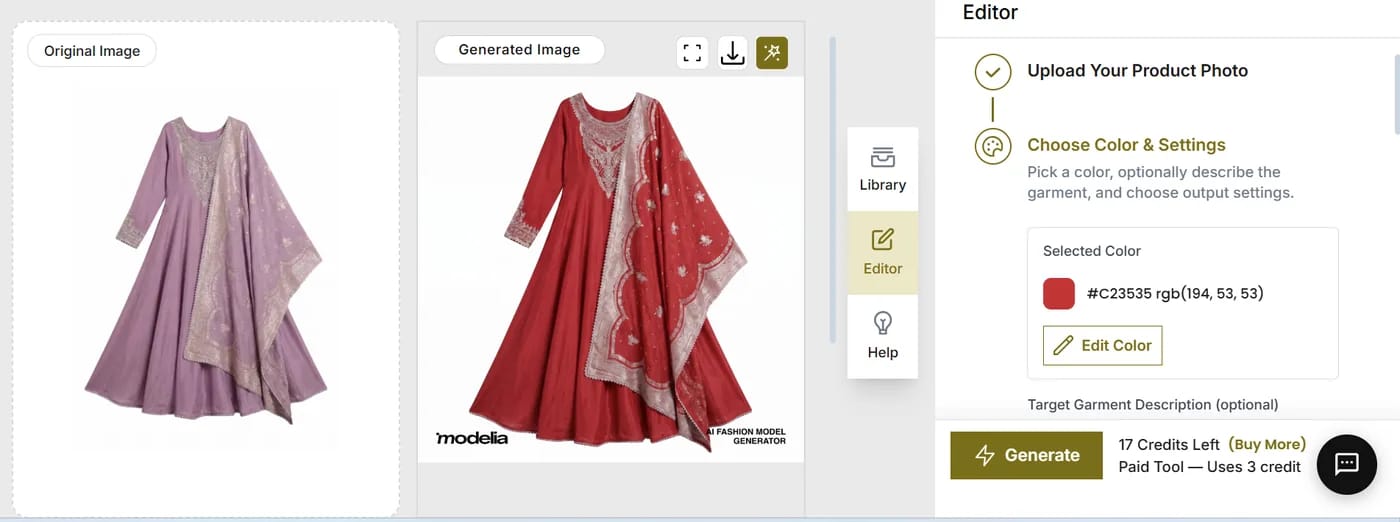
- Kept the embroidery intact — the dupatta border, sequin scatter and neckline panel all survived, on par with Photoroom.
- Cost is on the button before you spend it, along with your remaining balance.
- Shortest workflow of the six: upload, color, generate. No masks, no layers, no second tool for resolution.
- Sits next to a working AI fashion-model generator, so variants and on-model shots come from one place.
- A clean evaluation file costs extra. The free export carried two marks; the tested options were a $3 one-time clean download or a paid plan.
- Gold thread came back silver, the same failure as Photoroom.
- The tested generation used 3 credits. Include the paid clean-export requirement when comparing its usable-image cost with the other products.
- The garment description is optional and easy to skip. In this workflow, a precise description is important when embroidery and trim must remain separate from the base fabric.
4. WeShop AI — Good result, three attempts to get it
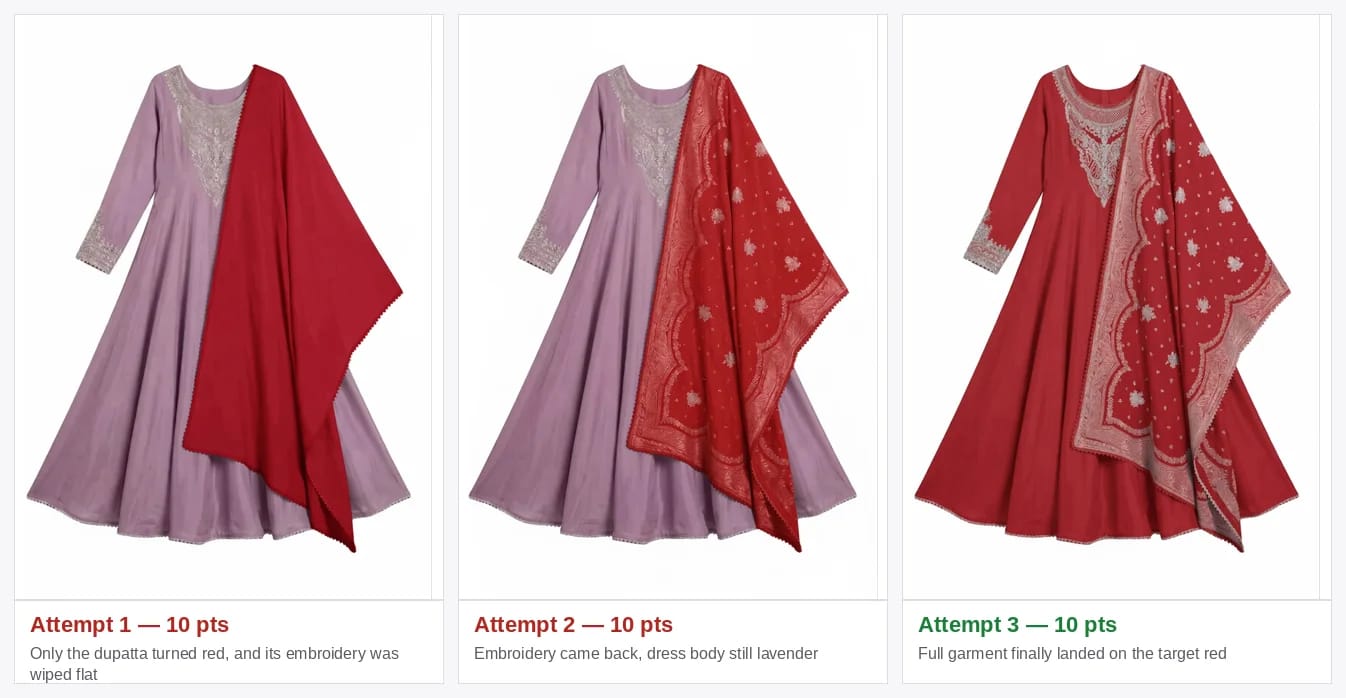
- Attempt 1Read the outfit as one region and picked the wrong one — dupatta only, embroidery wiped flat with it.
- Attempt 2A revised description restored the embroidery, but the kurta remained lavender, so the result was not usable as the requested colorway.
- Attempt 3Full garment on target, embroidery intact, clean download — and 30 points spent to get one file.
- The final image was excellent — whole garment covered, embroidery intact, clean download from a free account.
- Lowest headline cost per generation here at roughly $0.08, and 200 free points is 20 real attempts.
- Task queue and concurrency are built for volume rather than one-off edits.
- The surrounding suite covers model generation, ecommerce visuals and video from the same balance.
- It took three tries, and cost per usable image is what matters. 30 points for one publishable file puts it level with tools that landed on the first pass.
- The result changed with the garment description. Two of three runs recolored only one piece, so jacket-and-lining or dress-and-sash SKUs need region-by-region review.
- Attempt 1 flattened the embroidery. Detail preservation was inconsistent across the three runs.
- Queued tasks add a wait between prompt changes and result review.
5. SellerPic — Color Changer inside an AI fashion suite
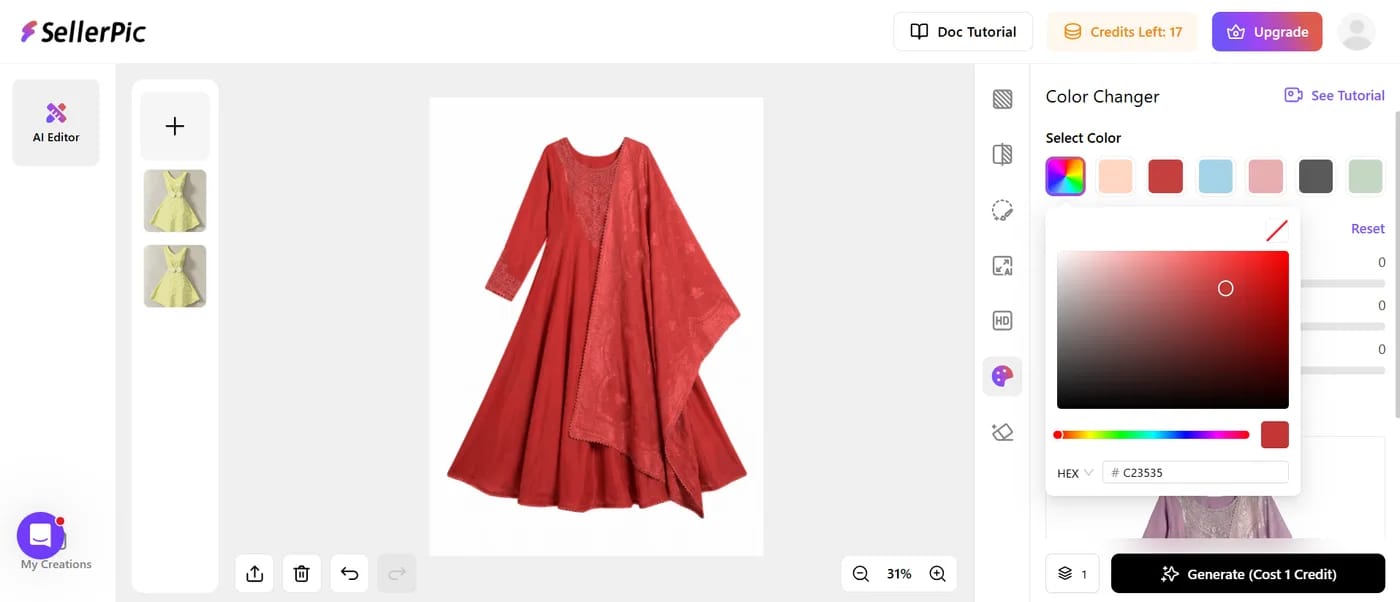
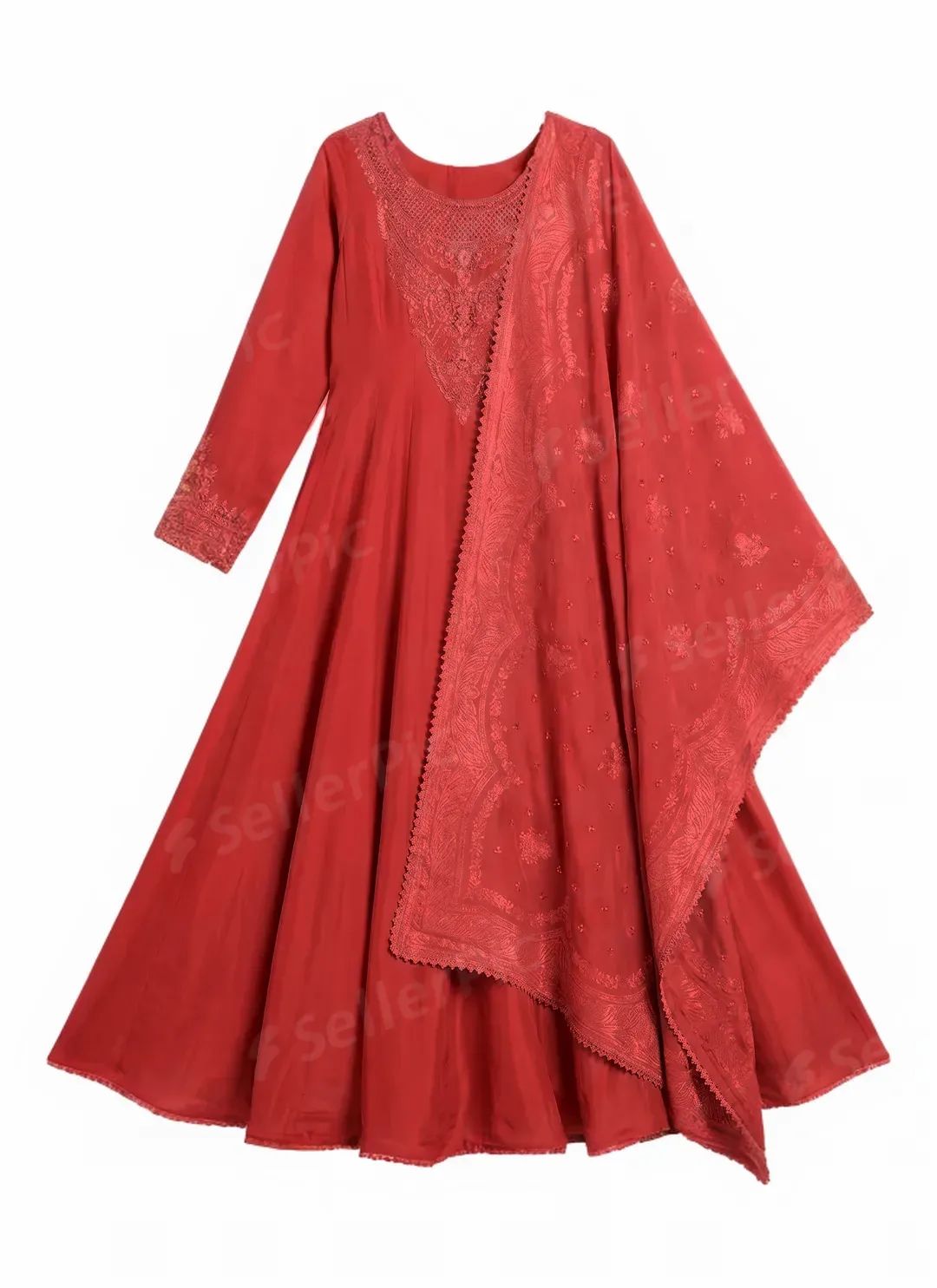
- ColorLands on the red without drifting — the base tone is right.
- DetailTone-on-tone. The gold border, the neckline panel and the sequin scatter all came back the same red as the fabric around them, so the dupatta stops reading as a separate embroidered piece.
- ExportThe logo is tiled across the entire image on the free plan, not tucked into a corner.
Recolor and resolution were handled in separate tools during testing. Producing a 2K file required saving the recolored intermediate, opening Image Enhancer and running an additional upscale. That added a second workflow step and brought the tested total to three credits per finished image.
- Much the broadest surrounding toolkit here — try-on, model swap, pose generation and image-to-video share one credit pool.
- Hit the target red cleanly on the base fabric, with no drift into orange or maroon.
- Multi-region recolor lets you set different colors on body, sleeves and collar in a single pass.
- The Advanced-tier estimate was about $0.05 per finished image under the tested three-credit workflow, before accounting for failed generations or manual review.
- Well-developed Shopify, Amazon, Etsy and WooCommerce connections; output can be pushed straight to Canva for social editing.
- The embroidery became tone-on-tone with the fabric. The issue was easy to miss at thumbnail size but visible at listing zoom, so the result did not accurately represent this SKU.
- The test export tiled a watermark across the whole image, so the result could be reviewed but not used as a listing image without upgrading.
- No exclusion input. Swatch and sliders only — there's no way to tell it to leave the trim alone, which is exactly what went wrong.
- Reaching full resolution takes two separate tools and an intermediate save, which breaks batch workflows and costs three credits per finished image.
- Unused credits are forfeited at the end of each month, with no rollover, and batch is locked to the $49.50 Advanced tier.
6. Canva — Palette swap inside a design suite
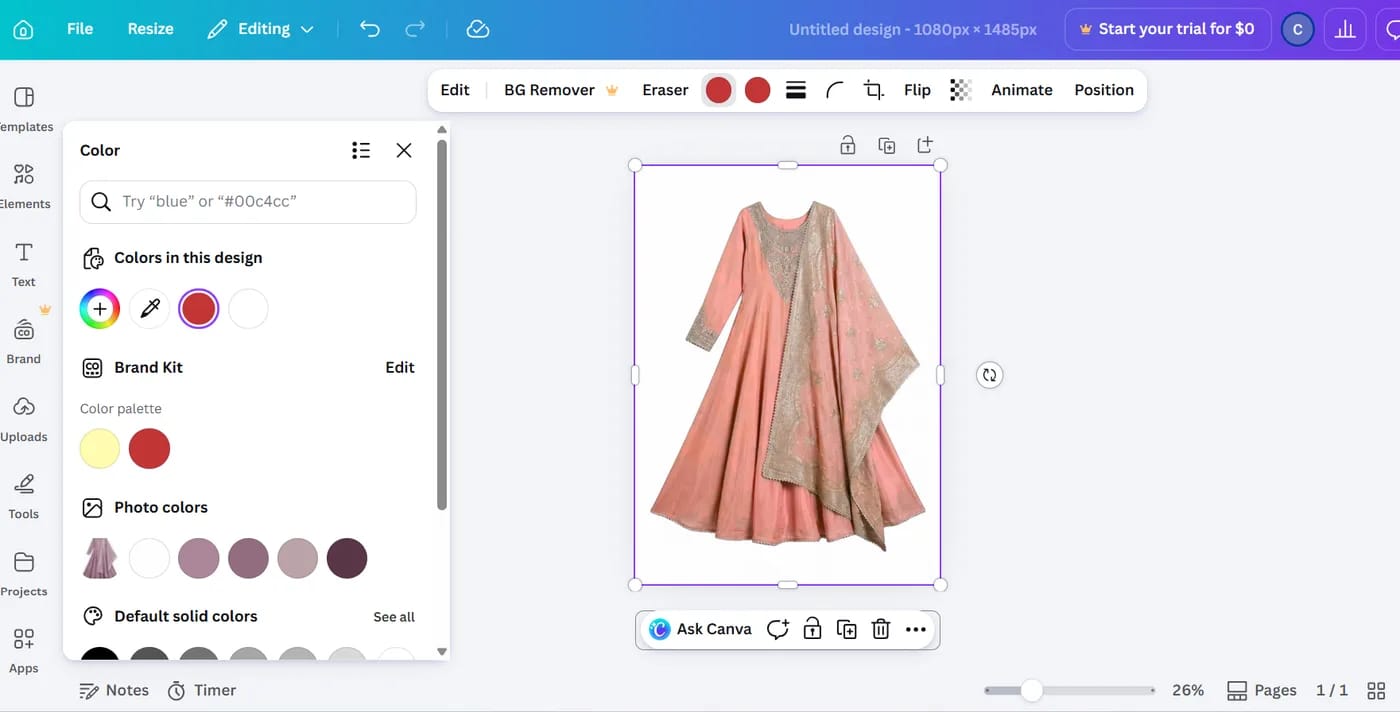
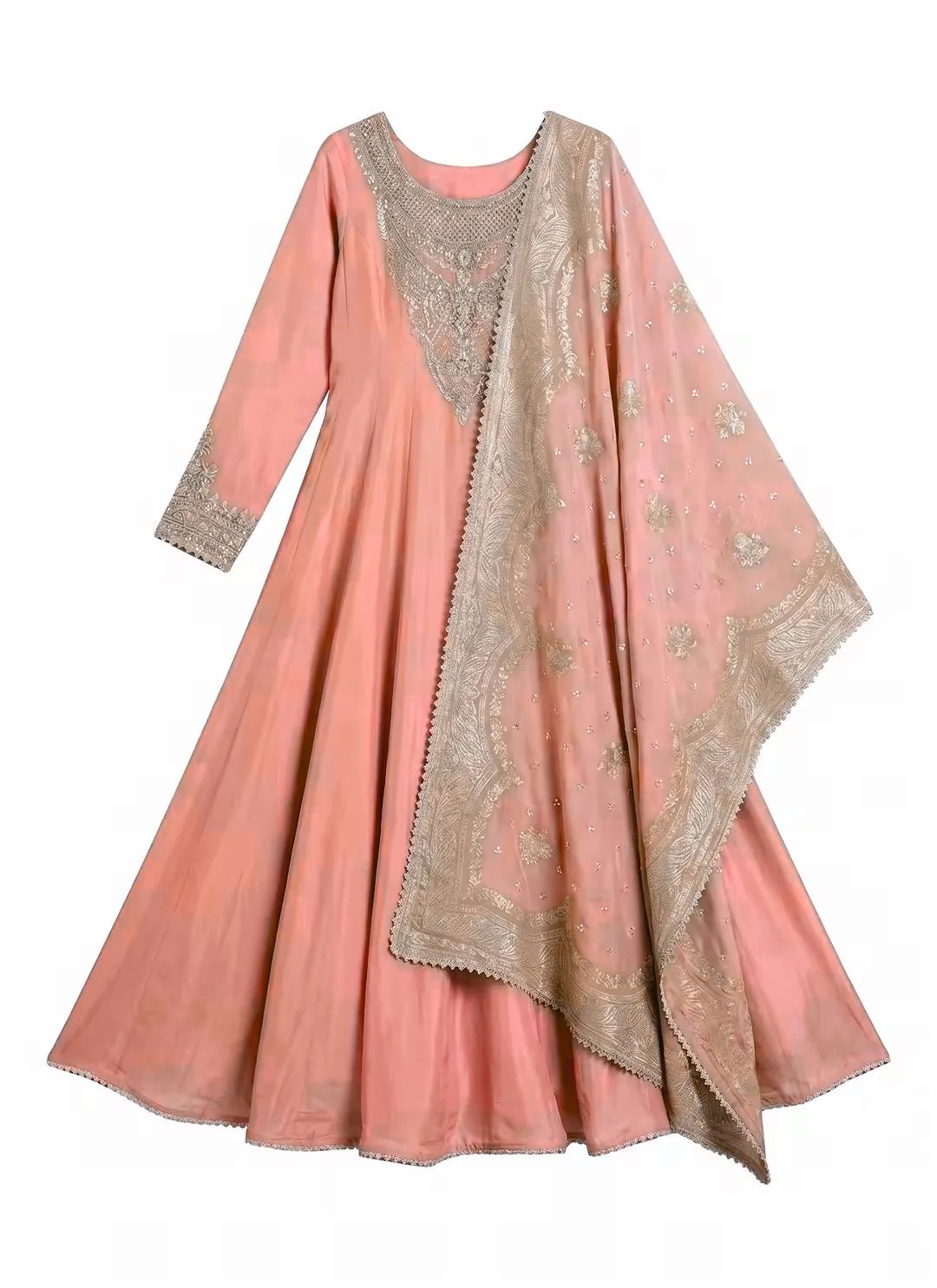
- ColorAsked for
#C23535, returned coral. Substituting one sampled swatch shifts only the pixels in that range, so the result lands wherever the original shading left it — not on your hex. - EvennessUneven tonal patches across the skirt where the sampled range didn't reach, most visible in the folds.
- RegionThe gold embroidery remained untouched because it was outside the sampled color range being substituted.
- The tested Color-panel swap was not metered. Iterating on the palette did not use the account's premium AI allowance.
- Non-target regions remained unchanged — gold thread, trim and background were outside the substituted color range.
- Accepts a hex value directly in the color search field, so brand-color targeting is at least expressible.
- No extra subscription if you already hold Pro, with the template library sitting right next to the edit.
- Affinity is now a free desktop app (Windows, Mac, iPad), Canva-owned since October 2025, if you want manual, selection-based control instead.
- The workflow substitutes a sampled palette. With the shared red as the target, the result appeared coral because the output depends on the original pixel ranges selected by the Color panel.
- Uneven result on draped fabric, with patchy tone across the skirt.
- The tested result was not suitable for a listing hero image because the target shifted toward coral and the skirt showed uneven tonal areas.
- Premium AI uses cap at 200/month on Pro, which is thin if you move to the generative tools for catalog work.
- Affinity's manual route preserves detail but costs minutes per image instead of seconds.
Why AI Recolor Fails: 6 Problems to Check Before You Publish
The six issues below appeared during the tested workflows and can affect whether a generated variant is safe to publish. Use them as a repeatable review checklist for every file in a catalog batch.
#C23535 produced a coral-looking result. Check: compare the export side by side with the approved swatch and the original product file.How to Change the Color of a Product Photo with AI, Step by Step
The same approval sequence applies to one garment or a larger catalog batch. The five steps below focus on producing a listing-ready colorway and accounting for retries, rather than stopping after the first generated preview.
- Start from your cleanest source photo. Even lighting, a plain background, the garment in full frame. Recolor amplifies whatever is already in the file: a shadow-heavy supplier JPEG produces a shadow-heavy variant in a new color. If the background is busy, remove it first and recolor afterwards.
- Use the approved hex value where the product supports it. A color name such as "burgundy" can map to different shades. Use the value from the product specification, supplier swatch or approved variant chip; in this comparison every case used
#C23535. - Say what must not change. Where a tool takes a written description, name the pieces you want recolored and the ones you don't — "change the one piece and stole, except the embroidery". This single line is what separated the tools that kept the gold thread from the tools that painted over it.
- Inspect the result at 200%. Check trim and hardware, the busiest texture, sheer or overlapping layers, and the edge where the product meets the background. Problems visible at that zoom should be corrected before the image reaches a product page.
- Export for the destination channel and keep the source. Confirm the current Amazon image guidance or the requirements of your marketplace, check that the file is watermark-free, and archive the approved source so later colorways use the same angle and crop.
Generate each colorway from the same approved source rather than from another AI-edited variant, and test a new product on a printed, lace or contrast-trim SKU before processing a batch. The product color-change tutorial shows the same workflow with step-by-step screenshots.
AI Recolor vs Traditional Reshoots
The operational comparison is between the current reshoot or retouching workflow and an AI-assisted variant workflow, not only between software brands.
| Traditional reshoot | Manual retouching | AI recolor | |
|---|---|---|---|
| Illustrative cost | Vendor-published examples: $25–$75 per white-background image; $300–$1,200 for a 5–8 shot set | Vendor-published examples: $0.70–$3 for standard ecommerce work; $15+ for higher-touch retouching | Plan and credit dependent; retries increase the usable-image cost |
| Turnaround | Usually scheduled in days and dependent on sample delivery | Depends on queue, complexity and service level | Generation is usually fast, but review and retries add workflow time |
| Sample required | Yes — physical sample in every color | No | No |
| Consistency across colorways | Can vary with lighting and styling between sessions | High when the same retouching specification is followed | Potentially high from one source, but every output still needs review |
| Ceiling on quality | Highest — it's a real photograph | High | Good on solids, variable on texture and print |
| Best use | Hero imagery, campaign, new silhouettes | Editorial and problem SKUs | Colorway variants, catalog fill, ad testing |
The photography and retouching figures are examples published by Designkit and Path, checked 3 August 2026; they are not industry-wide averages. AI cost depends on the selected plan, credits used and the number of attempts needed for an approvable image.
AI recolor does not replace the original product shoot. Its main ecommerce use is creating additional colorway images from one approved source when producing and photographing every physical sample would delay the catalog.
Using one approved source can also keep angle, crop, lighting and drape more consistent across variant thumbnails. That benefit depends on reviewing each output for product-detail changes before publication.
There is a ceiling, though. When the surface is the product — chunky cable knit, sequins, sheer organza — book the shoot. Performance varied substantially on those details in this test, so a physical shoot remains the safer choice for hero imagery where surface texture drives the purchase decision. Where that line falls for the rest of the stack — on-model shots, backgrounds, packshot video — is what our complete guide to AI product photography is for.
Pick by Scenario
Use the scenario closest to the current catalog bottleneck, then confirm the result on a difficult SKU before purchasing a plan.
#C23535 in this test while keeping the metallic embroidery readable. Photoroom and Modelia preserved the stitching structure but rendered the gold as silver.#C23535 and got coral, so keep it away from listing hero images.Shortlist two or three products, then use their available test access on a difficult SKU from the live catalog. Compare the exported files at listing zoom before selecting a paid tier.
Frequently Asked Questions
What's the best AI clothes color changer for product photos in 2026?
For the embroidered garment in this test, Snappyit AI Color Change produced the closest visual match to the shared #C23535 target while keeping the metallic thread readable. Photoroom was the stronger fit when recolor needed to sit inside a wider ecommerce editing workflow, although its result rendered the gold thread as silver. This is a one-garment visual test, so sellers should repeat it on a difficult SKU from their own catalog.
How much does it cost to change the color of a product photo with AI?
The usable-image cost depends on the subscription, credits charged per attempt, retries, export resolution and watermark rules. On annual billing, Snappyit's three paid tiers are equivalent to $8.20, $18.90 and $34.90 per month after the free trial, and the tested Color Change workflow used 1 credit per generation. WeShop AI needed three attempts for the usable result in this test, while SellerPic required a separate upscale for a larger file. Compare the cost of an approved export rather than the advertised cost of one generation. Prices were checked on the vendors' pages on 3–4 August 2026.
Which AI recolor tools provide a clean export during free access or a trial?
Snappyit, Photoroom, WeShop AI and Canva returned a clean file during the free access or trial used for this test. SellerPic tiled its logo across the result, while Modelia offered either a watermarked download or a $3 one-time clean export. Check the export rule before evaluating a large batch, because a watermarked result cannot be published as a marketplace listing image.
Can AI recolor tools preserve fabric texture and patterns?
Results varied by tool. On the embroidered anarkali, Snappyit kept the raised thread readable against the new color; Photoroom and Modelia preserved its structure but rendered the gold as silver; SellerPic changed it to tone-on-tone red. Canva used palette substitution and returned a coral-looking base color. Solid-color products are generally simpler, but embroidery, lace, knit and print should be tested on the seller's own source images.
Do AI recolor tools bleed color onto trim, embroidery and hardware?
This is the most common failure we saw, and it comes in two forms. The first is a color cast, where trim picks up a tint from the recolored fabric. The second is worse and less obvious: the trim gets recolored to match, so gold embroidery comes back the same red as the dress and simply disappears as a feature — that's what SellerPic did in our test. Photoroom and Modelia kept the embroidery but converted gold to silver. Snappyit held both structure and metallic sheen, though the gold shifted warm to sit with the new red. Zoom to 200% on any metallic, white or contrast element before publishing a listing image.
Do unused AI recolor credits expire?
Depends on the tool, and it matters if your catalog work comes in bursts. Snappyit rolls unused credits over for up to six months while the subscription stays active. SellerPic forfeits unused credits at the end of each calendar month. Photoroom meters AI credits monthly against a plan allowance, and WeShop AI issues points on an annual pool. Before choosing a tier, estimate normal monthly volume as well as peak launches. Expiring credits can make a larger plan less economical when catalog work is seasonal.
Which AI recolor tool is best for batch processing?
The tested Snappyit workspace accepted up to 100 photos or a folder in one import; current batch-generation access should be confirmed on the selected plan. Photoroom combines batch editing with its wider ecommerce workflow. WeShop AI runs recolor as queued tasks, while SellerPic places batch processing on its higher tier and may require a second upscale step. For a large catalog, compare queue limits, export resolution and the number of manual review steps rather than monthly price alone.
Can I use AI-recolored images as Amazon, Shopify or Etsy listing photos?
Solid-color products are generally simpler to review than textured or patterned goods, but every generated file should still be checked before publication. One of our six tools needed three attempts before it produced a publishable file. In practice: run the batch, then check every file at 200%. Look at the trim, the hardware, and the edge where the garment meets the background, and send the handful that fail back for a reshoot or a manual retouch. Also check the export against the current rules for Amazon, Shopify or Etsy. Confirm dimensions, crop, background and watermark requirements before publishing.
Does AI recolor work on model photos, or only flat-lays?
Both, though model shots are harder because the model has to separate garment from skin, hair and background before recoloring. All the specialist tools here handle on-model imagery; the failure mode to watch for is a color cast on skin at the neckline and cuffs, or on hair falling across the shoulder. Flat-lays and ghost-mannequin shots are the safest input for a first batch. If you're recoloring hair rather than a garment, use a dedicated AI Hair Color Changer instead of a product recolor tool.
The Bottom Line
Across six products on one embroidered garment, the larger difference was not the advertised generation price. It was whether the exported image still represented the SKU after the fabric, embroidery and overlapping pieces were processed. Sellers should compare the cost of an approved image, including retries and any separate upscale or watermark removal.
Snappyit Color Change is the first product to shortlist for detailed apparel similar to this test garment: it gave the closest visual match to the shared target and kept the metallic thread readable. Photoroom is the more practical choice when recolor is one step in a broader editing workflow. WeShop AI can be economical if the team budgets for retries. SellerPic is better aligned with mostly solid-color fashion catalogs that also need try-on or video, while Canva is better treated as a social-design option than a listing-accurate recolor tool.
Before choosing a paid tier, test a printed, lace or contrast-trim SKU from your own catalog. Approve the tool only after checking the result at listing zoom and confirming the export meets the destination channel's requirements.
References
Product information and marketplace guidance were checked on August 3–4, 2026. Pricing and plan allowances can change; confirm the linked page before purchasing.
- Snappyit — AI Color Change · pricing
- Photoroom — Recolor · pricing
- Modelia — Editor · pricing
- WeShop AI — Product Recoloring · plans
- SellerPic — Color Changer · pricing
- Canva — Color tools · pricing · Affinity announcement
- Marketplace image guidance — Amazon · Shopify · Etsy
- Service-cost examples — Designkit product photography pricing guide · Path retouching price guide






