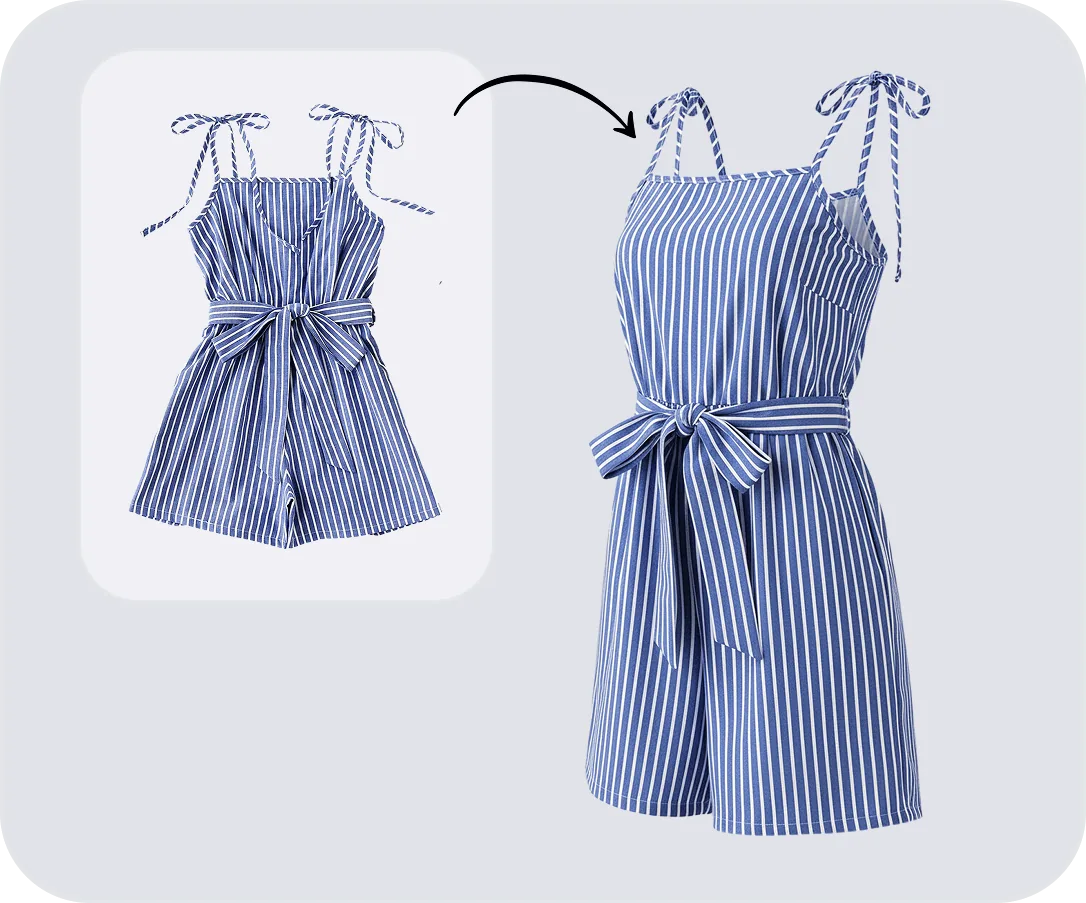

At a glance
We selected five relatively tricky garments and design elements to see how Snappyit handled details that are easy for generative tools to change: stripes, an irregular mixed print, fringe, a wedding dress and swimwear. Each source image was generated once. We did not retry or manually retouch any output before evaluating it.
Bottom line: all five results were broadly usable in this small sample. The wedding dress and swimwear were close to ready as generated. The striped shirt, irregular-print dress and fringe dress preserved the product well but each revealed a specific review point: color, occluded construction or a complex edge.
| Test detail | What we did |
|---|---|
| Date | August 3, 2026 |
| Tool | Snappyit Ghost Mannequin |
| Samples | 5 single-generation tests |
| Retries | None |
| Manual retouching | None before evaluation |
| Models shown in screenshots | Pro for stripes, irregular pattern and fringe; Basic for wedding dress and swimwear |
| Snappyit generation cost | Approximately $0.04–$0.15, depending on the model and subscription plan[5] |
How we tested Snappyit Ghost Mannequin
We used the source image and result shown inside the Snappyit interface rather than recreating a cleaner before-and-after comparison. This keeps the task ID, template and selected model visible. Each test was generated once, and the result shown below is the untouched output from that run.
If you are new to this product-photo format, our guide to the invisible mannequin effect explains how the hollow three-dimensional look is created and which garment areas normally have to be reconstructed.
The five images were deliberately selected for different risks:
- Stripes: can shift direction, spacing, alignment or color.
- Irregular print: can be duplicated, smoothed or invented in hidden areas.
- Fringe: creates hundreds of narrow, overlapping edges.
- Wedding dress: combines a long silhouette, embroidery, folds and structured volume.
- Swimwear: depends on narrow ties, cutouts and accurate edge geometry.
Three screenshots show the Snappyit Pro model. The wedding-dress and swimwear screenshots show Basic. We report those labels exactly as displayed; the five images should not be presented as a Pro-only benchmark. The Pro runs consumed 3 credits per generation. Across available models and subscription plans, a Snappyit generation costs approximately $0.04–$0.15.[5] The screenshots provide task timestamps, not processing duration, so this test does not make a measured speed claim.
Results summary
| Case | Input | Result | Main review point |
|---|---|---|---|
| Striped shirt | Flat lay | Usable with a minor limitation | Slight color difference; label reconstructed accurately |
| Irregular-print dress | Mannequin | Usable with verification | Pattern is accurate, but the mannequin hides part of the shoulder straps |
| Fringe dress | Model | Usable with edge review | High overall fidelity; skirt-edge fringe may need cleanup |
| Wedding dress | Mannequin | Nearly ready as generated | Check embroidery and shape at listing zoom |
| Swimwear | Flat lay | Nearly ready as generated | Check ties, cutout and leg openings at listing zoom |
“Usable” does not mean that quality control can be skipped. It means the result is a credible product image and the remaining concern is narrow enough to identify. With only five deliberately selected cases, these observations describe this sample—not every garment or every future generation.
1. Stripes: accurate construction, slight color shift
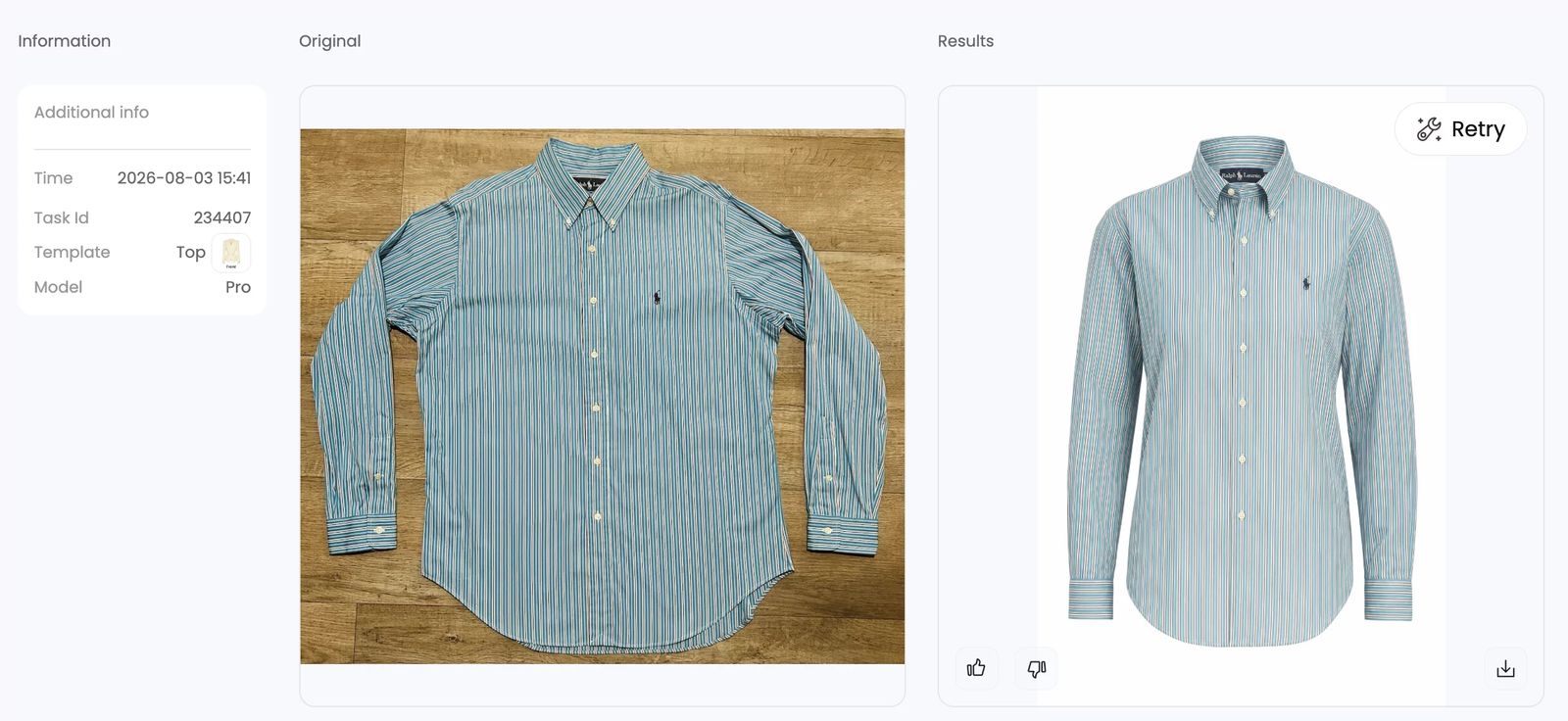
The result preserved the shirt's overall construction, vertical stripe rhythm, buttons, cuffs, chest logo and curved hem. The generated neck label is notably accurate and remains readable in the output—an area where small text is often vulnerable.
The main difference is color. The generated shirt appears slightly lighter and less saturated than the flat-lay source. Because the source was photographed on a warm wood floor and the result is isolated on white, some perceived difference may come from surrounding color and lighting rather than the garment pixels alone. A practical workflow would compare the output against the physical product or a color-managed reference before publication. If the real shirt matches the source, a small saturation or color adjustment may be needed.
2. Irregular pattern: strong print fidelity, hidden strap risk
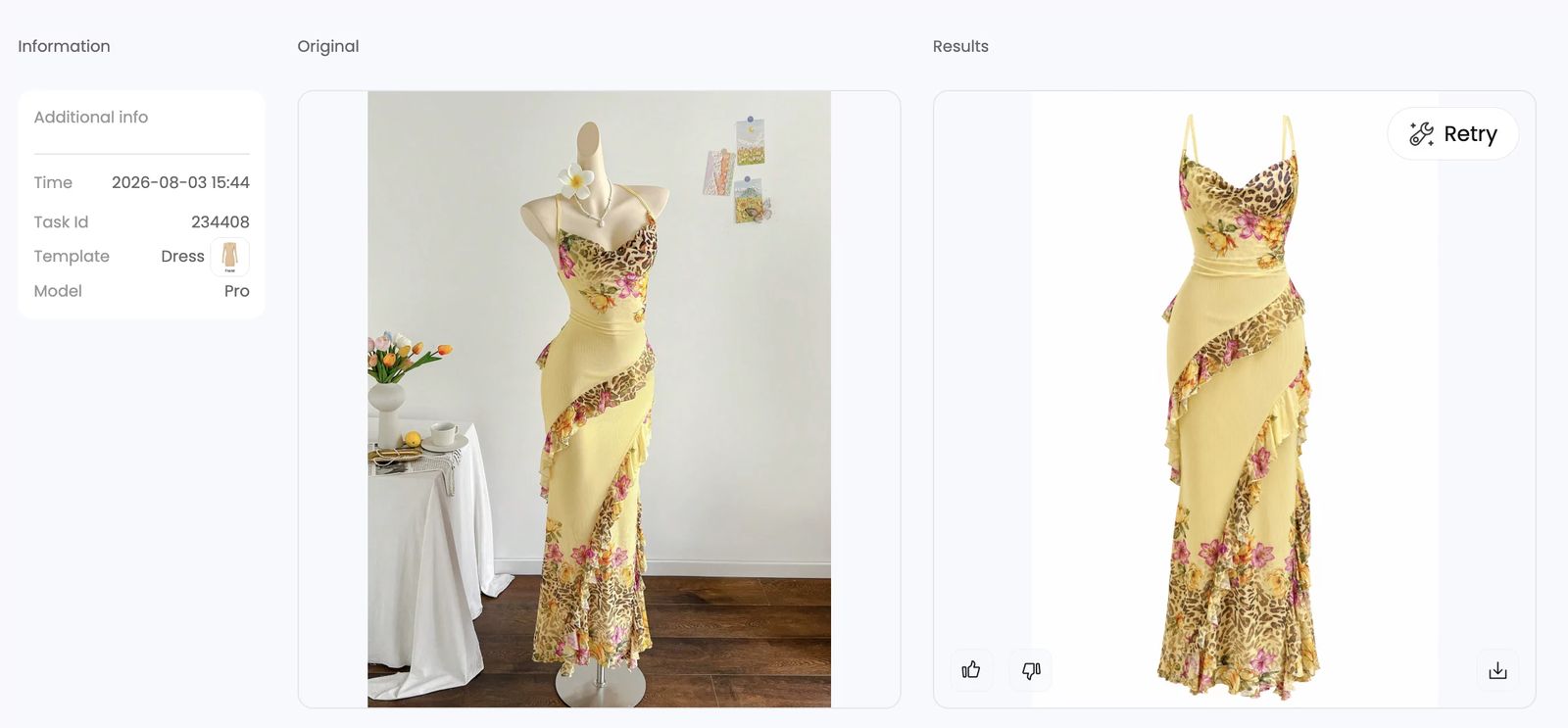
The mixed floral and animal print is reproduced with high visual fidelity. The asymmetric ruffles, yellow body fabric and changing pattern placement remain coherent rather than being simplified into a repeating texture.
The important limitation comes from the input, not an obvious defect in the result: the mannequin covers part of the dress's shoulder-strap and upper-back construction. Snappyit must generate the areas it cannot see. The output looks plausible, but plausibility is not proof that strap width, attachment point or hidden construction matches the real dress. Before listing, compare the generated straps directly with the physical product or a separate detail photograph.
3. Fringe: high overall fidelity, difficult skirt edge
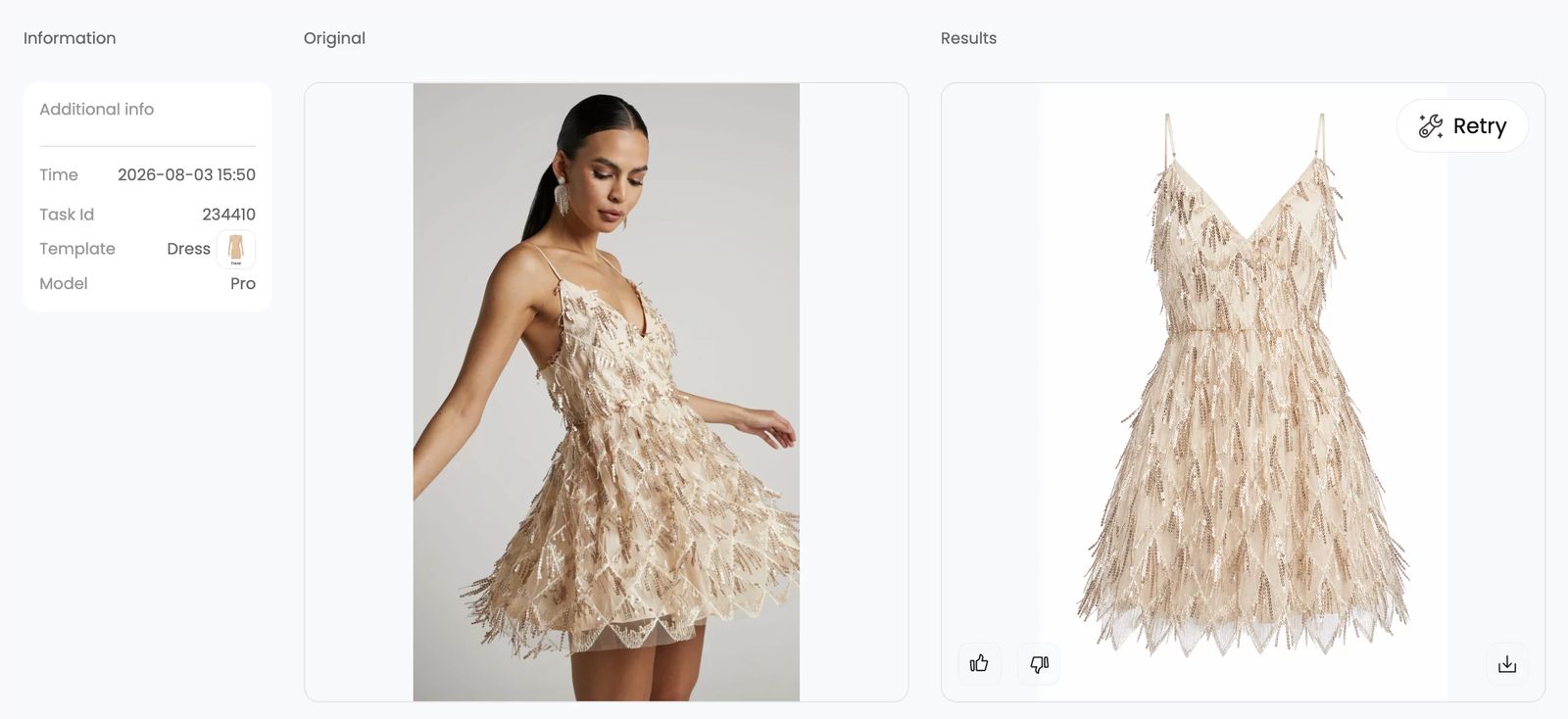
The output retains the champagne color, fitted bodice, V-neck, narrow straps and dense fringe texture. It also converts a posed model image into a centered product view without leaving visible skin or body fragments.
Fringe is an unusually difficult boundary because individual strands overlap the body and one another. The overall restoration is strong, but the lower skirt edge should be inspected at full listing resolution. Some fringe termination and fine edge separation may need manual cleanup before use on a high-zoom marketplace page. We did not perform that cleanup for this test.
4. Wedding dress: nearly ready as generated
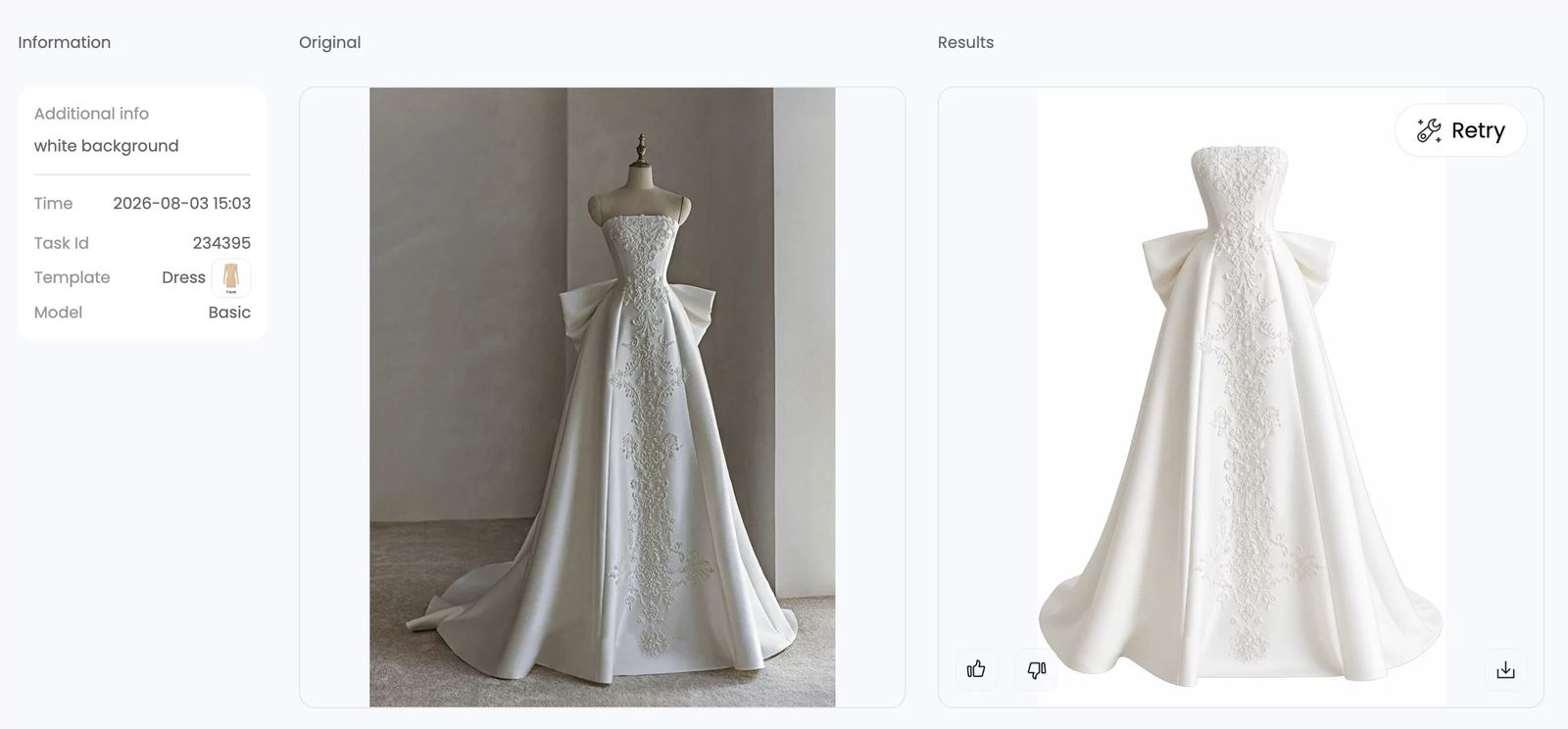
The generated image preserves the strapless bodice, central embroidery, large side bow, long A-line shape and train. The result is clean enough to be close to direct use and demonstrates that a long, structured garment does not necessarily require a simple silhouette.
For a wedding product, “nearly ready” still requires close inspection. Embroidery placement, bow construction, hem length and train shape are purchase-relevant details. They should be checked against the garment at listing zoom even when the overall result looks convincing.
5. Swimwear: narrow ties and cutouts remain usable
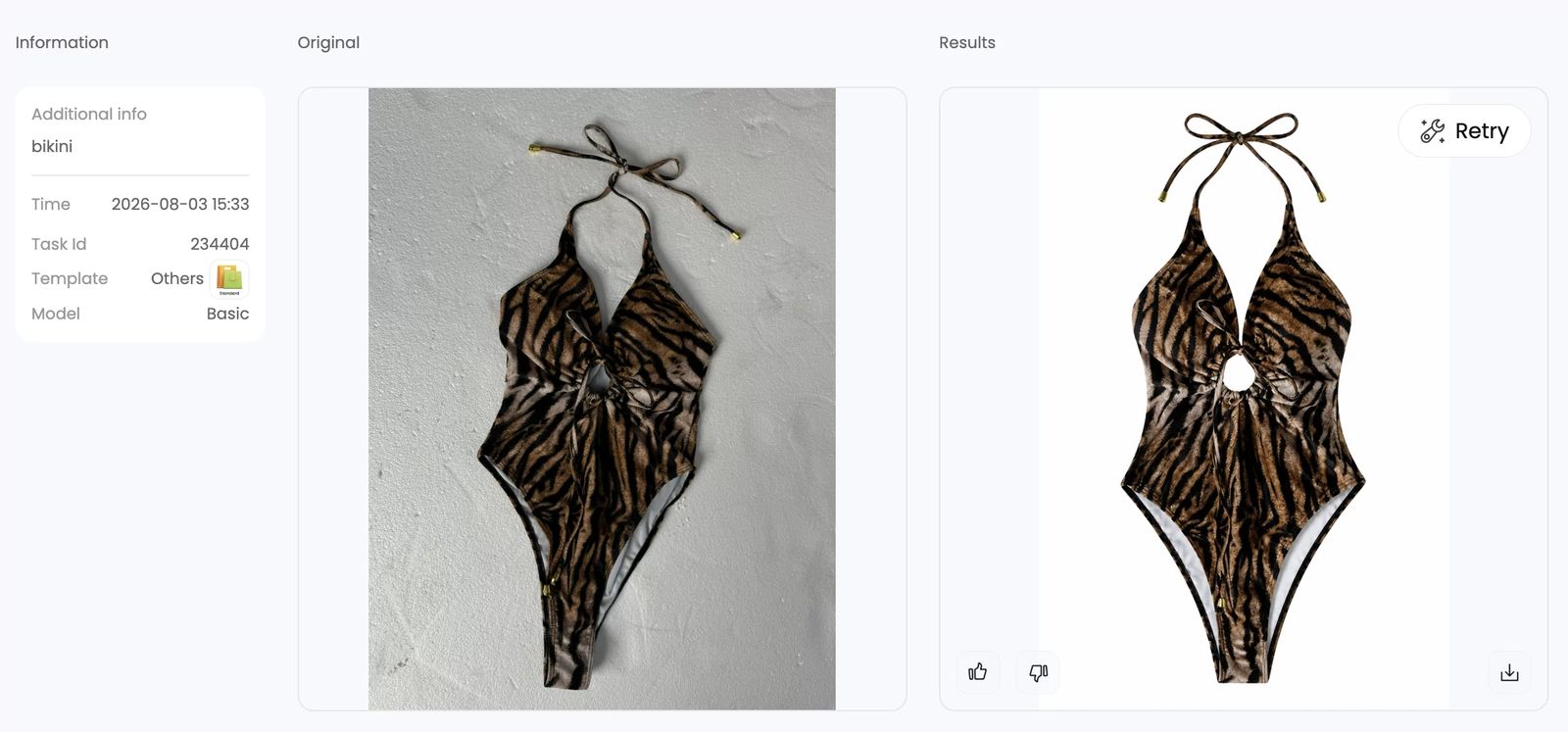
The generated swimwear image keeps the halter ties, central cutout, gathered front, leg openings and tiger pattern. The result is close to direct use, especially considering how easily narrow straps and cutout geometry can break during product isolation.
As a final check, compare tie length, metal tips, cutout shape and side seams with the physical item. These details are small in the full image but can affect whether the listing accurately represents fit and construction.[1]
What input image works best?
The sample suggests a simple principle: give the AI as much direct product information as possible.
| Input type | Advantage | Main risk |
|---|---|---|
| Flat lay | Shows the full garment without a person or mannequin covering it | AI must infer worn volume and drape |
| Hanger photo | Can show the full garment while preserving more natural vertical drape | Shoulders and neckline may still be distorted by the hanger |
| Mannequin photo | Provides an existing three-dimensional silhouette | Mannequin can hide labels, straps, interior panels and attachment points |
| Model photo | Provides realistic drape and proportion | Body, hair, arms and pose can obscure product edges and construction |
Based on the tested inputs, flat lays provide the clearest product evidence because they expose the garment without a body or mannequin covering it. Our practical recommendation is to start with a clean flat lay—or a hanger photo when the garment needs vertical drape—so the AI receives as close to 100% of the real product detail as possible.
Hanger input was not included in these five screenshots, so that part is a workflow recommendation rather than a measured result from this sample. For mannequin and model inputs, add separate detail photos when a label, strap, inner panel, closure or seam is hidden.
What this test shows—and what it does not
- Snappyit produced broadly usable results for all five selected tricky cases.
- Complex surface detail was not automatically a failure: stripes, mixed prints, fringe, embroidery and swimwear ties were largely preserved.
- The most important risk is not always a visible artifact. A plausible generated detail can still differ from an area hidden in the input.
- Input completeness matters. A 3D mannequin or model can help with shape while simultaneously hiding construction details.
- This is a five-case qualitative test, not a statistically representative success-rate study.
- The screenshots mix Pro and Basic models, so they do not establish a direct model-to-model comparison.
Final verdict
For this sample, Snappyit handled difficult garments better than a simple “AI works only on plain clothing” assumption would suggest. Wedding and swimwear outputs were nearly ready as generated. Stripes, irregular print and fringe were also usable, with specific and manageable review points.
The safest production workflow is not to trust or reject AI by category alone. Use an input that reveals the whole garment, inspect generated areas against the physical item, and pay special attention to color, labels, straps, embroidery, fringe and any construction hidden by a person or mannequin. When evaluating other workflows, compare their input support, reconstruction quality and review requirements rather than judging only the cleanest demo image; our invisible mannequin tools comparison covers those practical differences. This review supports truthful product presentation and catches image defects that become visible at ecommerce zoom.[1][2]
Traditional Ghost Mannequin Photography vs AI
Traditional ghost mannequin photography is not just one photograph. A full manual workflow can require a mannequin, controlled lighting, a main garment image, a separate inner-neck image and Photoshop compositing. The expense therefore comes from both capture and post-production. For sellers looking for a cheap ghost mannequin photography alternative, the useful comparison is the cost of a final approved image—not only the advertised price of one generation.
For the three Pro runs in this test, Snappyit AI ghost mannequin consumed 3 credits per generation. Depending on the model and subscription plan, a Snappyit generation costs approximately $0.04–$0.15.[5] Each image was generated once. That makes the direct generation cost low, but the practical cost can rise if an incomplete source forces retries or if color, straps, fringe or other reconstructed details need correction. Flat lays helped reduce that risk because they exposed more of the real garment.
| Approach | Advantages | Disadvantages | Cost |
|---|---|---|---|
| Traditional ghost mannequin photography | Captures the real garment on a shaped form; lighting, styling and hidden construction can be controlled by the production team | Requires equipment, garment preparation, multiple source shots, scheduling and retouching; cost and production time rise with every SKU | Squareshot lists clothing ghost mannequin photography at $75 per image on pay-as-you-go pricing; its displayed membership rates range from $52.50 to $67.50 per image.[3] |
| AI ghost mannequin | Creates the hollow-body view from one supplied image; no manual retouching was used in this test; low direct generation cost | Must infer details hidden in the input; color, straps and complex edges still need product-level QA | Approximately $0.04–$0.15 per Snappyit generation, depending on the model and subscription plan; the Pro test runs used 3 credits each.[5] |
| Outsourced ghost mannequin editing | A human editor can control masks, inner-neck composites and difficult edges; useful when suitable mannequin source shots already exist | Requires source-photo preparation, file handoff and turnaround; subscriptions, per-image fees and add-ons may apply | Pixelz lists Solo editing from $1.45 per image plus a $0.50 Invisible Mannequin add-on; its Professional tier starts at $0.95 per image plus the add-on and a $75 monthly subscription.[4] |
Price note: these are published vendor examples checked August 3, 2026—not market averages or quotes for the same brief. Volume, garment complexity, preparation, revisions, turnaround, taxes and plan fees can change the final price.
How to compare total cost without accepting low-quality output
- Test a difficult garment: use stripes, an irregular print, fringe, sheer fabric or narrow straps rather than judging a tool only on a plain T-shirt.
- Calculate cost per approved image: include failed generations, retries and any manual cleanup—not just the first credit charge.
- Inspect hidden areas: compare generated labels, straps, inner panels and seams with the physical item or a separate detail photo.
- Check the deliverable: confirm that the quality tier, resolution, background and file format match the marketplace where the image will be used.
For sellers who need the hollow 3D look at catalog scale, AI is the closest cheap ghost mannequin photography alternative to the traditional shoot-and-composite workflow. Traditional photography provides the most control over capture, while outsourced editing is the middle path when accurate source shots already exist. Difficult or high-value garments may still justify human production when exact reconstruction matters more than speed or unit cost.
Frequently Asked Questions
What is ghost mannequin AI?
Ghost mannequin AI removes the visible model or mannequin from a clothing photo and generates the hidden garment areas to create a hollow, three-dimensional product view. Because hidden areas are reconstructed, sellers should compare labels, straps, seams and interior panels with the real garment before publishing.
How accurate is ghost mannequin AI for stripes, patterns, fringe, wedding dresses and swimwear?
In our five single-generation Snappyit tests, all five outputs were broadly usable. The wedding dress and swimwear were nearly ready as generated. Stripes showed a slight color shift, the irregular print needed verification where the mannequin hid the straps, and fringe needed close edge review. This is a small qualitative sample, not a universal success rate.
Can Snappyit Ghost Mannequin AI use flat-lay, mannequin and model photos?
Yes. This test used flat-lay, mannequin and model photos. All three input types produced usable results, but mannequin and model photos can hide labels, straps, seams or panels that the AI then has to reconstruct.
What is the best input image for ghost mannequin AI?
A clean flat-lay photo was the most complete tested input because it exposed the garment without a person or mannequin covering it. A hanger photo can also be a practical option when vertical drape matters, although hanger input was a workflow recommendation and was not tested in these five cases.
Does ghost mannequin AI preserve labels, straps and product details?
It can preserve visible details well: the striped-shirt test reconstructed the neck label accurately. However, ghost mannequin AI cannot directly observe details hidden by a body or mannequin. Verify generated labels, straps, closures, seams and interior construction against the physical item or a separate detail photo.
How much does a Snappyit ghost mannequin generation cost?
A Snappyit ghost mannequin generation costs approximately $0.04–$0.15, depending on the model and subscription plan. The Pro model used in three of these tests consumed 3 credits per generation. Each test image was generated once, with no retries and no manual retouching before evaluation.
Are AI ghost mannequin images ready for ecommerce listings?
Some can be close to ready, but every output still needs product-accuracy review. Check color, pattern placement, labels, straps, seams, embroidery, cutouts and complex edges at listing zoom, then compare any reconstructed area with the physical item before publishing.
What is the cheapest alternative to ghost mannequin photography?
For the same three-dimensional hollow-body output, AI had the lowest direct cost in this comparison: a Snappyit generation costs approximately $0.04–$0.15, depending on the model and subscription plan. The Pro runs in this test used 3 credits each. As published vendor examples, Squareshot lists ghost mannequin photography at $75 per image on pay-as-you-go pricing. For outsourced ghost mannequin editing, Pixelz lists image editing from $1.45 plus a $0.50 invisible-mannequin add-on on its Solo tier. These are not market averages, and subscriptions, volume, garment complexity and source-image preparation affect the final cost.
References
- Federal Trade Commission, Truth in Advertising. Official guidance on truthful, non-misleading advertising.
- Amazon Seller Central, Product image requirements. Official marketplace image guidance; Seller Central sign-in may be required.
- Squareshot, Product photography pricing. The published calculator lists clothing ghost mannequin prices by plan.
- Pixelz, Ecommerce image editing pricing. Published base image prices, subscription fees and the Invisible Mannequin add-on.
- Snappyit, Pricing plans and credit allowances. Published subscription prices and included monthly credits used to calculate the approximate generation-cost range.