
What Is Ghost Mannequin Photography and Why It Matters
Defining the Ghost Mannequin Effect
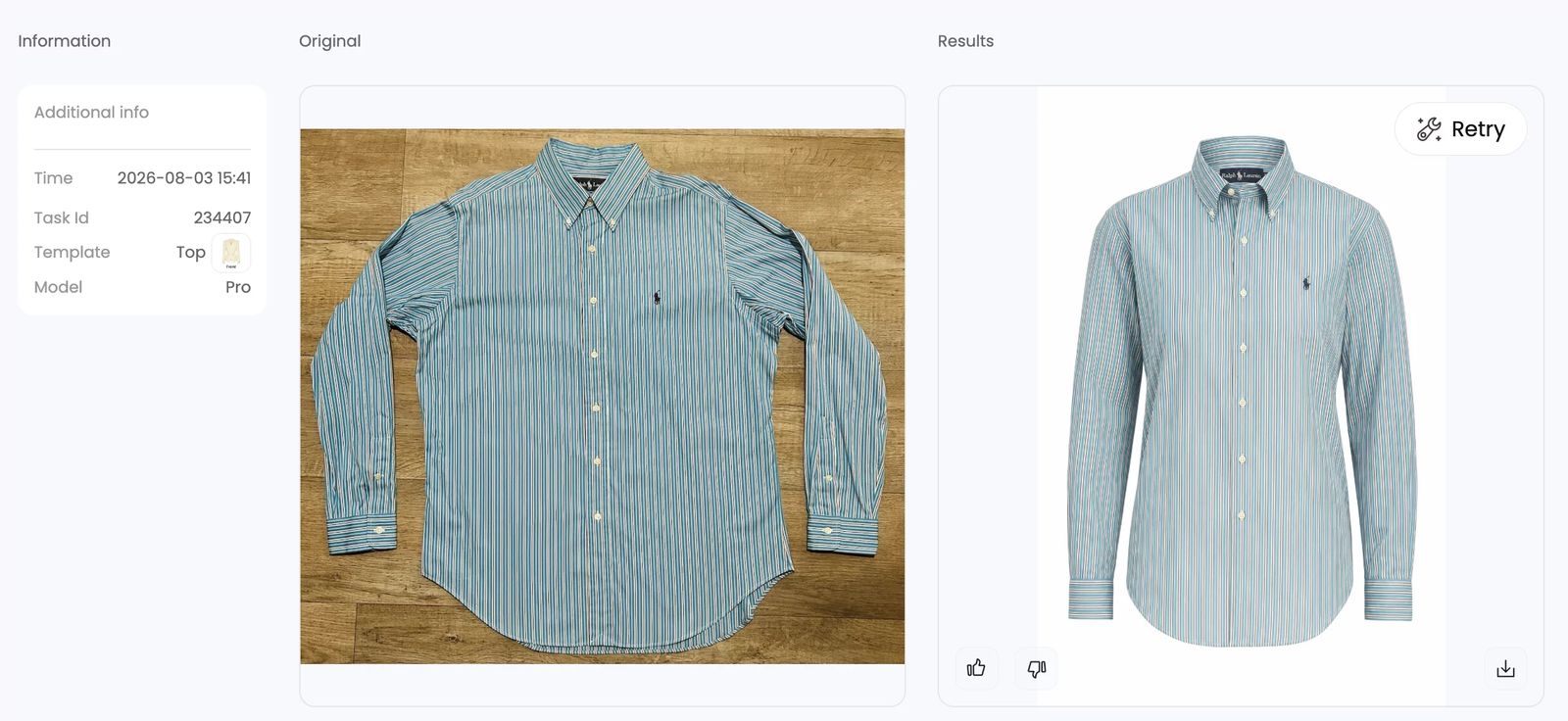
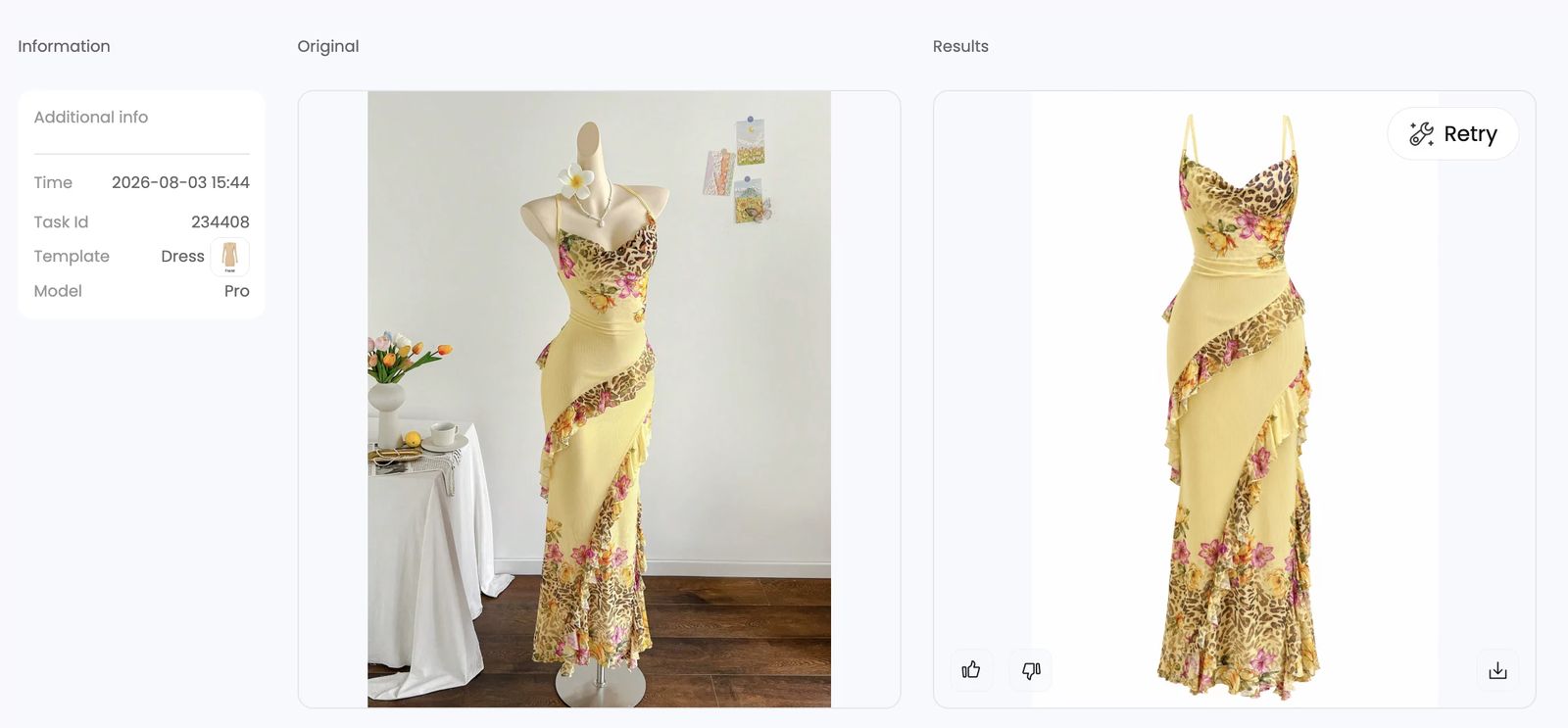
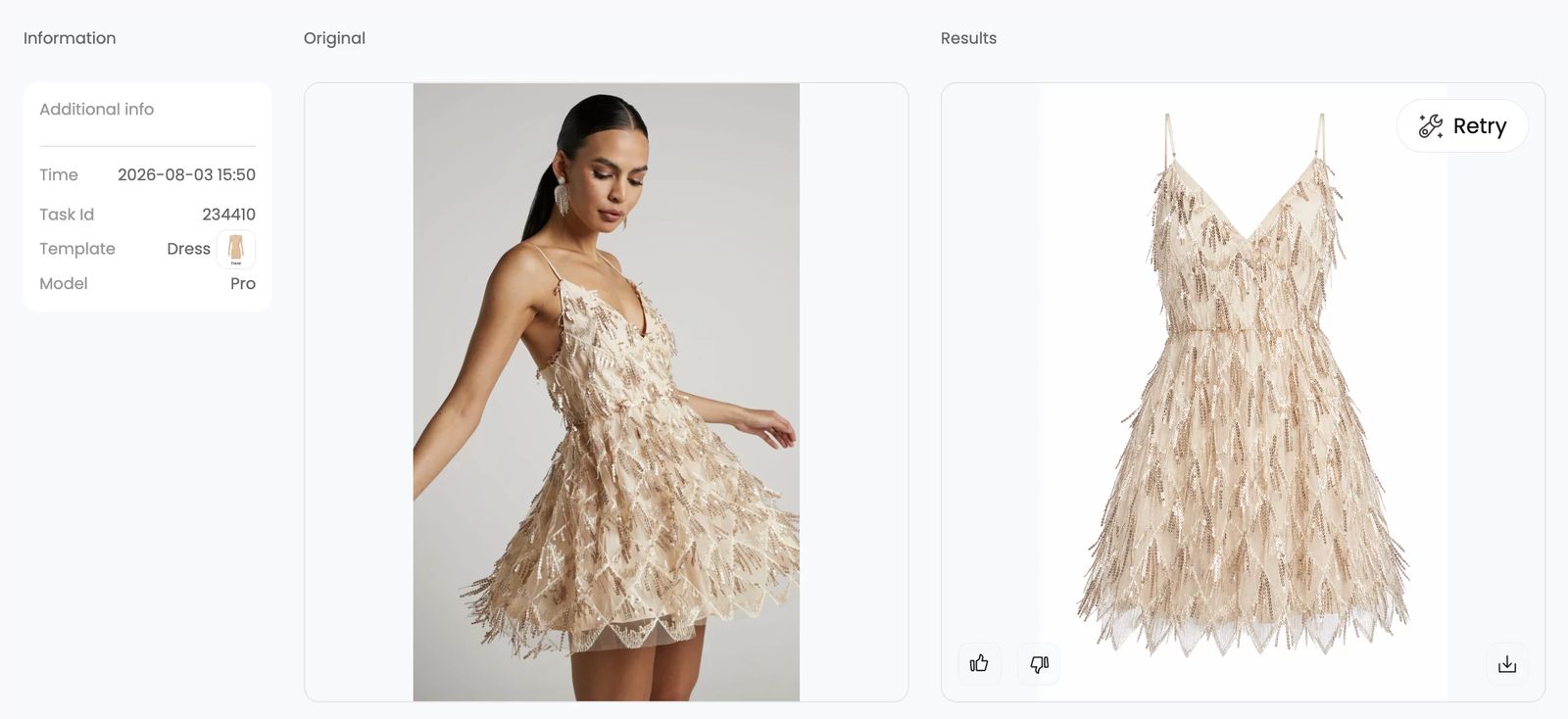
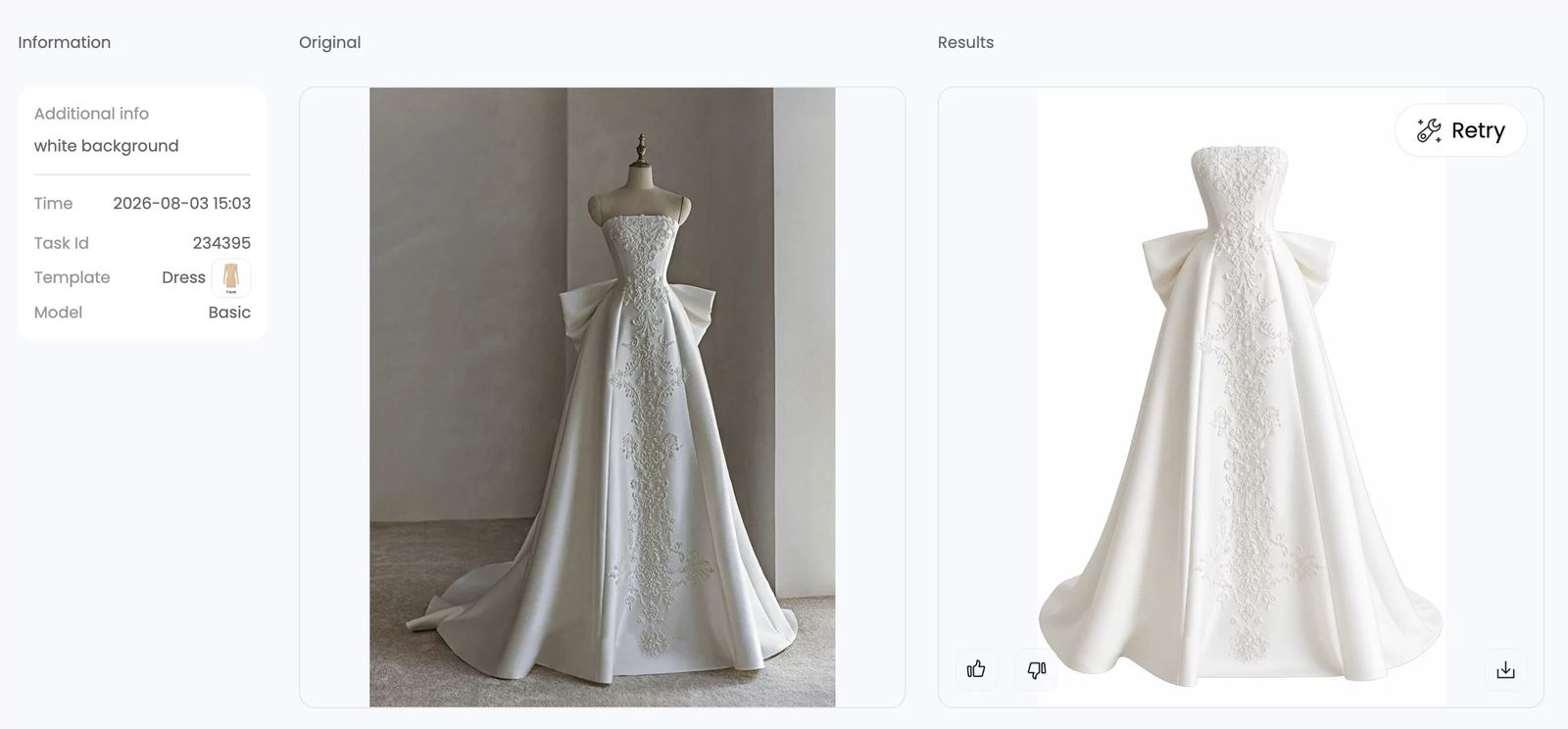
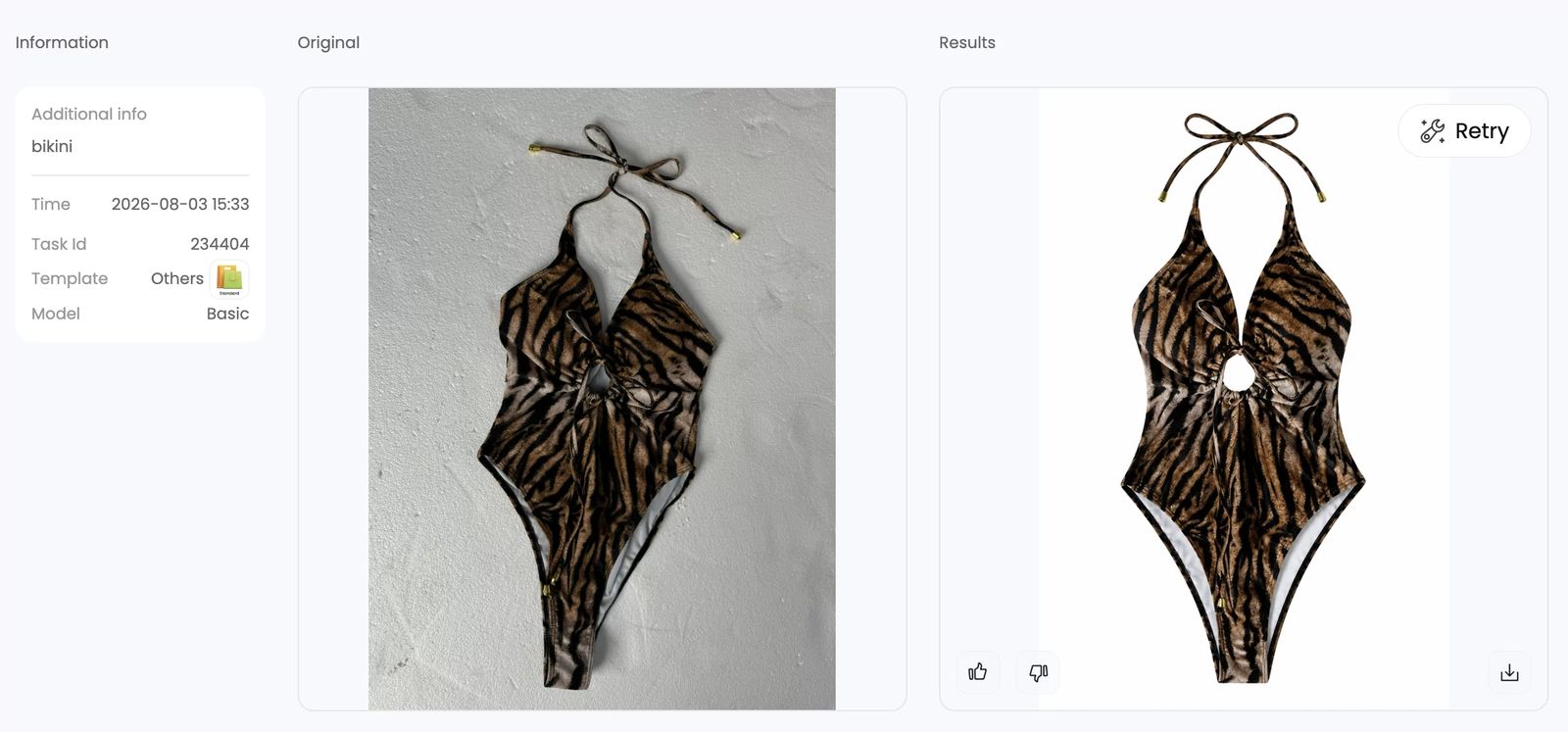
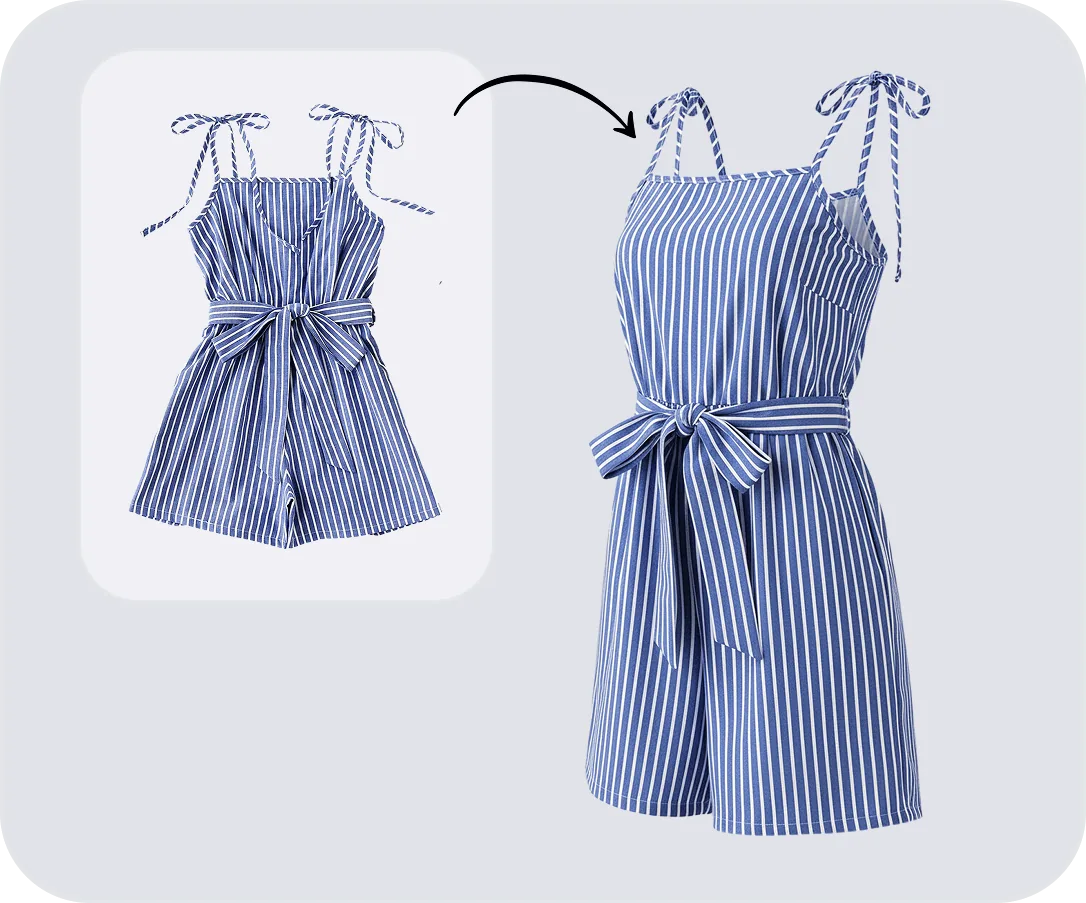
Ever scrolled through an online clothing store and noticed shirts, jackets, or dresses that seem to float in midair, perfectly shaped as if worn by an invisible person? That's the ghost mannequin effect in action.
Ghost mannequin photography is a product imaging technique where a garment is photographed on a mannequin, and the mannequin is then digitally removed in post-production so the clothing retains its three-dimensional shape as if worn by an invisible body.
Sometimes called the invisible mannequin or "hollow man" effect, this approach gives clothing a lifelike, structured silhouette without any visible support. The result is a clean, 3D product image that highlights shape, drape, and interior construction details like necklines, collars, and waistbands.
Why Ecommerce Brands Rely on This Technique
Imagine shopping for a blazer online. A flat lay photo shows you the fabric and color, but it can't communicate how the jacket actually sits on a body. A model shot adds personality, yet the focus often drifts to the person rather than the product. Ghost mannequin photography splits the difference. It delivers that realistic, "someone is wearing this" look while keeping every stitch, seam, and texture front and center.
This matters because online shoppers can't touch or try on clothing. They rely entirely on visuals to judge fit and quality. The hollow, three-dimensional silhouette created by the ghost mannequin effect bridges that gap, giving buyers a clear sense of how a garment drapes, where it cinches, and how the interior is constructed. As Squareshot notes, this technique reduces purchase hesitation by making it easier for customers to picture themselves in the item. It also delivers a consistent, distraction-free aesthetic across an entire product catalog, which builds trust and keeps storefronts looking polished.
That combination of realism and consistency is why ghost mannequin photography became a standard across fashion ecommerce, from fast-fashion marketplaces to premium designer brands.
From Manual Editing to AI Automation
Traditionally, achieving the ghost mannequin effect was anything but quick. It required shooting each garment at least twice, once on the mannequin and once showing the interior, then carefully compositing those images together in Photoshop. Skilled retouchers would spend time masking, blending, and cleaning up every edge by hand. For a brand with hundreds of SKUs, the hours and costs added up fast.
Ghost mannequin AI is changing that equation. Modern AI tools use advanced segmentation and shape inference to digitally remove the mannequin, reconstruct hidden interior areas, and produce a polished result in seconds rather than hours. What once demanded an experienced photographer, a specialized mannequin, and a retouching expert can now be handled with a single photo and a software subscription. For growing fashion brands and lean ecommerce teams, that shift from manual craft to intelligent automation opens up a level of speed and scale that simply wasn't accessible before.
The real question, though, is what exactly goes into that traditional process and where does AI fit into each step? Understanding the manual workflow is the key to appreciating just how much the technology streamlines.
How the Traditional Ghost Mannequin Process Works
Before AI entered the picture, every invisible mannequin photography image was built by hand, one layer at a time. The process is methodical, detail-heavy, and surprisingly time-consuming. Walking through each stage helps you see exactly where the bottlenecks live and why so many ecommerce teams have been eager for a faster alternative.
Shooting the Exterior and Interior Separately
When you learn how to photograph clothing on a mannequin for the ghost effect, the first thing you'll notice is that one photo isn't enough. The technique requires at least two separate shots of every garment, and each one serves a distinct purpose.
Here's the standard shooting sequence a ghost mannequin photographer follows:
- Prep and style the garment. Steam out every wrinkle, then dress the mannequin. Use pins, clips, and fashion tape along the back to pull the fabric taut and create a clean, fitted silhouette. Every crease you skip here becomes extra retouching work later.
- Shoot the exterior (front and back). With the camera locked on a tripod at chest height, capture the garment from the front. Then rotate the mannequin 180 degrees, keeping the camera and lights untouched, and shoot the back. Consistent framing between shots is critical for a seamless composite.
- Shoot the interior details. Remove the mannequin's detachable neck, chest, or arm sections to expose the garment's inner construction: the collar lining, inside neckline, inner waistband, or sleeve openings. Photograph these areas while the garment is still partially supported. This interior shot fills the hollow gap where the mannequin body used to be.
Skipping that interior shot is a common beginner mistake. Without it, the final image has a visible hole where the mannequin was removed, and no amount of Photoshop trickery can convincingly fill that void from scratch.
Compositing and Retouching in Post-Production
With the raw photos in hand, the real labor begins in Photoshop. The retoucher opens both the exterior and interior shots as separate layers, aligns them, and starts the painstaking process of ghost mannequin for photography compositing:
- Masking the mannequin. Using the Pen Tool or Quick Selection Tool, the editor carefully traces around the garment to isolate it from the mannequin body. Every pixel along the collar, cuffs, and hemline needs precision. Sloppy masking creates jagged edges that instantly break the illusion.
- Layering the interior shot. The interior image is positioned behind the exterior layer so the inner collar, neckline, or waistband fills the gap left by the removed mannequin. Aligning these two layers seamlessly is the most fiddly part of the entire process.
- Blending and cleanup. The retoucher feathers mask edges, blends seams between the two layers at 200-300% zoom, removes stray mannequin pixels with the Clone Stamp tool, and adds a subtle drop shadow to ground the garment. Color correction and final cropping round out the edit.
A seasoned retoucher usually turns a single image around in about 15 to 30 minutes. With practice and Photoshop actions for repetitive steps, that can drop to 5-10 minutes per garment. But even at that pace, a catalog of 500 products means weeks of dedicated editing time.
The True Cost of Manual Ghost Mannequin Work
The expenses stack up quickly. A mannequin with detachable sections runs $150 to $500. Add a DSLR or mirrorless camera, a 50-85mm lens, a tripod, two softbox lights, and a white seamless backdrop, and you're looking at a meaningful upfront investment before a single photo is taken. Then there's the ongoing cost per image. Mid-tier professional retouchers typically charge $15 to $35 per image, while high-end studio work for luxury brands can reach $50 to $150. Even at the lower end, a retailer processing 1,000 product images annually could spend $15,000 or more on post-production alone.
Beyond dollars, there's the skill barrier. The workflow demands both a competent photographer who understands lighting, garment styling, and consistent framing, and a retoucher fluent in layer compositing and edge refinement. Small teams and solo sellers rarely have both skill sets in-house, which means outsourcing and longer turnaround times.
All of these constraints, the cost, the time, the expertise, are exactly what pushed the industry to ask a different question: what if the software could handle the compositing itself, without needing that second interior shot at all?

How AI Ghost Mannequin Technology Actually Works
That second interior shot, the one that makes or breaks the traditional workflow, is exactly where AI rewrites the rules. Instead of requiring a photographer to physically expose the garment's inner collar and neckline, modern ghost mannequin photo editing tools synthesize that missing information automatically. But how does a piece of software "see" what's hidden behind a mannequin and reconstruct it convincingly?
The answer involves a multi-stage processing pipeline. Each stage handles a specific visual challenge, and together they replicate what used to take a skilled retoucher 15 to 30 minutes per image. Here's what happens under the hood when you feed a garment photo into an AI mannequin generator:
- Garment segmentation — The AI identifies and isolates the clothing from the mannequin, background, and any other objects in the frame.
- 3D shape inference — The system predicts the garment's three-dimensional volume and structure from a single flat image.
- Neck and collar joint reconstruction — The AI synthesizes the interior view (neckline, waistband, sleeve openings) that would normally require a separate photo.
- Texture and detail preservation — The output maintains the original fabric's weave, print, color, and material characteristics across every reconstructed area.
Sounds complex? Each stage is more intuitive than it first appears.
Background Removal and Garment Segmentation
The first thing the AI does is figure out where the garment ends and everything else begins. This step is called segmentation, and it's the foundation the entire pipeline depends on.
Modern segmentation models work by analyzing every pixel in the image and classifying it into categories: garment, mannequin body, background, skin, hardware, and so on. These models are trained on massive datasets of labeled clothing images, so they learn to distinguish a shirt collar from a mannequin neck, or a jacket sleeve from a plastic arm, even when colors and textures are similar.
Specialized clothing segmentation tools can go even further, separating individual garment regions like tops, bottoms, and combined outfits within a single frame. The output is a precise mask, essentially a pixel-perfect outline of the clothing item, with the mannequin and background cleanly stripped away. The quality of this initial mask directly determines how clean the final ghost mannequin image looks. A sloppy segmentation leaves jagged edges or mannequin remnants that no amount of downstream processing can fully fix.
3D Shape Inference from a Single Photo
Here's where things get genuinely impressive. A standard product photo is flat, a 2D grid of pixels. Yet the ghost mannequin effect demands a three-dimensional result: a garment that appears to have volume, depth, and realistic drape. How does the AI bridge that gap?
The technique is called 3D shape inference, and it works by predicting what the garment looks like in three dimensions based on visual cues in the 2D image. The AI has been trained on large datasets of garment images paired with corresponding 3D geometry, often generated through physics-based cloth simulations. During training, the model learns the relationship between how fabric folds, stretches, and drapes in a photo and the underlying 3D surface that produces those visual patterns.
When you upload a new image, the model reads subtle cues like shadow gradients, fold patterns, and edge contours to estimate the garment's depth and curvature. Think of it like how your brain can look at a photo of a puffy winter jacket and immediately sense its volume, even though you're staring at a flat screen. The AI does something similar, just mathematically. It maps pixel-level observations into a 3D coordinate space, reconstructing the garment's surface geometry including parts that are partially occluded or hidden from the camera's view.
Recent research has pushed this capability further by using diffusion models, a class of generative AI, to learn complex garment shape priors. These models capture the wide range of deformations that clothing undergoes due to body movement, gravity, and fabric stiffness. The result is a 3D reconstruction that accounts for realistic wrinkles, folds, and volume rather than producing a stiff, lifeless shell.
Neck Joint Reconstruction and Texture Preservation
The neck joint area is the hardest part of any ghost mannequin editing job. In the traditional workflow, it's the entire reason you need that second interior shot. The AI's ability to skip that step is arguably its most valuable trick.
During neck joint reconstruction, the model synthesizes what the inside of the garment looks like at the collar, neckline, and any other openings where the mannequin was visible. It does this by drawing on patterns learned during training: thousands of examples of how different collar types fold inward, how neckline stitching typically looks, and how interior fabric relates to the exterior surface. The AI essentially "imagines" the interior view and generates it pixel by pixel, blending it seamlessly behind the exterior layer.
Texture preservation runs in parallel throughout the entire pipeline. Every time the AI reconstructs, fills, or blends a region, it needs to maintain visual consistency with the original fabric. That means matching the weave pattern of a linen shirt, preserving the sheen of a satin blouse, or keeping a plaid print aligned across reconstructed seams. The models achieve this by learning fabric-level features during training, not just garment shapes but the micro-level texture characteristics that make cotton look like cotton and denim look like denim.
The combination of accurate segmentation, 3D shape prediction, joint reconstruction, and texture fidelity is what produces a polished ghost mannequin image from a single input photo. No second shot, no manual masking, no layer-by-layer compositing in Photoshop.
Of course, not every garment responds to this pipeline equally. A structured blazer with clean lines gives the AI plenty of predictable geometry to work with, while a sheer chiffon top or a heavily layered outfit introduces ambiguity that can trip up even the best models. Understanding which garment types play nicely with AI tools, and which ones push their limits, is the practical next step.
Skip the mannequin entirely. Snappyit turns a flat apparel photo into a polished ghost mannequin image in seconds. Try Snappyit free →
Which Garment Types Work Best with AI Ghost Mannequin Tools
You've seen how the AI pipeline segments, infers shape, and reconstructs hidden areas. But here's the practical question every seller needs answered before uploading their first batch: will it actually work well on my products?
The honest answer is that it depends on what you're selling. AI ghost mannequin tools don't treat every garment equally. A tailored blazer and a sheer chiffon blouse present very different challenges to the same algorithm. Understanding where these tools excel, where they struggle, and how your input photos affect the outcome will save you time, credits, and frustration.
Structured Garments That Produce the Best Results
Imagine a crisp button-down shirt or a fitted wool blazer. These garments have something in common: predictable geometry. Their rigid construction holds a consistent shape, which gives the AI clear visual cues to work with during 3D shape inference. Seams are well-defined, collars sit at expected angles, and the fabric doesn't shift dramatically between photos.
This is why structured clothing consistently produces the cleanest ghost mannequin images across virtually every AI tool on the market. The algorithm can confidently predict how the interior neckline folds, where the shoulder seams sit in three-dimensional space, and how the fabric drapes around the torso. There's less guesswork involved, which means fewer artifacts in the output.
Garments that fall into this ideal category include:
- Blazers, sport coats, and suit jackets
- Button-down dress shirts and Oxford shirts
- Denim jackets and structured outerwear
- Tailored trousers and chinos
- Polo shirts with stiff collars
- Structured dresses with defined waistlines
If your inventory leans heavily toward these categories, clothing photography ghost mannequin workflows powered by AI will likely handle 90% or more of your catalog without manual touch-ups.
Challenging Fabrics and Complex Layering
Move away from structured pieces and things get more interesting. Knitwear, jersey tops, and soft cotton tees sit in a middle ground. They're not rigid enough to hold a perfectly predictable shape, but they're not so unpredictable that the AI can't handle them. You'll notice that results with these fabrics are generally good, though you may occasionally see slight inconsistencies in how the AI renders drape around the neckline or hemline. A quick manual review catches most of these, and the output is typically marketplace-ready without heavy retouching.
The real challenges emerge with certain fabric types and garment constructions that introduce ambiguity into the AI's processing pipeline:
- Sheer and transparent fabrics. Chiffon, organza, and mesh create a segmentation headache. The AI struggles to determine where the garment ends and the background begins when it can see through the fabric. This often results in incomplete removal or patchy reconstruction.
- Heavily layered outfits. A jacket over a shirt over a vest creates overlapping edges and depth complexity that confuses shape inference. The AI may merge layers or lose definition between individual pieces.
- Complex hardware and embellishments. Chains, oversized buckles, sequins, and heavy beading introduce small, high-contrast details that segmentation models can misclassify. Metal hardware near the neckline is especially problematic since it sits right in the reconstruction zone.
- Unusual silhouettes. Asymmetric cuts, dramatically oversized fits, and avant-garde shapes fall outside the distribution of training data most AI models have seen. The less a garment resembles standard apparel shapes, the more likely the output will need manual correction.
- Accessories without body structure. Scarves, hats, bags, and belts lack the torso-shaped framework that ghost clothing photography depends on. These items don't have a "body" for the AI to infer, so the hollow 3D effect simply doesn't apply in a meaningful way.
The table below breaks this down at a glance so you can quickly assess where your product mix falls:
| Difficulty Level | Garment Types | Expected AI Output Quality | Manual Touch-Up Needed? |
|---|---|---|---|
| Ideal | Blazers, button-downs, denim jackets, tailored trousers, polo shirts, structured dresses | High — clean edges, accurate 3D shape, reliable neck joint reconstruction | Rarely |
| Moderate | Knitwear, jersey tops, soft cotton tees, hoodies, casual dresses, lightweight blouses | Good — occasional drape inconsistencies around neckline or hemline | Sometimes (minor adjustments) |
| Challenging | Sheer fabrics, layered outfits, garments with heavy hardware, asymmetric cuts, oversized fits | Variable — artifacts likely around transparent areas, overlapping layers, and embellishments | Often (targeted retouching recommended) |
| Not Suitable | Scarves, hats, bags, belts, jewelry, and other non-body-shaped accessories | Poor — no torso structure for the AI to infer a 3D hollow-body effect | Alternative photography style recommended |
How Input Photo Type Affects Output Quality
The garment itself is only half the equation. The type of photo you feed into the tool matters just as much. Most AI ghost mannequin tools accept three common input formats, and each one produces noticeably different results.
On-mannequin photos tend to deliver the best output. The garment is already shaped in three dimensions, giving the AI a strong starting point for segmentation and shape inference. The algorithm essentially needs to remove the mannequin and fill in the gaps, which is the most straightforward version of the task. Tools like WearView, Photoroom, and PixFocal all accept on-mannequin input and produce reliable results from it.
Flat lay photos are the most accessible input type since they require no mannequin at all, just a garment laid flat on a clean surface. The trade-off is that the AI has to work harder. It needs to infer the entire 3D silhouette from a completely flat image, predicting how the fabric would drape if it were hanging on a body. Results are generally solid for structured garments but can look less natural with soft, drapey fabrics where the flat lay doesn't hint at the garment's true shape.
Garment-on-hanger photos sit somewhere in between. The hanger gives the shoulders a basic shape, which helps the AI with the upper portion of the garment. However, the lower half hangs freely and can bunch or fold unpredictably, which sometimes leads to less accurate reconstruction below the chest area.
Regardless of which input type you use, one rule holds true across the board: the cleaner and better-lit your source photo, the better your ghost mannequin images will turn out. A wrinkled garment shot under uneven lighting on a cluttered background forces the AI to fight through noise before it can even start the real work. That's a recipe for artifacts and wasted credits.
Getting the input right is something you can control entirely on your end, and a few deliberate preparation steps make a measurable difference in output quality.

Preparing Your Photos for the Best AI Ghost Mannequin Results
You can pick the most advanced AI tool on the market, but if the photo going in is poorly lit, wrinkled, or shot against a cluttered background, the output will disappoint. As one AI photography training resource puts it: prompts guide interpretation, but files determine possibility. The same principle applies to ghost mannequin AI. A few minutes of deliberate preparation before you click the shutter will consistently outperform hours of trying to fix bad input after the fact.
Lighting and Background Setup for Clean Input
Lighting is the single biggest factor in whether your ghost mannequin photo comes out clean or riddled with artifacts. Harsh, directional light creates deep shadows that confuse segmentation models, while flat, even illumination lets the AI clearly distinguish garment edges from the mannequin and background.
Here's what to aim for:
- Use diffused lighting from two sides. Softboxes or LED panels positioned at roughly 45-degree angles, about 4 to 6 feet from the garment, create even coverage without hot spots. A 3:1 light-to-shadow ratio adds just enough depth to show fabric texture without creating harsh contrasts that trip up the AI.
- Set color temperature to 5500K manually. Auto white balance shifts between shots, which introduces color inconsistency across a batch. Locking to daylight-equivalent 5500K keeps tones uniform and gives the AI a stable color baseline to work from.
- Use a clean, contrasting backdrop. A seamless white or light grey background is the gold standard for mannequin product photography. It gives segmentation models a clear, high-contrast boundary between the garment and its surroundings. Busy or uneven backgrounds force the AI to guess where the clothing ends, which leads to ragged edges and leftover background pixels in the final image.
- Add a fill light or reflector. If one side of the garment falls into shadow, a reflector or low-power fill light on the opposite side evens things out. The goal is to preserve fabric detail in every fold and seam so the AI has complete information to work with.
For shiny or reflective fabrics like satin or patent leather, bring your lights in closer and increase diffusion. This softens specular highlights that can confuse the AI into misreading surface geometry.
Garment Styling and Positioning Tips
The way a garment sits on the mannequin directly shapes how the AI interprets its silhouette. A crooked collar or bunched sleeve doesn't just look sloppy in the source photo. It carries through to the output, because the AI reconstructs what it sees, wrinkles and all.
Before the camera comes out, invest a few minutes in styling each piece:
- Steam or iron every garment. Budget roughly 5 to 10 minutes per item to remove wrinkles. This is the single highest-ROI step in invisible ghost mannequin photography. Wrinkles create false shadow patterns that the AI may interpret as fabric edges or structural features, leading to distorted reconstruction.
- Lint-roll thoroughly. Dust, loose threads, and pet hair are nearly invisible to the naked eye but show up clearly in high-resolution photos. The AI can amplify these small artifacts during processing.
- Pin and clip for a natural silhouette. Use pins, fashion tape, and clips along the back of the garment to pull fabric taut and create a fitted, symmetrical shape. Breast forms or sleeve stuffers add realistic volume. The cleaner the silhouette you present, the less the AI has to guess about the garment's intended shape.
- Align using your camera's grid overlay. Center the garment in the frame and use the grid to check that collars, shoulders, and hems are level. Even a slight tilt can throw off the AI's symmetry assumptions during 3D shape inference.
Camera angle matters more than most people realize. For tops, shoot at chest height. For bottoms, drop to hip level. For full-length dresses, aim at mid-torso. Shooting from too high or too low introduces perspective distortion that warps the garment's proportions in the AI's reconstruction. Lock your tripod position and mark the spot on the floor with tape so every shot in a batch shares identical framing.
Resolution and File Format Recommendations
AI models interpret pixel data, not print resolution. A common misconception is that bumping up the DPI setting improves AI output. It doesn't. What matters is actual pixel dimensions, the amount of real visual information in the file.
Higher resolution inputs give the segmentation model more detail to work with along garment edges, which translates to cleaner masks and smoother reconstruction. Low-resolution photos force the AI to interpolate, and that's where you start seeing soft edges and lost texture detail.
Use this checklist to get your files right before uploading:
- Shoot at your camera's full resolution. Don't downsize in-camera. You can always reduce later, but you can't add pixel information that was never captured.
- Target at least 2000 x 2000 pixels for the final output. This meets the image requirements of most major ecommerce platforms and gives the AI plenty of data to work with.
- Save as PNG for lossless quality or high-quality JPEG (quality 90+). PNG preserves every detail without compression artifacts, making it ideal for ghost mannequin photo workflows where edge precision matters. JPEG works fine at high quality settings but avoid heavy compression, which smudges fine fabric textures.
- Use TIFF for maximum fidelity when the tool supports it. TIFF files in 16-bit preserve more tonal range and color depth, giving the AI richer data to interpret. Not every platform accepts TIFF, so check your tool's supported formats first.
- Keep file sizes under 8MB unless the platform specifies otherwise. Most AI tools resize internally above their input limits, which means your extra data gets thrown away. Match your file to the platform's actual processing ceiling for the best balance of quality and speed.
- Clean the image before uploading. Remove sensor spots, stray threads, or background blemishes in a quick editing pass. AI tools can misinterpret these small imperfections as garment features and bake them into the final output.
One last detail worth noting: consistency across a batch matters as much as quality on any single image. When every photo in a set shares the same lighting, angle, background, and resolution, the AI produces uniform results across your entire catalog. Inconsistent inputs lead to inconsistent outputs, and that patchwork look undermines the professional aesthetic ghost mannequin images are supposed to deliver.
With your photos properly prepared, the natural next question becomes how AI-generated results actually stack up against the traditional manual workflow in terms of cost, speed, and quality, especially when you're deciding which approach fits your team and budget.

AI Ghost Mannequin vs Traditional Editing Side by Side
You know how to prepare your photos for the best possible output. But before you commit to a workflow, there's a more fundamental decision to make: should you stick with the traditional studio-and-Photoshop approach, or shift to an AI-powered pipeline? The answer isn't the same for every team, and the trade-offs are more nuanced than "AI is faster" or "manual is better."
Let's break the comparison down across the dimensions that actually affect your bottom line: what you spend upfront, how long each image takes, what skills your team needs, and how well each method holds up when your catalog doubles overnight.
| Dimension | AI Ghost Mannequin | Traditional Ghost Mannequin |
|---|---|---|
| Initial Setup Cost | Software subscription ($19-$50/month typical); smartphone or basic camera | $2,000-$5,000+ (modular mannequin, DSLR/mirrorless camera, lens, lighting kit, backdrop, studio space) |
| Per-Image Processing Time | 15-60 seconds | 15-90 minutes (shooting + retouching combined) |
| Per-Image Cost | $0.19-$1.00 depending on platform and plan | $8-$50+ (photographer time + retoucher fees) |
| Skill Level Required | Basic: upload a photo, click process | Advanced: photography, garment styling, Photoshop compositing, edge masking |
| Equipment Needed | Camera or smartphone, clean surface or hanger, internet connection | Modular mannequin, studio lighting, camera + lens, tripod, Photoshop license, pins and clips |
| Scalability | Near-unlimited; batch process hundreds of images without added labor | Linear to labor; each additional image requires proportional photographer and editor time |
| Output Consistency | Mathematically uniform across every image in a batch | Variable; depends on editor skill, fatigue, and whether multiple retouchers split the work |
| Turnaround (100 SKUs) | Under 1 hour | 2-7 days (shooting, shipping to editor, editing, revisions) |
The numbers paint a clear picture at the macro level, but the real decision lives in the details of where each approach genuinely excels.
Setup Cost and Equipment Requirements
Traditional ghost mannequin photography demands a meaningful upfront investment before you capture a single usable image. A modular mannequin with detachable neck, chest, and arm sections runs $150 to over $1,000 depending on quality. Add a capable camera body, a 50-85mm lens, a sturdy tripod, two softbox lights, and a seamless white backdrop, and you're easily past $2,000. If you don't own studio space, rental fees of $500 to $1,500 per day stack on top. Then there's the software: an Adobe Photoshop subscription for the retoucher, plus any batch-processing plugins that speed up repetitive tasks.
AI ghost mannequin effects, by contrast, require almost no physical infrastructure. Most tools run entirely in the browser. Your input photo can come from a smartphone flat lay on a clean table or a garment hanging on a basic hanger against a white wall. The primary cost is the software subscription itself, which typically ranges from $19 to $50 per month depending on the platform and volume tier. For a solo Etsy seller or a small brand just getting started, that difference between a few thousand dollars in equipment and a monthly subscription fee is the difference between launching this week and launching next quarter.
Speed and Scalability at Volume
Speed is where the gap between the two approaches becomes almost absurd. In a traditional workflow, each garment needs to be steamed, dressed on the mannequin, styled, shot from multiple angles, undressed, shot again for the interior, and then sent to a retoucher. An experienced editor spends 15 to 90 minutes per image in Photoshop depending on garment complexity. For a 100-SKU product drop, that translates to roughly 40 to 50 hours of editing labor alone, not counting the shoot itself.
AI tools compress that entire cycle into seconds. Upload a flat lay or on-mannequin photo, and the processed ghost mannequin image is ready in 15 to 60 seconds. A 100-SKU batch that would consume a full work week in the traditional pipeline finishes in under an hour. Tools like Snappyit's Ghost Mannequin tool are built specifically for this kind of volume, turning flat apparel shots into polished ghost mannequin images with minimal effort, which makes them particularly relevant for ecommerce teams and growing fashion brands scaling their catalogs without adding studio overhead.
The scalability advantage compounds over time. When your catalog grows from 100 to 1,000 SKUs, the traditional approach requires proportionally more photographer hours, more editor hours, and more studio days. The AI approach? The same subscription, the same browser tab, the same one-click workflow. Your costs stay roughly flat while your output multiplies.
Consistency at scale is another underrated advantage. When a traditional editing house distributes 500 images across a dozen retouchers, subtle differences in masking style, shadow intensity, and edge treatment creep in. One retoucher cuts a crisp collar line, the next prefers a gentler edge. The result is a product grid that looks slightly mismatched. AI processing applies identical parameters to every single image, producing uniform lighting, shadows, and edge quality across your entire catalog.
Where Each Approach Still Wins
None of this means traditional ghost mannequin photography is obsolete. There are specific scenarios where manual work still delivers results that AI can't reliably match.
Pros of Traditional Ghost Mannequin Editing
- Complex and avant-garde garments. Heavily layered pieces, asymmetric couture, and garments with intricate physical construction benefit from a stylist who can physically manipulate the fabric and a retoucher who can make subjective creative decisions about how the final image should look.
- Difficult materials. Sheer lace, reflective sequins, and semi-transparent fabrics still occasionally challenge AI boundary detection. A skilled retoucher can handle these edge cases with precision that current models struggle to match consistently.
- Editorial and luxury contexts. When the image needs to convey a specific creative vision rather than just clean product documentation, the hands-on control of a physical shoot and manual post-production gives art directors the pixel-level authority they need.
- Physical creative direction. Some brands want their creative director in the room during the shoot, making real-time decisions about how a garment is pinned, lit, and framed. That tactile, collaborative process doesn't translate to an upload button.
Pros of AI Ghost Mannequin Generation
- Speed to market. A new shipment arrives at your warehouse in the morning, and product listings with polished ghost mannequin images can be live by afternoon. Traditional workflows measure the same turnaround in days or weeks.
- Cost efficiency at any volume. Whether you process 10 images or 10,000, the per-image cost stays low and predictable. No overtime, no rush fees, no scaling headaches.
- Accessibility for small teams. You don't need a photographer, a stylist, a retoucher, and a studio. One person with a smartphone and a software subscription can produce marketplace-ready images.
- Fatigue-proof consistency. Image number 500 in a batch comes out identical in quality to image number 1. Human editors lose sharpness over long sessions; algorithms don't.
- No mannequin required. Many AI tools accept flat lay or hanger photos as input, which means you can skip the mannequin entirely and still get a convincing 3D ghost mannequin effect.
The practical takeaway? For the vast majority of standard apparel, from tees and button-downs to jackets and trousers, AI delivers results that are visually indistinguishable from manual editing at a fraction of the cost and time. Reserve traditional methods for the 5-10% of your catalog that involves genuinely complex construction or demands editorial-level creative control. Many brands are already running exactly this kind of hybrid model: AI handles the bulk of the catalog at speed, while a skilled retoucher polishes the hero pieces that need a human eye.
Whichever approach you lean toward, the output still needs to meet the specific image standards of wherever you're selling. Amazon, Shopify, Etsy, and eBay each enforce their own rules around backgrounds, dimensions, and file formats, and those requirements shape how you configure your final images.
Marketplace Image Requirements and AI Ghost Mannequin Output Optimization
Every marketplace has its own visual rulebook, and ignoring it doesn't just hurt your listing's appearance. It can get your product suppressed, delisted, or buried in search results. The tricky part for sellers using ghost mannequin for ecommerce is that a single AI-generated image rarely works everywhere without adjustment. What passes on Shopify might violate Amazon's main image policy, and what looks polished on Amazon can feel sterile on Etsy.
Knowing each platform's specific requirements before you export your final files means fewer rejected listings, faster time to market, and a consistent shopping experience no matter where your customers find you. As Pixelz notes, there's a direct link between high-quality, compliant product photos and actual conversions. Better images, better customer experience, more sales.
Here's a quick reference for the core image specs across the four most common selling channels:
| Requirement | Amazon | Shopify | Etsy | eBay |
|---|---|---|---|---|
| Background (Main Image) | Pure white (RGB 255, 255, 255) required | No platform requirement; brand-defined (white recommended for clean grids) | No strict rule; warm, lifestyle-adjacent backgrounds preferred | White or light, neutral backgrounds recommended |
| Minimum Image Size | 1000 px on longest side (1600 px+ recommended for zoom) | 2048 x 2048 px recommended | 2000 px on shortest side recommended | 500 px on longest side minimum (1600 px recommended) |
| Preferred Aspect Ratio | 1:1 (square) | Variable (1:1, 4:5, or 2:3 depending on theme) | 4:3 or 1:1 | 1:1 (square) |
| Max File Size | 10 MB | 20 MB per image | 1 MB per image | 12 MB |
| Accepted Formats | JPEG, PNG, TIFF, GIF | JPEG, PNG, WebP, GIF | JPEG, PNG, GIF | JPEG, PNG |
| Product Fill | 85% or more of the image frame | No strict rule; consistent framing across catalog recommended | No strict rule; product should be clearly visible | Product should dominate the frame |
| Text/Watermarks on Main Image | Not allowed | Not restricted (but discouraged for clean UX) | Allowed but discouraged | Not allowed on main image |
Amazon and Major Marketplace Standards
Amazon is the strictest of the bunch, and for good reason. With 37.8% of online sales flowing through its platform, Amazon has the data to know exactly what converts. Their image rules aren't suggestions. They're enforced, and non-compliant listings get suppressed without warning.
For mannequin photography for ecommerce sellers targeting Amazon, the key requirements are:
- Pure white background. Not off-white, not light grey. RGB 255, 255, 255. Most AI ghost mannequin tools output a transparent or white background by default, but "white" in practice often lands at RGB 250 or 252 due to subtle shadow rendering. Run a quick check in any image editor by sampling the background corners. If the values aren't all 255, use a levels adjustment to push them there.
- No visible mannequin. This is the entire point of the ghost mannequin effect, but it's worth double-checking. Occasionally, AI tools leave faint remnants of the mannequin's neck or shoulder area, especially on garments with wide necklines. Zoom to 200% around the collar and armholes before uploading.
- Product fills 85% of the frame. AI tools typically output the garment centered with generous padding. You'll often need to crop tighter to hit that 85% fill threshold. A quick batch crop in a tool like Photoshop's "Canvas Size" or a free bulk resizer handles this in seconds.
- Minimum 1600 pixels on the longest side. While Amazon's technical minimum is 1000 pixels, listings below 1600 pixels lose the zoom-to-enlarge feature, which directly impacts conversion. Make sure your AI output resolution meets this threshold, or use an upscaler before uploading.
eBay follows a similar philosophy but with slightly more flexibility. White backgrounds aren't mandatory, though they're strongly recommended. eBay allows up to 12 image slots per listing, so you can pair your ghost mannequin hero shot with detail crops, back views, and lifestyle context images. The practical tip here: export your AI-generated ghost mannequin image as the main listing photo, then use your original flat lay or on-mannequin shots (before AI processing) as supplementary angles to fill those extra slots.
Shopify and Direct-to-Consumer Storefronts
Shopify is a different game entirely. There's no compliance officer reviewing your images before they go live. Your store is your brand, and the visual standards are whatever you set them to be. That freedom is powerful, but it also means inconsistency can creep in fast if you're not deliberate.
The biggest challenge for Shopify sellers using AI-generated ghost mannequin images isn't meeting a technical spec. It's maintaining visual cohesion across an entire catalog. When every product page shares the same lighting, shadow style, background tone, and crop ratio, the storefront feels professional and trustworthy. When images look like they came from five different sources, the brand feels patchy.
Here's what to focus on:
- Lock in a consistent aspect ratio. Shopify themes display product grids using a fixed ratio. If your images mix 1:1, 4:5, and 2:3, the grid looks uneven and products appear randomly cropped. Pick one ratio that works with your theme and batch-resize every AI output to match.
- Match background tone across the catalog. If your brand aesthetic calls for a warm off-white rather than clinical pure white, adjust the background in post. Most AI tools output a neutral white, so a simple color overlay or levels tweak in batch processing keeps every image on-brand.
- Optimize for mobile load speed. Smartphones account for roughly 77% of retail site traffic and generate 68% of online orders. Large, uncompressed images slow page loads and kill mobile conversions. Export as WebP where your theme supports it, or use JPEG at quality 80-85 for a strong balance of sharpness and file size. Aim to keep hero images under 200-300 KB without visible quality loss.
- Use Shopify's built-in image optimization. Shopify automatically serves responsive images at different sizes depending on the viewer's device. Upload at your full resolution (2048 x 2048 px is a solid target) and let the platform handle the scaling. This ensures zoom functionality works on desktop while mobile users get a lighter file.
For direct-to-consumer brands, the mannequin online shopping experience is all about trust. A cohesive product grid built from uniform ghost mannequin images signals professionalism. It tells the shopper that the brand cares about presentation, which translates directly into confidence about product quality.
Post-Processing Adjustments for Platform Compliance
Even the best AI output usually needs a light post-processing pass before it's truly marketplace-ready. The good news is that these adjustments are fast, repeatable, and easy to batch.
Here are the most common fixes sellers need to make after generating their ghost mannequin images:
- Background color correction. Sample the background in your image editor. If it reads anything other than pure 255, 255, 255 and you're selling on Amazon, adjust using Levels or Curves. For Etsy or Shopify, you might intentionally warm the background to match your brand palette, just keep it consistent across every listing.
- Crop and canvas adjustment. Amazon's 85% fill rule means you'll often need to trim excess whitespace. For Shopify and Etsy, you may want more breathing room around the garment for a cleaner grid appearance. Create a canvas template at your target dimensions and drop each AI output into it for uniform framing.
- File format conversion. Export as JPEG for Amazon and eBay (best compatibility and file size). Use WebP for Shopify if your theme supports it. For Etsy, JPEG works well, but watch the 1 MB file size cap. Etsy's limit is notably tighter than other platforms, so you may need to compress more aggressively or reduce dimensions slightly.
- Shadow and grounding. Some AI tools output a completely flat image with no shadow at all, which can make the garment look like it's floating in a void. A faint drop shadow or gentle reflection under the piece keeps it from appearing to hover in empty space. Keep shadows light and diffused. Amazon allows natural shadows as long as the background remains pure white.
- Metadata and file naming. Rename your files with descriptive, keyword-rich names before uploading.
mens-navy-wool-blazer-front.jpghelps both marketplace search algorithms and your own internal organization. Add alt text that describes the garment and its key features for accessibility and SEO.
If you're processing more than a handful of images, set up a Photoshop action or use a batch processing tool to apply these adjustments automatically. Record the steps once, background correction, crop, resize, export, and run the action across your entire folder. What takes 2 minutes per image manually takes 2 seconds per image in a batch.
The goal across every platform is the same: deliver a clean, professional ghost mannequin image that meets the channel's technical requirements while staying true to your brand's visual identity. Get the specs right, and your listings look polished from the moment they go live. Get them wrong, and you're dealing with suppressed listings, rejected uploads, and wasted time re-exporting files you thought were finished.
Meeting marketplace specs is one thing. But even perfectly formatted images can fall short if the AI itself introduces visual artifacts or struggles with certain garment types. Knowing where the technology's limits lie, and when to step in with a manual fix, is just as important as nailing the export settings.

Limitations and Edge Cases You Should Know About
AI ghost mannequin tools deliver impressive results on standard apparel, but they're not magic. Every algorithm has blind spots, and pretending otherwise would waste your time and credits. If you've already processed a few batches, you've probably noticed that some images come out flawless while others need a second look. That inconsistency isn't random. It follows predictable patterns, and understanding those patterns lets you decide when to trust the AI output as-is and when to budget for a manual fix.
Common Artifacts and Quality Issues
Even the best ghost mannequins generated by AI exhibit recurring visual problems. Most of these stem from the same root cause: the model is making educated guesses about information it can't directly see. When those guesses miss, the result is an artifact that a careful buyer will notice, especially at zoom.
Here are the most common issues you'll encounter:
- Unnatural neck joint blending. The collar and neckline area is where the AI synthesizes an interior view that never existed in the original photo. When the reconstruction doesn't quite match the exterior fabric's color, texture, or lighting angle, you get a visible seam or tonal shift right where the inner collar meets the outer garment. This is the single most frequent artifact across virtually every AI tool on the market.
- Fabric distortion on complex textures. Lace, sequins, heavy embroidery, and intricate prints can confuse the model during reconstruction. The AI may smear a lace pattern across a filled-in area, misalign a plaid or stripe at a reconstructed seam, or flatten the dimensional quality of sequins into a blurry patch. As PixFocal's analysis notes, thin straps, lace edges, and sheer fabric details are among the first casualties when AI models struggle with fine garment features.
- Transparency and sheer fabric failures. Semi-sheer materials like chiffon, organza, and mesh create a fundamental segmentation problem. The AI can't cleanly determine where the garment ends and the background begins when it can literally see through the fabric. The result is often incomplete mannequin removal, patchy edges, or areas where the background bleeds through unpredictably.
- Shadow and depth inconsistencies. The AI generates shadows based on learned patterns, but those patterns don't always match the actual lighting in your source photo. You might see shadows that fall in the wrong direction, disappear entirely in areas that should have depth, or appear unnaturally uniform across folds that should cast varying shadow intensities.
- Color fringing along edges. A thin halo of the original background color sometimes persists around the garment outline, particularly noticeable when the output is placed on a pure white background. This fringing is subtle at thumbnail size but becomes obvious when a shopper zooms in.
- Loss of fine detail in reconstructed areas. Stitching, button thread, and subtle fabric grain in the neck joint or sleeve opening zones can look softer or less defined than the rest of the garment. The AI is generating these details from learned patterns rather than copying them from actual pixel data, so they lack the crispness of the original photograph.
Most of these artifacts are minor enough that they won't matter at standard listing-image sizes. But if your marketplace supports zoom, or if you're selling premium products where buyers scrutinize construction details, even small imperfections can erode confidence.
Edge Cases That Challenge Current AI
Beyond the common artifacts that show up across standard garments, certain product categories push AI ghost mannequin technology into territory where it consistently underperforms. These aren't occasional glitches. They're structural limitations tied to how the models were trained and what assumptions they make about garment geometry.
- Asymmetric and avant-garde silhouettes. One-shoulder tops, dramatically draped wraps, and deconstructed designs fall outside the distribution of shapes most AI models learned from during training. The algorithm expects roughly symmetrical, body-conforming geometry. When a garment breaks those assumptions, the 3D shape inference can produce distorted or flattened results.
- Heavily oversized fits. Boxy, oversized garments hang far from the body's natural contour. The AI may struggle to infer where the "body" would be inside all that extra fabric, leading to an output that looks deflated or oddly shaped rather than intentionally relaxed.
- Multi-layer outfits photographed together. A jacket layered over a shirt creates overlapping edges and depth ambiguity. The AI may merge the two layers into a single surface, lose the visual separation between pieces, or produce artifacts where one garment's edge crosses behind another.
- Accessories and non-body-shaped items. Scarves, hats, bags, and belts lack the torso-shaped framework that the ghost mannequin effect depends on. There's no "invisible body" for the AI to infer, so the hollow 3D illusion simply doesn't apply. These items need a different photography approach entirely.
- Garments with large cutouts or open backs. Designs featuring keyhole openings, deep V-backs, or cage-style construction expose large areas where the mannequin was visible. The AI has to fill those gaps convincingly, and the more exposed area there is, the higher the chance of visible reconstruction artifacts.
Input photo quality amplifies every one of these challenges. A well-lit, high-resolution image of a tricky garment might produce a usable result that only needs minor cleanup. The same garment shot in dim, uneven light at low resolution will almost certainly fail. The AI can only work with the visual information you give it, and difficult garments leave less room for error on the input side.
When a Hybrid Workflow Makes More Sense
Knowing these limitations doesn't mean abandoning AI tools. It means using them strategically. The most efficient approach for quality-conscious sellers is a hybrid workflow that lets AI handle the bulk of the catalog while reserving manual retouching for the images that need it.
Here's a practical framework for deciding which track each image takes:
- Use AI confidently for structured garments on clean backgrounds: blazers, button-downs, denim jackets, tailored trousers, polo shirts, and standard-fit dresses. These items produce reliable, marketplace-ready output with little to no manual intervention.
- Use AI with a quick manual review for knitwear, soft cotton tees, hoodies, and casual dresses. Spot-check the neck joint area and hemline at 200% zoom. Most images will pass; the occasional one needs a 2-minute touch-up in Photoshop.
- Use AI as a starting point, then retouch for sheer fabrics, heavily embellished pieces, layered outfits, and unusual silhouettes. The AI saves you the heavy lifting of mannequin removal and basic compositing, but a skilled editor should refine the problem areas. This hybrid approach still cuts per-image editing time significantly compared to a fully manual process.
- Skip AI entirely for accessories without body structure and for editorial or luxury hero shots where pixel-level creative control matters. These are better served by traditional photography and manual retouching from the start.
This tiered approach mirrors what many mid-size and large fashion brands already practice. As SmartPHOTOeditors describes in their pipeline model, AI handles the routine setup and bulk processing while human editors finish the parts that require judgment and creative nuance. The result is fast delivery and consistent quality without sacrificing accuracy on the pieces that matter most.
The key takeaway is straightforward: AI ghost mannequin technology is remarkably capable for standard apparel, but it's a tool with defined boundaries, not a universal replacement for human skill. Sellers who understand those boundaries make better decisions about where to invest their time and budget. And that clarity becomes especially important when you're choosing which AI tool to build your workflow around, since different platforms handle these limitations in different ways.
Choosing the Right AI Ghost Mannequin Tool for Your Workflow
Different sellers face different realities. A solo Etsy shop listing 20 new pieces a month has nothing in common with a mid-size fashion brand dropping 500 SKUs per season, and neither operates like a large catalog retailer cycling through thousands of products weekly. The right ghost mannequin app for one of those businesses could be completely wrong for another. Picking a tool without matching it to your actual volume, budget, and selling channels is how you end up paying for features you'll never touch or hitting limits that slow you down at the worst possible moment.
Matching the Right Tool to Your Business Size
Your monthly image volume is the single clearest signal for which tier of tool makes sense.
Solo sellers and small shops (under 50 images/month). If you're running a small Etsy or Shopify store, you don't need unlimited processing or enterprise SLAs. A tool with a low-cost subscription or generous free tier lets you test quality without financial risk. Snappyit's Ghost Mannequin tool fits this profile well, offering a fast, modern way to turn flat apparel shots into polished ghost mannequin images without studio overhead, which is exactly what growing fashion brands need when every dollar counts. Free options like Musely.ai also work for initial testing, though output quality and daily limits make them impractical for ongoing production use.
Mid-size brands (50 to 200 images/month). At this volume, per-image pricing starts to matter. Look for subscription plans that bring your cost per image below $1. Platforms like WearView (from $29/month for 50 credits) and Photta (from $9.95/month) offer credit-based plans that scale with your catalog. If you also need virtual try-on or AI model generation alongside ghost mannequin output, an all-in-one platform avoids juggling multiple subscriptions.
High-volume retailers (200+ images/month). Predictable costs become critical when you're processing at scale. Flat-rate unlimited plans, like those from PixFocal (from $29/month unlimited), eliminate per-image math entirely. For brands with strict quality standards, hybrid services like Pixelz ($1.50-$3.00/image) pair AI processing with human review for guaranteed consistency, though at a significantly higher per-image cost.
Key Features to Compare Before Committing
Price alone doesn't tell the full story. Two tools at the same monthly rate can deliver very different experiences depending on what's under the hood. Before you commit to any platform, run through this checklist:
- Supported input types. Does the tool accept flat lay photos, on-mannequin shots, hanger images, or all three? Some platforms specialize in flat-lay-to-ghost-mannequin conversion, while others are optimized for removing an actual mannequin from the frame. If your workflow relies on one specific input type, confirm the tool handles it well before signing up.
- Output quality and resolution. Request sample outputs at your target resolution. Check the neck joint area at 200% zoom, look for edge fringing, and compare fabric texture in the reconstructed zones against the original. A tool that looks great at thumbnail size might fall apart when shoppers use Amazon's zoom feature.
- Batch processing capability. If you're uploading more than a handful of images at a time, batch support is non-negotiable. Some tools process one image at a time through a web interface, while others let you drag in an entire folder and walk away. For large catalogs, this difference translates to hours saved per product drop.
- Turnaround speed. Pure AI tools typically deliver results in 15 to 60 seconds per image. Hybrid AI-plus-human services like Pixelz offer same-day delivery but measure turnaround in hours, not seconds. Match the speed to your operational rhythm. If you need listings live the same day inventory arrives, seconds matter.
- Pricing structure. Credit-based, per-image, flat monthly rate, or pay-as-you-go? Each model favors a different usage pattern. Credit systems work well for predictable, moderate volumes. Flat rates reward high-volume users. Per-image pricing suits occasional or seasonal needs. Calculate your actual monthly cost at your expected volume, not just the headline subscription price.
- Platform integrations and export options. If you sell on Amazon, Shopify, and Etsy simultaneously, check whether the tool exports in the right dimensions, formats, and background colors for each channel. Some platforms offer marketplace-specific presets that save you the post-processing adjustments covered earlier in this article.
- Additional features. Do you also need AI model generation, virtual try-on, background replacement, or product video? All-in-one platforms bundle these alongside ghost mannequin processing, which can be more cost-effective than subscribing to separate tools for each task.
A practical tip from WearView's tool comparison: test with 3 to 5 of your actual product photos before committing to any annual plan. Use a mix of garment types, a structured piece, a soft knit, and something with detail like a print or hardware, to see how the tool handles your specific inventory.
Getting Started with Your First AI Ghost Mannequin Workflow
You don't need to overhaul your entire photography process on day one. The fastest path to results is a focused pilot run that proves the concept with your actual products before you scale.
Start by selecting 10 to 15 garments that represent your catalog's range: a few structured pieces, a couple of soft fabrics, and one or two items you suspect might be challenging. Photograph them following the preparation guidelines from earlier in this article, consistent lighting, clean background, full resolution. Upload the batch to your chosen tool and evaluate the output against your marketplace requirements.
Pay attention to three things during that first run. First, how many images are marketplace-ready without any manual touch-up? That percentage tells you how much of your catalog the AI can handle autonomously. Second, how long does the entire process take from photo capture to final export? Compare that against your current workflow timeline. Third, what does the per-image cost work out to on your chosen plan? Factor in any post-processing time for images that need minor fixes.
If 80% or more of your test batch comes out clean, you've found a tool that can carry the bulk of your production workload. Route the remaining 20% through a quick manual review, applying the hybrid workflow approach for edge cases. As your confidence grows and you learn which garment types need extra attention, you'll naturally refine the process into a repeatable system that scales with your business.
The broader shift happening across fashion ecommerce is clear: AI ghost mannequin technology has moved past the experimental phase and into daily production workflows for sellers at every scale. The tools are faster, more affordable, and more capable than they were even a year ago. The sellers who gain the most aren't necessarily the ones with the biggest budgets. They're the ones who pick the right tool for their specific situation, prepare their inputs carefully, and build a workflow that balances AI speed with human judgment where it counts.
Ready to scale your catalog? Batch-process flat lays into marketplace-ready ghost mannequin shots without studio overhead. Try Snappyit free →
Create your first ghost mannequin image in seconds
Upload a flat lay, on-mannequin, or hanger photo and let Snappyit handle the segmentation, 3D shape inference, and neck-joint reconstruction automatically — no Photoshop, no second interior shot, no studio.
Ghost Mannequin AI: Frequently Asked Questions
1. What is ghost mannequin AI and how does it work?
Ghost mannequin AI uses a multi-stage processing pipeline to automatically remove mannequins from clothing photos and reconstruct a hollow, 3D garment silhouette. The technology segments the garment from the background, infers three-dimensional shape from a single 2D image, synthesizes the interior neckline and collar area that would normally require a separate photo, and preserves original fabric texture throughout. This replaces the traditional workflow of shooting multiple angles and manually compositing layers in Photoshop, reducing per-image processing time from 15-30 minutes down to under 60 seconds.
2. Can AI ghost mannequin tools work with flat lay photos instead of on-mannequin shots?
Yes, many AI ghost mannequin tools accept flat lay photos as input and convert them into 3D ghost mannequin images without requiring a physical mannequin at all. The AI infers how the garment would drape on a body based on visual cues in the flat image. Results are generally strong for structured garments like blazers and button-downs, though soft, drapey fabrics may look slightly less natural since the flat lay provides fewer shape cues. Tools like Snappyit's Ghost Mannequin (snappyit.ai/ghost-mannequin) are specifically designed to turn flat apparel shots into polished ghost mannequin images quickly.
3. Which clothing types produce the best results with AI ghost mannequin tools?
Structured garments consistently produce the cleanest AI ghost mannequin output. Blazers, button-down shirts, denim jackets, tailored trousers, and polo shirts have predictable geometry that gives the AI clear visual cues for 3D shape inference. Knitwear and soft cotton tees produce good results with occasional minor inconsistencies. Challenging categories include sheer fabrics, heavily layered outfits, garments with complex hardware like chains or sequins, and asymmetric or oversized silhouettes. Accessories without body structure, such as scarves and hats, are not suitable for the ghost mannequin effect.
4. How much does AI ghost mannequin editing cost compared to traditional methods?
AI ghost mannequin tools typically cost between $0.19 and $1.00 per image depending on the platform and subscription plan, with monthly subscriptions ranging from $19 to $50. Traditional ghost mannequin editing costs $8 to $50+ per image when factoring in photographer time and retoucher fees, plus an upfront equipment investment of $2,000 to $5,000 for mannequins, cameras, lighting, and studio space. For a retailer processing 1,000 images annually, AI can reduce post-production spending from $15,000+ down to a few hundred dollars while delivering results in seconds rather than days.
5. Do AI ghost mannequin images meet Amazon and marketplace image requirements?
AI ghost mannequin output generally aligns well with marketplace standards but usually requires minor post-processing adjustments. Amazon demands a pure white background (RGB 255,255,255), product filling 85% of the frame, minimum 1600px on the longest side, and no visible mannequin remnants. Most AI tools output white or transparent backgrounds by default, though you should verify the background reads exactly 255,255,255 and crop to meet the fill requirement. For Etsy, watch the tighter 1MB file size limit. For Shopify, focus on consistent aspect ratios across your catalog and optimize for mobile load speed using WebP format.