A colpo d'occhio
I 6 migliori strumenti di ricolorazione AI testati per le foto dei prodotti nel 2026: prezzi verificati, qualità di output, supporto batch. Trova lo strumento di cambio colore AI giusto per il tuo negozio.
| Bisogno | Cosa fare |
|---|---|
| Orientarsi | Leggi il breve riepilogo, quindi utilizza la lista di controllo di seguito. |
| Crea un'immagine di prova | Prova il cambio colore gratuitamente |
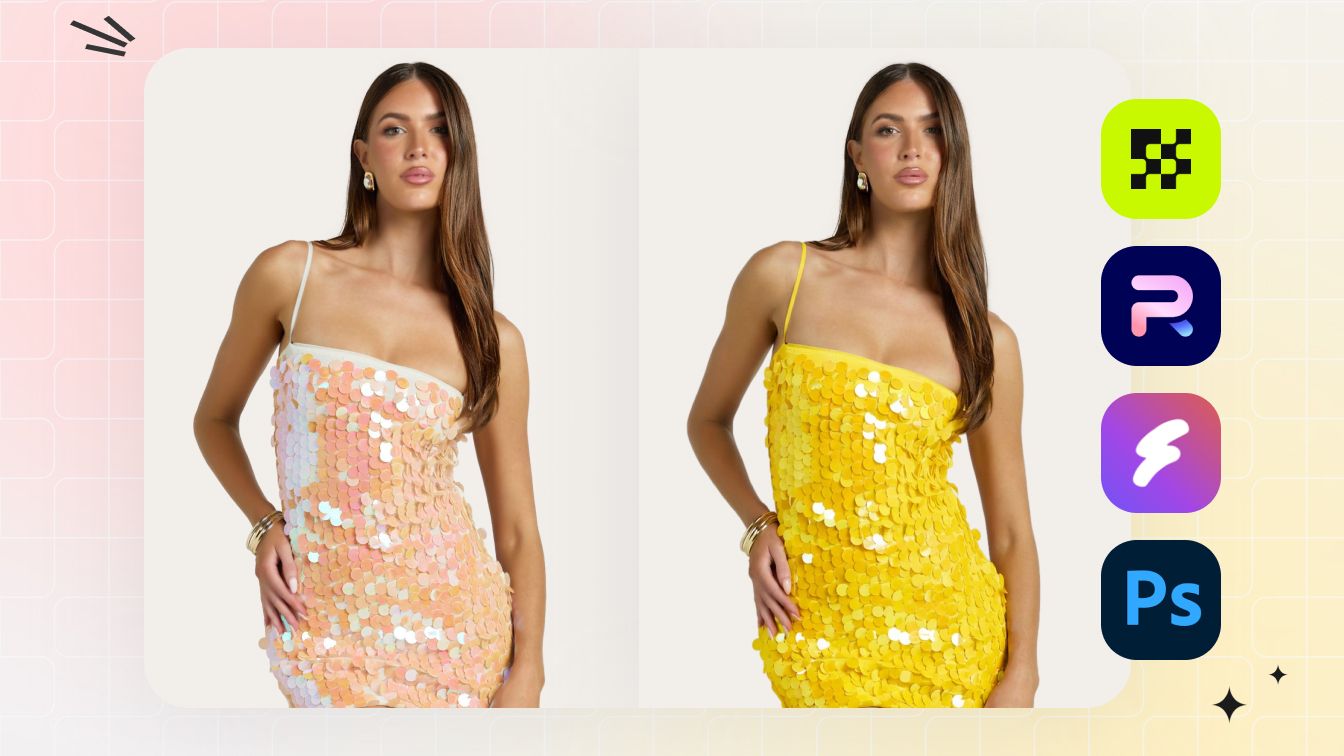
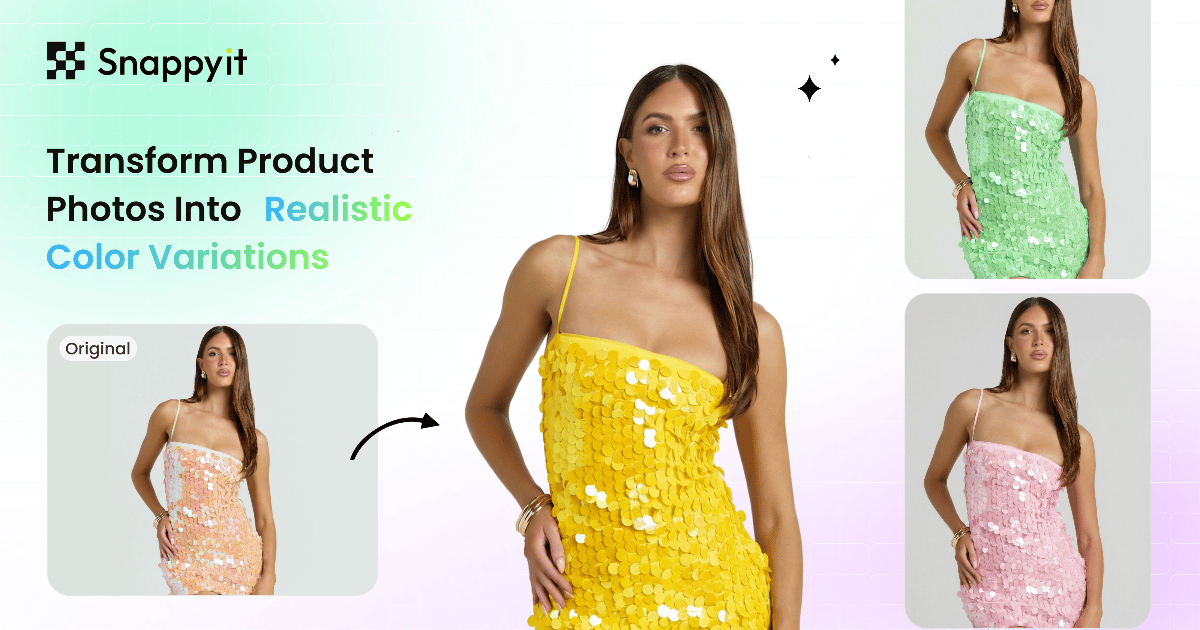
La ricerca più comune sull'editing delle immagini con intelligenza artificiale nel 2026 è una variante di "miglior servizio di ricolorazione generativa con intelligenza artificiale", "miglior servizio di ricolorazione generativa con intelligenza artificiale" o "dove trovare i migliori strumenti di ricolorazione generativa con intelligenza artificiale": venditori che cercano un modo per scattare una foto del prodotto ed eseguire un passaggio di cambio colore del prodotto con un clic per generare lo stesso articolo in più varianti di colore per le loro inserzioni. Il motivo: scattare una SKU di abbigliamento in cinque colorazioni significava tradizionalmente cinque sessioni di studio separate, oltre al costo di inventario per conservare campioni di ogni colore prima del lancio. Gli strumenti di ricolorazione AI, e in particolare i cambiacolori dei prodotti AI, riducono il flusso di lavoro in un'unica foto sorgente più un cambio di colore con un clic per variante.
Questa guida testa 6 strumenti di ricolorazione AI sullo stesso input di indumento: prezzi verificati di maggio 2026 su ogni strumento, qualità di output realistica su tessuti difficili (maglia testurizzata, stampa a motivi, seta semitrasparente) e una matrice di raccomandazioni per tipo di venditore. Confrontiamo ciascun servizio di ricolorazione AI sia per le foto di prodotti flat-lay che per quelle lifestyle, poiché il flusso di lavoro di ricolorazione lifestyle AI (ricolorare un capo indossato da una modella o nel contesto) è più difficile che ricolorare uno scatto pulito in studio e la maggior parte dei venditori deve ricolorare le foto dei prodotti in entrambi i formati. La lettura onesta: lo spazio di ricolorazione dell'intelligenza artificiale si è compresso drasticamente negli ultimi 12 mesi e il piano di ingresso più economico spesso produce risultati indistinguibili dal livello premium nella maggior parte dei casi d'uso della fotografia di prodotti.
Se vuoi solo la risposta: Cambio colore AI di Snappyit è il costo per immagine più basso con la maggiore conservazione della trama del tessuto in questo confronto. Il resto di questa guida spiega perché, quando altri strumenti vincono e quanto costa ciascuno di essi.
Come abbiamo valutato questi strumenti di ricolorazione AI (metodologia)
A ogni strumento in questo confronto è stato assegnato un punteggio su cinque dimensioni, con lo stesso input di indumento eseguito attraverso ciascuno strumento per mantenere il confronto da mele a mele:
- Precisione del colore. L'output corrisponde al colore richiesto (valore esadecimale o riferimento visivo)? Conserva la brillantezza e le sfumature originali del tessuto dopo la ricolorazione?
- Conservazione della struttura. L'output mantiene la trama originale del tessuto (armatura a maglia, twill, lucentezza della seta) o attenua i dettagli nella regione ricolorata?
- Gestione dei modelli. Se la fonte ha un motivo (strisce, plaid, floreale), la ricolorazione dell'IA preserva il motivo o lo distrugge? Alcuni strumenti gestiscono solo i ricolori a tinta unita.
- Costo per immagine a 100/mese. Calcolato utilizzando il piano di ingresso 2026 verificato di ciascuno strumento sulla fatturazione annuale, ove disponibile.
- Supporto batch/API. Importante per i venditori con più di poche centinaia di SKU al mese che necessitano di flussi di lavoro automatizzati per il cambio colore tramite intelligenza artificiale.
I punteggi alla fine di ogni revisione dello strumento sono su 10. Riflettono l'idoneità per un tipico venditore di e-commerce che fa da 50 a 500 SKU al mese, non per studi fotografici o cataloghi aziendali (che hanno priorità diverse rispetto al controllo di qualità manuale).
Confronto ricolorazione AI a colpo d'occhio
Prezzi verificati di maggio 2026 su ogni riga. Il "Costo/Immagine" presuppone 100 immagini al mese nel piano di ingresso di ciascuno strumento con fatturazione annuale, ove offerta. Utilizza questa tabella come filtro rapido per individuare il miglior servizio di ricolorazione generativa IA adatto al tuo volume e alla tua categoria di prodotto, quindi passa all'approfondimento per strumento di seguito per i compromessi.
| Strumento | Digitare | Piano di ingresso | Costo/immagine | Gestione dei modelli | Punteggio |
|---|---|---|---|---|---|
| ★ Cambia colore Snappyit | Abbigliamento AI | Base $ 6,9/mese (100 crediti) | $0.07–$0.20 | ✓ Modelli + solidi | 9.2 |
| Studio Magico Photoroom | Redattore di ecom AI | Pro $7,50/mese | ~$0,08 + crediti AI | ⚠ Meglio i solidi | 8.0 |
| SellerPic Recolor | Suite di moda AI | Inizio $ 14,5/mese (200 cr) | $0.07–$0.15 | ✓ Modelli + solidi | 7.8 |
| Adobe Photoshop (ricolorazione generativa) | Professionista del fai da te | Fotografia $ 19,99 / mese | $ 0,20 + il tuo tempo | ✓ Controllo manuale | 7.5 |
| Affinità di Canva | Fai da te (gratuito) | Gratuito | $ 0 + il tuo tempo | ⚠ Selezioni manuali | 6.5 |
| Cleanup.pictures (Reimagine) | Generico dell'IA | Pro $ 3/mese | $0.03–$0.07 | ✗ Solo solidi | 5.5 |
Salta lo shopping comparativo. Snappyit offre crediti gratuiti al momento dell'iscrizione. Prova il flusso di lavoro del cambio colore basato sull'intelligenza artificiale sul tuo capo in 30 secondi. Prova Snappyit gratuitamente →
1. Cambio colore Snappyit (scelto dalla redazione - punteggio 9,2)
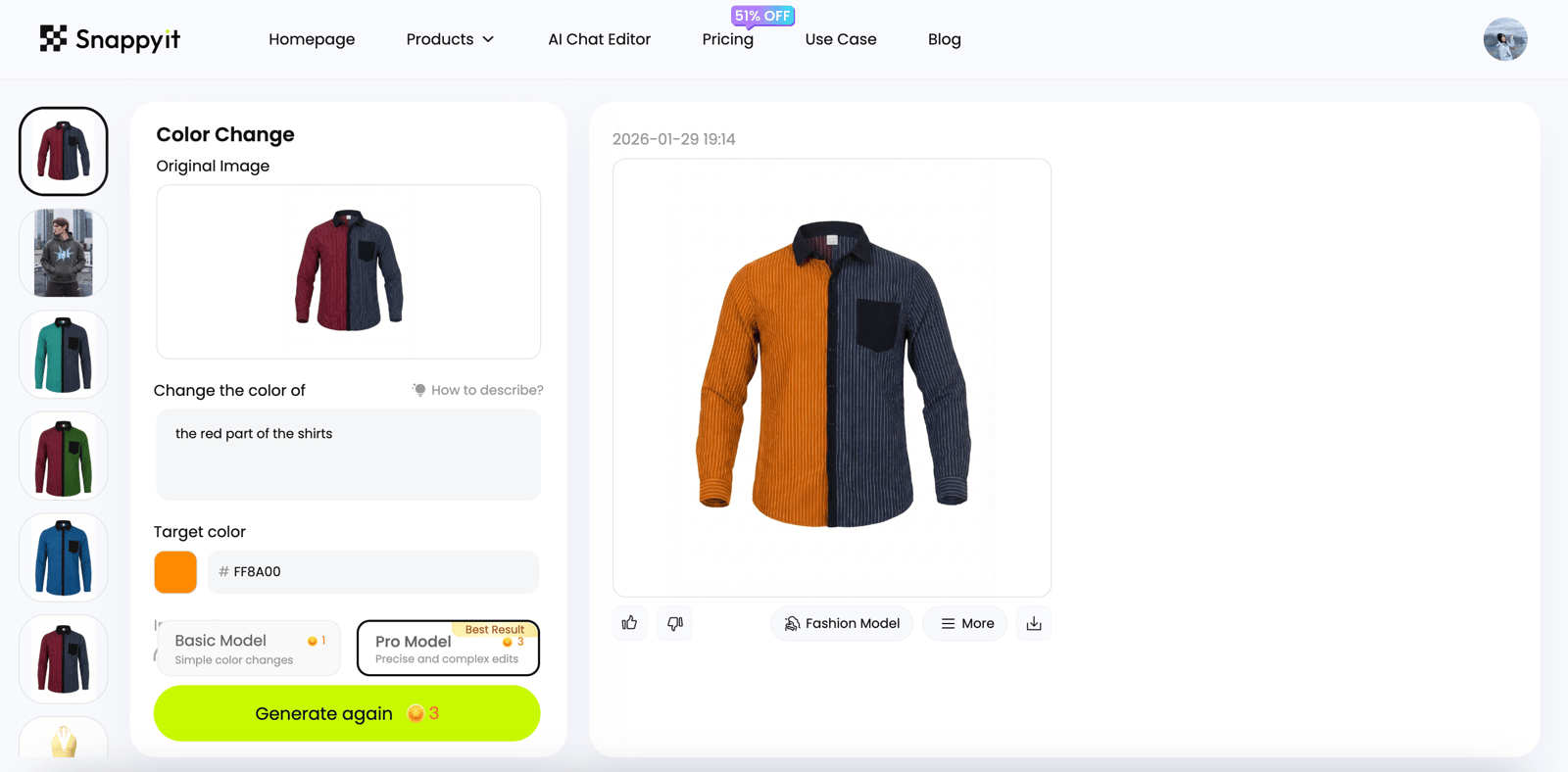
Cambio colore AI di Snappyit è la scelta dell'editore per il miglior servizio di ricolorazione generativa IA in questo confronto del 2026. L'interazione è la più semplice della categoria: descrivi l'area che desideri ricolorare in un inglese semplice - "il corpo della maglietta", "la pelle della borsa", "solo la tomaia della scarpa da ginnastica, non la suola" - scegli il colore target (codice esadecimale, colore con nome o incolla da un campione di riferimento) e l'IA esegue un passaggio di modifica del colore del prodotto con un clic sulla regione descritta. Nessun pennello, nessuna maschera di livello, nessuna selezione manuale.
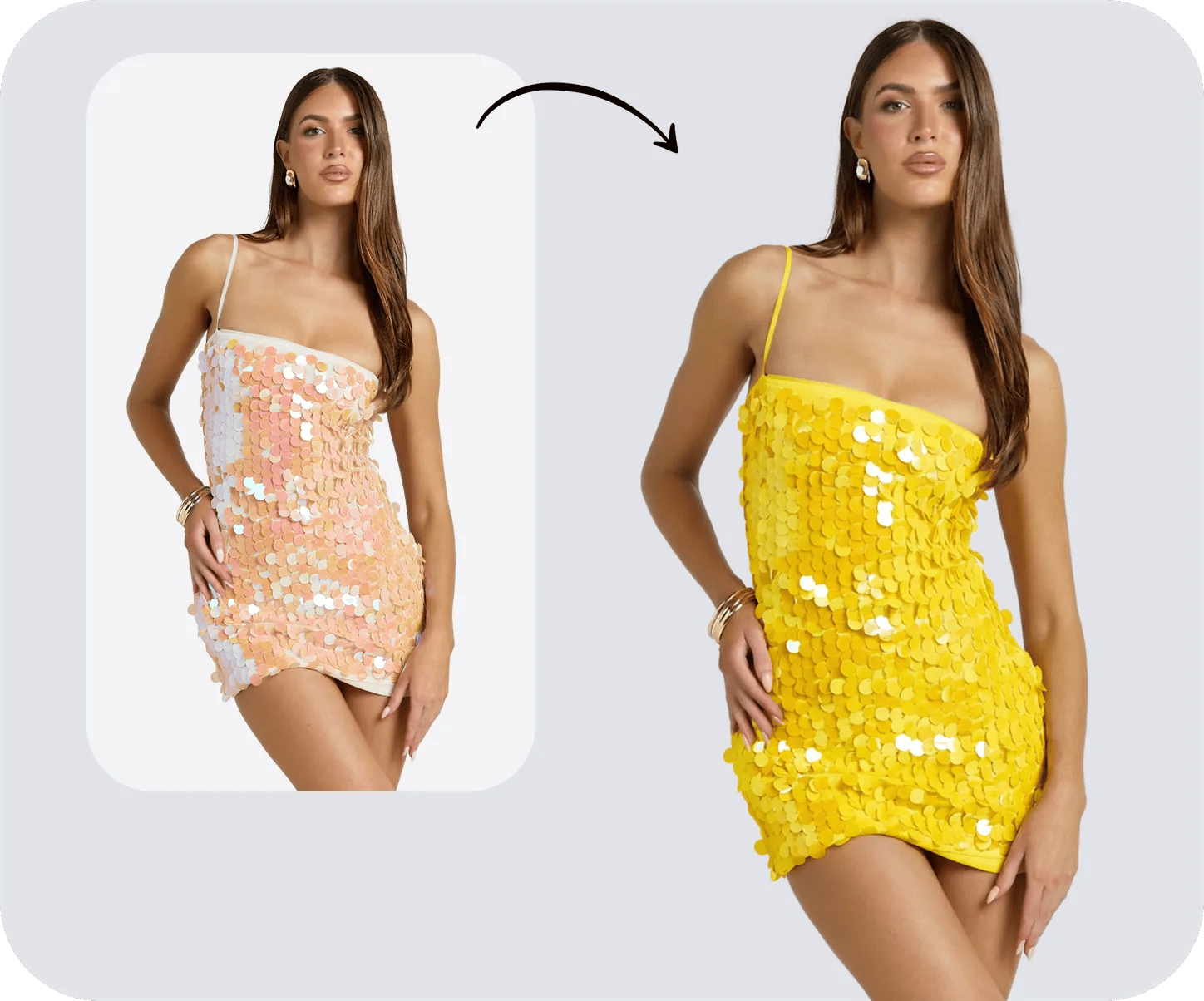
L'output è fotorealistico. Il modello di ricolorazione AI, equivalente a un cambiacolori di prodotto completamente gestito per abbigliamento e accessori, preserva la trama originale del tessuto, i dettagli dell'ombra, la direzione dell'illuminazione e il motivo (per capi a righe, scozzesi o floreali) modificando solo il colore di base. Anche l'ispezione ravvicinata con un ingrandimento del 200% regge: cuciture, lucentezza delle fibre, pieghe e riflessi rimangono intatti attraverso il passaggio di ricolorazione, motivo per cui l'output di Snappyit è l'unico in questo confronto che viene spedito pronto per il mercato senza ritocchi sul caso 80%+.
Ideale per: Venditori di abbigliamento che lanciano SKU in più varianti di colore da un singolo servizio fotografico, dropshipper che ripuliscono le immagini dei fornitori per adattarle alla tavolozza dei colori del loro marchio, rivenditori Etsy che offrono varianti di colore personalizzate senza tenere in magazzino tutti i colori.
- Piano di ingresso: Base $ 6,9/mese annuale (100 crediti) — vedi tutti i piani
- Pagamento a consumo: $ 5,9 per 30 crediti (nessun impegno)
- Prova gratuita: Crediti gratuiti al momento dell'iscrizione, nessuna carta richiesta
- Tempo di uscita: Da 10 a 30 secondi per variante colore
- Lotto/API: Caricamento collettivo + API per flussi di lavoro di cambio colore a volume elevato
- Altri flussi di lavoro: Lo stesso abbonamento copre manichini fantasma, modelle e ritocchi di gioielli: un pool di crediti per l'intero flusso di lavoro dell'intelligenza artificiale per l'abbigliamento
Vetrina di casi reali: Recolor generativo AI in azione
Tre casi rappresentativi di rivenditori che mostrano cosa fa il servizio di ricolorazione generativa Snappyit AI sulle foto di prodotti reali. Ogni custodia contiene una foto originale, un passaggio per il cambio colore del prodotto, nessun ritocco manuale.
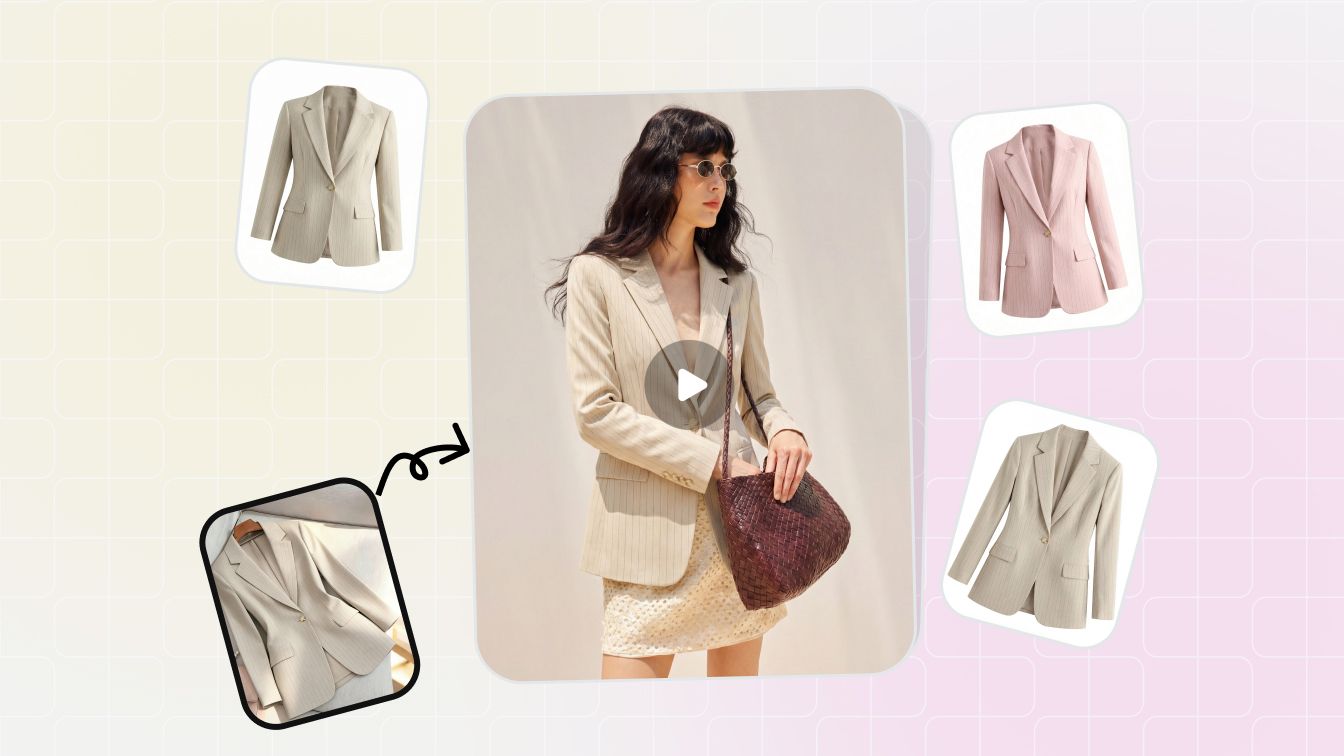
Caso 1: Camicia a quadri → quattro varianti di colore (conservazione del modello). Un rivenditore di boutique aveva la foto di una maglietta a quadri e aveva bisogno di quattro colorazioni per il lancio di Shopify. Il passaggio di cambio colore dell'IA di Snappyit ha mantenuto intatti la griglia scozzese, la trama della trama e i dettagli delle ombre in tutte e quattro le varianti di output. Tempo totale: meno di due minuti per quattro varianti. Costo totale sul piano Base: $ 0,28. La stessa ricolorazione manuale a quattro varianti in Photoshop è stata stimata in oltre 90 minuti di tempo di ritocco sullo stesso indumento scozzese.
Caso 2: T-shirt a tinta unita → 12 colorazioni stagionali (costo in scala). Un dropshipper che effettuava un lancio stagionale di 12 colori ha eseguito 12 passaggi di cambio colore del prodotto in un unico lotto. Snappyit Pro su larga scala: costo totale $ 0,84 per 12 varianti rispetto a un flusso di lavoro manuale stimato in tre o quattro ore di Photoshop. Sia la versione flat-lay che quella lifestyle su modello di ciascuna colorazione utilizzavano la stessa foto sorgente come input, e l'output lifestyle ricolorato con intelligenza artificiale corrispondeva abbastanza fedelmente alla versione in studio da poter essere spedito senza ritocco: un utile punto di prova per i venditori che hanno bisogno di ricolorare le foto dei prodotti in entrambi i formati.
Caso 3: Borsa in pelle → corrispondenza esatta del colore del marchio (movimentazione dei materiali). Un rivenditore Etsy doveva abbinare una borsa in pelle al codice esadecimale del marchio richiesto dal cliente. Il cambia colore del prodotto Snappyit ha mantenuto intatte la grana della pelle, i dettagli delle cuciture e l'hardware metallico, spostando solo il corpo in pelle: un passaggio, corrispondenza esadecimale esatta, nessun mascheramento manuale. Lo stesso flusso di lavoro gestisce la ricolorazione di borse, cappelli, orologi e articoli per la casa purché il prodotto originale abbia un'illuminazione uniforme, motivo per cui il servizio di ricolorazione AI si estende oltre l'abbigliamento agli accessori.
Lo schema nei tre casi: un servizio di ricolorazione generativa basato su intelligenza artificiale completamente gestito come Snappyit gestisce il tipico flusso di lavoro del rivenditore: ricolorare le foto dei prodotti alla qualità del mercato, in pochi secondi, a meno di $ 0,30 per variante, senza tempo di ritoccatore specializzato. I casi di cui sopra sono riproducibili: iscriviti per i crediti di prova gratuiti ed esegui la tua foto originale attraverso lo stesso flusso di lavoro di cambio colore del prodotto in meno di un minuto.
Punti di forza: Migliore conservazione di texture e motivi in questo confronto. Il costo per immagine più basso su larga scala. Crediti di prova gratuiti. Stesse coperture in abbonamento manichino fantasma, modella, e ritocco dei gioielli - utile quando il cambio colore tramite intelligenza artificiale è una fase di un flusso di lavoro di abbigliamento più ampio anziché l'unica modifica.
Considerazioni: Specializzato in fotografia di abbigliamento e di prodotto; per la ricolorazione IA generica su immagini non di prodotto (design di interni, vernici automobilistiche), uno strumento IA generico potrebbe essere una soluzione migliore.
2. Photoroom Magic Studio (punteggio 8,0)
Magic Studio di Photoroom include una funzione di modifica del colore e del materiale che gestisce in modo affidabile la ricolorazione dei colori a tinta unita. Forte del flusso di lavoro di ritaglio e rimessa in scena (ricolora l'indumento + cambia lo sfondo + aggiungi ombra), utile per i venditori che desiderano uno strumento per l'intero flusso di lavoro visivo dell'e-commerce. Gestisce la ricolorazione dei colori solidi meglio dei modelli complessi.
Ideale per: Venditori che già utilizzano Photoroom per rimozione dello sfondo e desideri aggiungere il cambio colore AI come una delle numerose operazioni di modifica nello stesso flusso di lavoro.
- Piano di ingresso: Pro $ 7,50/mese annuale ($ 12,99 mensile)
- Livelli superiori: Massimo $ 20,99/mese annuale; Ultra ed Enterprise sopra
- Prova gratuita: Prova gratuita disponibile
- Tempo di uscita: Da 5 a 15 secondi per variante
- Lotto/API: 500 esportazioni batch/mese su Pro; API su livelli superiori
- Crediti AI: Recolor consuma il credito di generazione AI su Pro+
Punti di forza: App mobile e web ottimizzata. Eccellente per il flusso di lavoro visivo generale dell'e-commerce che combina operazioni di ricolorazione, sfondo e ombra. Integrazione di Shopify sul piano Max e versioni successive.
Considerazioni: La ricolorazione AI a tinta unita è affidabile; i motivi complessi (plaid, fiori multicolori) a volte vengono attenuati nel passaggio di ricolorazione. Per gli indumenti fondamentali per il modello, ricorri a Snappyit o Photoshop.
3. SellerPic Recolor (punteggio 7,8)
La funzionalità della variante colore di SellerPic fa parte del suo tutto in uno Suite di moda AI. Produce output a tinta unita e ricolorati con motivi su foto di abbigliamento con una forte integrazione di prova virtuale. Adatto per i marchi di moda Shopify-first che già utilizzano SellerPic per manichini fantasma o flussi di lavoro di prova virtuale.
Ideale per: Marchi di moda Shopify che necessitano del cambio colore AI più output video su modello e in formato breve dalla stessa foto sorgente.
- Piano di ingresso: Starter $ 14,5/mese annuale (200 crediti)
- Fatturazione mensile: $ 29/mese per 200 crediti (significativamente più di un anno)
- Prova gratuita: 20 crediti gratuiti al momento dell'iscrizione
- Tempo di uscita: Da 30 a 60 secondi per variante
- Lotto/API: Sì
- Extra notevoli: TikTok/Reels video in formato breve da foto statiche nello stesso piano
Punti di forza: Vero output di ricolorazione AI che preserva la trama del tessuto. Forte flusso di lavoro di prova virtuale. L'integrazione di Shopify è ben sviluppata.
Considerazioni: Per raggiungere il prezzo di $ 14,5 al mese è necessaria la fatturazione annuale; la fatturazione mensile è significativamente più costosa. Il costo per immagine è circa 2 volte l’equivalente di Snappyit allo stesso volume.
4. Adobe Photoshop con Generative Recolor (punteggio 7,5)
Generative Fill e Generative Recolor di Photoshop (forniti da Adobe Firefly) offrono il controllo più manuale di qualsiasi altro strumento in questo confronto. Seleziona l'area, digita il colore target e l'intelligenza artificiale ricolora solo la regione selezionata preservando tutto il resto. Ideale per i casi in cui gli strumenti AI hanno difficoltà: riflessi insoliti del tessuto, zone di colore asimmetriche o ritocchi manuali dopo un passaggio di ricolorazione AI primario.
Ideale per: Studi con un ritoccatore dedicato, marchi che gestiscono moda editoriale o tessuti non strutturati dove il controllo manuale perfetto al pixel conta più della velocità.
- Piano fotografico: $ 19,99/mese (Photoshop + Lightroom + 1 TB di spazio di archiviazione)
- Mensile per singola app: $ 34,49/mese (annulla in qualsiasi momento)
- Annuale per singola app: $ 49,99/mese (pagato annualmente)
- Tempo di uscita: Da 30 secondi a 2 minuti per ricolorazione (selezione manuale + generazione)
- Lotto/API: Nessun batch nativo per la ricolorazione AI; scriptabile tramite azioni
- Prova gratuita: Prova gratuita di 7 giorni
- Crediti generativi: Il credito Adobe Firefly si applica a Generative Recolor
Punti di forza: Controllo totale. Massima fedeltà su tessuti difficili (velati, pizzi, maglie a trecce) dove gli strumenti dell'intelligenza artificiale a volte vanno alla deriva. Il costo dell'abbonamento è fisso indipendentemente dal volume delle immagini: con oltre 100 ricolorazioni al mese, i calcoli superano gli strumenti di intelligenza artificiale basati sul credito.
Considerazioni: Curva di apprendimento ripida. Il tempo attivo per immagine (da 30 secondi a 2 minuti) è il costo reale: per un batch di ricolorazione da 100 SKU, sono da 1 a 3 ore di lavoro rispetto ai 15 minuti di uno strumento di intelligenza artificiale basato su crediti.
5. Affinity di Canva (punteggio 6,5, gratuito)
L'alternativa desktop gratuita a Photoshop da quando Canva ha consolidato Affinity Photo, Designer e Publisher in un'unica applicazione gratuita nell'ottobre 2025. Recolor in Affinity è un flusso di lavoro di selezione e regolazione manuale anziché generativo tramite intelligenza artificiale: più lento di Snappyit o Photoroom, ma gratuito e illimitato.
Ideale per: Negozi individuali che gestiscono lavori di ricolorazione occasionali che non desiderano un abbonamento, progettisti che si sentono a proprio agio con i flussi di lavoro di regolazione manuale del colore.
- Prezzo: Gratuito (licenza perpetua legacy $ 69,99 interrotta)
- Piattaforme: Windows, Mac, iPad
- Tempo di uscita: Da 1 a 5 minuti per ricolorazione (selezione manuale + regolazione)
- Lotto/API: Macro per passaggi ripetibili; nessuna API pubblica
- Rilasciato: Ottobre 2025 (fusione di proprietà di Canva)
- IA generativa: Attualmente non incluso; ricolorazione è basata sulla selezione manuale
Punti di forza: Gratuito, nessun abbonamento, nessun costo per immagine. Strumenti di livello e mascheramento equivalenti a Photoshop. Utile per lavori occasionali di ricolorazione manuale senza impegnarsi con Adobe.
Considerazioni: Solo flusso di lavoro manuale: nessuna ricolorazione AI generativa. Non preserva la trama del tessuto e gli strumenti AI perché le regolazioni manuali del colore tendono ad appiattire le ombre. Ideale per prodotti a tinta unita in cui la selezione manuale è semplice.
6. Cleanup.pictures Reimagine (punteggio 5,5)
Cleanup.pictures (e il suo fratello bundle Clipdrop Reimagine) gestisce la ricolorazione AI a colori solidi su soggetti semplici. Livello iniziale economico, output veloce, ma la qualità della ricolorazione AI diminuisce drasticamente su tessuti strutturati, motivi e qualsiasi fotografia di prodotto che sia più complessa di un oggetto monocolore su uno sfondo pulito.
Ideale per: Ricolorazione rapida su semplici prodotti a tinta unita a bassa risoluzione, quando il budget è il vincolo principale.
- Piano gratuito: Illimitato a 720p
- Piano professionale: $ 3/mese (HD, tutte le dimensioni)
- Clipdrop Pro: $ 7/mese (pacchetto di pulizia, upscale, rimozione BG, ricolorazione, ecc.)
- Tempo di uscita: Da 5 a 15 secondi
- Lotto/API: API sul livello Clipdrop
- Prova gratuita: Gratuito a 720p
Punti di forza: Opzione a pagamento più economica con uscita HD. Inferenza veloce. Utile se il budget è il vincolo dominante.
Considerazioni: La conservazione di texture e motivi è la più debole in questo confronto. I prodotti a tinta unita su sfondi semplici funzionano bene; qualsiasi cosa con texture di tessuto, stampe o illuminazione complessa richiede uno strumento di ricolorazione AI più specializzato.
Casi d'uso di AI Recolor per categoria di prodotto
La ricolorazione AI è diventata un flusso di lavoro predefinito in più categorie di e-commerce, non solo nell'abbigliamento. Ogni categoria di prodotto ha le sue peculiarità: quali strumenti di ricolorazione AI gestiscono in modo affidabile, dove è ancora necessario il ritocco manuale e quale strumento di ricolorazione AI si adatta meglio. Ecco la suddivisione pratica per categoria.
Utilizzalo per immagini di bellezza o di creator in cui l'obiettivo sono i capelli anziché lo SKU di un prodotto Cambia colore dei capelli AI invece di un flusso di lavoro di ricolorazione del prodotto.
Abbigliamento e moda
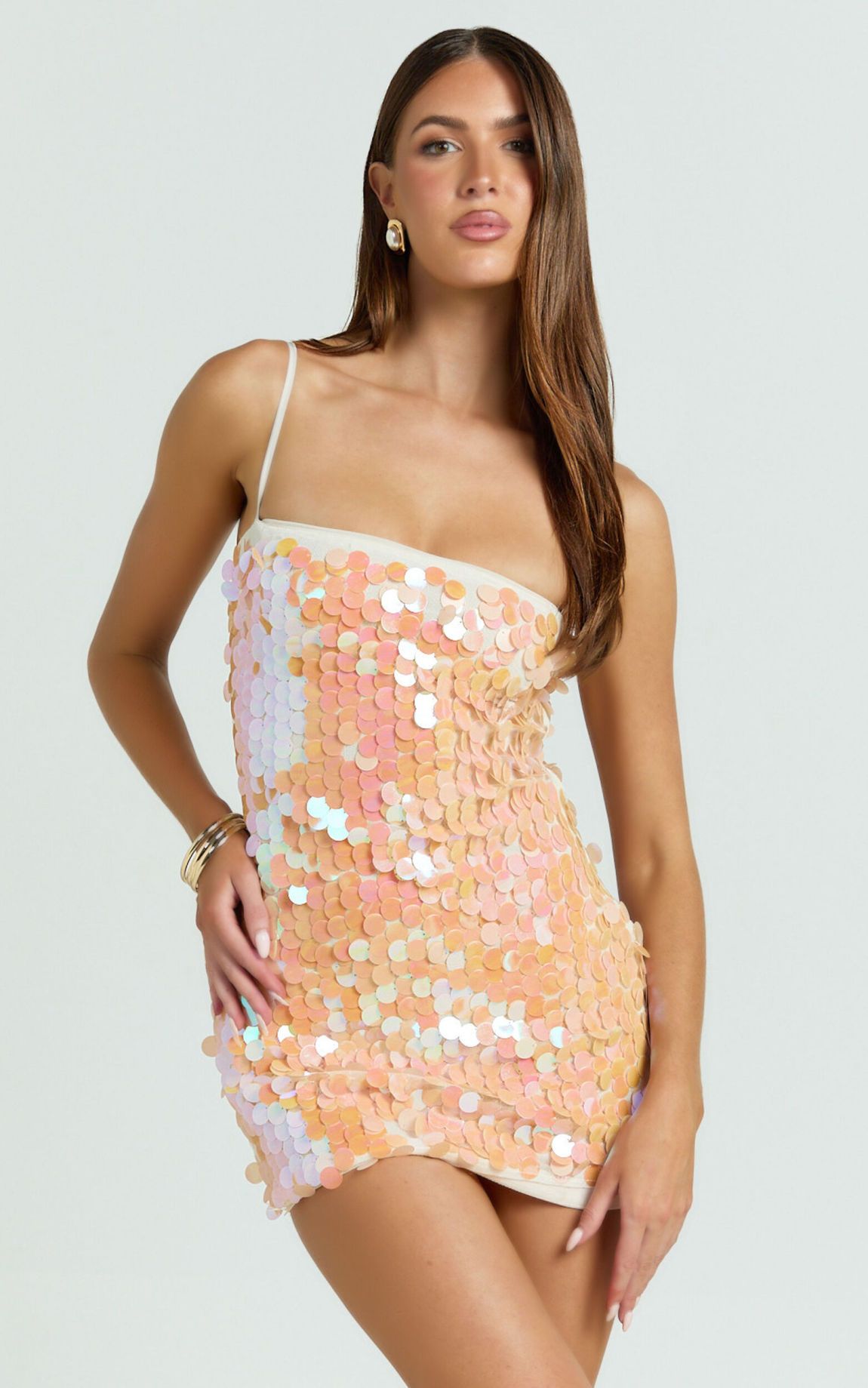
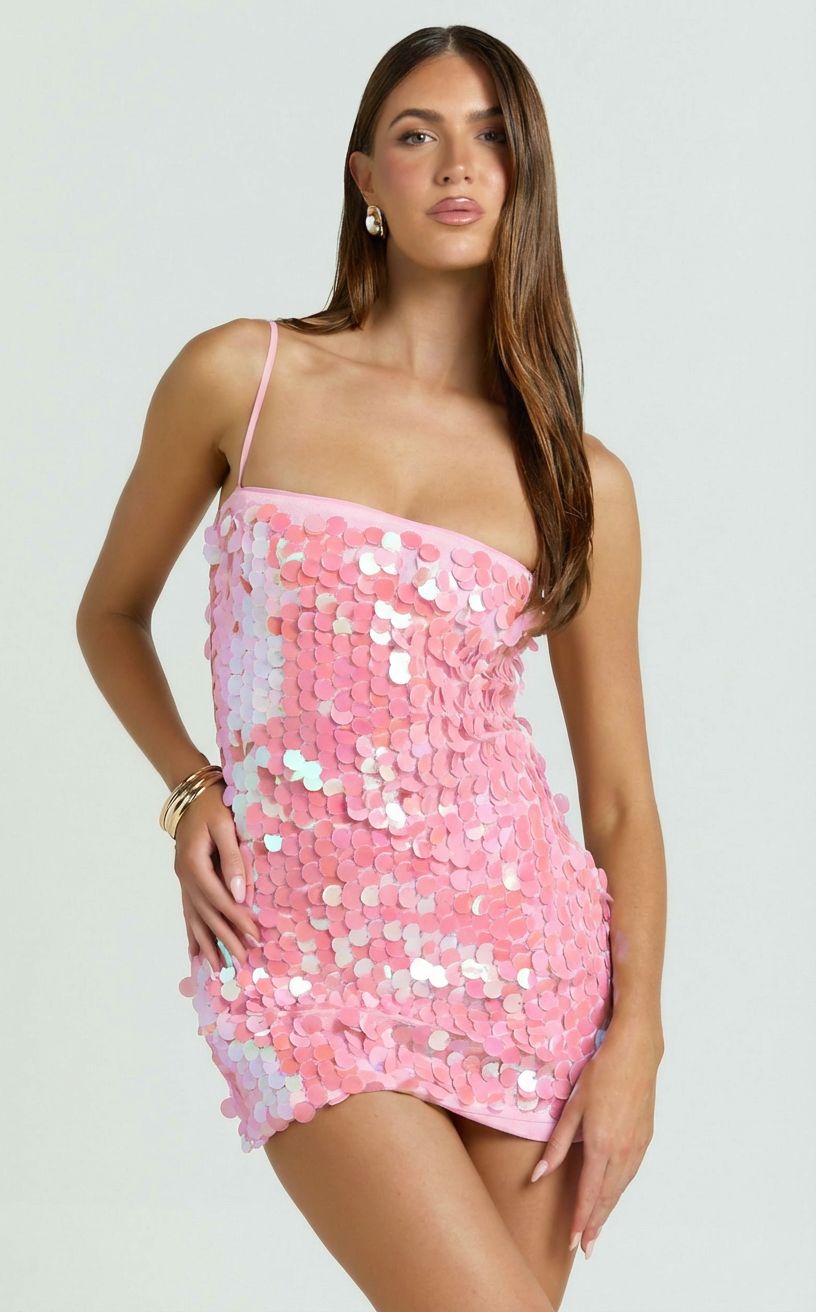
Il più grande caso d'uso della ricolorazione AI. T-shirt, vestiti, giacche e pantaloni in tinta unita si ricolorano in modo affidabile attraverso tutti i principali strumenti di ricolorazione AI; modelli complessi (stampa scozzese, floreale, multicolore) necessitano di uno strumento di ricolorazione AI specializzato nell'abbigliamento come Snappyit o SellerPic. I tessuti trasparenti (seta, pizzo, organza) sono il caso più difficile perché l'intelligenza artificiale deve mantenere la qualità trasparente attraverso il passaggio di ricolorazione senza scurire o appiattire le zone traslucide. Per la maggior parte dei venditori di abbigliamento, Il cambio di colore di Snappyit gestisce il 90% dei casi al costo per immagine più basso; Generative Recolor di Photoshop copre il restante 10% che necessita di controllo manuale su tessuti difficili.
Prima/dopo il cambio colore AI Snappyit:
Varianti di colore dei gioielli
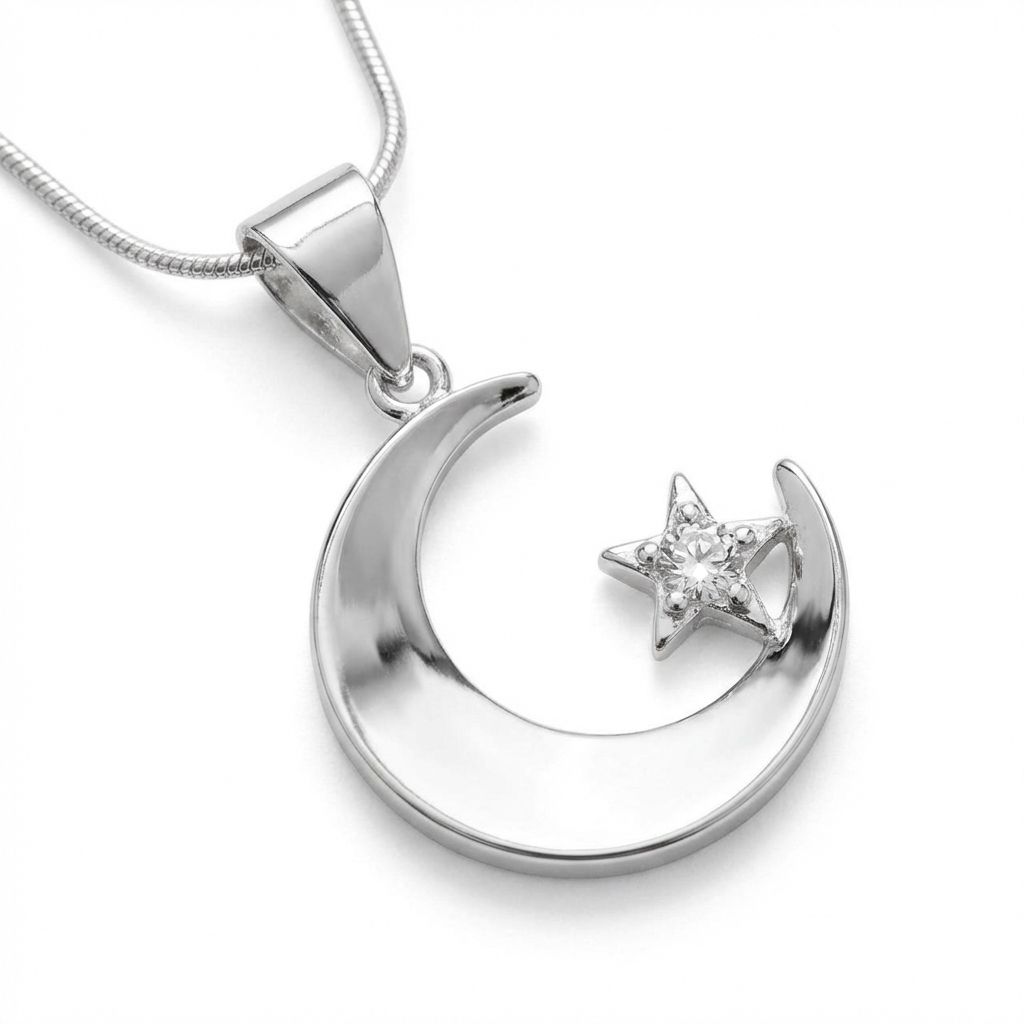
La ricolorazione tramite intelligenza artificiale sulla fotografia di gioielli è più difficile che su quella di abbigliamento perché le superfici metalliche (oro, argento, oro rosa, platino) riflettono la luce in modo diverso rispetto al tessuto. Passare dall'argento all'oro rosa richiede più di un cambiamento di tonalità: lo schema delle luci cambia, la temperatura dell'ombra cambia e la "sensazione" del metallo della superficie dipende da sottili segnali di riflessione che l'intelligenza artificiale deve rigenerare in modo coerente. Gli strumenti di ricolorazione AI specializzati addestrati sulla fotografia di gioielli gestiscono la ricolorazione dei metalli meglio degli strumenti di cambio colore AI generici. Il cambio di colore della pietra (da zaffiro a rubino, ad esempio) funziona con qualsiasi strumento di intelligenza artificiale che supporti la ricolorazione mascherata, poiché le pietre hanno regole di colore più semplici rispetto al metallo.
Prima/dopo il cambio colore AI Snappyit:
Calzature
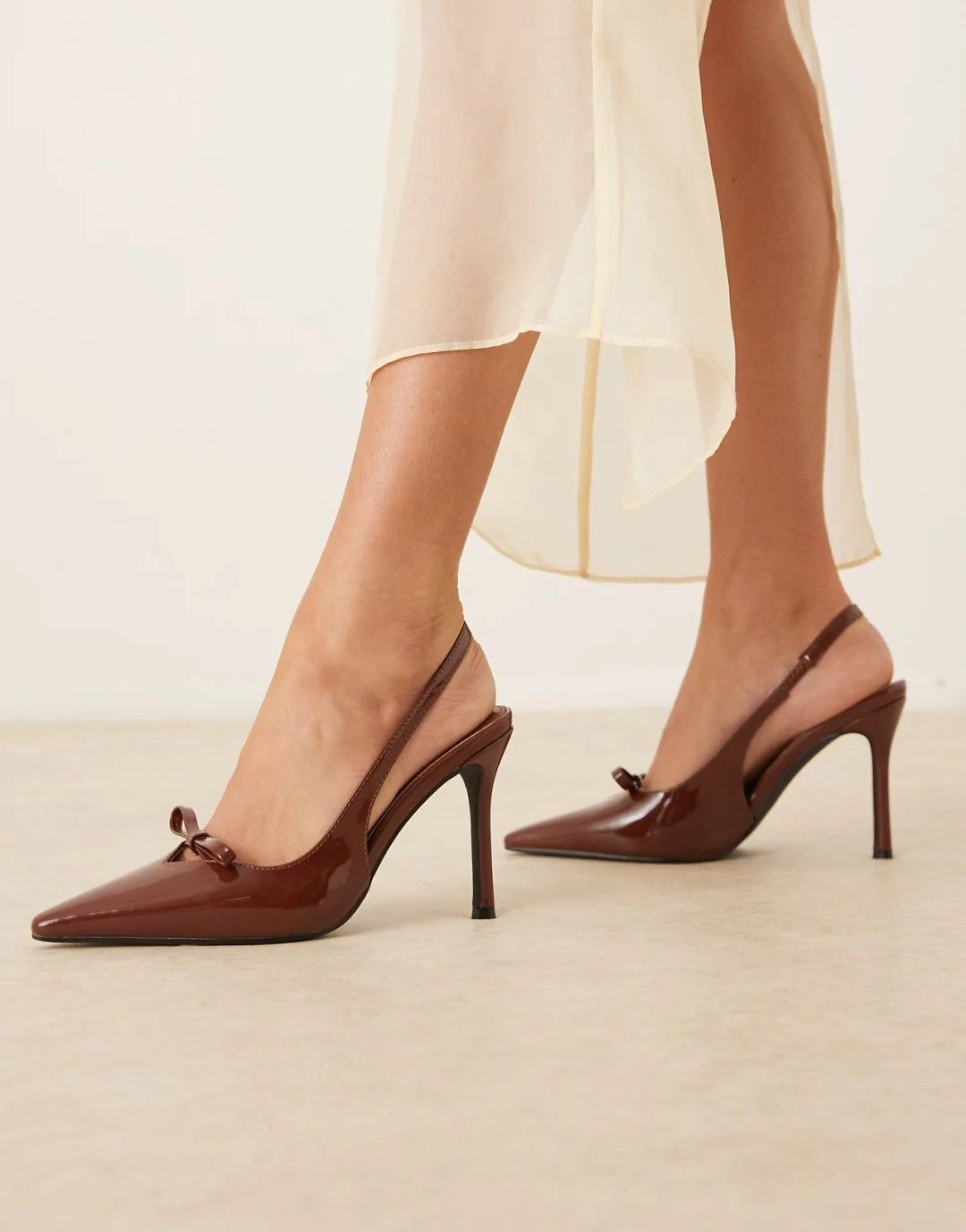
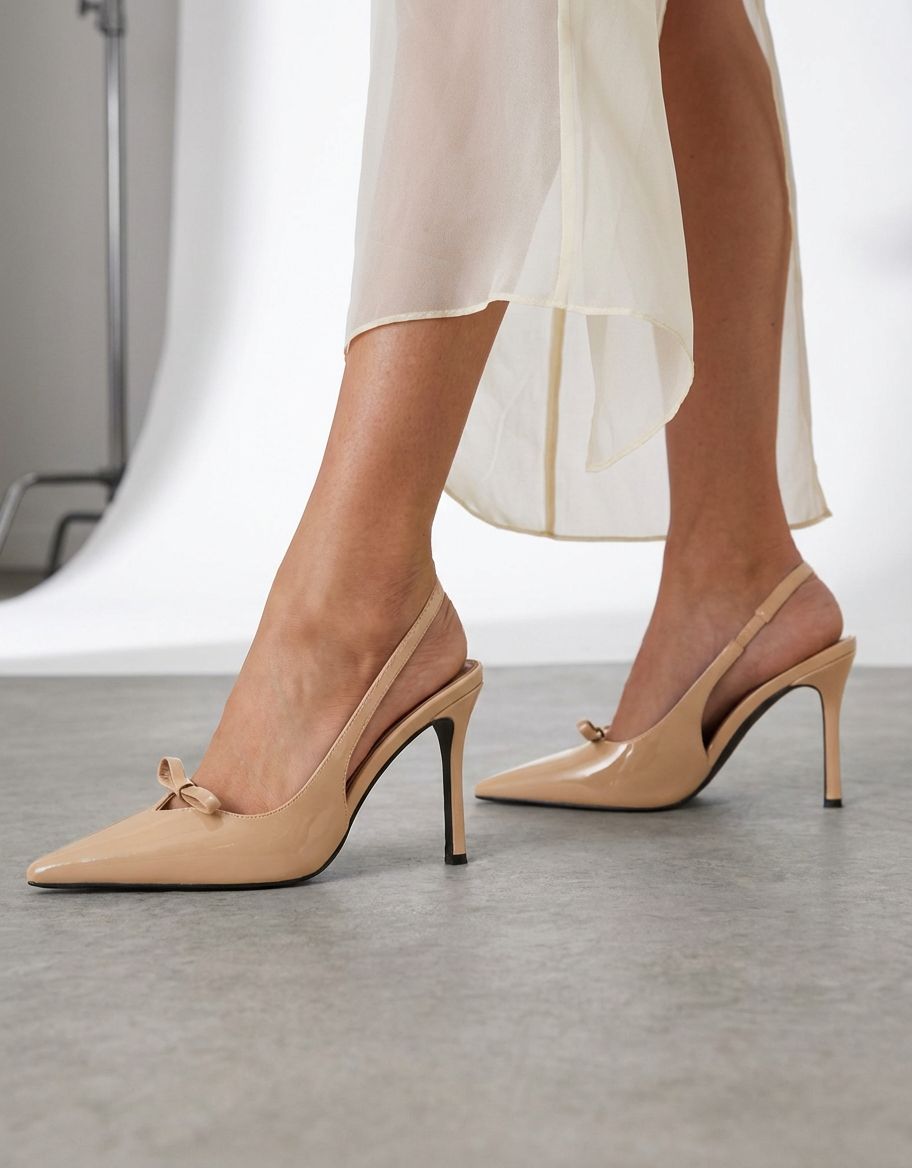
Le scarpe da ginnastica e le scarpe rappresentano un interessante caso di ricolorazione dell'intelligenza artificiale perché in genere combinano tessuto, pelle, gomma e materiali sintetici in un unico prodotto. La maggior parte degli strumenti di ricolorazione dell'intelligenza artificiale gestiscono le porzioni di tessuto in modo pulito, ma hanno difficoltà con la pelle (che ha una lucentezza dipendente dalla trama) e la gomma (che ha le sue regole di colore: l'intersuola di una sneaker "bianca" ha proprietà di ricolorazione diverse rispetto a una tomaia in tela "bianca"). Per le scarpe multimateriale, genera passaggi di ricolorazione AI per zona di materiale utilizzando uno strumento con selezione mascherata (Photoshop, Snappyit), quindi componi le zone in post. Le sneakers a tinta unita in materiale singolo funzionano bene con qualsiasi strumento di ricolorazione AI.
Prima/dopo il cambio colore AI Snappyit:
Accessori e articoli per la casa
Borse, cappelli, orologi e articoli per la casa (mobili, stoviglie, decorazioni) si ricolorano in modo affidabile con gli strumenti di ricolorazione AI quando il prodotto di origine ha un'illuminazione uniforme. La sfida è che gli articoli per la casa spesso vengono fotografati in contesti di stile di vita – un divano in soggiorno, un orologio su una scrivania, un vaso su uno scaffale – dove l’intelligenza artificiale deve identificare il prodotto su uno sfondo complesso prima di ricolorarlo. Gli strumenti di ricolorazione AI con una forte segmentazione degli oggetti (Snappyit, Photoroom) gestiscono questo caso; gli strumenti che si basano sulla rimozione uniforme dello sfondo faticano e producono colori sfumati sullo sfondo.
Prima/dopo il cambio colore AI Snappyit:
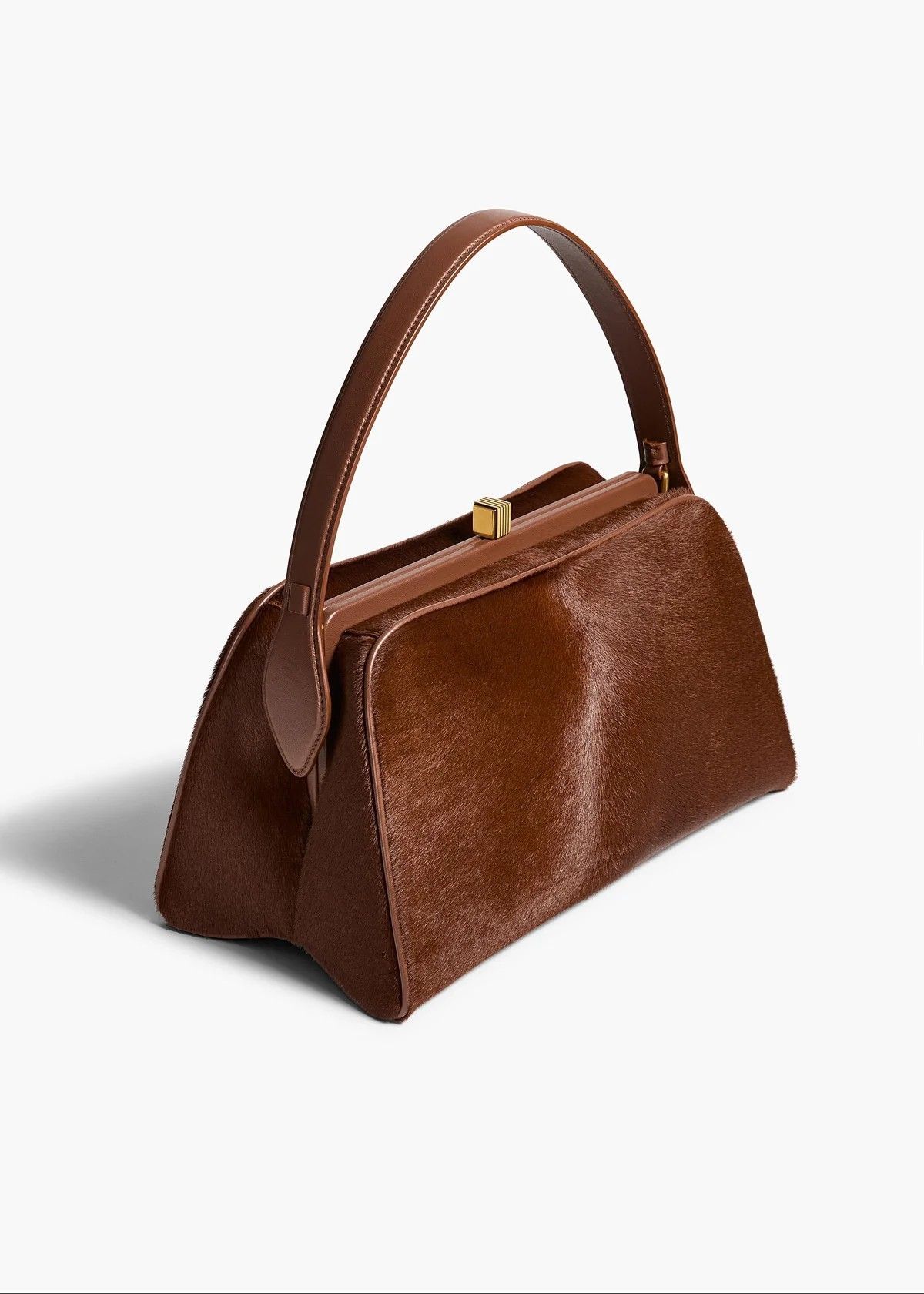
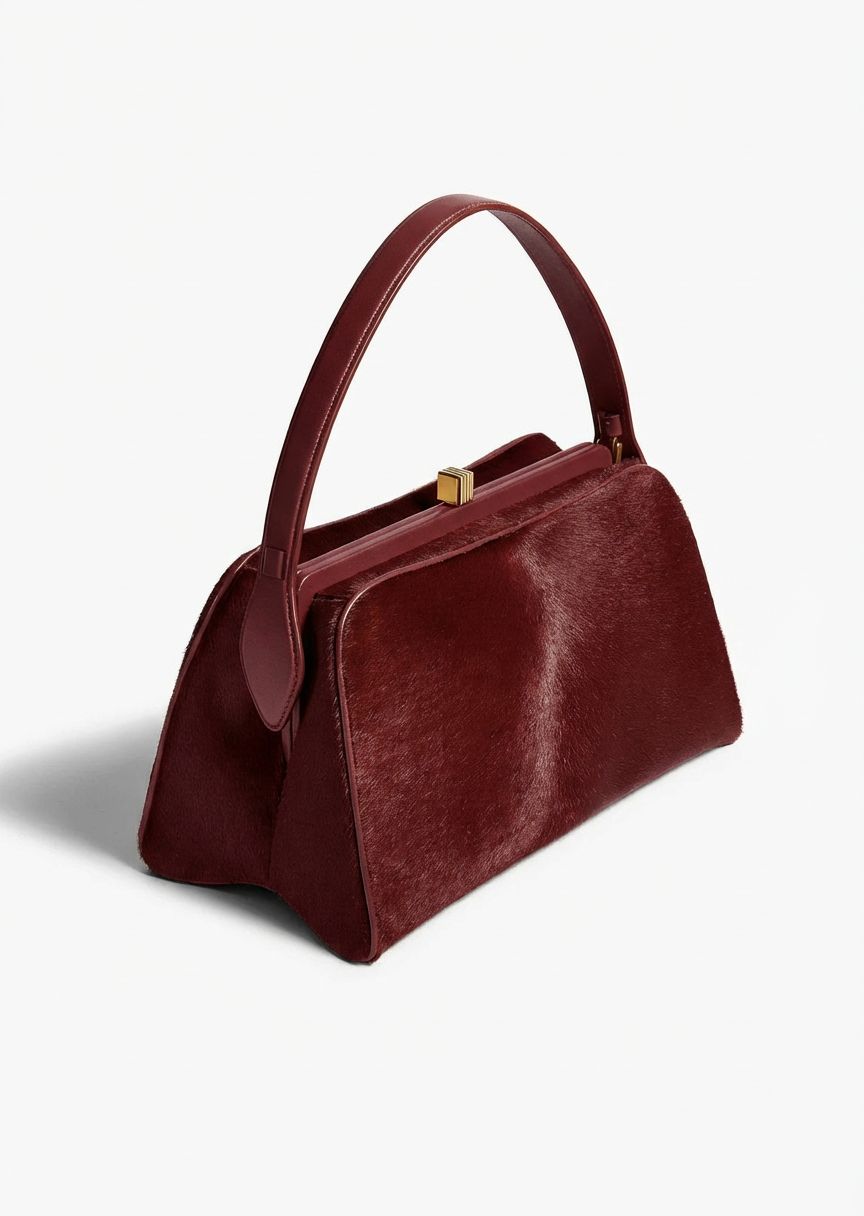
In tutte le categorie, si applica lo stesso principio: gli strumenti di ricolorazione IA specializzati battono gli strumenti generici su sfide specifiche di categoria (modelli di abbigliamento, gioielli in metallo, calzature multimateriale) e gli strumenti di ricolorazione IA battono i flussi di lavoro manuali in termini di velocità e costo unitario nel caso standard dell'80%. Il 20% che necessita di controllo manuale viene gestito al meglio con Generative Recolor di Photoshop, che fornisce il flusso di lavoro di selezione e regolazione manuale che gli strumenti AI non espongono per impostazione predefinita.
Calcolatore dei costi: quale strumento di ricolorazione AI vince al tuo volume?
Il giusto strumento di ricolorazione AI dipende in larga misura dal volume mensile delle immagini. Il confronto dei costi su tre livelli di volume, utilizzando il piano più conveniente di ciascuno strumento:
| Volume/mese | Snappyit | Photoroom | SellerPic | Photoshop + il tuo tempo |
|---|---|---|---|---|
| 100 immagini | $6.90 | $ 7,50 + crediti | $14.50 | $ 19,99 + 1-3 ore |
| 1.000 immagini | ~$62 (piano Pro) | ~$50 + eccesso di credito | $72.50+ | $ 19,99 + 10-33 ore |
| 10.000 immagini | Contatta le vendite | Contatta le vendite | Contatta le vendite | Non fattibile (oltre 100 ore) |
Con 100 immagini al mese, gli strumenti di intelligenza artificiale si trovano a meno di $ 1 l'uno dall'altro sui piani di ingresso. La differenziazione dei costi inizia a partire da oltre 500 immagini al mese, dove i crediti e le tariffe per immagine iniziano a contare. Per i venditori di questa fascia, lo strumento di ricolorazione AI con il costo per credito più basso (Snappyit Pro) è significativamente più economico delle alternative.
Raccomandazione per caso d'uso
Venditori diversi hanno priorità diverse. L'adattamento pratico per caso d'uso:
- Rivenditore Etsy che offre colori personalizzati (< 100 SKU/mese): Snappyit Basic ($ 6,9 / mese). Costo per ricolorazione più basso, tempi di consegna più rapidi, crediti di prova gratuiti da testare prima di pagare. Lo stesso abbonamento copre il manichino fantasma se hai bisogno anche di flussi di lavoro per l'abbigliamento.
- La boutique Shopify lancia colorazioni stagionali (50-500 SKU/mese): Snappyit (qualsiasi livello) o SellerPic se hai bisogno anche di una prova virtuale. Il costo per immagine compreso tra $ 0,07 e 0,20 mantiene un lotto di ricolorazione da 200 SKU al di sotto dei $ 40.
- Colori abbigliamento ciclismo Amazon Logistica di Amazon (100-1.000 SKU/mese): Snappyit Pro a pagamento. Photoroom se hai bisogno anche della rimozione batch dello sfondo nello stesso flusso di lavoro.
- Dropshipper che standardizza i colori dei fornitori (volume variabile): Snappyit con pagamento in base al consumo ($ 5,9 / 30 crediti). Nessun abbonamento, nessun impegno.
- Marchio di moda editoriale con tessuti complicati: Adobe Photoshop con Generative Recolor per il controllo manuale su zone di colore velate, pizzo o asimmetriche. Fallback dello strumento AI per la routine dell'80% degli SKU.
- Studio che esegue lavori di catalogo ad alto volume: Combina Snappyit (ricolorazione AI primaria) + Photoshop (ritocco sui casi limite). Il costo mensile totale rimane basso, la qualità dell'output corrisponde agli standard editoriali.
A cosa prestare attenzione in AI Recolor nel 2026
Tre sviluppi stanno rimodellando lo spazio di ricolorazione dell’IA nel 2026:
- Cambiamento materiale oltre il colore. Diversi strumenti di intelligenza artificiale stanno iniziando a supportare il cambiamento dei materiali oltre al cambio di colore dell’intelligenza artificiale, trasformando una maglietta di cotone in una riproduzione dello stesso indumento in seta, denim o maglia. Magic Studio di Photoroom ha oggi l'implementazione più potente; ci si aspetta che questa diventi una funzionalità di ricolorazione AI standard entro la fine dell'anno.
- Ricolorazione AI con riconoscimento dei pattern. I primi strumenti di ricolorazione AI potevano gestire solo foto sorgente in tinta unita. Gli strumenti più recenti (Snappyit, SellerPic) ora preservano i motivi attraverso il passaggio di ricolorazione: gli indumenti a righe, a quadri e floreali arrivano con il motivo intatto e solo il colore sottostante è cambiato. Ciò rende la ricolorazione AI praticabile per una gamma molto più ampia di SKU del catalogo.
- Consolidamento API e garanzie SLA. Le differenze di costo per immagine tra gli strumenti di intelligenza artificiale si sono ridotte. La successiva differenziazione è la velocità effettiva dell'API e l'affidabilità per i venditori con volumi elevati. Controlla le garanzie SLA sugli strumenti di ricolorazione AI entro il quarto trimestre del 2026.
Domande frequenti
Qual è il miglior servizio di ricolorazione AI nel 2026?
Per i venditori di abbigliamento e fotografie di prodotti, Cambio colore AI di Snappyit è il miglior servizio di ricolorazione AI nel 2026 in termini di rapporto costo-qualità. Conserva la trama e i motivi del tessuto attraverso il passaggio di ricolorazione da $ 0,07 a $ 0,20 per immagine e include crediti di prova gratuiti al momento della registrazione. Photoroom Magic Studio è una valida alternativa quando hai bisogno anche della rimozione dello sfondo e dell'allestimento del prodotto nello stesso flusso di lavoro.
Dove trovare il miglior servizio di ricolorazione generativa AI per le foto dei prodotti?
Il miglior servizio di ricolorazione generativa AI per le foto dei prodotti dipende dal volume e dal caso d'uso. Per meno di 500 SKU al mese, Snappyit e Photoroom sono le scelte migliori con meno di $ 0,20 per immagine: entrambi ti consentono di caricare una foto sorgente ed eseguire un passaggio di cambio colore del prodotto che produce output pronto per il mercato in pochi secondi. Per volumi più elevati, Snappyit Pro e SellerPic offrono entrambi supporto batch e API. Per i lavori editoriali che richiedono controllo manuale, Adobe Photoshop con Generative Recolor rimane l'opzione con la massima fedeltà nonostante il tempo attivo per immagine più elevato. Per le foto di prodotti lifestyle (indossati su modelli o con stile nel contesto), il pass lifestyle di ricolorazione AI di Snappyit gestisce la ricolorazione nel contesto senza sanguinare il colore sullo sfondo o sui toni della pelle.
Gli strumenti di ricolorazione dell'intelligenza artificiale possono preservare la trama e i motivi del tessuto?
Sì, ma solo con gli strumenti di ricolorazione AI specializzati nell'abbigliamento. Snappyit e SellerPic sono formati sulla fotografia di abbigliamento e di prodotto, quindi preservano la trama del tessuto (trama a maglia, twill, lucentezza della seta) e il motivo (righe, plaid, floreali) attraverso il passaggio di ricolorazione. Gli strumenti di ricolorazione AI generici (Cleanup.pictures, flusso di lavoro di base di Photoroom) a volte appiattiscono la texture durante la ricolorazione. Per gli indumenti fondamentali per il modello, scegli uno strumento di ricolorazione AI specializzato.
Quanto costa il cambio colore dell'intelligenza artificiale per foto di prodotto nel 2026?
La ricolorazione AI costa da $ 0,07 a $ 0,20 per immagine sui principali strumenti AI (Snappyit, Photoroom, SellerPic) con fatturazione annuale del piano iniziale. Il prezzo a consumo è circa 3 volte la tariffa annuale. Generative Recolor di Adobe Photoshop utilizza i crediti Firefly all'interno del piano Fotografia da $ 19,99/mese; il costo effettivo dipende dal volume mensile delle immagini. Cleanup.pictures è il più economico, da $ 0,03 a $ 0,07 per immagine, ma con una conservazione delle texture più debole.
Quale strumento di ricolorazione AI è il migliore per l'elaborazione batch?
Snappyit, Photoroom e SellerPic offrono tutti l'accesso API per l'elaborazione batch del cambio colore AI. L'API di Snappyit è inclusa nei piani Pro+; L'esportazione batch di Photoroom varia da 500/mese su Pro fino a 4.000/mese su Ultra; L'API di SellerPic è inclusa nel piano Starter e versioni successive. Per i venditori con volumi elevati (oltre 1.000 ricolorazioni al mese), la velocità effettiva e l'affidabilità dell'API contano più del costo per immagine.
Gli strumenti di ricolorazione dell'intelligenza artificiale possono gestire stampe complesse come quelle a quadri o floreali?
Gli strumenti di ricolorazione AI specializzati nell'abbigliamento gestiscono stampe complesse in modo affidabile. Snappyit e SellerPic preservano entrambi le griglie scozzesi, l'allineamento del motivo floreale e la struttura della stampa multicolore attraverso il passaggio di ricolorazione: l'intelligenza artificiale sposta la tavolozza dei colori sottostante senza distruggere la geometria del motivo. Gli strumenti generici di ricolorazione AI (Cleanup.pictures, Photoroom di base) a volte appiattiscono o distorcono i modelli. Per gli SKU fondamentali per il modello, testa un campione prima di impegnarti in un lotto di catalogo completo.
Il cambiamento di colore dell'intelligenza artificiale è sufficientemente accurato per le inserzioni sul marketplace?
Sì per il caso dell'80%. L'output del cambio colore dell'intelligenza artificiale soddisfa gli standard di qualità delle immagini delle inserzioni Amazon, Shopify ed Etsy in circa l'80% degli SKU del pass di prima generazione. Il restante 20% necessita di una rigenerazione o di un piccolo ritocco manuale, in genere quando la foto originale presenta un'illuminazione insolita, un tessuto trasparente o zone di colore asimmetriche. Effettuare sempre un controllo a campione con un ingrandimento del 200% prima della pubblicazione.
La ricolorazione AI funziona su foto con modelli o solo su flat-lay?
La maggior parte degli strumenti di ricolorazione AI gestiscono entrambi: flat-lay, output di manichini fantasma e foto indossate da modelli. La complessità è maggiore nelle foto dei modelli perché l’intelligenza artificiale deve identificare la regione dell’indumento (rispetto alla pelle, ai capelli, allo sfondo) e ricolorare solo quella regione senza influenzare il tono della pelle. Snappyit, Photoroom e SellerPic gestiscono tutti le foto dei modelli in modo affidabile; Cleanup.pictures e Affinity beneficiano di una selezione disegnata manualmente sulle foto dei modelli.
Il punto: scegliere il miglior strumento di ricolorazione AI
Per l’80% dei venditori di e-commerce, la risposta è semplice: il miglior strumento di ricolorazione AI è un’app di ricolorazione AI specializzata nell’abbigliamento che preserva la trama e i motivi del tessuto a un prezzo compreso tra $ 0,07 e $ 0,20 per immagine. Cambio colore Snappyit vince in termini di costo per immagine e turnaround; SellerPic è una valida alternativa se hai bisogno anche di output video su modello e in formato breve; Photoroom va bene quando il cambio colore AI è una delle numerose operazioni di modifica nel tuo flusso di lavoro.
Per il restante 20% (moda editoriale, tessuti trasparenti, zone di colore asimmetriche) il Generative Recolor di Adobe Photoshop guadagna ancora il suo premio attraverso il controllo manuale che gli strumenti AI non espongono. Affinity di Canva è la soluzione di riserva gratuita per lavori occasionali di ricolorazione manuale senza abbonamento. Cleanup.pictures è l'opzione più economica ma con la conservazione delle texture più debole in questo confronto.
Il modo più affidabile per trovare il miglior servizio di ricolorazione generativa AI per il tuo catalogo specifico è testare un capo reale dal tuo inventario. Esegui la stessa foto originale su 2 o 3 candidati, esegui un passaggio di cambio colore del prodotto per strumento, confronta l'output fianco a fianco e controlla se ciascuno strumento gestisce correttamente il tessuto e il motivo tipici. Il "miglior" strumento di ricolorazione AI in qualsiasi raccolta è quello che produce un output pulito tuo prodotti - foto di prodotti flat-lay o lifestyle allo stesso modo - non su un abito generico con foto di stock.
Prova il cambio colore dell'intelligenza artificiale prima di impegnarti
Snappyit offre crediti gratuiti al momento dell'iscrizione. Esegui la foto del tuo prodotto reale attraverso il flusso di lavoro di cambio colore AI in 30 secondi e guarda il risultato prima di impegnarti in qualsiasi piano.
Prova Snappyit gratuitamente →