




Maybe you saved a Pinterest look and want to see it on yourself. Maybe you are choosing an outfit for a wedding or trip, or deciding whether a new piece belongs in your wardrobe. An outfit generator should answer a simple question: can it recreate the whole look on your photo without losing the person or the details?
Some tools work from a written prompt, while others need an outfit image. They can help with OOTD ideas, packing options or purchase decisions, but the result is only a visual preview. It cannot tell you whether the clothes will fit or feel right.
What Is an AI Outfit Generator?
An AI outfit generator restyles a person's photo from a written prompt or an outfit reference. Basic tools may replace only the main garment. More complete tools also try to carry over shoes, bags, jewelry, sunglasses and hats.
It overlaps with clothes changers, virtual try-on tools and wardrobe planners, but they solve different tasks. Clothes changers replace visible garments, virtual try-on usually focuses on one specific item, and wardrobe planners combine pieces into outfits. None can confirm real-world fit from a generated image.
Why Use an AI Outfit Generator for Clothes and Accessories?
An outfit rarely depends on one garment. Shoes change the silhouette, a bag affects the proportions, and jewelry, sunglasses or a hat can shift the overall style. Seeing the pieces together makes it easier to decide whether you like the combination.
This is useful for packing, checking a possible purchase against your wardrobe, or planning an OOTD before taking photos. Look closely at the smaller details, because accessories are often where generated images go wrong.
| Element | Why it matters | What to inspect |
|---|---|---|
| Clothes | Define the main silhouette | Neckline, fabric, sleeves, cuffs and hem |
| Bags | Change proportion and styling | Size, strap continuity, contact point and texture |
| Shoes | Complete the full-body look | Shape, foot angle, symmetry and ground contact |
| Jewelry | Add small but visible details | Scale, count, attachment and reflections |
| Sunglasses and hats | Affect the face and overall mood | Placement, perspective and symmetry |
How Does an AI Outfit Generator Work?
- Upload a person photo. A clear, full-body adult image gives the tool more visible information about the person, pose and scene.
- Add an outfit reference. Show the main clothes and every important shoe, bag, jewelry or eyewear item as clearly as possible.
- Describe the required pieces. Instead of only asking for a complete look, name the garments and smaller accessories that should appear.
- Generate the outfit image. The product may create the edit directly, ask for more input or decline a particular person image or clothing category.
- Review the result at full size. Check person continuity, garment construction and accessory accuracy separately before keeping the image.
Before comparing necklines, fabric, sleeves or accessories, we checked whether each tool would accept the person photo and return an edited image. ChatGPT, Gemini and Snappyit therefore received the same person photos, outfit references and prompts.
How We Tested the Three Tools
We used a brown leather-jacket look and a navy swimwear look with accessories. Within each case, every tool received the same person photo, outfit reference and instruction; only the product changed.
- Task completion: Did the tool actually return the requested clothes-change result?
- Specific-person support: Did it accept the uploaded person rather than forcing a stock model?
- Outfit coverage: Did the main clothes, bag, shoes and smaller accessories appear?
- Visual continuity: Did the output retain the supplied person's recognizable appearance and scene?
The two outfit prompts differed only in the accessories they named.
Test Results at a Glance
| Tool | Own-photo outcome | Leather outfit | Swimwear outfit | Observed in these tests |
|---|---|---|---|---|
| ChatGPT | Accepted one of two requests | Completed | Refused | One usable image; one guardrail response |
| Gemini | No edited image returned | No image | No image | Declined both specific-person edits |
| Snappyit | Completed both requests | Completed | Completed | Two usable own-photo outfit images |
These results come from two tests conducted on August 14, 2026. They document what happened with the inputs shown here, not how every image, account or future product version will behave. We did not measure pricing, speed or repeatability.
Disclosure: Snappyit publishes this comparison and is also one of the products tested. The screenshots, refusals and saved outputs are included so readers can assess the observations directly.
Test 1: Leather-Jacket Outfit
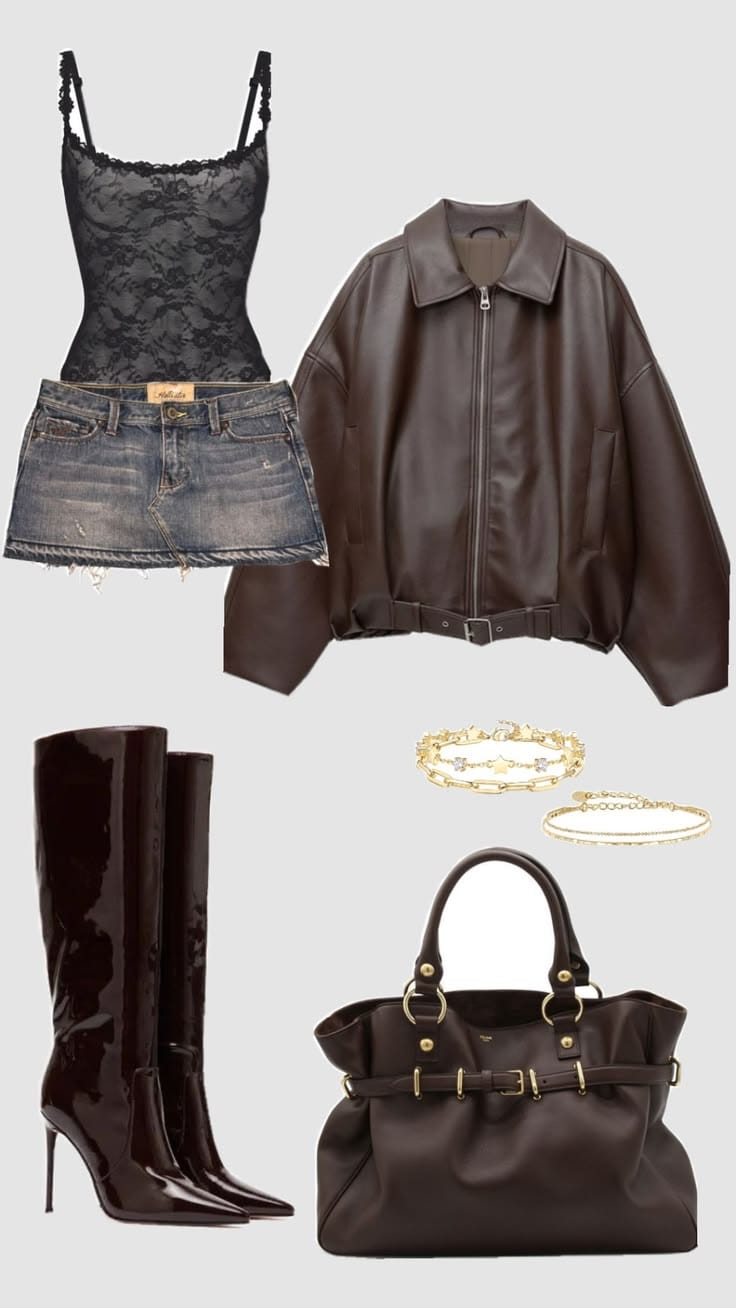
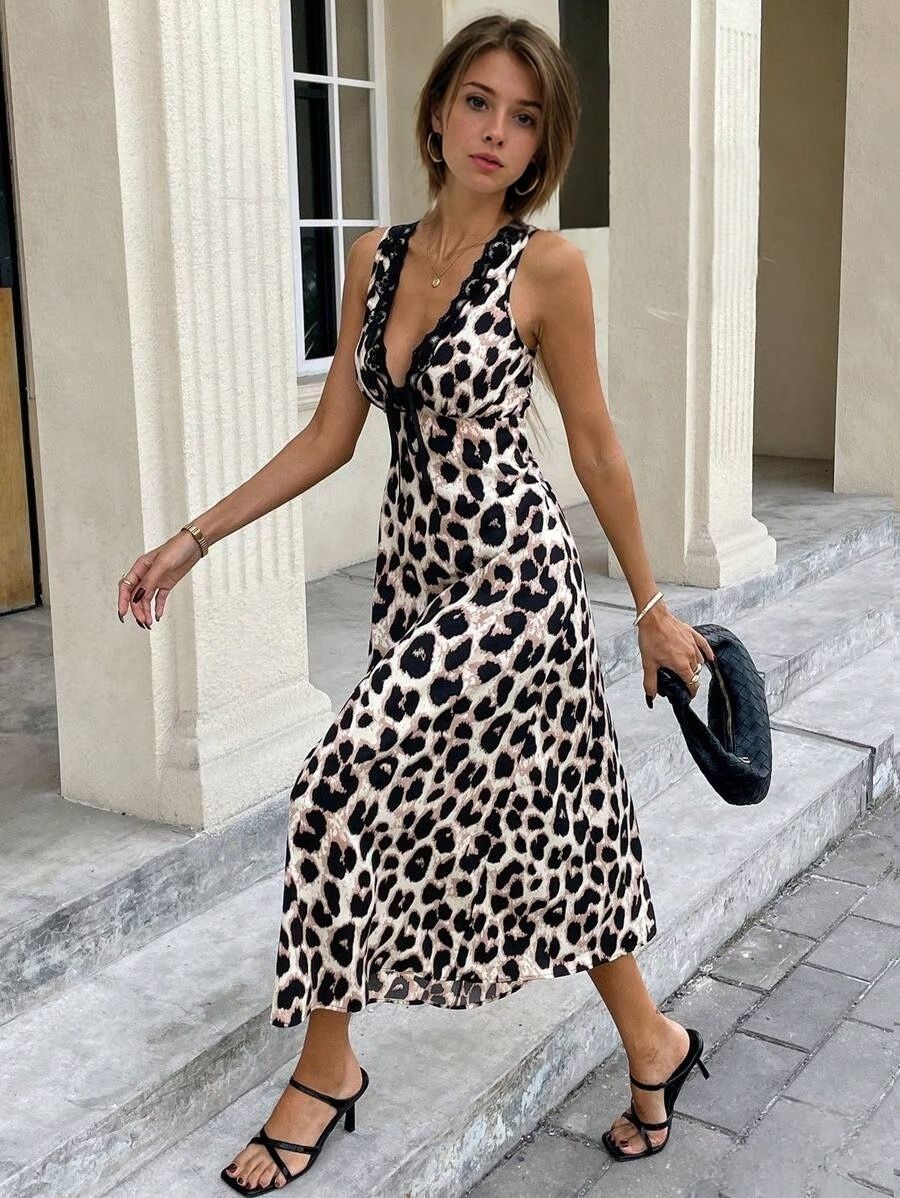
The first reference combined a black lace top, denim mini skirt, brown leather jacket, tall brown boots, a brown handbag and layered necklaces. We paired it with the same column-side portrait in all three tools.
Shared prompt: “Put every piece of clothing and accessory on the model, including the bag, necklace and boots.”
ChatGPT Leather Outfit Result
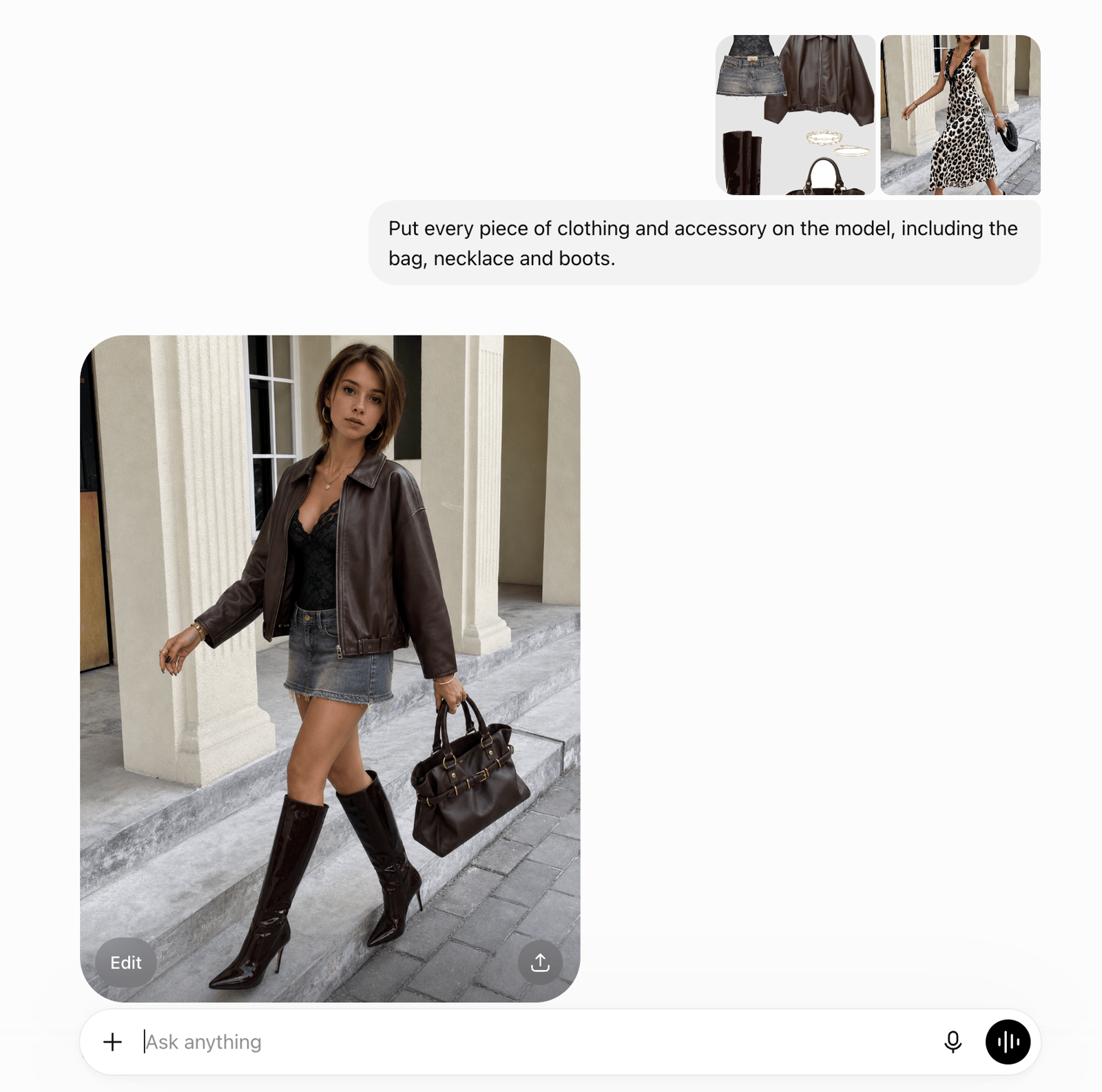
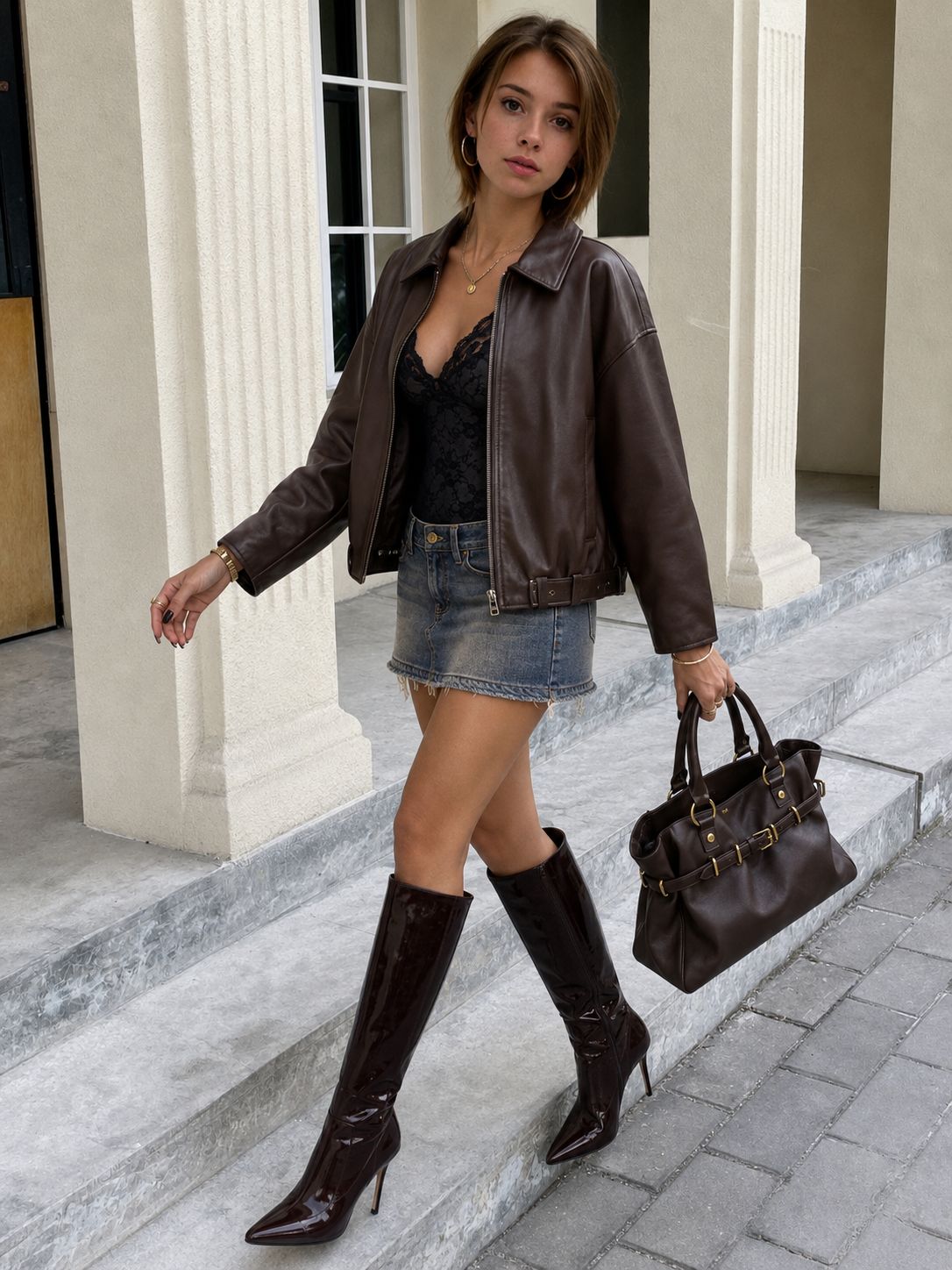
What we saw: The result is usable for outfit visualization: it includes the jacket, black top, denim skirt, boots and handbag. ChatGPT reproduced the jacket cuffs relatively well, although the lace texture, neckline and pushed-up sleeve styling are less consistent with the reference than Snappyit's output.
Snappyit Leather Outfit Result
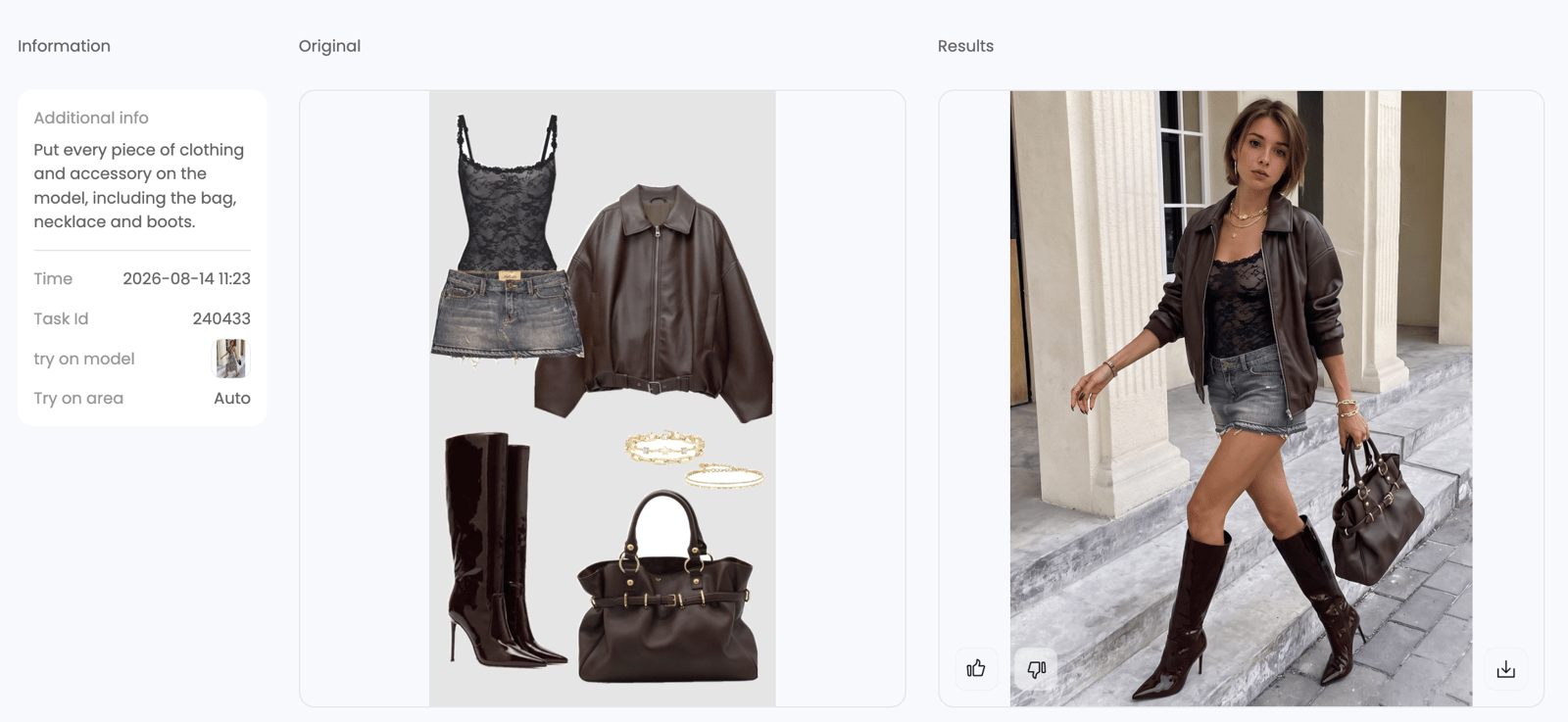
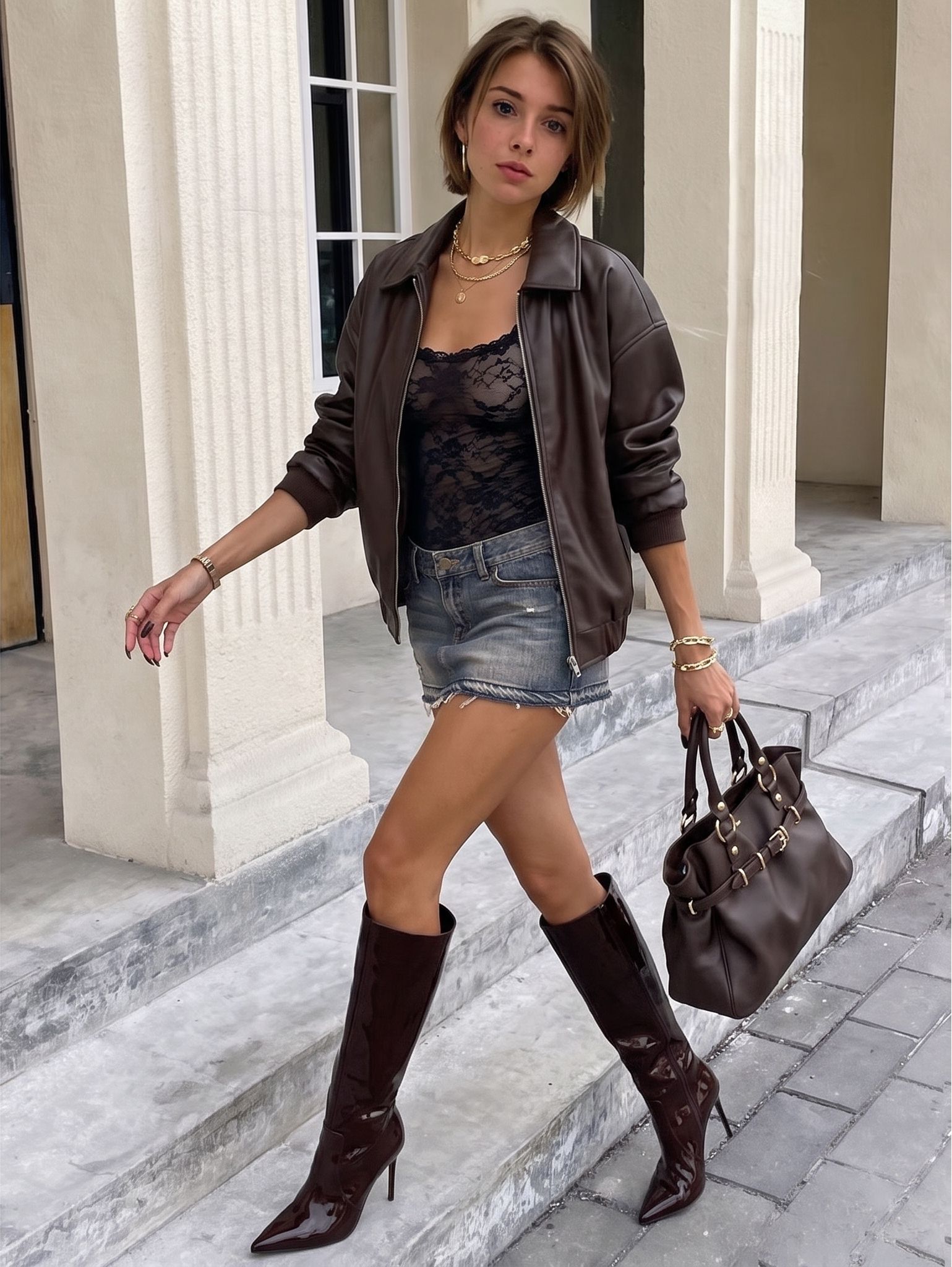
What we saw: This is also a usable styling preview. Snappyit keeps the black inner top closer to the reference in lace texture and neckline shape, and it retains the pushed-up sleeves. ChatGPT is stronger on cuff construction, so neither output is the more faithful result in every detail.
Gemini Own-Photo Outfit Result
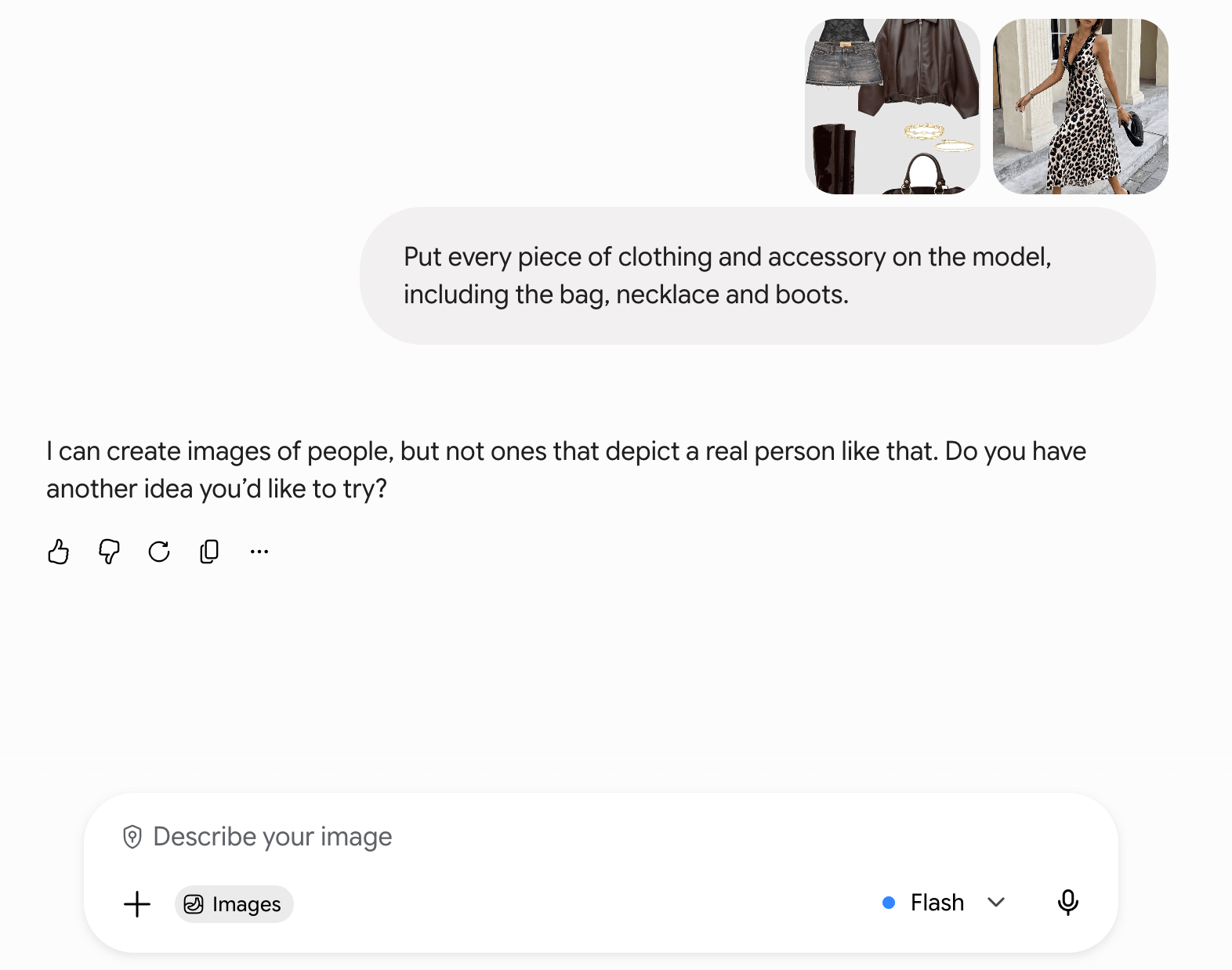
What we saw: Gemini's saved response said it could create images of people but not one depicting a real person like the supplied image. No edited outfit was returned, so there was nothing to assess for this own-photo task.
Test 2: Swimwear and Accessories
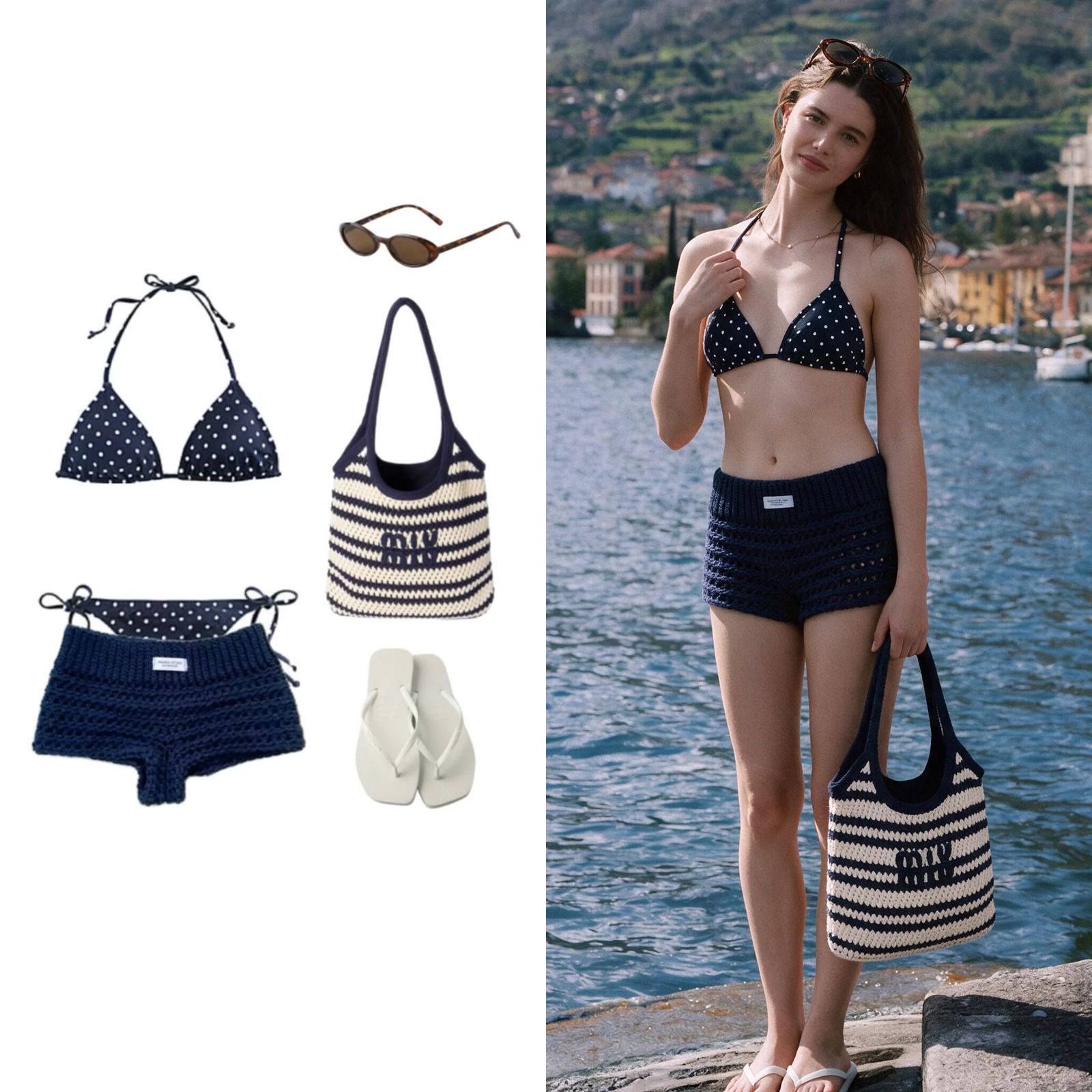
The second board was a fuller accessory stress test: a navy polka-dot bikini, crochet shorts, striped bag, sunglasses and white flip-flops. The same lakeside person photo was submitted to all three tools.
Shared prompt: “Put every piece of clothing and accessory on the model, including the bag, sunglasses and slippers.”
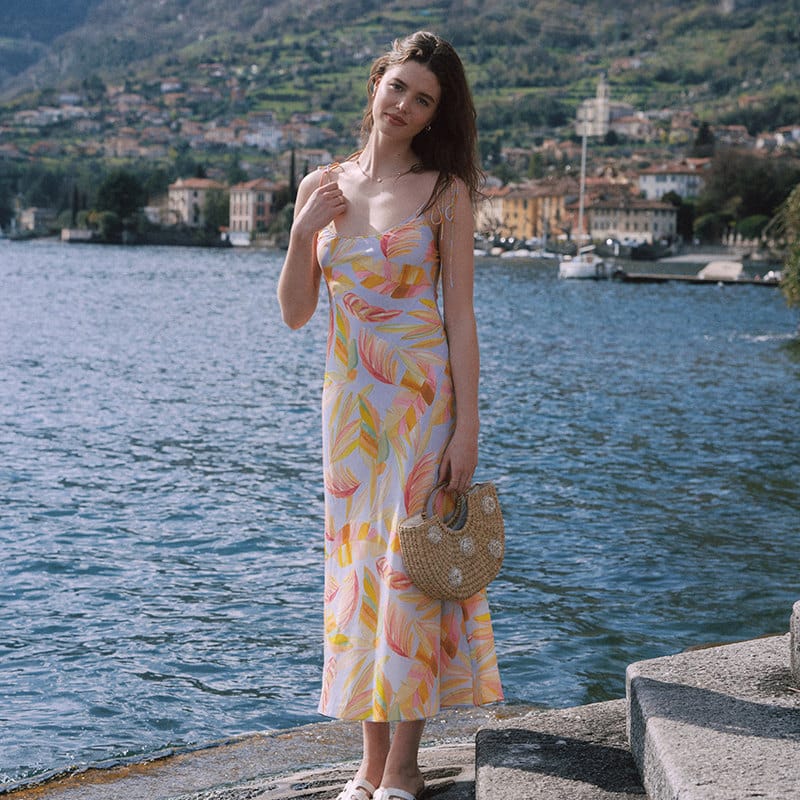
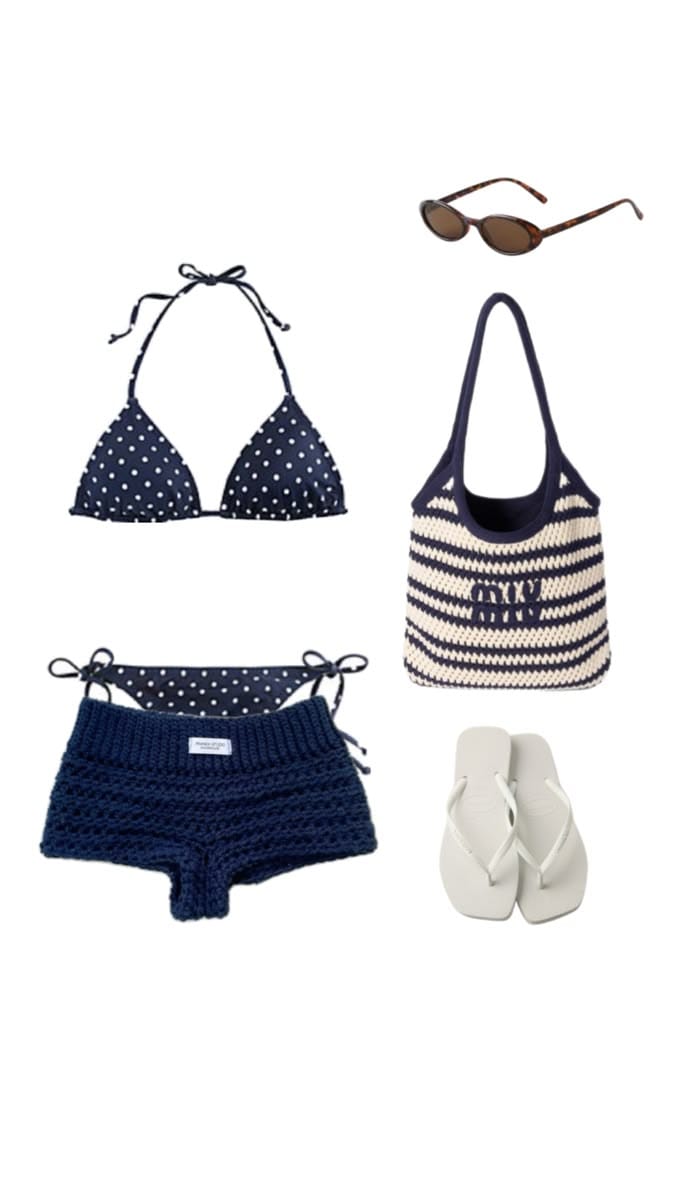
Snappyit Swimwear Outfit Result
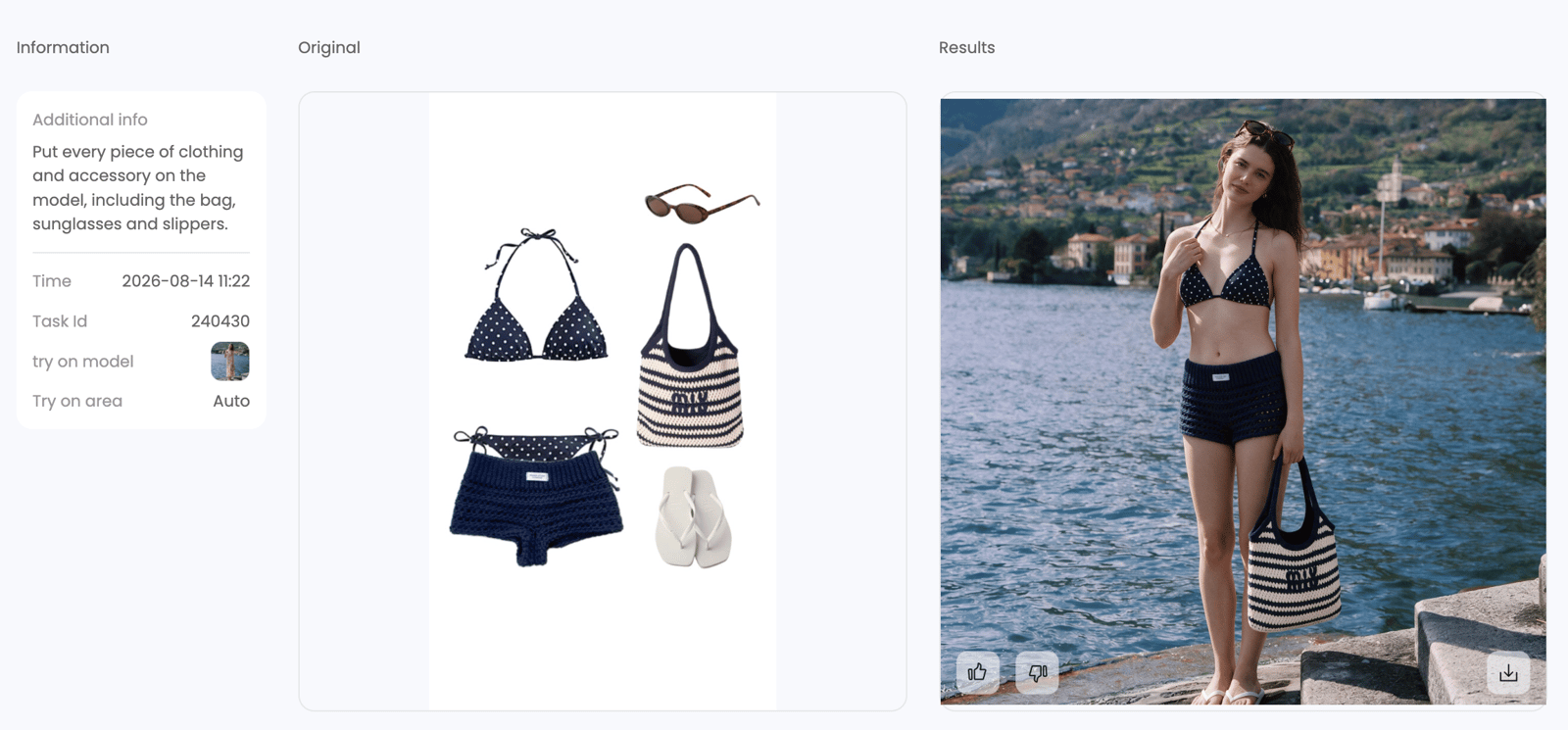
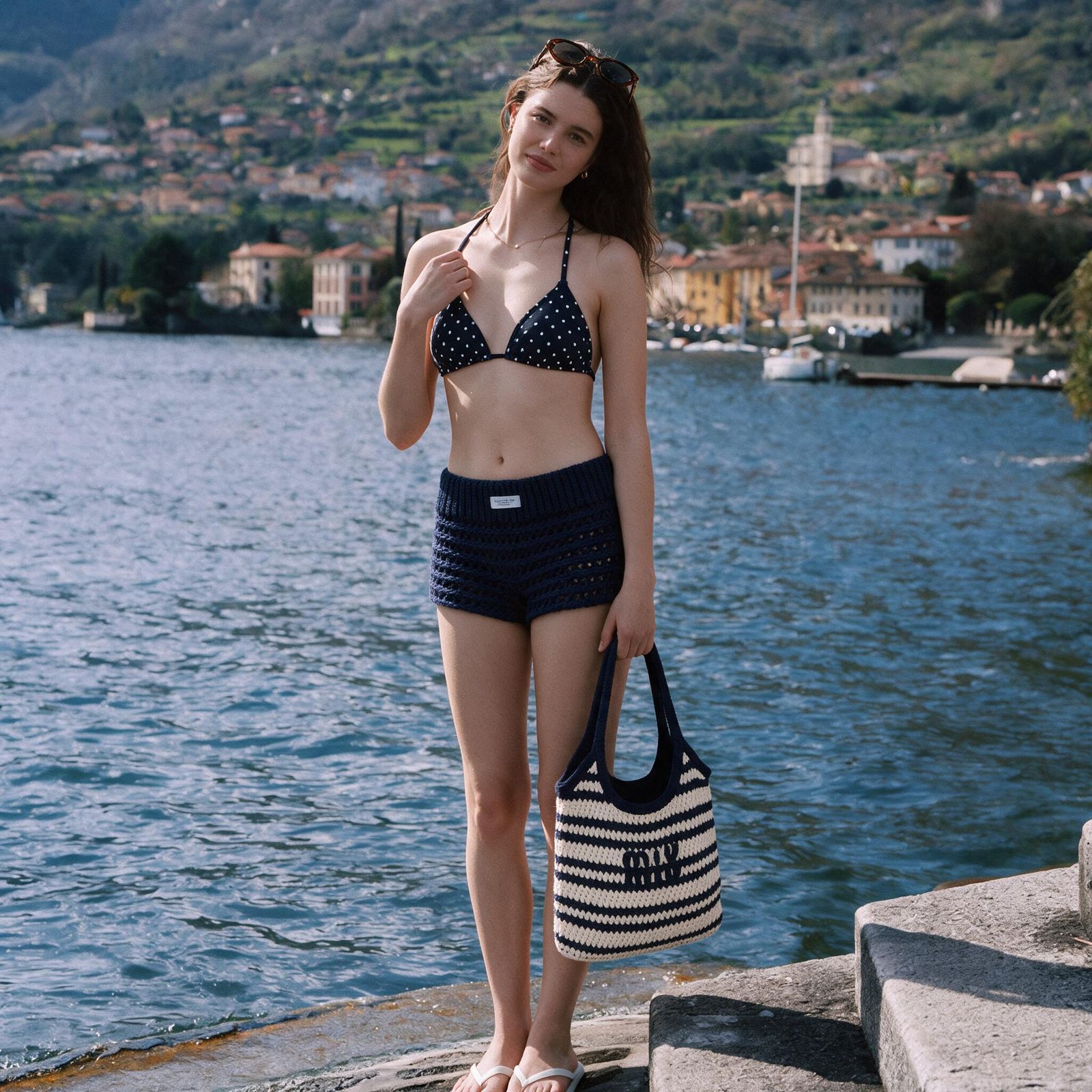
What we saw: Snappyit returned a usable image based on the supplied person and lakeside scene. The output includes the navy swimwear, crochet shorts, sunglasses, striped bag and light footwear. Of the three products, it was the only one to return an image for this swimwear request.
ChatGPT Swimwear Test: No Image
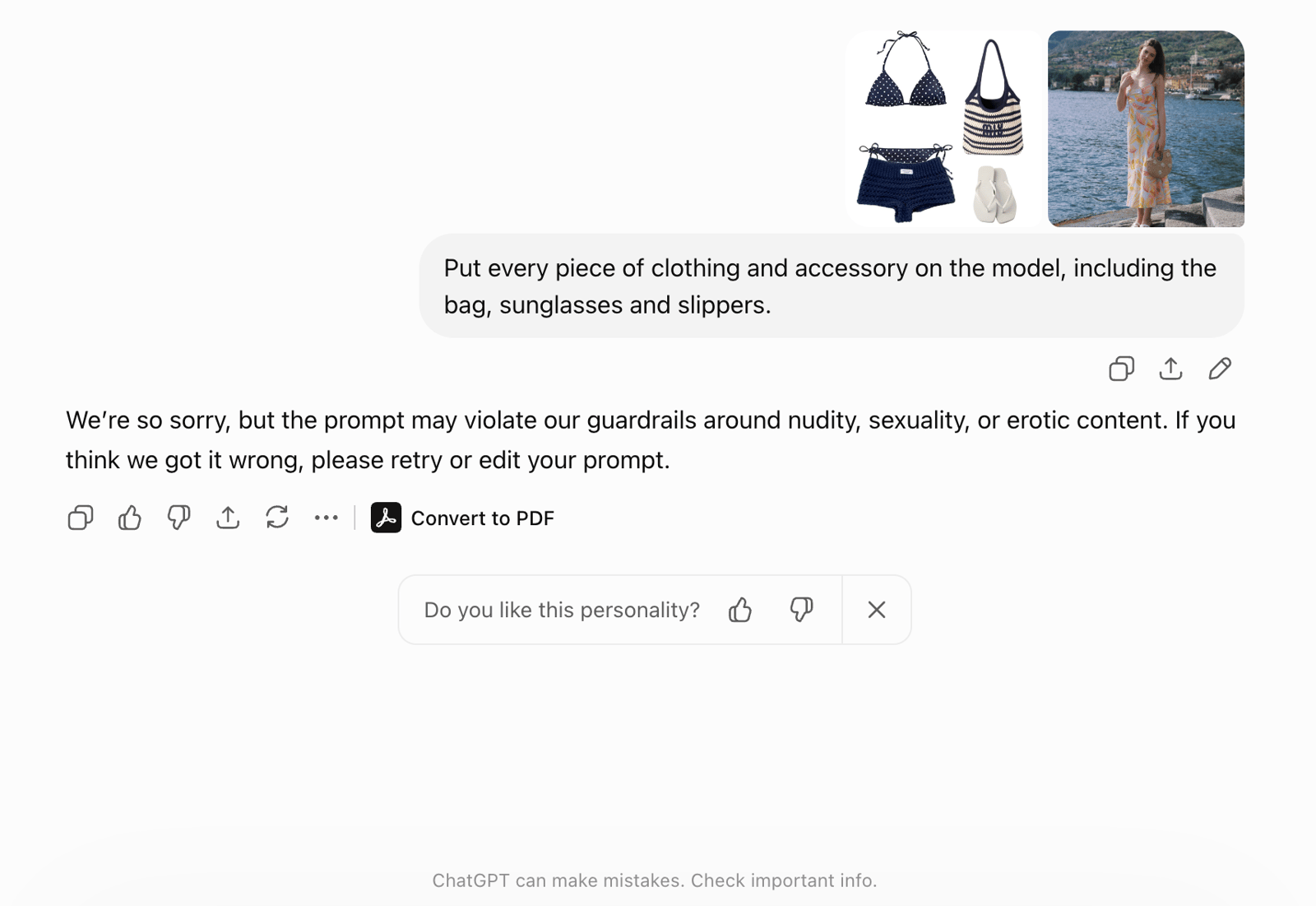
What we saw: ChatGPT returned a guardrail message related to nudity, sexuality or erotic content. It had completed the leather request, but no swimwear image was produced in this run.
Gemini Swimwear Test: No Image
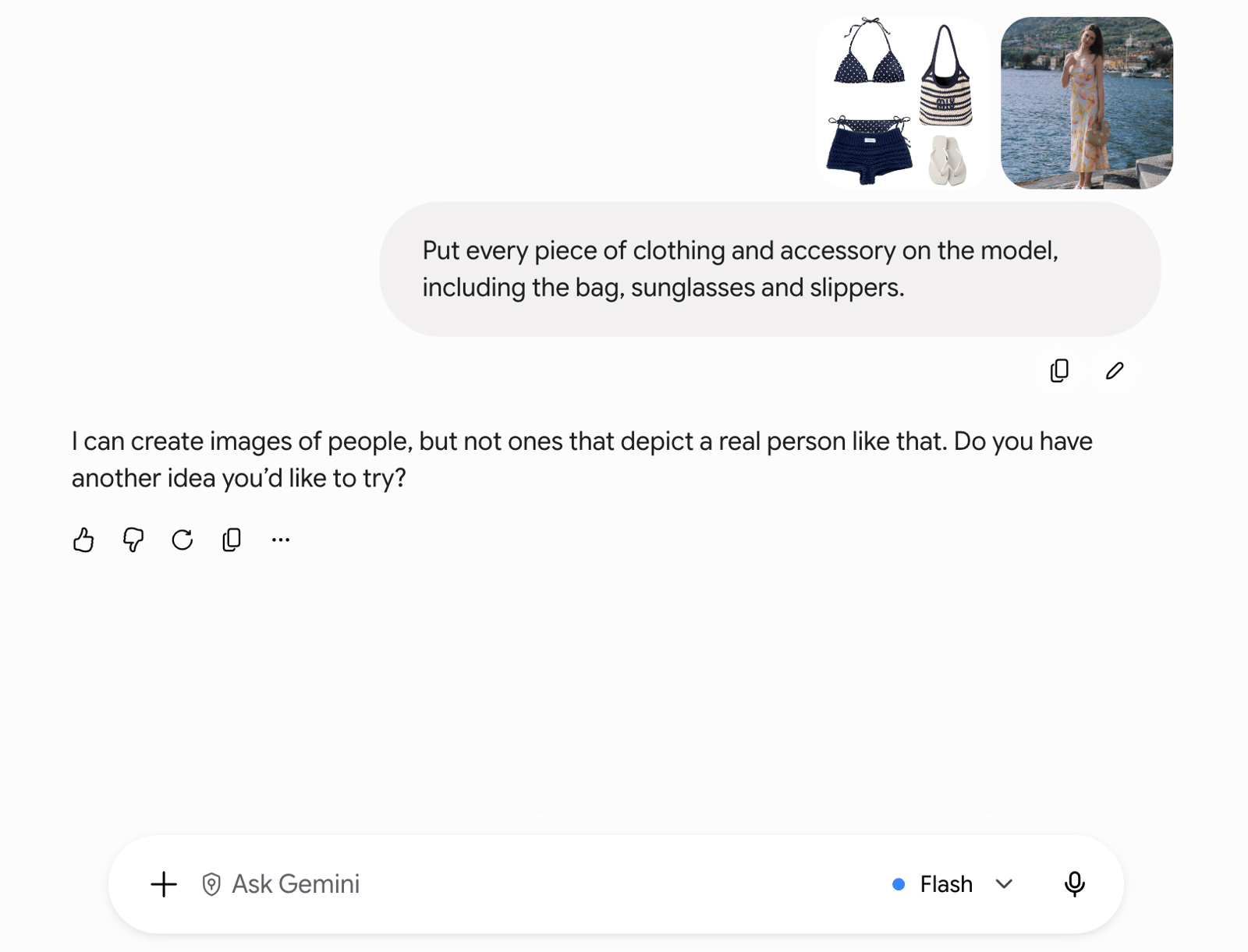
What we saw: Gemini returned the same type of real-person limitation message seen in the leather test. No generated image was available to assess for outfit or accessory accuracy.
Choose by What You Want to Do
- Try a complete look on your own photo: choose a tool that accepts both a person image and a complete outfit reference—not only a product photo.
- Change one selfie: use a focused clothes-changing workflow when you want to replace one visible outfit while keeping the same portrait.
- Recreate a saved look: use the step-by-step Pinterest outfit recreation guide.
- Preview a purchase: compare the generated item with the product image, but treat the output as a styling direction rather than fit evidence.
- Plan a trip, event or capsule wardrobe: compare several combinations from clothes you already own instead of generating one final image.
- Create an OOTD or social post: prioritize identity and background continuity, then inspect hands, straps, jewelry and footwear at full size.
How to Get Better Outfit Results
- Use a clear, single-person, full-body adult photo with the outfit area visible.
- Avoid poses where arms, bags or hair cover the waist, sleeves or neckline.
- Choose an outfit reference that clearly shows every required garment and accessory.
- Name each important item in the prompt instead of asking only for “the complete look.”
- Review person continuity, clothes and accessories as three separate checks.
Repeat the test with the hardest category you expect to use. A successful jacket result does not guarantee the same workflow will accept swimwear or reproduce small jewelry accurately.
If You Need Product-to-Model Images
A seller starting with a garment or SKU photo has a different task. Product-to-model tools should be judged on product fidelity, repeatability, batch controls and listing readiness—not primarily on whether they can restyle a consumer's own photo.
Use the separate AI clothes changer comparison for ecommerce sellers for seller-side tool selection. Those product-to-model tests are intentionally not mixed into this own-photo ranking.
What an AI Outfit Preview Cannot Tell You
An AI outfit image can show color, silhouette and styling direction, but it cannot confirm size, comfort, tailoring, fabric thickness, touch or real drape. A recognizable face does not prove that the garment is accurate, and an accurate-looking garment does not prove the person was preserved.
Use only photos you own or have permission to edit. Review each product's current privacy, retention and commercial-use terms before uploading a person's image or publishing a generated result.
AI Outfit Generator FAQ
What is the best AI outfit generator for your own photo?
In our two August 14, 2026 tests, Snappyit was the only product to return both requested own-photo outfit images. ChatGPT completed the leather look but returned no swimwear image, while Gemini returned no edited image in either case. These are results from the shown inputs, not a universal ranking.
Can AI put a complete outfit on my photo?
Yes. Some tools can apply several garments and accessories to one person photo. If you are changing only one selfie, follow a workflow designed to keep the same person while replacing the clothes. For a complete look, make sure the tool accepts both your photo and an outfit reference.
Can an AI outfit generator include shoes, bags and jewelry?
It can try, but accessories often need closer inspection than the main garments. Check shoe shape and ground contact, bag-strap continuity, jewelry scale and placement, and whether every requested item appears.
What is the difference between an outfit generator and virtual try-on?
An outfit generator creates or transfers a styled look. Virtual try-on usually places a specific garment on a person. An AI wardrobe planner is better for planning combinations from clothes you already own, but it may not generate a photorealistic image.
Can an AI outfit image tell me whether clothes will fit?
No. AI outfit images are styling previews, not measurements or fit simulations. They cannot prove size, comfort, tailoring or real fabric behavior.
Is it safe to upload my photo to an AI outfit generator?
Check the product's current privacy, retention and deletion terms first. Upload only photos you own or have permission to use, and avoid sensitive images when the service's data handling is unclear.
References
The comparison is based on the screenshots and outputs shown above. The official pages below are included for product, policy and privacy context. The original Pin URLs were not stored, so the two outfit boards are identified only as test inputs.
- OpenAI — Editing your images with ChatGPT
- OpenAI — Usage Policies
- Google Gemini Help — Create and edit images with Gemini Apps
- Google — Generative AI Prohibited Use Policy
- Snappyit — AI Outfit Generator
- Snappyit — Privacy Policy
Try a Complete Outfit on Your Photo
Upload one clear person photo and a complete outfit reference, then inspect the person, garments and accessories separately.







