Disclosure: Snappyit publishes this comparison. We used the same source set where possible, documented visible limitations, and separated generation from general editing so unlike tasks are not treated as a single quality ranking. Results reflect the tested web interfaces and plans in August 2026.
Quick Picks: Best Batch Photo Editor by Catalog Size
- Best for fashion-specific batch generation: Snappyit. Choose it for on-model, ghost mannequin, flat lay, recolor, and jewelry listing visuals in one saved workspace.
- Best all-in-one ecommerce suite: Photoroom. Choose it when you need apparel generation plus broad background, resize, staging, and enhancement controls.
- Best for very large basic-edit uploads: Pixelcut. Its tested interface displayed the largest upload allowance, although batch export required a paid plan.
- Best for selecting different subsets: Picsart. It offered the clearest image-level selection controls among the three general editors.
- Best for styled batch backgrounds: Fotor. Its AI Background output created a more finished scene than a flat color, but the same scene did not suit every product equally.
How We Tested AI Batch Photo Editors for Product Photos
On August 11–12, 2026, we loaded the same four source products—earrings, a handbag, a sweatshirt, and a camisole on a mannequin—into each accessible web batch workspace. Screenshots in this article show the tested interfaces and outputs.
The comparison uses two tracks:
- Track 1, product-image generation: Snappyit and Photoroom were evaluated on representative fashion and product-generation functions suited to each input.
- Track 2, repeatable catalog editing: Photoroom, Pixelcut, Picsart, and Fotor were evaluated on batch background removal or replacement and related editing controls.
We reviewed subject separation, edge quality, product-detail fidelity, consistency, image-level selection, saved-project behavior, download access, visible batch limits, and paywalls. A dash in the feature matrix means a function was not confirmed inside the tested batch workspace; it does not claim that the vendor lacks a separate tool.
This was a workflow test, not a laboratory image-quality benchmark: different generation functions were selected to match different products, and we did not run repeated generations or normalize every export to one resolution. For a catalog rollout, test a representative sample and review logos, prints, seams, hardware, and color before scaling.
1. Snappyit for Batch Fashion Product Image Generation
Merchant use case
Snappyit fits fashion and jewelry sellers who need new listing visuals—not just cleanup—from flat lays, mannequin shots, or supplier photos. Its saved workspace includes Fashion Model, Ghost Mannequin, Flat Lay, Recolor, Jewelry Retouching, Jewelry Model, and Face Swap.
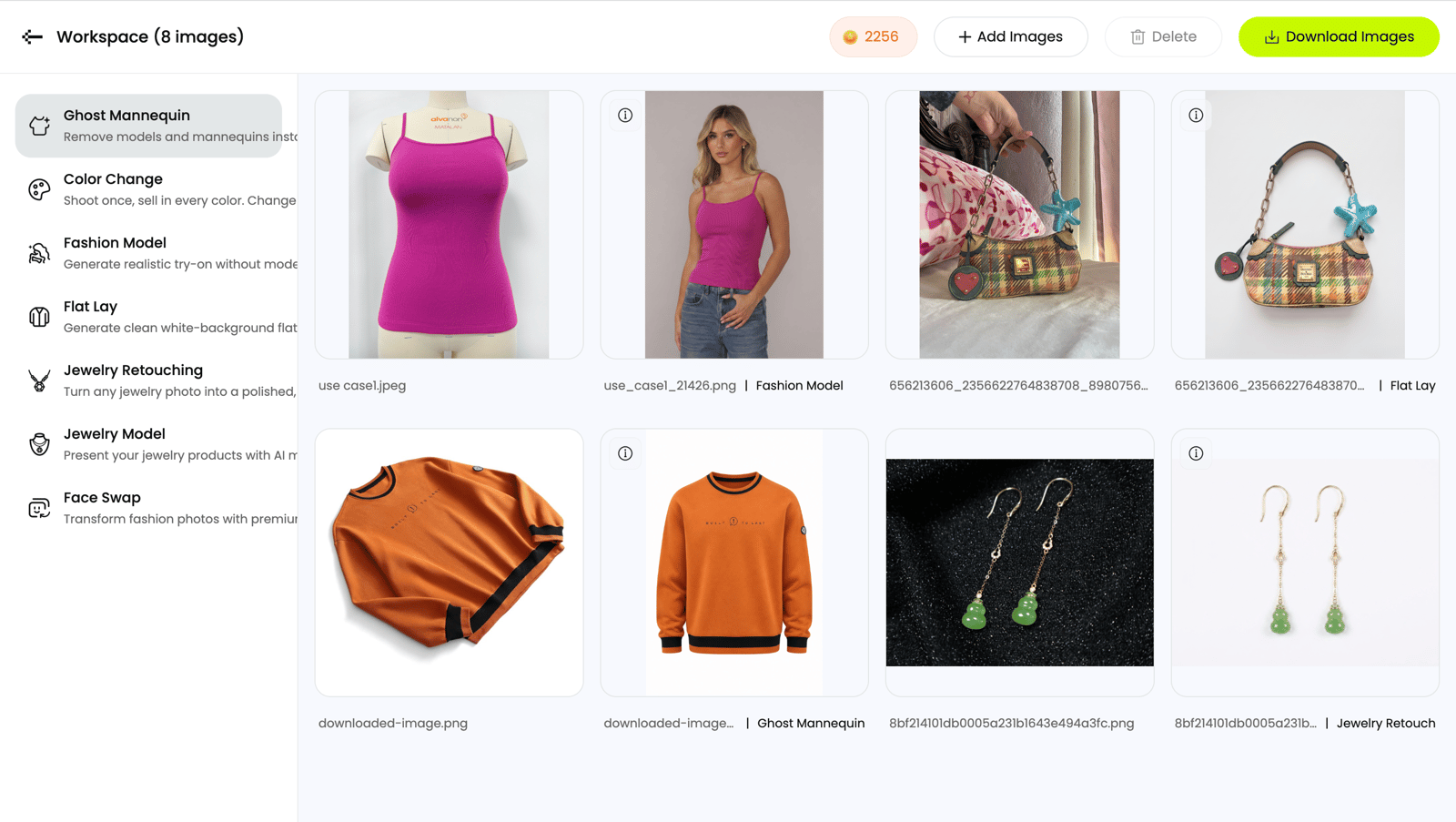
Four source products remain paired with their generated outputs for faster catalog review.
Test outcome and operational risk
Fashion Model placed the camisole on a model, Flat Lay rebuilt the handbag as a clean presentation, Ghost Mannequin converted the sweatshirt into a front-facing garment image, and Jewelry Retouching placed the earrings on white. The tested workspace accepted up to 100 images and retained each batch as a reusable project. This is a specialized generator: background removal, crop, resize, and upscale were not exposed in the same workspace, so merchants may need a separate finishing step. See the Batch Product Photo Editor workflow.
2. Photoroom for Ecommerce Batch Editing and AI Product Photos
Merchant use case
Photoroom suits mixed-category stores that want generation and catalog cleanup in one product. Its tested workspace combined background removal, resize, positioning, shadows, and enhancement with AI Fashion Models, Ghost Mannequin, Flat Lay, Product Staging, and Recolor.
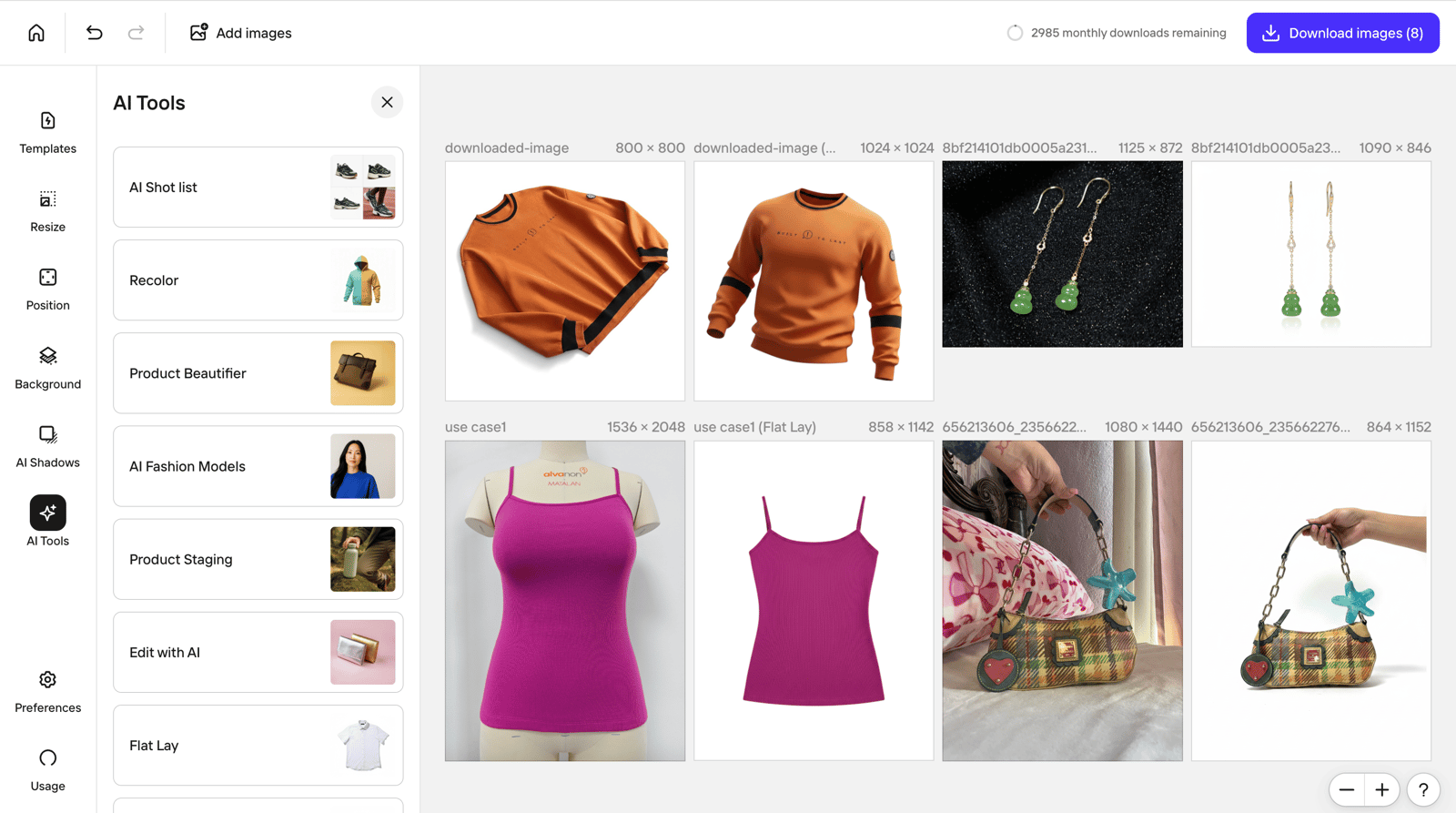
Generation and general ecommerce editing controls sit in the same batch workspace.
Test outcome and operational risk
The visible outputs included a clean camisole flat lay and usable presentations for the earrings and handbag. However, Ghost Mannequin altered parts of the sweatshirt's black trim and chest graphic. Merchants should route logo, print, and trim-heavy SKUs through manual fidelity review before publishing. For a product-level comparison, see Snappyit versus Photoroom.
3. Pixelcut for High-Volume Bulk Product Photo Editing
Merchant use case
Pixelcut is aimed at stores with a large existing catalog that need the same background, canvas, shadow, resize, or enhancement treatment across many files. The tested interface displayed uploads up to 10,000 images, while batch export was paid.
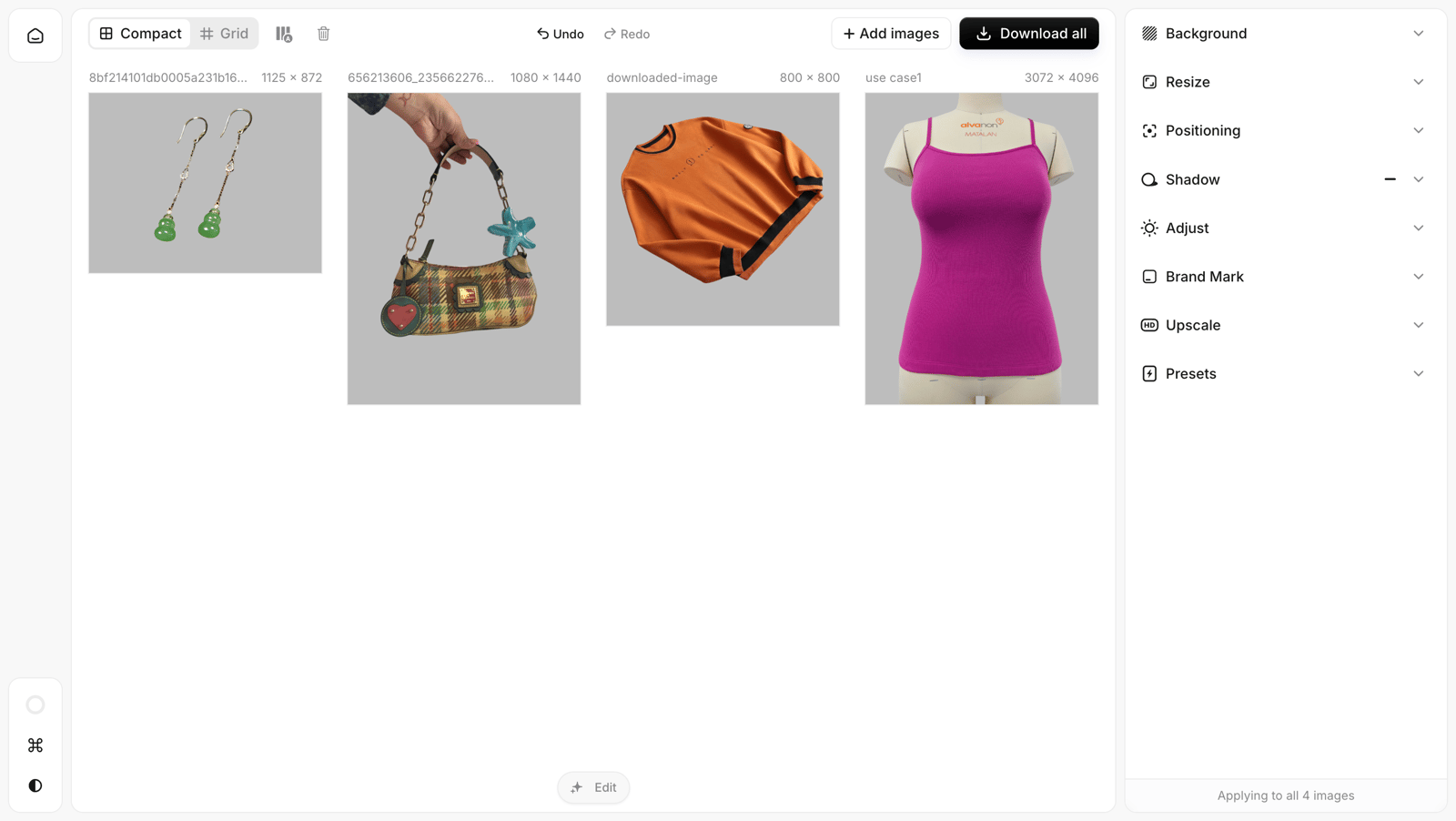
One gray background was applied consistently across the four-product batch.
Test outcome and operational risk
The background was consistent, but the hand holding the handbag and the mannequin under the camisole remained because the cutout treated them as part of the subject. The selected function also applied across the batch. Separate clean packshots from difficult lifestyle or mannequin inputs before processing, then review the latter individually.
4. Picsart for Flexible Batch Product Image Editing
Merchant use case
Picsart is useful when a small ecommerce team wants filters and styling controls plus the ability to select different image subsets before applying a bulk operation.
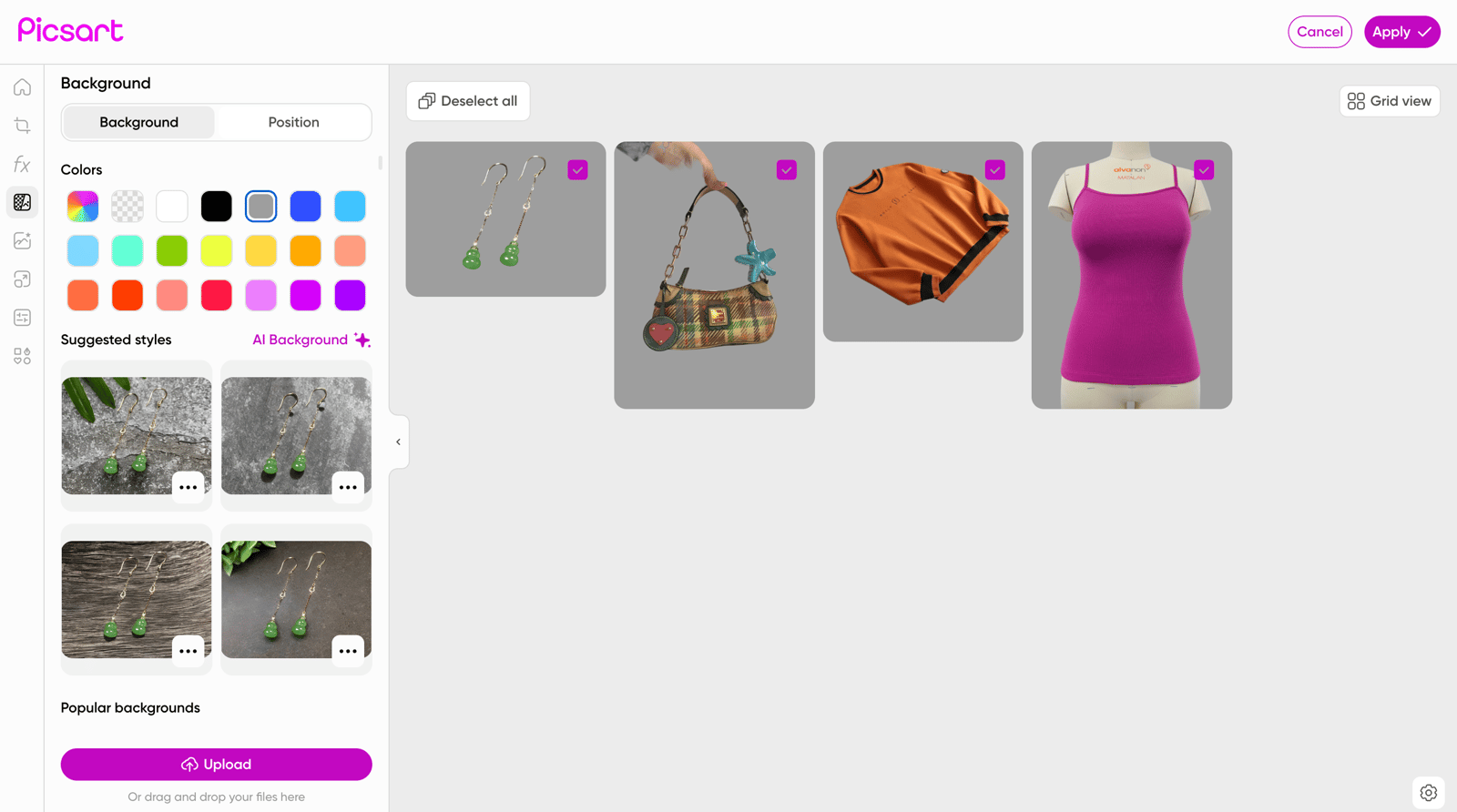
Image-level selection lets a merchant apply an operation to only part of a batch.
Test outcome and operational risk
The gray background was uniform, and thumbnails could be selected or deselected before each edit. The hand and mannequin remained in two outputs, so subset control improved routing but did not solve difficult subject isolation. Use separate selections for straightforward packshots and exception SKUs.
5. Fotor for Styled Ecommerce Product Backgrounds
Merchant use case
Fotor is relevant to sellers preparing campaign or storefront imagery that needs a styled scene rather than a plain marketplace background. Its tested workspace displayed Remove BG, AI Background, Resize, Position, Crop, AI Upscaler, format conversion, compression, and watermark controls.
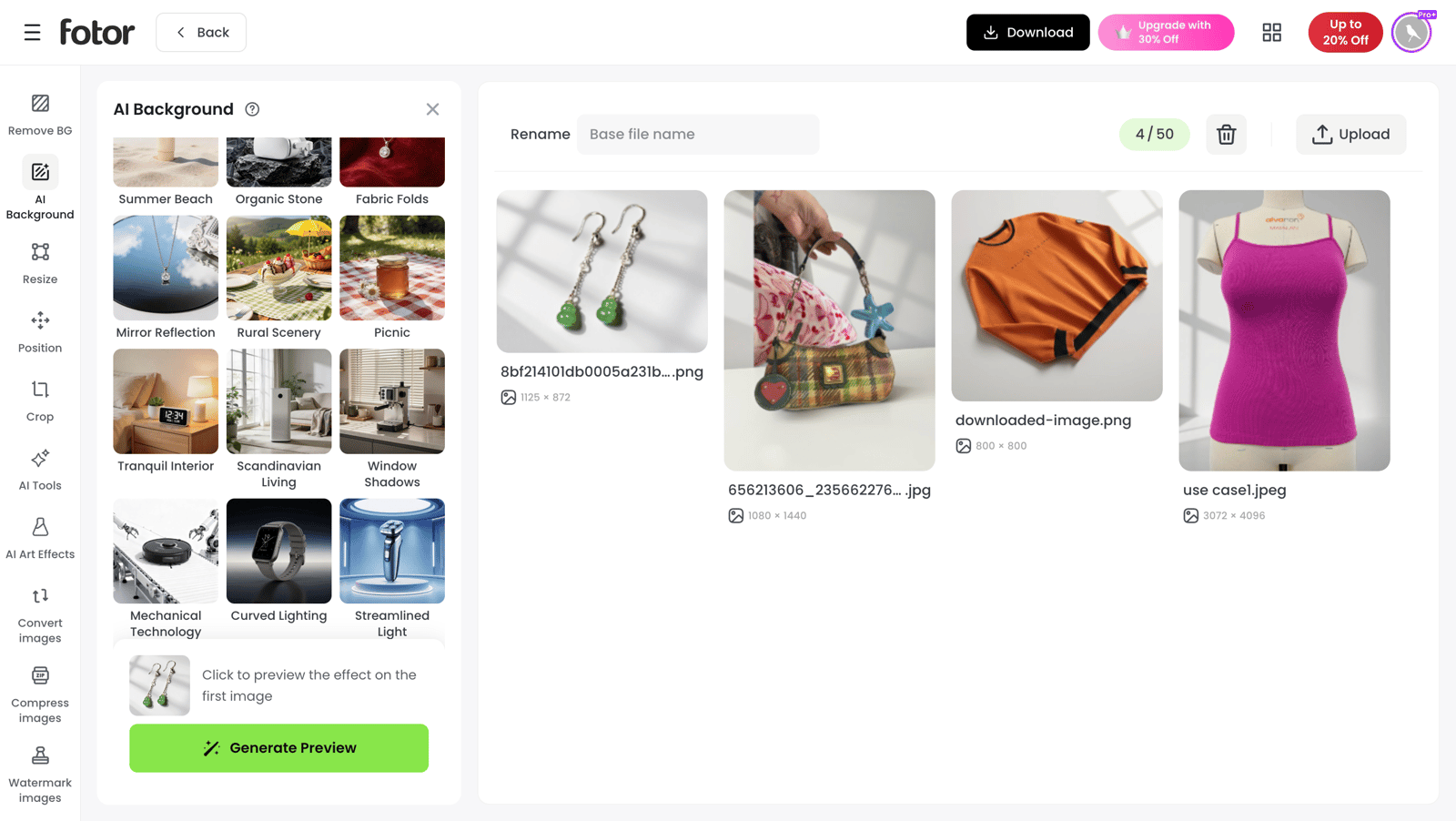
A light studio surface and soft window shadows were applied to the mixed-product set.
Test outcome and operational risk
Fotor created the most styled background among the general editors in this test. Fine earring edges appeared softened, however, and one scene did not suit every category equally. Group products by merchandising style—rather than sending an entire mixed catalog through one preset—and reserve plain white outputs for channels that require them.
AI Batch Photo Editor Pricing and Batch Limits
These USD monthly options and access messages were displayed during our August 2026 review. They are dated observations, not permanent product facts; regional pricing, taxes, credits, annual discounts, and export caps can change.
| Product | Displayed access or price | Displayed batch allowance |
|---|---|---|
| Snappyit | Plans displayed from $12.90/month; batch generation shown on Pro and Custom | Up to 100 images per batch |
| Photoroom | Pro displayed at $12.99/month; Max at $34.99/month | 50 edits on Pro; 250 on Max |
| Pixelcut | Pro shown at $10/month; Business at $30/month | Upload up to 10,000; export plan-limited |
| Picsart | Pro shown at $15/month; Ultra at $75/month | 50 on Pro; 100 on Ultra |
| Fotor | 7-day trial; Pro shown at $10.99/month | Up to 50 images |
Source note: Snappyit and Photoroom plan relationships were checked against their official Snappyit pricing and official Photoroom pricing pages. Pixelcut, Picsart, and Fotor values reproduce what their tested interfaces and Pixelcut, Picsart, and Fotor pricing pages displayed when accessed August 11, 2026. Confirm the current plan before purchase.
Batch Generation vs Batch Editing: Feature Comparison
A check means the function was confirmed inside the tested web batch workspace. A dash means it was not confirmed there; standalone tools and agent modes were outside this test.
| Batch-workspace function | Snappyit | Photoroom | Pixelcut | Picsart | Fotor |
|---|---|---|---|---|---|
| Fashion and jewelry generation | |||||
| AI Fashion Model | ✓ | ✓ | — | — | — |
| Ghost Mannequin | ✓ | ✓ | — | — | — |
| AI Flat Lay | ✓ | ✓ | — | — | — |
| Product Recolor | ✓ | ✓ | — | — | — |
| Jewelry Retouching | ✓ | — | — | — | — |
| Jewelry Model | ✓ | — | — | — | — |
| Face Swap | ✓ | — | — | — | — |
| Batch workflow | |||||
| Batch upload and download | ✓ | ✓ | ✓ | ✓ | ✓ |
| Reusable saved projects | ✓ | — | — | — | — |
| General catalog editing | |||||
| Background removal | — | ✓ | ✓ | ✓ | ✓ |
| Crop or resize | — | ✓ | ✓ | ✓ | ✓ |
| AI backgrounds | — | ✓ | ✓ | ✓ | ✓ |
| Enhancement or upscale | — | ✓ | ✓ | ✓ | ✓ |
How to Choose a Batch Image Editor for Shopify, Amazon and Etsy
- Define the deliverable. Separate new on-model, ghost mannequin, flat lay, or colorway generation from background, crop, resize, and enhancement work.
- Build an exception-heavy pilot. Test 10–20 SKUs with fine jewelry edges, transparent materials, straps, hands, mannequins, prints, logos, and black-on-black garments—not only easy packshots.
- Measure approval economics. Record first-pass approval rate, correction time, export speed, and cost per approved image. A high advertised batch limit has little value if most outputs need repair.
- Validate channel delivery. Check canvas ratio, background, color, crop, resolution, file format, and compression for Shopify, Amazon, and other marketplaces. Use the product background removal checklist and marketplace image size guide.
Best Bulk Photo Editor by Ecommerce Catalog Workflow
Choose Snappyit for focused fashion and jewelry generation; choose Photoroom when one team needs both generation and broad catalog editing. For existing photos, shortlist Pixelcut for upload scale, Picsart for subset control, or Fotor for styled backgrounds. Pilot the closest match on representative SKUs and expand only after it meets your approval-rate and channel-delivery targets.
Try Batch Product Photo Editor →
AI Batch Photo Editor FAQ for Ecommerce Sellers
1. What is the best AI batch photo editor for product photos?
The best AI batch photo editor depends on the output your store needs. In our test, Snappyit was the focused choice for generating fashion and jewelry listing visuals, while Photoroom combined product-image generation with broader ecommerce editing. Pixelcut, Picsart, and Fotor were more relevant when a merchant already had usable product photos and needed repeatable background, resize, or enhancement work. Run a sample of 10–20 representative SKUs before committing, then compare the cost per approved image rather than the advertised cost per export.
2. Which AI batch photo editor is best for clothing and apparel?
Snappyit was the most apparel-specialized option in this test, with Fashion Model, Ghost Mannequin, Flat Lay, Recolor, and jewelry workflows in one batch workspace. That makes it a practical fit when a fashion seller needs new merchandising images from flat lays, mannequin shots, or basic supplier photos. Photoroom is the broader alternative when the same team also needs batch background removal, crop, resize, shadows, and enhancement. For either tool, inspect logos, prints, seams, garment color, and hardware before publishing Shopify or Amazon product listings.
3. Can AI batch photo editors remove backgrounds from multiple product images?
Yes. Photoroom, Pixelcut, Picsart, and Fotor supported batch background removal or replacement in the web workspaces we tested. Results still need quality control: hands, mannequins, transparent materials, straps, fur, reflective jewelry, and low-contrast edges can remain attached or become softened. Test those difficult SKUs first, verify that the background and canvas size meet marketplace requirements, and keep the original files so failed cutouts can be corrected. Snappyit focuses on generating fashion and jewelry listing visuals rather than general batch background cleanup.
4. What is the difference between a batch editor and a batch product-image generator?
A bulk product photo editor repeats controlled changes—such as batch background removal, crop, resize, format conversion, or enhancement—across existing images. A batch product-image generator creates a new presentation, such as an on-model image, ghost mannequin, styled flat lay, or new colorway. Ecommerce teams often need both: generate the merchandising image first, then standardize its crop, canvas, background, file format, and compression for each sales channel.
5. How many product photos can each tool process in one batch?
Limits depended on both product and plan in the interfaces checked in August 2026. Snappyit displayed up to 100 images per batch, with batch generation associated with Pro and Custom plans. Photoroom listed 50 batch edits on Pro and 250 on Max. The tested Pixelcut interface displayed uploads up to 10,000 with paid batch export; Picsart displayed 50 images on Pro and 100 on Ultra; Fotor displayed 50 images. These are dated observations, not permanent limits, so check the linked official pricing pages for credits, export caps, and current regional pricing before purchase.
6. How should ecommerce sellers choose a bulk product photo editor?
Choose a bulk product photo editor by running a catalog pilot. First define whether you need new ecommerce product photos or repeatable edits to existing images. Next test 10–20 SKUs that include your hardest edges, materials, colors, logos, and product categories. Then measure approval rate, correction time, export speed, channel-ready sizes, and total cost per approved image. Start with Snappyit or Photoroom for newly generated apparel imagery; consider Photoroom, Pixelcut, Picsart, or Fotor for background replacement, crop, resize, enhancement, and other repeatable catalog edits.
Sources and Verification Notes
- Snappyit Pricing. Accessed August 11, 2026.
- Photoroom Pricing. Accessed August 11, 2026.
- Pixelcut Pricing. Accessed August 11, 2026.
- Picsart Pricing. Accessed August 11, 2026.
- Fotor Pricing. Accessed August 11, 2026.