


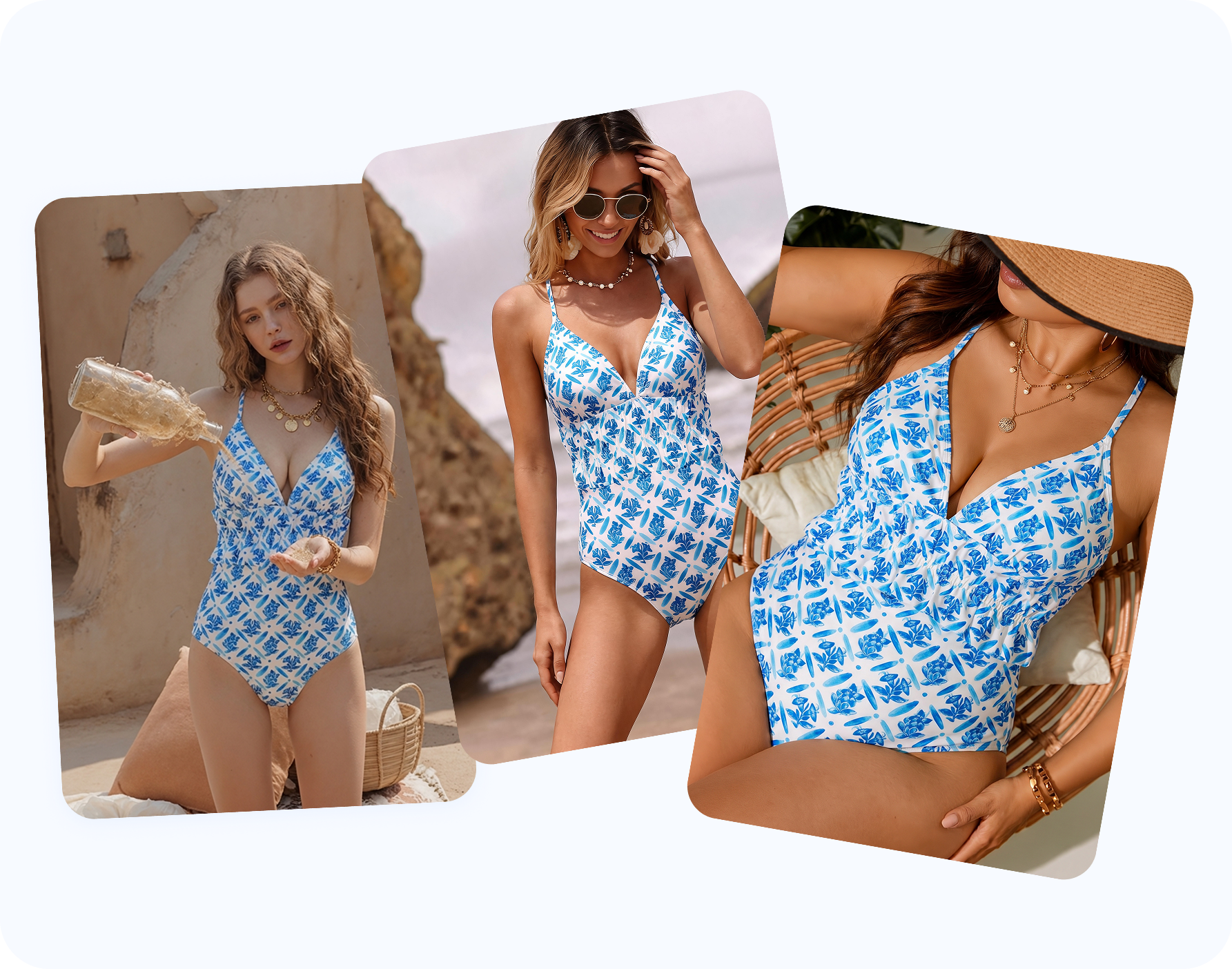
One safe editor for AI bikini, lingerie, bra and underwear outfit concepts
This page brings together the main ways people use an AI bikini editor: bikini photo editor online, AI swimwear photo editor, AI lingerie model generator, AI clothes changer, AI outfit changer, bikini try-on, virtual bikini try-on, see myself in a bikini, change outfit on model, put bikini on model and put swimwear on a model. It focuses on the consent-first side of that need: authorized adult model photos, visible outfit changes, realistic fit refinement and clothed results.
AI bikini photo editor
Create bikini outfit changes, swimsuit photo edits, beachwear variations, one-piece looks, tankinis and resortwear styling from an approved model photo.
AI lingerie photo editor
Preview lingerie sets, lace details, bodysuits, bralettes, sleepwear and intimate apparel concepts for product pages, lookbooks, creator briefs and style boards.
Bra and underwear model editor
Test bra, underwear, panties, shapewear and lounge looks while keeping straps, cups, waistbands, seams and body proportions natural.
Safe AI clothes changer
Use it as an AI outfit changer, virtual bikini try-on or put bikini on model workflow for images you control. It is built for authorized adult model photos, not explicit, private, minor or non-consensual edits.
Realistic bikini fit editor
Refine fabric tension, strap placement, cup shape, shadows and contours so the swimsuit sits naturally across different body types and poses.
Personal bikini try-on
Use your own adult photo to see how you might look in a bikini, swimsuit, cover-up or resortwear idea before a trip, shoot, purchase or post.
Edit existing or AI-generated images
Use image-to-image editing to polish existing bikini photos or synthetic model drafts while preserving identity, background integrity and campaign direction.
Lighting and texture preservation
Keep skin tone, fabric texture, stitching, prints, highlights and background lighting coherent so results avoid an over-processed AI look.
Create multi-scene model showcases without reshoots
Upload a swimwear or lingerie reference, then apply that look to authorized adult model photos in different scenes, poses and styling directions. Swimwear sellers and lingerie brands can turn one approved product direction into studio shots, lifestyle images, resort-style model photos, marketplace listing visuals and campaign previews without booking another shoot for every model, backdrop or creative angle.

Compare design, fit and styling choices on the same pose
Keep the model, camera angle and background stable while testing bandeau, triangle, balconette, bralette, high-waist, thong, shapewear, sarong, rashguard and resortwear ideas. This makes it easier to judge cup coverage, strap placement, waistband height, colorways, prints and beach-to-resort styling before sampling, buying inventory or publishing content.

Preview your own beach or travel look before buying
For personal use, upload your own adult photo to see how a bikini, swimsuit, cover-up or resort outfit might look before a vacation, pool day, lifestyle shoot or purchase. Keep the edit clothed, use only images you control, and treat the result as a private styling preview unless you are comfortable publishing it.

How the AI bikini and lingerie outfit editor works
You start with an authorized adult model photo and finish with a polished outfit variation for a listing, design board, creator post, travel moodboard, lifestyle try-on or campaign. The workflow supports safe outfit-change use cases only: no private, minor or non-consensual image edits.
Step 1 — Upload a model photo you can legally edit. Use yourself, a synthetic model, or an adult model image with explicit permission for AI outfit editing. If you plan to publish commercially, confirm commercial-use rights.
Step 2 — Choose the clothing type or upload a reference garment. Pick Bikini, Lingerie or Underwear, or upload the bikini, bra, lingerie set or underwear image you want placed on the model. The editor uses that direction while keeping the model's pose, face and scene natural.
Step 3 — Generate and export static images. Review the result, then download beach lifestyle photos, design review images, creator posts, travel try-on previews, ad creatives and crops for Shopify, Etsy, TikTok Shop or swimwear campaigns. It works from JPG, PNG and WebP.
Why use an AI bikini editor for fashion design, content and try-on?
An AI bikini editor is useful because sellers, designers, creators and personal users describe the same outfit-change need in different language. This section covers fashion production, design review, content creation and personal try-on scenarios while keeping the boundary clear: authorized adult images only, visible outfit changes, no private or non-consensual edits.
- Fashion sellers and swimwear brands. Sellers need fast listing, lookbook and ad variations without booking another model shoot for every bikini cut, one-piece swimsuit, tankini, cover-up, lingerie set, bra or underwear colorway. Use the editor to create consent-based PDP visuals, marketplace crops, campaign variants and colorway tests from approved model images.For this audience, the product works as an AI bikini photo editor, AI swimwear photo editor or AI bikini model generator that can put bikini on model, put swimwear on a model, support an AI clothes changer for ecommerce and prepare Shopify bikini photos, swimwear product photos or bikini listing images.
- Fashion designers and product teams. Designers can compare silhouette and construction ideas before sampling: strap placement, cup coverage, waistband height, lace detail, cutouts, sarongs, rashguards and resortwear layers. Use it as a visual review step before a sample, fit session, merch meeting or retouching brief.Design teams may call this an AI bikini design generator, swimwear design AI, lingerie design AI, bra design preview, underwear design mockup, outfit changer for fashion design, bikini concept generator or resortwear design preview.
- Creators, influencers and content teams. Creators need quick content directions for beach posts, pool thumbnails, travel reels, creator briefs and paid social concepts. Use the workflow to make clothed outfit concepts from images you control, then review realism, fit and brand suitability before posting or sending to a partner.For creator work, this functions as a bikini photo editor online, AI outfit changer for creators, a way to change outfit to bikini, beach photo editor, Instagram bikini editor, swimsuit content generator, resortwear photo editor or AI lingerie photo editor.
- Personal lifestyle and travel try-on. Personal users may want to see whether a swimsuit, lingerie-inspired resort layer or beach outfit suits them before buying, packing or planning a trip. Use your own adult image or a synthetic model, and treat the result as a consent-first, clothed styling preview.For personal use, this is closer to virtual bikini try-on: seeing myself in a bikini, trying bikini on photo, using a swimsuit try on online tool, planning an AI swimsuit try-on, vacation outfit planner, beach outfit try-on or travel bikini look.
More AI model-photo editing tools
Go deeper: swimwear, lingerie and model-photo guides
AI Clothes Remover for Bikini ImagesConsent-first hub for bikini, lingerie, clothes changer and try-on workflows.
AI Swimwear Model GeneratorA guide for bikini, one-piece, swimwear and resortwear model visuals.
Bikini Ghost Mannequin PhotographyNo-model white-background workflow for Amazon and marketplaces.
How to Sell Swimwear OnlinePlatform, listing, photo and marketing playbook for swim brands.
Explore More AI Product Photography Tools


Go further with AI fashion photography
An authorized model-photo outfit edit is just the start — Snappyit's AI product photography suite also gives you ghost-mannequin images, colorway variants, clean white-background cutouts and short videos for swimwear, lingerie, bras, underwear, creator content and lifestyle planning.
Frequently asked questions
Is this an AI clothes changer or outfit changer?
Yes — it is a safe AI clothes changer and outfit changer for authorized adult model photos. You can change outfit on a model, put bikini on model, put swimwear on a model, and preview lingerie, bra, underwear or resortwear looks. It is not for explicit, private, minor or non-consensual image edits.
Can I refine existing bikini photos or AI-generated model images?
Yes. Use it for authorized adult model photos, synthetic model images, or AI-generated bikini model drafts that you have the rights to edit. The workflow can polish swimwear fit, fabric texture, lighting and background consistency without changing the consent requirements.
Does it support video generation?
This page is focused on high-resolution static images for ecommerce listings, design review, lookbooks, creator content, travel/lifestyle previews, ads and social posts. For motion assets, use Snappyit's AI fashion video or image-to-video tools after the still image direction is approved.
Are the bikini and lingerie results realistic?
The goal is realistic fit and natural polish: straps, cups, seams, stitching, prints, shadows, highlights, skin tone and fabric texture should stay coherent with the original pose, lighting and background.
What image can I upload?
Upload a clear adult model photo that you own, shot yourself, licensed, or have explicit permission to edit for the intended use. If publishing commercially, confirm commercial-use rights. Do not upload private photos, screenshots from social media, images of minors, or anyone who has not consented to outfit editing.
Can I change her outfit to a bikini, lingerie, bra or underwear look?
Yes. The workflow is designed to change the outfit in an authorized model photo into bikinis, one-pieces, tankinis, bras, underwear, lingerie sets, rashguards, cover-ups, sarongs and resortwear while keeping the image clothed and consent-safe.
Will the original pose, face and body stay natural?
The goal is to keep the model's pose, face, body proportions and scene natural while changing the visible outfit. Use high-quality, front-facing adult photos for the cleanest results.
What consent and rights do I need?
Use only yourself, a synthetic model, or adult model images where you have the model's consent, the photographer or license rights, and permission to create the intended edit. If you plan to publish commercially, confirm commercial-use rights before using the output.
Is it free?
You can start free. It is built for fashion sellers, designers, creators, and personal users testing swimwear or resort looks quickly before a shoot, post, purchase, packing decision or retouching round.
Do I own the images and can I use them commercially?
Yes, if you have the necessary rights to the input image and the adult model has consented to the intended outfit edit. Snappyit is built for product listings, design review, creator content, ads and personal planning, not private or non-consensual edits.
Can I do a whole catalog at once?
Yes. Batch a full swim drop, design board, creator pack or travel moodboard by uploading authorized images, testing multiple outfit directions, creating colorway variants and exporting the crops you need.
Does it work for bikinis, lingerie, bras, underwear and cover-ups?
Yes. Bikinis, one-pieces, tankinis, lingerie sets, bras, underwear, rashguards, swim shorts, cover-ups, sarongs and resortwear all work. Each garment type is handled so straps, cups, lace, bands, prints and cutouts sit naturally on the model.
How is this different from a generic AI image generator?
A generic generator invents a new picture from a prompt. This starts from an authorized model photo and changes the outfit in that image, so the output keeps the model, pose and scene closer to your design, creator, campaign or lifestyle direction.





