



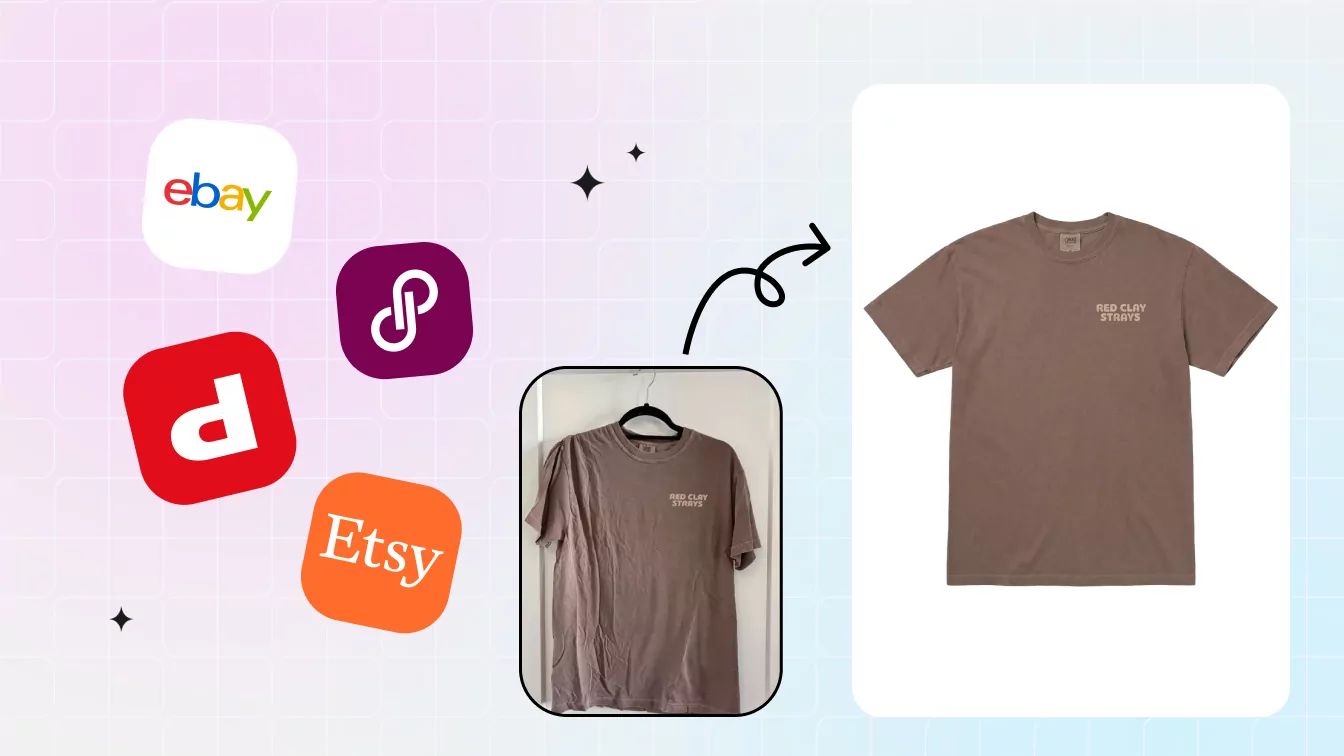

For clothing resellers, growth makes repetitive work harder to manage. A useful tool should save time on sourcing, pricing, product photography, or cross-listing without adding more corrections to the workflow.
This guide organizes reseller tools by where they fit in a daily workflow. Product prices and features were checked against official pages on August 3, 2026. Because plans change, verify the checkout price and channel support before subscribing.
The three sample stacks near the end use monthly base prices. Treat them as starting points and adjust them to your inventory, sales channels, and listing volume.
Reseller Tools: Quick Decision Table
Use this table to shortlist tools by the job you need to complete. Prices are monthly USD starting prices checked on August 3, 2026; transaction fees, taxes, add-ons, and usage charges are not included.
| Workflow stage | Tool | Starting price | Core use | Platform / channel coverage | Main limitation to check |
|---|---|---|---|---|---|
| Sourcing | ShopGoodwill | Free to browse | Browse secondhand auctions and eligible pickup inventory | Web | Condition, shipping charge, and pickup terms vary by listing |
| Sourcing | Poshmark | Free to browse | Browse current secondhand marketplace listings | iOS, Android, Web | Asking prices do not establish resale value |
| Pricing | eBay Sold Listings | Free | Review completed and sold-item results | Web, eBay app | Useful comps require a close match on version, condition, size, and shipping |
| Pricing | Poshmark Sold Comps | Free | Compare sold fashion, handbag, and accessory listings | iOS, Android, Web | Loosely similar products can produce a misleading price comparison |
| Photography | Snappyit | Free trial; then $12.90/mo | Flat lay, ghost mannequin, fashion model, and color-change workflows | Web, app, Shopify app | Better suited to apparel and accessories sellers; offers fewer general-purpose image editing features |
| Photography | PhotoRoom | $12.99/mo | General product editing, AI Fashion Models, video on eligible plans | iOS, Android, Web; Shopify integration on Max | Pro, Max, and Ultra differ in AI credits, exports, video, integrations, and resolution |
| Cross-listing | Vendoo | $14.99/mo | Importing, templates, analytics, sale detection, and auto-delisting | Supported marketplaces; Web, iOS, Android | Pricing page also shows legacy item-based options; confirm checkout plan |
| Cross-listing | Crosslist | $29.99/mo | Templates, photo editing, bulk actions, and multi-marketplace posting | 11+ marketplaces including Shopify; Web and mobile workflow | CSV import, auto-delisting, and analytics begin on higher tiers |
1. Sourcing & Deal Finding
Use sourcing tools to find possible inventory, then verify condition, total landed cost, fees, and recent comparable sales before buying.
2. Pricing & Market Research
Use completed transactions rather than active asking prices, and compare condition, size, shipping, date, and exact product details before treating a result as a useful comp.
3. Product Photography & Editing
Product-photo automation is useful only when it reduces styling or editing work without changing the color, shape, texture, condition, or sellable details of the item.
Flat-lay test: the same eight garment photos
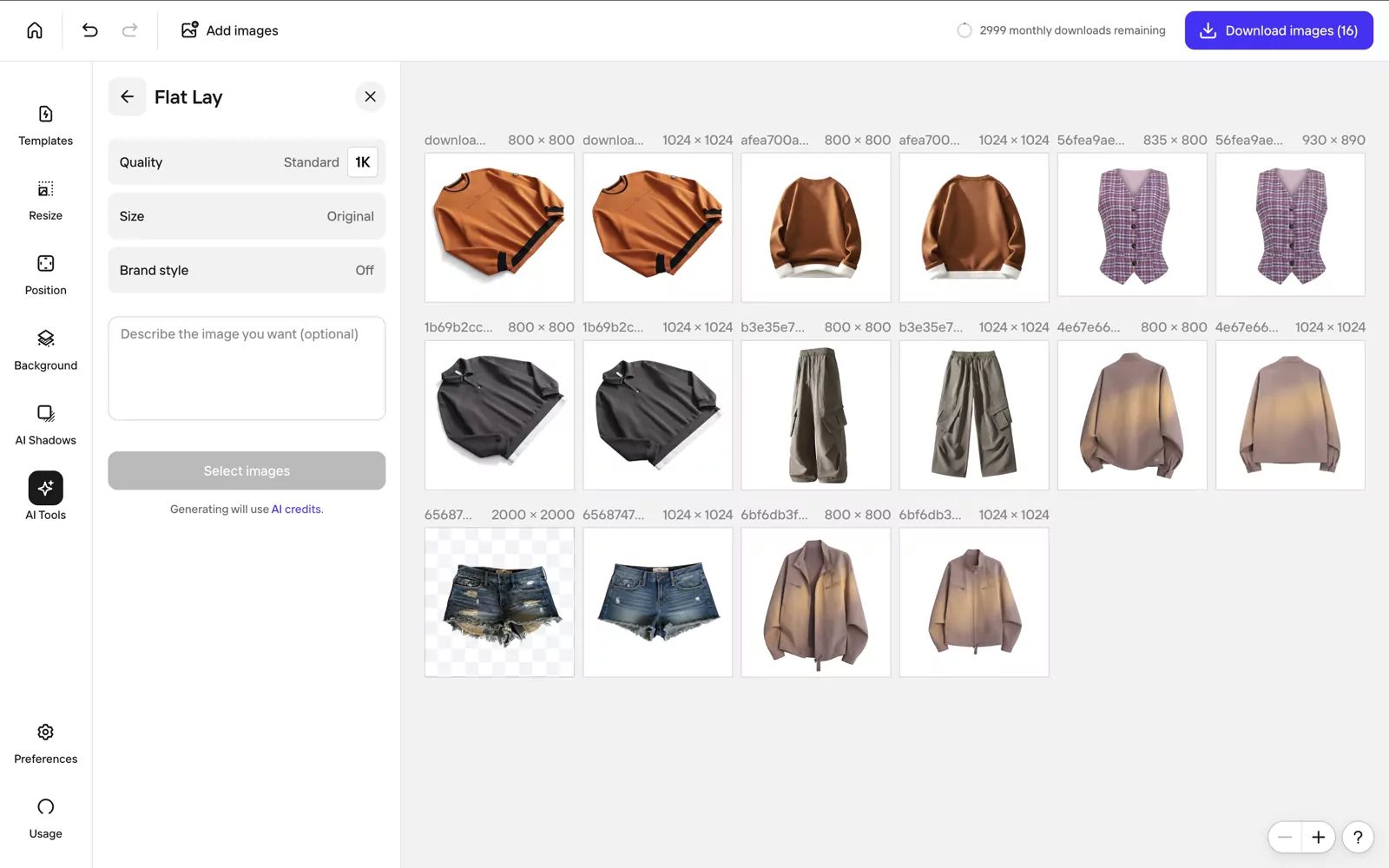
- Product fidelity: Color and print were generally stable, but the distressed denim hem was smoothed away.
- Image clarity: Outputs were clean enough to inspect at listing size.
- Realism: Garments remained natural-looking, but mixed source poses stayed inconsistent.
- Generation cost: AI-credit usage was visible; no reproducible per-image USD cost was shown.
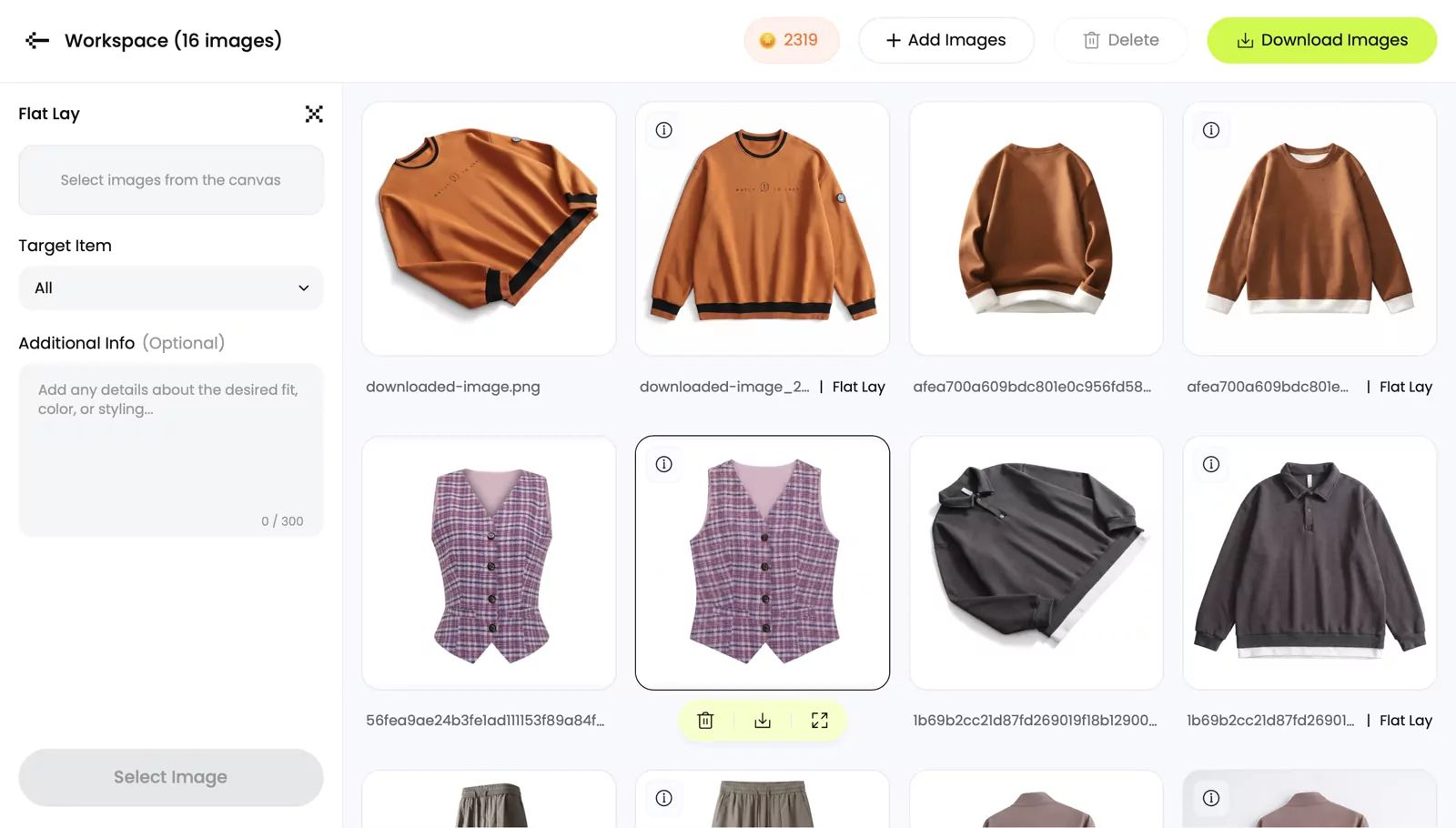
- Product fidelity: Color and garment details were generally retained; one denim output in the batch duplicated a waistband.
- Image clarity: The displayed results were clean and easy to inspect.
- Realism: Front-facing layouts were more consistent, but every structural detail still required review.
- Generation cost: 3 credits, about $0.15 at the $0.05 reference credit value.
Fashion-model test: where garment details changed
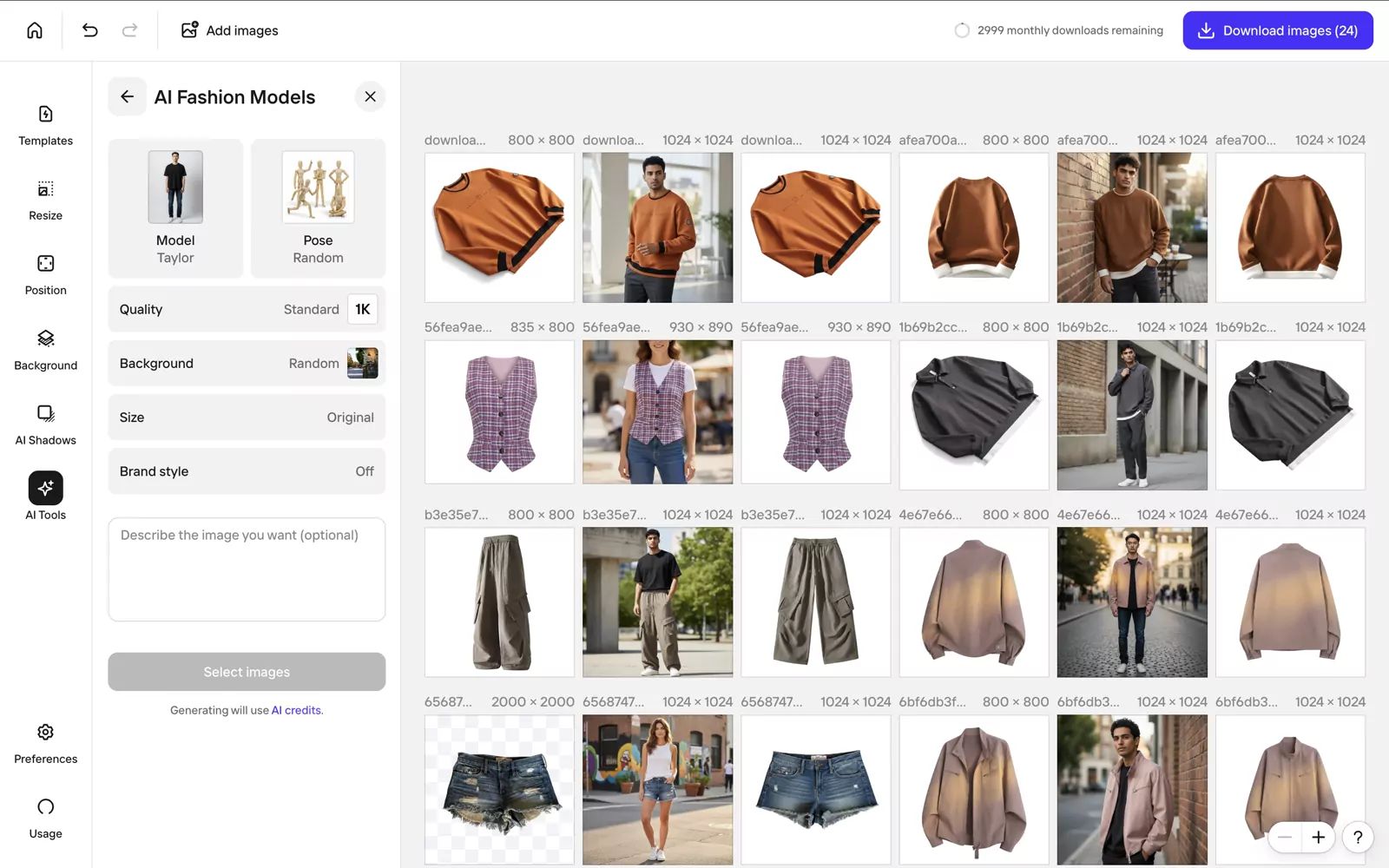
- Product fidelity: The orange sweatshirt lost its black bands, cargo trousers changed color, and abrasion disappeared from denim shorts.
- Image clarity: Model outputs were visually clean.
- Realism: The models appeared plausible, but changed product details made affected images unsuitable for an accurate listing.
- Generation cost: AI-credit usage was visible; no reproducible per-image USD cost was shown.
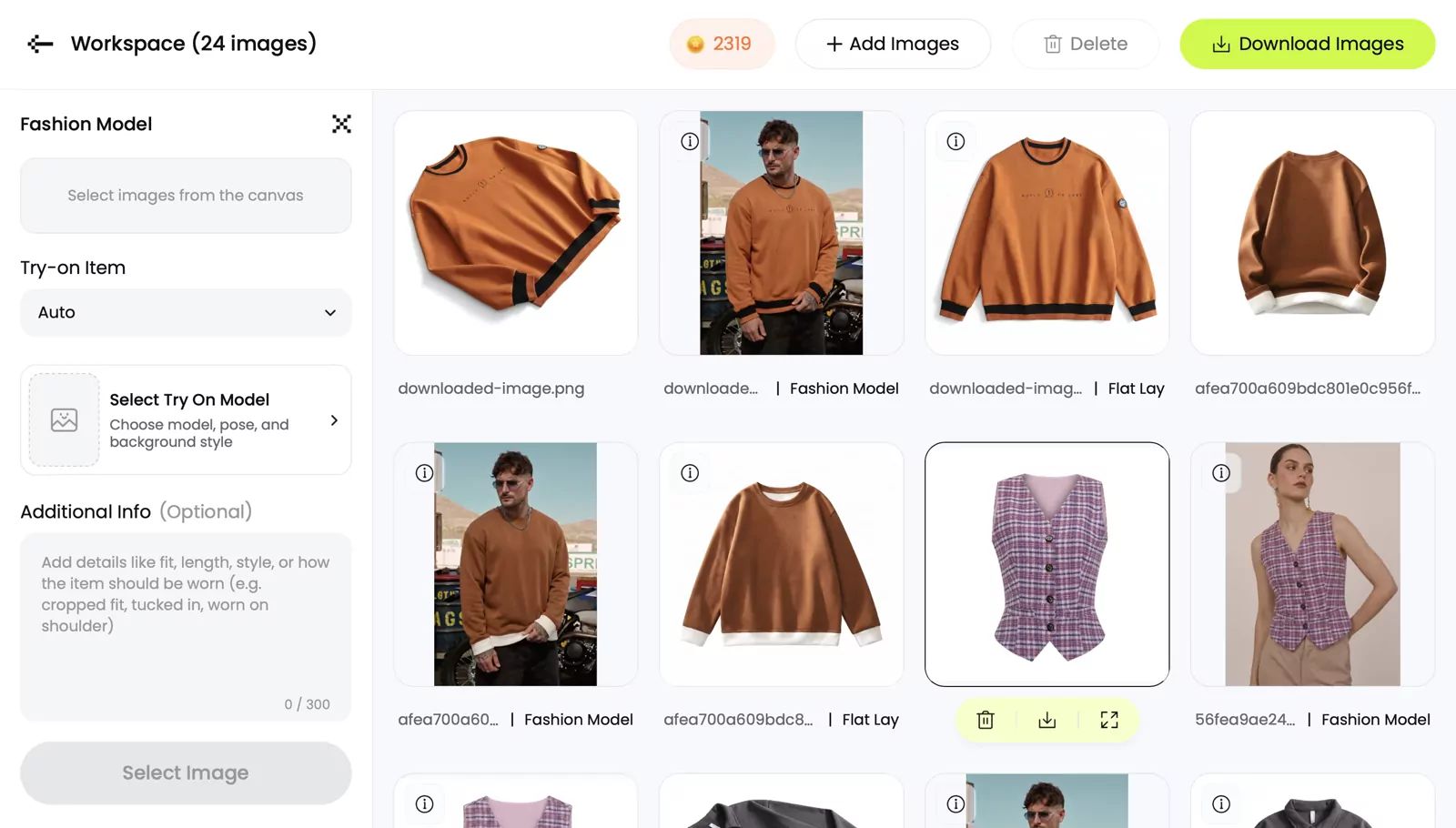
- Product fidelity: The tested orange sweatshirt retained its black collar and hem bands.
- Image clarity: The displayed output was clean at listing-view size.
- Realism: The on-body result was plausible, but one displayed item is not evidence that every garment will pass.
- Generation cost: 3 credits, about $0.15 at the $0.05 reference credit value.
Snappyit standardized the set; both tools produced one rejected result.
Each tool produced seven usable flat lays from the eight-item batch under the criteria used for this test.
PhotoRoom started with an automatically assigned model; Snappyit retained the tested trim more accurately.
Results can vary with the garment, pose, and product details.
Choose by inventory and required output.
PhotoRoom covers broader editing workflows; Snappyit provides apparel-focused layouts and controlled model selection.
Run difficult products through the workflow first.
Test text, distressed fabric, asymmetric cuts, unusual trims, and back views before processing a full catalog.
4. Listing & Cross-Listing
Cross-listing tools differ by marketplace coverage, import limits, delisting behavior, bulk actions, and mobile support. Confirm the channels and automations required by your workflow before subscribing.
App Store ratings provide broader context, while lower-rated reviews highlight issues worth checking during a trial.
Some lower-rated reviews report that Import & Merge was still in beta or unavailable to certain accounts, with feature availability not always clear before purchase. If this workflow is essential, confirm that it is enabled for your account before subscribing.
Some lower-rated reviews report crashes during listing creation, lost unsaved work, incomplete field prefill, and marketplace fields that still require manual correction. Smaller-inventory sellers should compare the time saved with the subscription cost.
Marketplace coverage: Vendoo vs Crosslist
Do not choose by the marketplace count alone. Confirm that the exact channel, region, account type, and posting method you use are supported.
| Tool | Marketplaces named on the official page | Access | Coverage detail to check |
|---|---|---|---|
| Vendoo | eBay, Etsy, Poshmark, Mercari, Depop, Grailed, Shopify, Vestiaire Collective, Vinted, and Whatnot | Web, iOS, Android | Connecting Shopify adds a separate $9.99 monthly charge billed through Shopify. Confirm whether every required action is available on mobile as well as web. |
| Crosslist | eBay, Poshmark, Vinted, Facebook Marketplace, Depop, Mercari, Grailed, Shopify, Etsy, Whatnot, and WooCommerce | Web and mobile app | Pricing includes all marketplaces, but each marketplace can have its own account, authorization, category, and posting requirements. |
Import and auto-delisting differences
| Workflow | Vendoo | Crosslist |
|---|---|---|
| Import existing inventory | Starter includes importing from available marketplace integrations, listing templates, and default preferences. | Core plans support listing transfers. CSV import and export begin with Gold at $39.99/month. |
| New inventory allowance | Current Starter pricing lists unlimited items. | Bronze adds up to 200 new listings per month, Silver 500, Gold 1,000, and Diamond unlimited. Once added, listings can be posted without a separate posting limit. |
| Sold-item handling | Starter includes sale detection and auto-delisting, plus delist and relist tools. | Auto-delisting begins with Gold; Bronze and Silver do not list it among their included features. |
| Analytics | Starter includes profit tracking and business analytics. | Sales analytics begin with Gold. |
Field mapping and publishing risks
Cross-listing software can reuse titles, descriptions, prices, photos, and categories, but marketplaces do not use identical listing forms. A mapped category does not guarantee that condition, size, brand, shipping policy, item specifics, or image order will be correct on the destination channel.
Check the destination category, required item specifics, price, quantity, shipping and return settings, photo order, image resolution, and SKU. Save a draft before posting when possible. Lower-rated app reviews also mention incomplete field prefill, missing marketplace options, crashes, and unsaved work, so confirm that a failed post can be recovered without creating a duplicate listing.
Cross-listing trial checklist
- Connect two priority marketplaces first. Do not authorize every account until the basic workflow works.
- Import a small, low-risk batch. Check for duplicate records and confirm which listing becomes the inventory source of truth.
- Compare the drafts field by field. Review category, title, condition, size, price, quantity, shipping, returns, SKU, and photo order.
- Edit one listing centrally. Confirm which changes sync automatically and which still require marketplace-level edits.
- Test sold-item handling safely. Verify detection speed and confirm that the matching listings are removed without affecting unrelated inventory.
- Test recovery. Save a draft, interrupt the workflow, reconnect an expired marketplace authorization, and check whether the tool resumes without losing work or creating duplicates.
- Measure the result. Record time per item, first-pass publishing success, manual corrections, and failed or duplicate listings before choosing a paid tier.
Build Your Clothing Reseller Tool Stack
These sample stacks use monthly billing. Start with the closest match, then adjust the plans to your inventory size, sales channels, and listing volume.
Starter Stack
| Stage | Tool | Monthly cost |
|---|---|---|
| Sourcing | Direct marketplace browsing | Free |
| Pricing | eBay Sold Listings + Poshmark Comps | Free |
| Photography | Snappyit Basic | $12.90 |
| Listing | Direct marketplace listing | Free |
| Total | $12.90 |
Growth Stack
| Stage | Tool | Monthly cost |
|---|---|---|
| Sourcing | ShopGoodwill | Free to browse |
| Pricing | eBay Sold Listings + Poshmark Comps | Free |
| Photography | Snappyit Standard | $29.90 |
| Listing | Vendoo Starter | $14.99 |
| Total | $44.89 (~$45) |
Full-Time Stack
| Stage | Tool | Monthly cost |
|---|---|---|
| Sourcing | ShopGoodwill + Poshmark | Free to browse |
| Pricing | eBay Sold Listings + Poshmark Comps | Free |
| Photography | Snappyit Pro | $49.90 |
| Listing | Crosslist Gold | $39.99 |
| Total | $89.89 |
Snappyit offers a free trial; after the trial, monthly pricing is $12.90 for Basic, $29.90 for Standard, and $49.90 for Pro. Annual billing displays lower monthly equivalents. The stack totals use paid monthly plans and exclude taxes, usage charges, add-ons, marketplace fees, and regional differences.
Frequently Asked Questions
Measure Whether a Tool Is Worth Its Cost
Test a tool on a small batch and compare it with your current process. Track:
- Average time spent per item
- Percentage of images or listings accepted on the first pass
- Number of products published each month
- Listings that still need manual corrections
- Problems caused by incorrect fields, missed delisting, or changed product details
Keep the tool if the time saved and extra output justify its monthly cost without increasing listing errors.
References
Product features, platform support, and pricing were checked against the following official pages on August 3, 2026. Prices are in USD and may vary by billing cycle, region, taxes, usage, add-ons, or legacy plans.
- ShopGoodwill — marketplace categories, auctions, saved searches, favorites, and pickup listings.
- Poshmark — marketplace listings and fashion resale.
- eBay Advanced Search — completed and sold-item filters.
- Snappyit Pricing — credits, plan prices, and batch features.
- Snappyit Flat Lay, Ghost Mannequin, Fashion Model, and Color Change — product workflow pages.
- PhotoRoom Pricing — current plans and included features.
- PhotoRoom Export Limits and PhotoRoom AI Credits — plan allowances.
- Vendoo Pricing and Vendoo Marketplaces — plans, importing, auto-delisting, marketplace access, and the separate Shopify connection charge.
- Crosslist Pricing and Crosslist Marketplaces — prices, marketplace coverage, inventory allowances, CSV, auto-delisting, and analytics.
- Vendoo on the App Store — 4.5 out of 5 from 2.7K ratings when checked on August 3, 2026; ratings and review counts change over time.
- Crosslist on the App Store — 4.7 out of 5 from 163 ratings when checked on August 3, 2026; ratings and review counts change over time.
- Snappyit on Trustpilot — 4.1 out of 5 when checked on August 3, 2026; ratings can change as new reviews are added.
- PhotoRoom on Trustpilot — 2.0 out of 5 when checked on August 3, 2026; ratings can change as new reviews are added.






