




Best free AI image upscalers for ecommerce: quick answer
We tested Snappyit, Upscayl Cloud, bigimg.ai, Fotor, Bigjpg, and Let's Enhance on the same 1170 × 1560 blurry fashion photo. For merchants, “free” did not always mean a listing-ready download: account requirements, watermarks, batch access, and output fidelity differed across the six tools.
- Best balance in this test: Snappyit retained the most natural-looking knit, hair, and garment texture while producing a clean export.
- Strongest alternatives for visible detail: Fotor and Let's Enhance looked crisp, but both reconstructed more facial or material detail; the free Let's Enhance export was watermarked.
- Best way to choose for a catalog: shortlist tools by clean-export terms and batch access, then test labels, logos, fabric, and repeated patterns on representative SKUs.
This is a source-specific comparison, not a universal benchmark. Each tool used its available settings, so model behavior and output dimensions were not identical.
How we tested AI image upscalers for ecommerce photos
Each service received the same source image with the subject and crop unchanged. We selected a high-resolution option available in the interface, downloaded or recorded the result, and reviewed the face, knit pattern, hair, garment texture, bag strap, output dimensions, and watermark status at full size.
We judged five merchant criteria together: a usable download, enough resolution for the target marketplace, no unexpected watermark, a workable batch process, and faithful product detail. More pixels did not count as a better result if the tool changed an eye shape, label, stitch line, fabric weave, or jewelry edge. For source-quality and export guidance, see how to make product photos clearer.
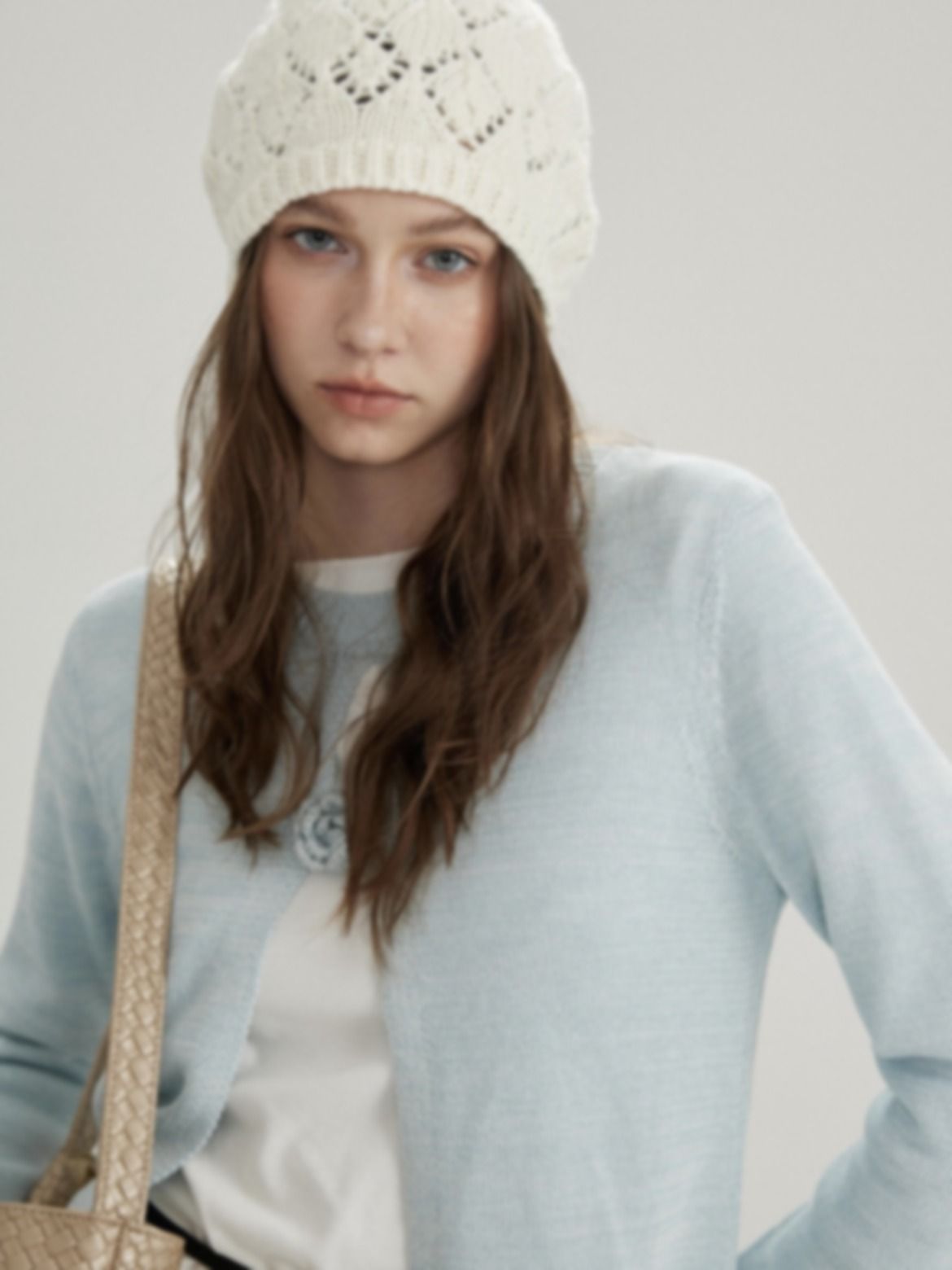
The same 1170 × 1560 blurry source image was used for all six tests.
The reported dimensions below come from the downloaded files or the matching workspace shown in each screenshot. They describe these exact runs; they do not make files with different output sizes directly comparable.
1. Snappyit Product Photo Upscaler
Snappyit's Product Photo Upscaler is designed for ecommerce images. Its official page lists upscaling, sharpening, deblurring, denoising, batch processing, and size checks for major marketplaces, and states that the tool needs no login, adds no watermark, and has no daily cap.
Snappyit test settings
We selected the 2160p / 4K-oriented target, reviewed the before-and-after view, and exported the result. The workspace reported a 2496 × 3328 output and displayed marketplace-size checks.
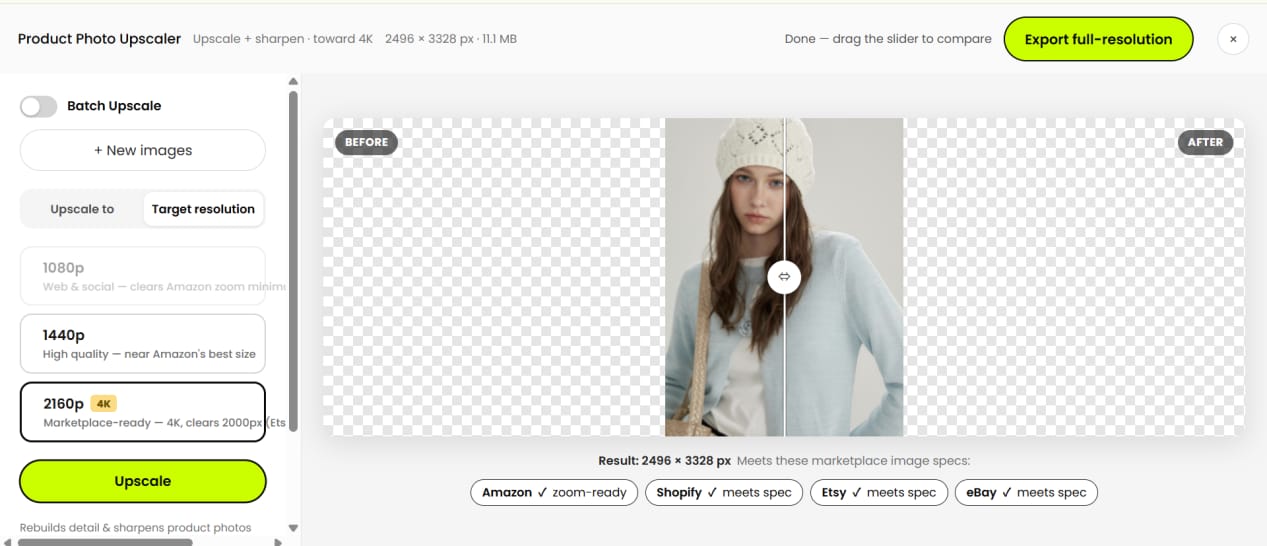
Snappyit workspace: the output shown in the test was 2496 × 3328, with marketplace-size checks below the preview.

Snappyit result from the shared blurry image.
Result summary: For this source, Snappyit gave the strongest balance of visible detail and natural texture. The knit pattern, hair strands, eyes, garment texture, and woven strap were clearer without the painted finish seen in several other outputs. No visible watermark appeared in the export.
Try Snappyit Product Photo Upscaler Free
Merchant fit: Sellers who want a fast browser workflow, batch access, a clean export, and marketplace-size feedback without setting up an account.
2. Upscayl Cloud
This review covers Upscayl Cloud, not the separate open-source desktop application. The tested browser interface offered multiple models, scale and format choices, and additional paid controls.
Upscayl Cloud test settings
We completed the trial application, selected Upscayl Standard, 4×, and JPG, then downloaded the result. The workspace projected 4680 × 6240 from the 1170 × 1560 source.
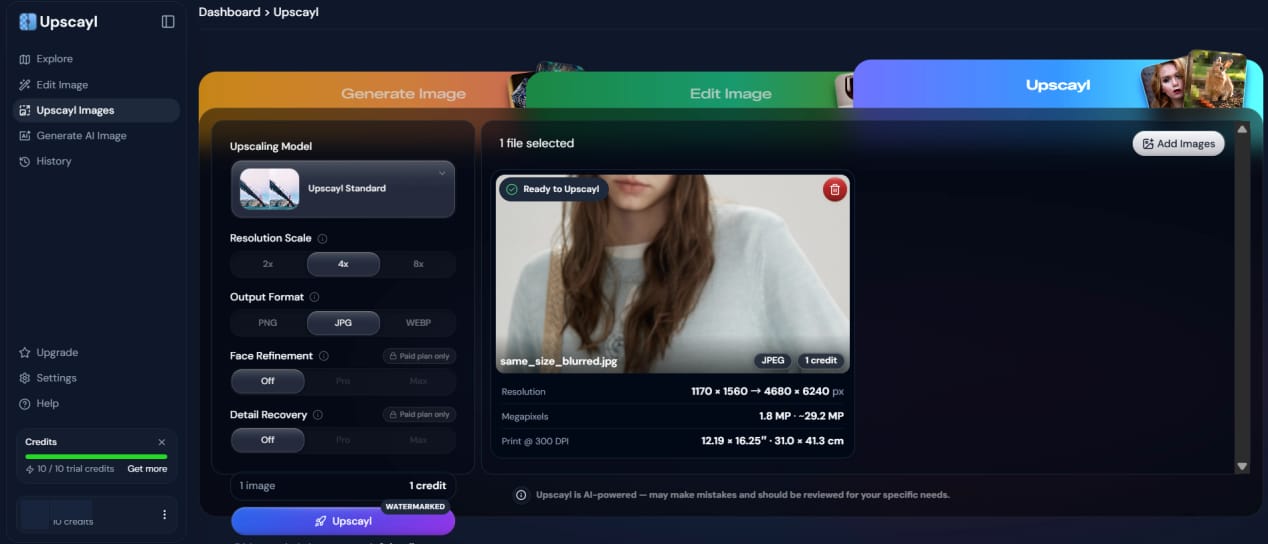
Upscayl Cloud workspace. Personal profile details have been removed; the remaining interface is unchanged.

Upscayl Cloud trial result; the watermark is visible in the lower-right corner.
Result summary: Upscayl Cloud produced the largest reported dimensions in this test and reduced the source blur, but the face, hair, and knit looked smoother and more redrawn. The trial export carried a visible watermark, so that file was not listing-ready.
Merchant fit: Teams that value browser-based model, scale, and format controls and will confirm the clean-export entitlement before processing a catalog.
3. bigimg.ai
bigimg.ai is a browser image toolkit with upscaling and separate editing utilities. The tested free interface allowed image-type, scale, and denoise choices; the official homepage also states that paid Pro access adds batch processing.
bigimg.ai test settings
We selected Photo, 4×, and Highest denoise. The downloaded file measured 4240 × 5652.

bigimg.ai workspace with Photo, 4×, and Highest denoise selected.

bigimg.ai result from the shared blurry image.
Result summary: The Highest denoise setting reduced blur but also removed natural texture. The face looked plastic-like, hair grouped into painted strands, and the knit and garment edges looked more generated than restored. No visible watermark appeared in the downloaded test file.
Merchant fit: Occasional cleanup where denoise control matters and the seller can compare a less aggressive setting before approving texture-sensitive products.
4. Fotor AI Image Upscaler
Fotor pairs its AI image upscaler with a broader browser editor. The test account displayed 50 signup credits, this upscale used one credit, and a batch entry was visible in the interface.
Fotor AI image upscaler test settings
We ran the browser AI upscaler on the shared source, compared the before-and-after view, and reviewed the downloaded 1266 × 1687 file.
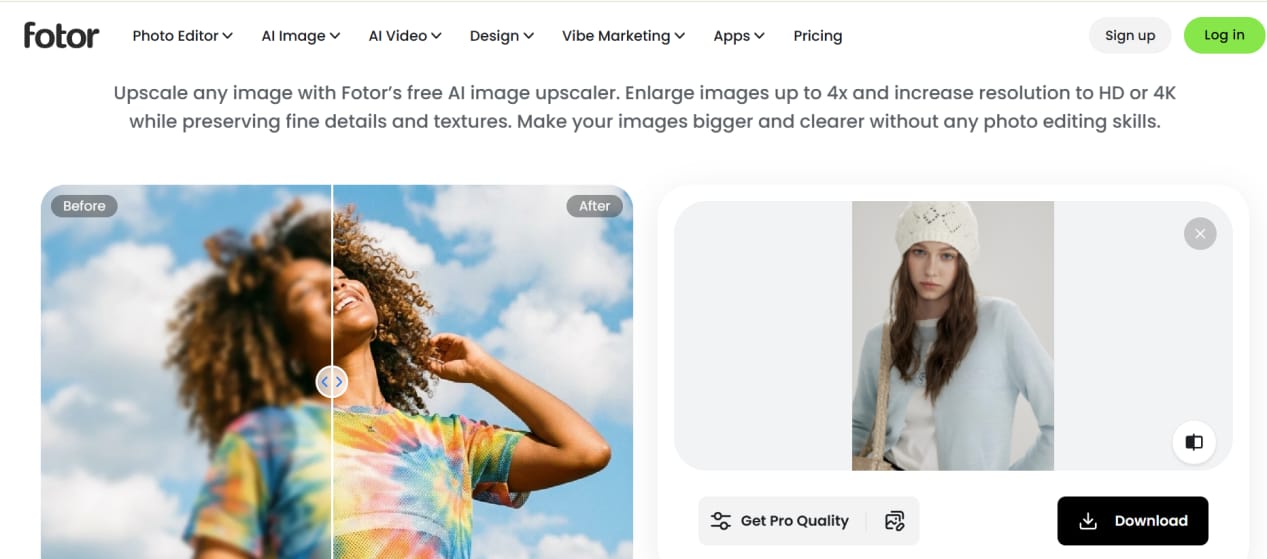
Fotor workspace with the shared test image loaded and the before-and-after preview available.

Fotor result from the shared blurry image.
Result summary: Fotor produced a clear, photographic-looking file with defined eyes, hair, knit openings, cardigan texture, and strap pattern. It also reconstructed parts of the face and hat, making some skin and knit edges less source-faithful. No visible watermark appeared in the export.
Merchant fit: Sellers who want upscaling inside a broader browser editor and can approve one output for each identity, fabric, or repeated-pattern group before batching.
5. Bigjpg
Bigjpg is a separate product from bigimg.ai. Its official page lists a limited free allowance and adds parallel and batch processing on paid plans.
Bigjpg product photo test settings
We selected the 4K option, downloaded the 1266 × 1687 result, and compared the face, knit openings, hair edges, cardigan, and strap with the source at full size.
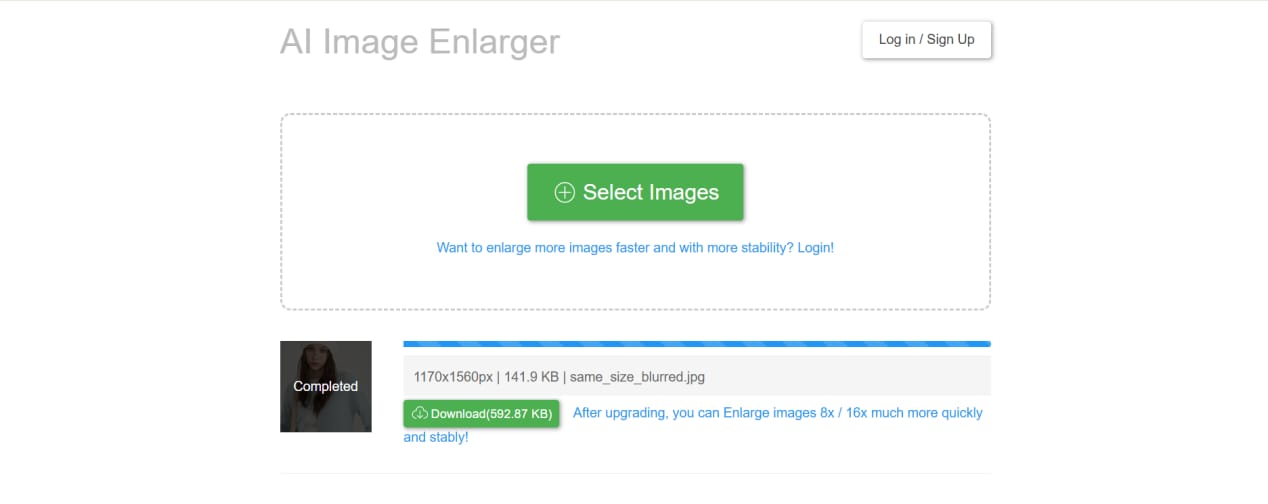
Bigjpg workspace after the shared test image finished processing.

Bigjpg result from the shared blurry image.
Result summary: Bigjpg reduced some blur, but the face, hair, knit, cardigan, and strap remained soft. No visible watermark appeared in the downloaded file.
Merchant fit: Simple enlargements where fine product detail is not critical; this tested result would need another approach for labels, knitwear, or repeated patterns.
6. Let's Enhance
Let's Enhance is a credit-based browser service with model and size controls plus optional lighting and background tools. Its current pricing page states that new accounts receive 10 free credits and that free outputs carry a watermark.
Let's Enhance product photo test settings
We selected Prime and Auto, with Light AI and background removal off. The workspace reported 1666 × 2221 from the 1170 × 1560 source.
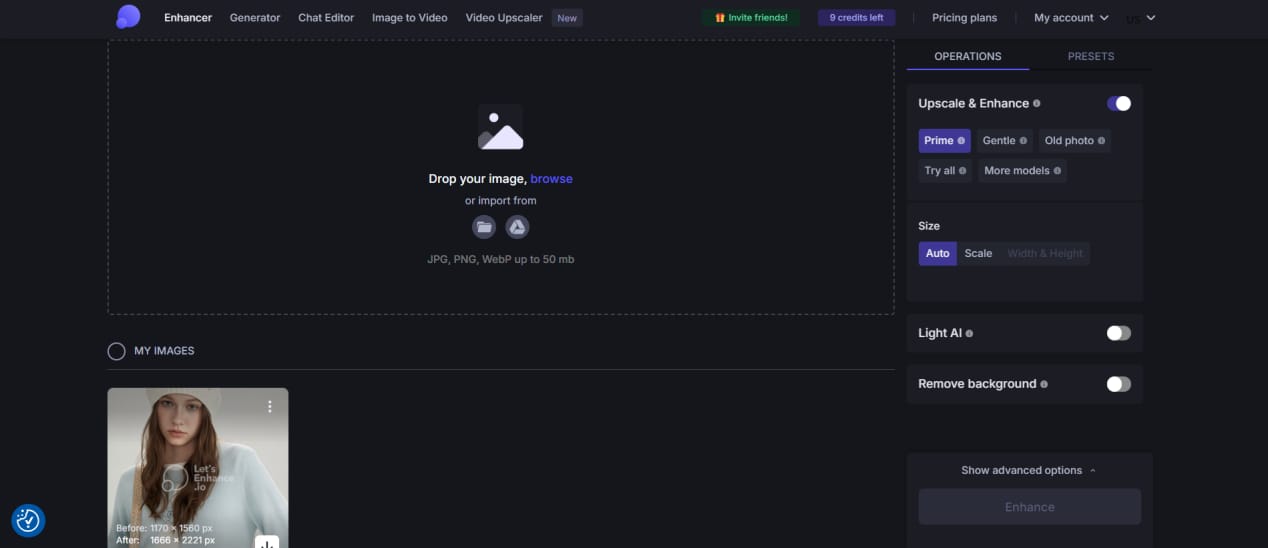
Let's Enhance workspace with Prime and Auto selected; the result card reported 1666 × 2221.

Free Let's Enhance export with a watermark in the lower-left corner.
Result summary: Let's Enhance recovered strong visible detail in the knit, eyes, hair, cardigan, and strap, but rebuilt the face, skin, and material texture more aggressively. The free export carried a visible watermark.
Merchant fit: Teams that want model controls and credit-based processing and will verify reconstruction and watermark-free entitlement before a catalog run.
AI image upscaler comparison for ecommerce sellers
| Tool | Test result | Free and batch access | Best fit |
|---|---|---|---|
| Snappyit | Best balance of visible detail and natural texture in this test | Official page: no account, watermark, or daily cap; batch available | Ecommerce sellers who want a fast browser workflow, marketplace-size checks, and batch processing |
| Upscayl Cloud | Reduced blur, but the face, hair, and knit looked more reconstructed | Login and trial application; 10 credits; test export watermarked | Teams that prioritize model, scale, and format controls and can confirm clean-export terms |
| bigimg.ai | Strong denoising; the Highest setting looked painted or plastic | No account for 10 daily uses; paid batch; no test watermark | Occasional cleanup where several denoise settings can be compared |
| Fotor | Strong clarity, with more reconstruction in the face and knit | 50 signup credits and a batch entry observed; no test watermark | Sellers who want a broader browser editor and will inspect identity and material detail |
| Bigjpg | Softer output that still lacked crisp fine detail | 20 images per month free; paid batch; no test watermark | Simple enlargements that do not require fine product detail |
| Let's Enhance | Crisp detail, with more aggressive reconstruction | 10 signup credits; batch option observed; free export watermarked | Teams that want model controls and credit-based processing |
Use this table as a shortlist, not a universal ranking. Test at least two representative SKUs—one with labels or logos and one with fine or repeated texture—then compare the full-resolution downloads. In this test, a larger reported pixel count did not reliably mean more faithful product detail.
Upscaling is only one stage of a listing workflow. If the catalog also needs consistent scenes, lighting, backgrounds, or model imagery, see the AI product photography workflow.
Topaz Gigapixel alternative for product photos: when a browser tool is enough
Topaz Gigapixel's official page describes Mac and Windows standalone or plugin use with local and cloud rendering. Those capabilities were not part of this six-tool browser test, so the findings above should not be read as a direct Topaz quality ranking.
A browser alternative is usually enough when a merchant needs quick representative-SKU tests, batch access, no installation, and marketplace-size feedback. Consider a desktop workflow when local processing or deeper enhancement controls matter more than browser speed. In either case, approve the tool on labels, logos, packaging text, knit patterns, and fine edges—not on generated detail alone.
How to batch upscale a product photo catalog
Batch upscaling is most useful during store migrations, supplier-image cleanup, marketplace expansion, and seasonal catalog refreshes. Treat it as a catalog operation: test a representative group before applying one setting to every SKU.
- Select representative SKUs. Include each product type, camera source, and recurring defect.
- Group files by source quality. Separate images by dimensions, compression, blur, and detail type.
- Set the destination dimensions. Use the lowest scale that meets the storefront or marketplace requirement.
- Run a pilot batch. Preserve a predictable filename-to-SKU mapping.
- Inspect each group at full size. Check for invented text, changed logos, false texture, halos, and oversharpening.
- Process the remainder. Import only after the pilot passes, and retain the originals for rollback.
Upscaling cannot reliably restore unreadable text, severe motion blur, or a non-compliant background. Route those files to retouching, reshooting, or background removal instead of applying a stronger upscale to the whole batch. If a source is already sharp and only needs new dimensions, use the free image resizer instead.
Free AI image upscaler cost comparison
These allowances and prices reflect official pages and test accounts checked on August 18–19, 2026. For catalog budgeting, compare clean-export and batch terms as well as the headline price, then confirm the live checkout before processing.
| Tool | Free access checked | Paid price checked |
|---|---|---|
| Snappyit | Official page: no login, watermark, or daily cap | Free |
| Upscayl Cloud | 10 trial credits after application; test export watermarked | Pro: $24.99/month for 300 credits |
| bigimg.ai | 10 free uses per day without an account | $3 for 50 credits |
| Fotor | 50 signup credits observed | $10.99/month |
| Bigjpg | 20 images per month | Basic: $6 for two months; 500 images per month |
| Let's Enhance | 10 signup credits; free export watermarked | Starter: $9/month billed yearly for 100 credits |
Ecommerce image upscaler FAQs
Which AI image upscaler produced the best ecommerce result in this test?
For this 1170 × 1560 source image, Snappyit gave the best balance of visible detail, natural texture, and a clean export. Fotor and Let's Enhance also looked crisp, but reconstructed more facial or material detail, and the free Let's Enhance export was watermarked. This is a source-specific result, not a universal ranking.
Is Snappyit's Product Photo Upscaler free and watermark-free?
The official Product Photo Upscaler page states that the tool is free, needs no login, has no daily cap, and exports without a watermark. The tested workspace also offered a browser batch option. Re-check the live tool before committing a large catalog because product terms can change.
Which free AI image upscalers exported without a watermark?
Snappyit's official page states that its export has no watermark. No visible watermark appeared on the tested bigimg.ai, Fotor, or Bigjpg files. The Upscayl Cloud and Let's Enhance free exports were watermarked in this test. Check the current download screen before processing listing images because export terms can change.
How many free bigimg.ai upscales are available?
At the August 19, 2026 check, the official bigimg.ai homepage stated 10 free daily uses without an account. Its pricing page offered credit packs starting at 50 credits for $3. Check the live counter before scheduling recurring catalog work because limits can change.
Can an AI image upscaler change product labels, logos, or fabric?
Yes. AI upscalers reconstruct missing detail rather than reveal an exact hidden original. Labels, logos, printed text, fabric weave, jewelry edges, and repeated patterns can be smoothed or invented. Compare the full-resolution download with the source before publishing the product listing.
Is there a free Topaz Gigapixel alternative for product photos?
Yes, when the goal is routine browser-based catalog cleanup rather than a feature-for-feature desktop replacement. Topaz Gigapixel was not included in this six-tool test, so these findings do not rank it against the tested tools. Topaz's official page describes Mac and Windows standalone or plugin use with local and cloud rendering; choose based on workflow needs, then test product-detail fidelity on a representative SKU.
How should I batch upscale a product photo catalog?
Start with representative SKUs, group files by source size and defect type, and use the lowest scale that reaches the required storefront dimensions. Preserve the filename-to-SKU mapping, inspect samples from every product group at full size, and only then process the remainder. Handle unreadable text, severe motion blur, and background-compliance problems separately.
References
- Snappyit, Product Photo Upscaler. Accessed August 19, 2026.
- Upscayl, Upscayl Cloud. Accessed August 18, 2026.
- Upscayl, Cloud pricing. Accessed August 19, 2026.
- bigimg.ai, AI image tools and free-use statement. Accessed August 19, 2026.
- bigimg.ai, Pricing. Accessed August 19, 2026.
- Fotor, Image Upscaler, Batch Photo Editor, and pricing. Accessed August 19, 2026; Fotor Pro was listed at $10.99/month.
- Bigjpg, official website and pricing. Accessed August 19, 2026.
- Let's Enhance, image enhancer and pricing. Accessed August 19, 2026.
- Topaz Labs, Topaz Gigapixel product page. Accessed August 19, 2026.







