WearView vs Snappyit: AI Virtual Try-On

Compare garment fidelity, 2K image quality, and cost per listing-ready virtual try-on.

  • Fur, quilting, hardwarewhere the two renders part company at 2K
  • ~$0.16 vs ~$1.50cost per tested 2K configuration
  • 6 free creditsno card, nothing to cancel

Run your own garment through it before you read another word

Click or drag image here

Use a piece you actually sell — ideally the one that always photographs badly.

WearView vs Snappyit: Same-Jacket Try-On Results

The same jacket and reference model, compared at the same three-credit spend.
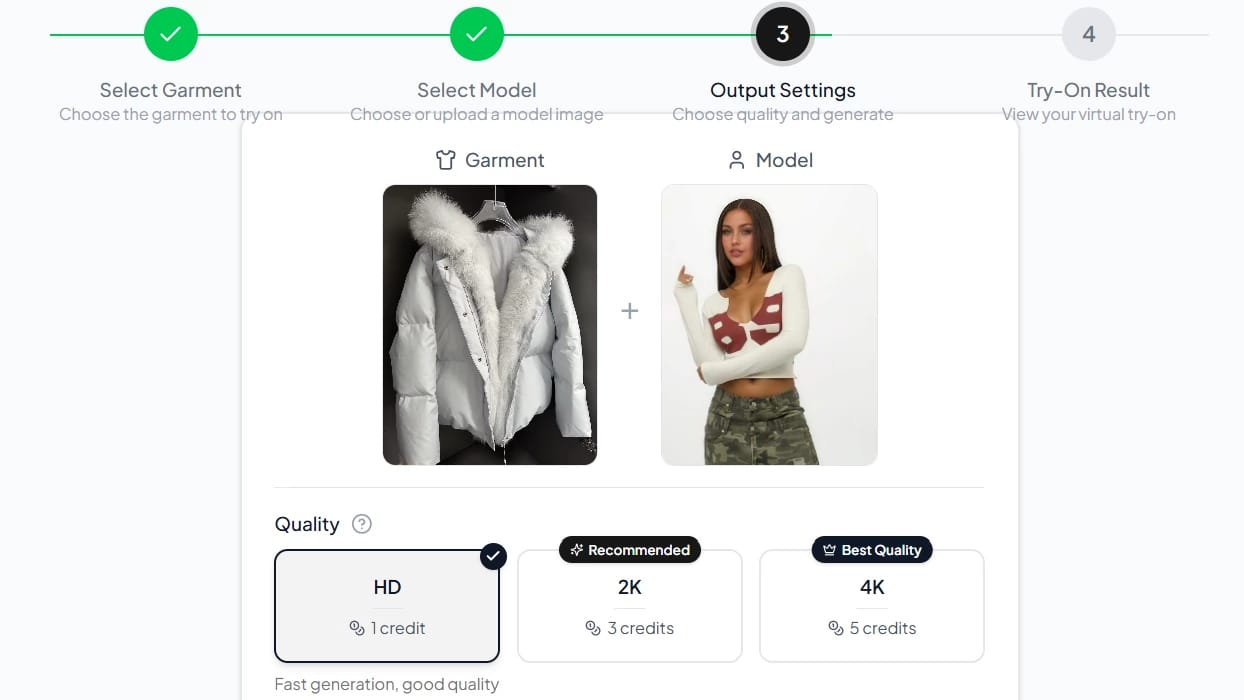
The two workbenchesCaptured during the test
WearView AI Try-On output settings
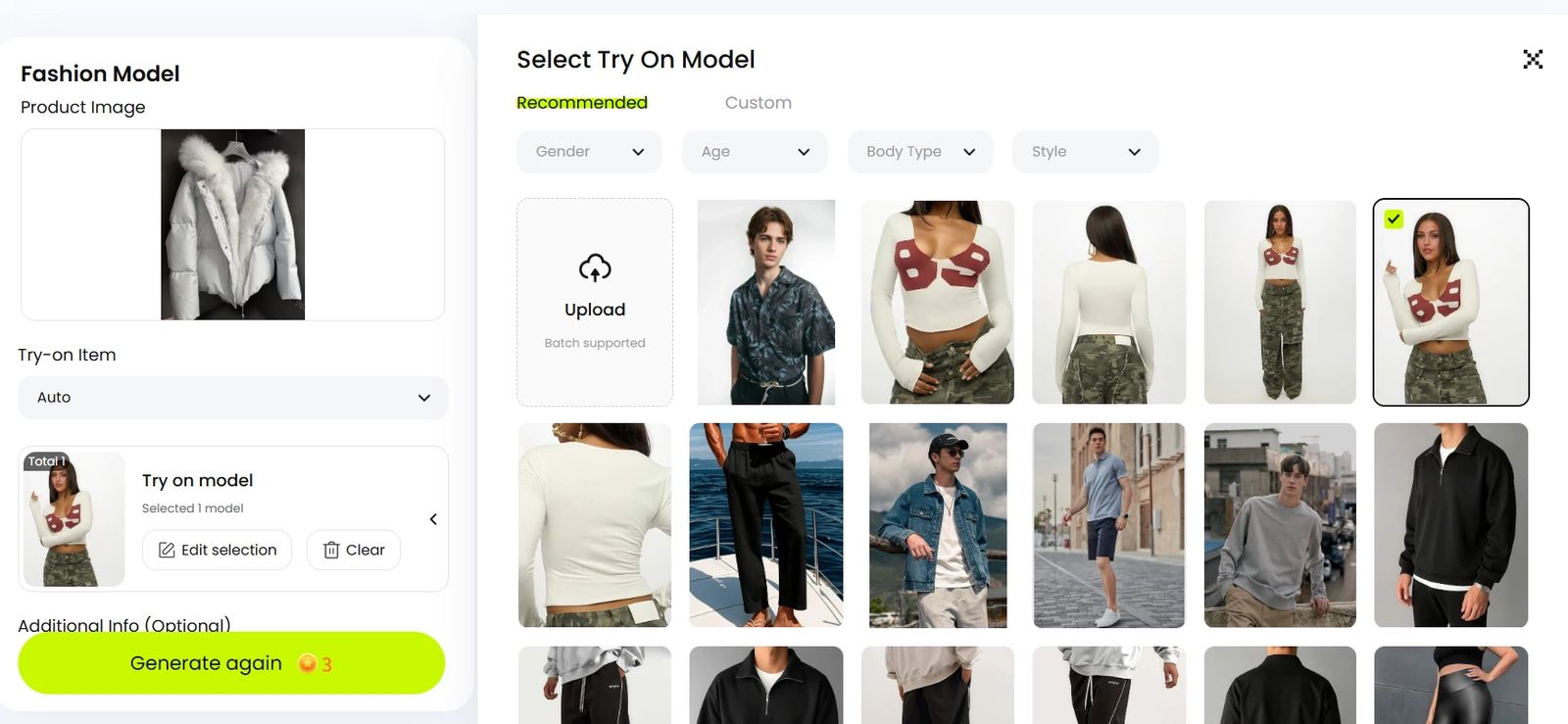
WearView AI virtual try-on output settings — the white fur-collar puffer and the selected model, with 2K chosen at 3 credits against HD at 1 and 4K at 5
Quality is where the price is set. We ran 2K at 3 credits — the tier its own UI marks Recommended. HD is 1 credit, 4K is 5.
Same garment, same model, both resultsNo crop, no retouch, no product swap
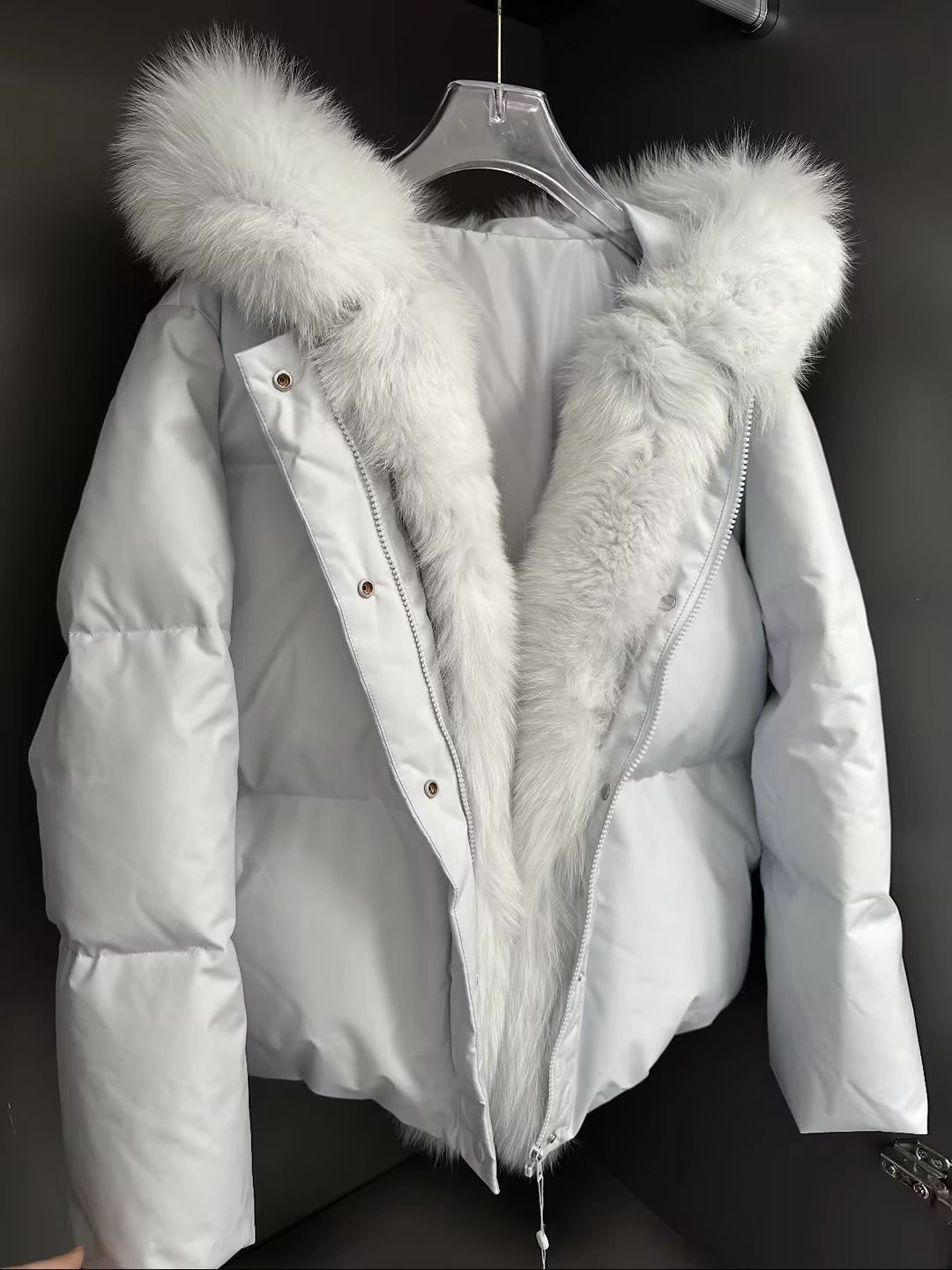
Input the product photo
Test input for both AI try-on tools — hanger product photo of a white hooded down jacket with a thick white fur collar, snap placket and full-length zip
Hip-length, boxy, quilted; plush fur running the full length of the opening; warm-toned snap placket over a two-way zip.
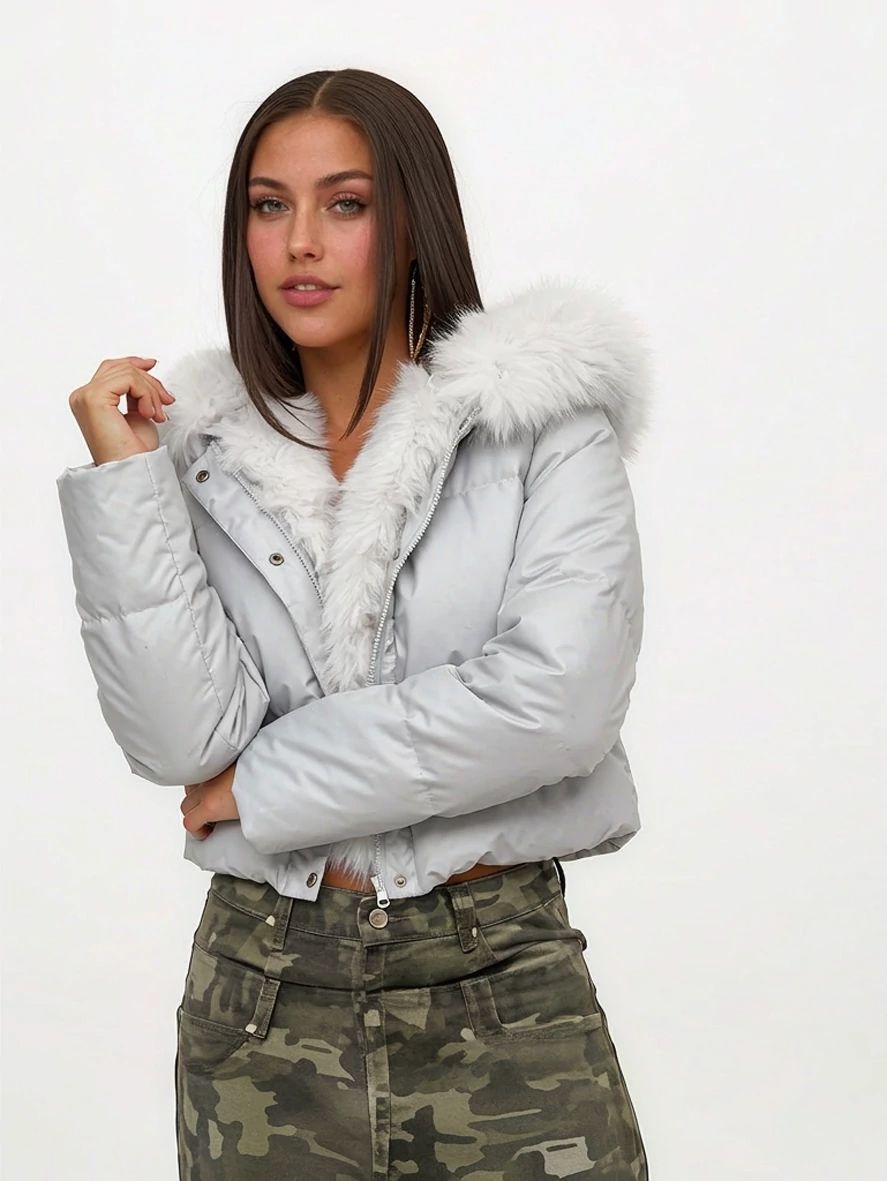
WearView result · 2K · 3 credits
WearView AI try-on result — the white fur-collar down jacket worn hood-down on the reference model, cropped above the waist with the body drawn in, the fur trim thinned and the quilt channels flattened
The hood stays down and the body is recut: the hem stops above the waist, the waist is drawn in, the fur trim thins and loses its separated strands, and the quilt channels flatten across the shell.

How we ran it

InputsOne hanger shot of the fur-collar jacket and the same reference model in both tools.
SettingsWearView Lite at 2K and Snappyit Fashion Model; three credits per output.
MatchedThe garment, reference model, and credit spend were held constant.
Result ruleThe first render from each tool, shown without cropping, retouching, or rerolls.
The verdict on four benchmarksSame jacket, same 3-credit spend
BenchmarkSnappyitWearView
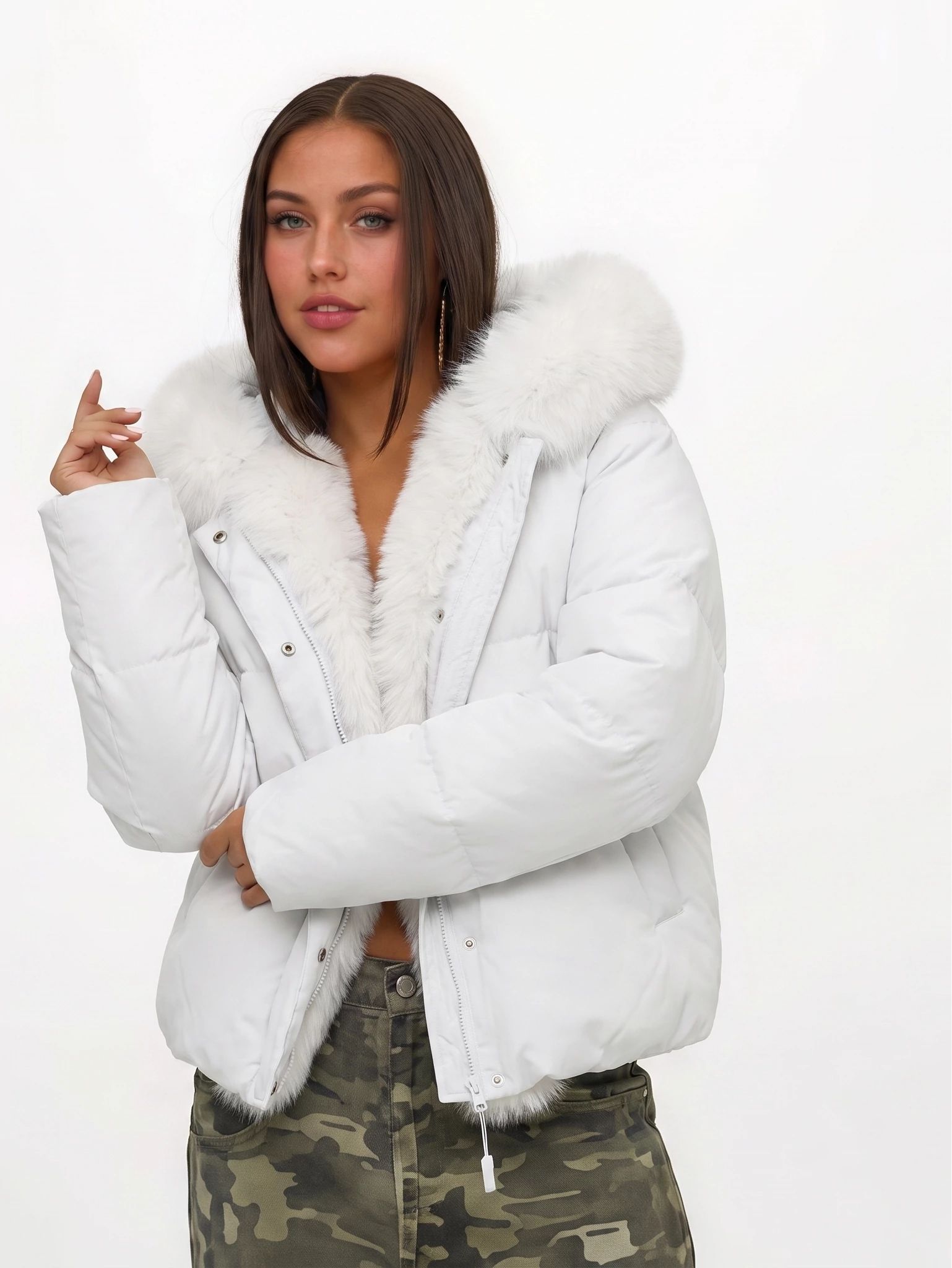
Model likenessNatural body proportions and smoother garment integration, so the result reads as a realistic try-onA slimmer, more stylized figure: stronger visual appeal, weaker as a guide to how the piece actually sits
Garment fidelityKeeps the jacket length, silhouette, fur collar and shell colour close to the hanger shotShell colour and fur collar survive, but the garment is recut — cropped above the waist, drawn in through the body, fur trim thinned, and the snaps come back cool silver rather than the original warm gold
Hard-case handlingHolds volume, fur texture and quilting on the awkward case: a bulky white puffer with a fur collarHandles the scene well, but flattens the quilting, thins the fur and auto-reshapes through the waist and hem
Operational effortIn this first render, the output landed closer to the source garment and needed fewer correctionsIn this first render, the changed length, waist, fur, and hardware would need correction before an accuracy-led listing
Overall Both platforms deliver high-quality AI try-on results, but they serve different goals. Snappyit prioritises garment fidelity, realistic fitting and ecommerce readiness, which is what a product listing is judged on. WearView leans towards fashion styling and visual impact, which suits marketing and social. On this test Snappyit gives the stronger balance of realism, product accuracy and workflow efficiency. Worth noting that neither render is purely the product: Snappyit puts the hood up, which the hanger shot never shows, while WearView leaves it down but restyles the cut.

Garment test run 31 July 2026 on snappyit.ai and wearview.co — one garment, first render from each, output settings as stated above. Observations describe these tests, not general product performance.

Run the same test on your own product photo 6 free credits, no card. One upload tells you more about AI product photography than another comparison table will.
Generate a free try-on
What its own customers say

The complaint that keeps coming up — and it is not about quality

WearView holds a strong public rating and has earned it — most ecommerce sellers reviewing it like the images. So we went looking for a four-star review rather than a rave or a hatchet job. In three sentences this customer praises the output and names the thing that will cost you money.

WearView customerTrustpilot · 4 out of 5

“Very faithful images of the clothes and consistency with models. Clear functionality. Very occasionally it gets stuck in loops and uses a bunch of credits to produce unusable images, and sadly there is no recourse against that.”

Customer (GB) · 4/5 · reviewed 30 April 2026 · read on Trustpilot
Snappyit customerTrustpilot · 5 out of 5

“As a small clothing reseller, Snappyit is a game-changer. Professional product photos in seconds, no photoshoot needed—it saves me time and money on every single listing.”

Customer · 5/5 · “Snappyit helps small clothing reseller” · reviewed 27 May 2026 · read on Trustpilot
Read the four-star review again Notice what is missing: any complaint about the pictures. This customer calls the output faithful and consistent, and we would not argue. The cost sits somewhere else — failed generations still burn credits, “and sadly there is no recourse against that.” WearView replied the next day and said safeguards were coming, a fair response that does not change the arithmetic: on a plan estimated at 16 images a month at 2K, a handful of dud renders is a large slice of what you already paid for.

Reviews quoted verbatim from Trustpilot and linked to their original entries, retrieved 29 July 2026. Individual reviews reflect one customer’s experience, not overall product performance. WearView’s and Snappyit’s Trustpilot profiles: wearview.co · snappyit.ai

The rest of the checklist

Features, plans and what an image really costs

Published features, plan facts and the per-image maths for both AI virtual try-on tools — the part you would otherwise assemble yourself from two pricing pages. Credits are spent per output, so the number that matters is the last column of each plan card: what one 2K listing image actually works out at.

Decision areaWearViewSnappyit
Fit and access
Who it is built forFashion brands, online boutiques and apparel creatorsEcommerce sellers: clothing, footwear, jewelry and accessories
Cheapest way in$29/month, or $24/month on annual billingFrom $8.20/month on annual billing
App and API availabilityWeb app; API access on custom Enterprise plansShopify app; no public API listed
IntegrationsCustom integrations on Enterprise plansShopify: import listing images and push finished assets back to the store
Where the images end upManual export, then upload to the store or marketplace yourselfShopify sync, plus marketplace ratio presets (Etsy 1:1, Poshmark 1:1, Whatnot 9:16, Vinted 4:5)
Feature checklist
Garment onto a model✓ Product-to-model✓ Fashion Model
Same model held across a set✓ Included from Lite✓ Built into the same workflow
Ghost Mannequin✓ Included from Pro✓ Ghost Mannequin
Colorways of the same styleNo color tool was found, so a style that sells in five colors means a fresh upload and a fresh paid render per variant✓ AI Recolor: upload the garment once and Color Change produces each colorway off that same photo
Jewelry image editing and virtual try-on
Image to Video✓ Included from Pro✓ Image to Video
Batch ModeNot listed as a dedicated mode✓ Batch upload and generation
Room to iterate
Engine tiers, and what a retry costsLite carries the Standard engine only; the Premium engine starts on Pro ($49/mo)Standard and Pro engines, so a second attempt can be a cheap one
What happens to credits you did not spendMonthly credits reset each billing cycle, and unlimited rollover is listed only on the $99 Advanced plan; separately sold add-on packs do not expire, but sit in a different pot from the monthly allowanceUnused credits carry into the next month and keep rolling for up to six months

WearView plans, translated into images 29 Jul 2026 · USD

Monthly credits and what they buy at 3 credits per 2K image. The images-per-month figures are WearView’s own published estimates, not ours.

FreeNo free tierMoney-back guarantee instead of a trial
Lite$29/mo · $24/mo annual50 credits → ~16 images at 2K
Pro$49/mo · $40/mo annual200 credits → ~66 images at 2K
Advanced$99/mo · $82/mo annual500 credits → ~166 images at 2K

Snappyit plans, same maths 31 Jul 2026 · USD

Annual-billing rates, every tool included on every tier, unused credits rolling forward for up to six months.

Free$0, no card6 credits → 2–3 try-on images
Basic$8.20/mo annual120 credits → ~40 images at 2K
Standard$18.90/mo annual360 credits → ~120 images at 2K
Pro$34.90/mo annual800 credits → ~266 images at 2K

Pricing captured 30 July 2026; garment test run 31 July 2026. USD, United States pricing. Sources: wearview.co/pricing · snappyit.ai/pricing. WearView is a trademark of its respective owner; this is an independent comparison, not affiliated with or endorsed by WearView. Plans change — check both pages before you buy.

The honest version

When we would tell you to buy WearView instead

The numbers above make the case that we are cheaper per usable image. They do not make WearView a bad product, and there are jobs we would hand straight to it. Here they are.

Choose WearView when …

One model persona has to hold across a whole collection. Its preset library is broad, and keeping dozens of SKUs looking like one shoot is a real problem it takes seriously.

You publish at 4K in volume. At 5 credits an image you are on a $99 plan whichever way you go — and Advanced is the only WearView tier with unlimited credit rollover.

Finished 1080p video is your main deliverable, not a by-product of your stills.

Choose Snappyit when …

You rerun things until they look right. A retry is 2 credits on the standard engine, so being fussy stays affordable.

Your stock list never sits still. A marketplace range spends its credits on experiments, not on a planned shoot list — and the finished files land straight on Shopify, Etsy or eBay in the ratio each one wants.

You want to see your own product on a model before you pay. 6 credits, no card, nothing to cancel.

FAQ

Snappyit vs WearView FAQ: the six questions sellers ask before switching

Some of these came up while we were running the test. The rest are what sellers put into a search box before they spend anything — what a credit really buys, whether the print survives, and what the marketplace will do about it.

Yes. WearView has no free tier — its pricing page answers its own “Why no free trial?” question with a money-back guarantee instead, so the $29 Lite plan is the cheapest way to see your first render. Snappyit gives new accounts 6 credits with no card, about two to three on-model images, and those free credits reach the 2K setting. In our 31 July 2026 test, run at 3 credits a side, both tools returned a clean on-model image, but the WearView render came back cropped shorter and slimmer than the jacket on the hanger. Only one of them let us find that out for nothing.
Credits are spent per output, so it depends on resolution: on WearView, 1 credit for HD, 3 for 2K, 5 for 4K. Lite is $24/month on annual billing for 50 credits — about 16 images at 2K by WearView’s own estimate, so roughly $1.50 an image. The comparable Snappyit plan is $18.90 for 360 credits, about 120 images at 2K, or roughly $0.16 each, and the entry plan starts at $8.20/month on annual billing. Two things people leave out of the maths: a credit is spent when an image comes out, not when you approve it, so retries count — and unused Snappyit credits roll forward for up to six months, while a plan that resets monthly quietly costs double what the page says per image you actually use.
For catalogue work, by a wide margin. A plain white-background studio shot is commonly quoted at $25–$75, and anything with a live model starts nearer $250; a full day producing around 60 finished frames still works out at roughly $27–$115 each once you count the model, the studio and the retoucher. The quote is rarely the bill either — shipping the garment both ways, sample handling and reshoots land on top. A 2K on-model render on our Standard plan is about $0.16. What the photographer still buys you is a real person wearing the real garment, and for a campaign hero shot that is worth paying for. It is worth a lot less on the sixth colourway of a dress you already shot in March.
It can, and this is the failure that costs real money. These models are optimising for a believable photograph, not for your brand mark, so fine text, embroidery and repeating patterns drift first — a wordmark goes slightly wrong, a check turns wavy, a woven label becomes mush. Nobody returns a parcel because the photo looked AI; they return it because the logo in the photo is not the logo in the box. Two things help. Generate at 2K rather than the cheapest tier — WearView’s 1-credit option renders at HD, and the HD file we got was too soft to list, which is where fine detail goes first. Then open every render at 100% and check the print, the label and the hardware before it goes live. In our own test the entire difference between the two outputs sat in that kind of detail: fur density, quilt lines, the tone of the press studs.
Both tools provide downloadable files, but each marketplace applies its own current image, accuracy and AI-content rules. Snappyit also offers a Shopify app and marketplace ratio presets, while WearView’s published plans place integrations and API access on Enterprise. Before publishing, check the official seller-policy page for every marketplace you use, keep the source product photo, verify that the generated image accurately represents the item, and disclose AI use wherever the platform or applicable law requires it. This comparison is not legal advice.
There is nothing to migrate, because the input is your own product photo rather than a library you built inside the tool. Open a free account and upload the garment you would have run next — ideally the one that always photographs badly, because an easy mid-tone piece tells you nothing. A flat lay or hanger shot is enough; shoot it straight on, fill the frame, keep the light even, and steam the creases out first, since the AI will faithfully reproduce a fold you left in. Then hold the result against what you are getting now. If it passes your listing standard, run the rest of the drop; unused credits roll forward for up to six months, so a slow week does not cost you the balance.

Everything stated about WearView reflects its public pricing page and product interface as at 30 July 2026, plus documented tests on 29 and 31 July 2026 — not general claims about the product. Snappyit pricing as published on snappyit.ai/pricing, 31 July 2026. Marketplace requirements change; check each marketplace’s current official seller-policy pages before publishing AI-assisted images. This page is not legal advice. Studio photography rates are typical 2026 market quotes, not a quote for your catalogue. WearView is a trademark of its respective owner; this is an independent comparison, not affiliated with or endorsed by WearView. Plans change — check both pages before you buy.

Run the garment that never photographs well

6 free credits, no card, nothing to cancel. Upload it, pick a model, and know in about 30 seconds whether AI product photography is worth paying for on your catalog.
More AI product photography tools and guides