



A supplier image may be enough to launch a product, but it rarely covers every job in a storefront. A white-background main image, a color variant, an on-model photo, and a lifestyle scene each need a different workflow. This guide looks at six tools through the jobs they promote most strongly. For help planning the wider catalog, see our AI product photography guide.
Why Supplier Photos Hold Dropshipping Stores Back
Many dropshipping stores source products from the same marketplaces, including AliExpress, 1688, and CJ Dropshipping. Multiple sellers can end up using the same small set of supplier photos, while imported copies may also be resized or compressed before they reach the storefront.
Before editing a low-quality AliExpress or Alibaba supplier photo, find the largest source file available or ask the supplier for a higher-resolution original and permission to use it. Upscaling, denoising, and light sharpening can improve a small but reasonably clear image; they cannot reliably recover missing text, stitching, logos, hardware, or material texture.
Once the source is usable, sellers can create the additional views a listing needs through a sample shoot, manual editing, or an AI workflow. AI can reduce the work involved in producing color variants, model views, and campaign assets, but it does not replace product verification or a final accuracy check.
What Dropshipping Sellers Need From an AI Image Tool
The longest feature list is not automatically the best choice. Look for a workflow that fits the source photos you receive, the image slots you need to fill, and the amount of review your team can handle.
- Source-photo compatibility: the workflow should handle the supplier images the seller actually receives, not only polished studio inputs.
- Task fit: ghost mannequin tools, recolor, AI models, catalog cleanup, and lifestyle scenes serve different image slots.
- Product fidelity: colors, construction, patterns, logos, hardware, and item count must remain accurate.
- Usable economics at catalog scale: compare credits, retries, review time, export limits, and publishable results—not subscription price alone.
- Channel-ready output: resolution, crop, background, and image-slot requirements should fit the intended marketplace or storefront.
Use these criteria when testing your own shortlist. The examples below focus mainly on workflow fit and product fidelity, while catalog-scale speed and cost will depend on your source images, plan, and approval standards.
How We Reviewed These AI Product Image Tools
We did not force every platform through the same feature. Instead, we selected workflows that reflect what each tool promotes most strongly to merchants, then reviewed whether the results suited the intended listing or marketing job. The examples cover ghost mannequin, recolor, AI model generation, jewelry, and accessories.
For color-specific workflows, our AI product recoloring tools comparison goes deeper into target-color accuracy, masking, pattern preservation, and material appearance.
Six AI Product Image Tools Compared
This table combines documented feature availability with current pricing references. Use it to narrow your shortlist, not as a scorecard from one identical test. A check means the workflow was documented when reviewed; a dash means we did not confirm a standalone version of that output.
| Feature | Snappyit | Photoroom | SellerPic | The New Black | Claid.ai | Botika |
|---|---|---|---|---|---|---|
| Ghost Mannequin | ✓ | ✓ | — | ✓ | — | — |
| Flat Lay | ✓ | ✓ | — | — | — | — |
| Recolor | ✓ | ✓ | ✓ | ✓ | ✓ | — |
| AI Model | ✓ | ✓ | ✓ | ✓ | ✓ | ✓ |
| Face Swap | ✓ | — | — | — | ✓ | — |
| Shopify Integration | ✓ | ✓ | ✓ | — | — | ✓ |
| Batch AI Generation | ✓ | ✓ | — | — | — | — |
| Pricing Reference | BasicFrom $8.20/moannual billing | PlansCheck live priceofficial pricing page | Starter$14.50/moyearly plan shown | Plans and creditsFrom $10official starting price | EssentialsCheck live priceofficial pricing page | PlansFrom $22/moofficial starting price |
Pricing references were checked on official pages on August 17, 2026. Where a stable public price could not be confirmed, the table directs you to the vendor's live pricing page. Treat every figure as a starting point and compare credits, exports, retries, resolution, commercial-use terms, and review time for your own catalog. See the official sources.
Best AI Product Image Tools for Dropshipping: Quick Picks
Snappyit
A practical fit for apparel-heavy catalogs that also need jewelry retouching, color variants, and model images in one workspace.
Photoroom
Worth considering for clean product images, recolor, model images, and Shopify-oriented publishing workflows.
SellerPic
Useful for on-model variations, virtual try-on, product spotlights, and promotional secondary images.
The New Black
Suited to fashion-led model, styling, and editorial concepts rather than only plain marketplace images.
Claid.ai
Practical for product-scene generation, recolor, creative photoshoots, and teams that may need an API workflow.
Botika
Focused choice for turning clothing inputs into styled on-model fashion imagery and related fashion content.
1. Snappyit for Multi-Category Product Images
Best for: sellers who want multiple apparel and jewelry workflows in one workspace.
Outputs reviewed: ghost mannequin, recolor, change-clothes model, and jewelry-retouch results.
Watch for: the tested recolor shade did not exactly match the selected target, so color and product details still need review.
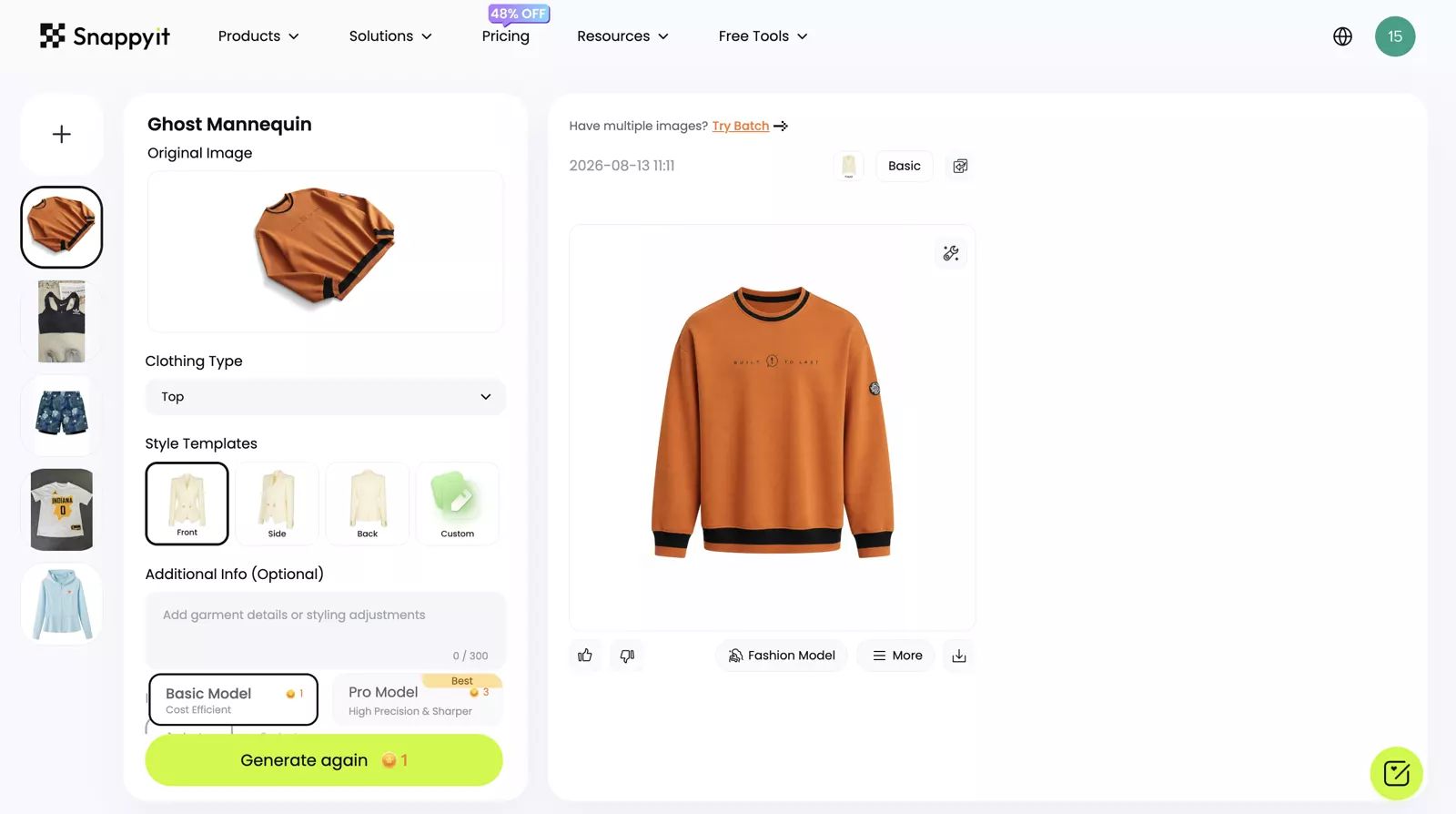
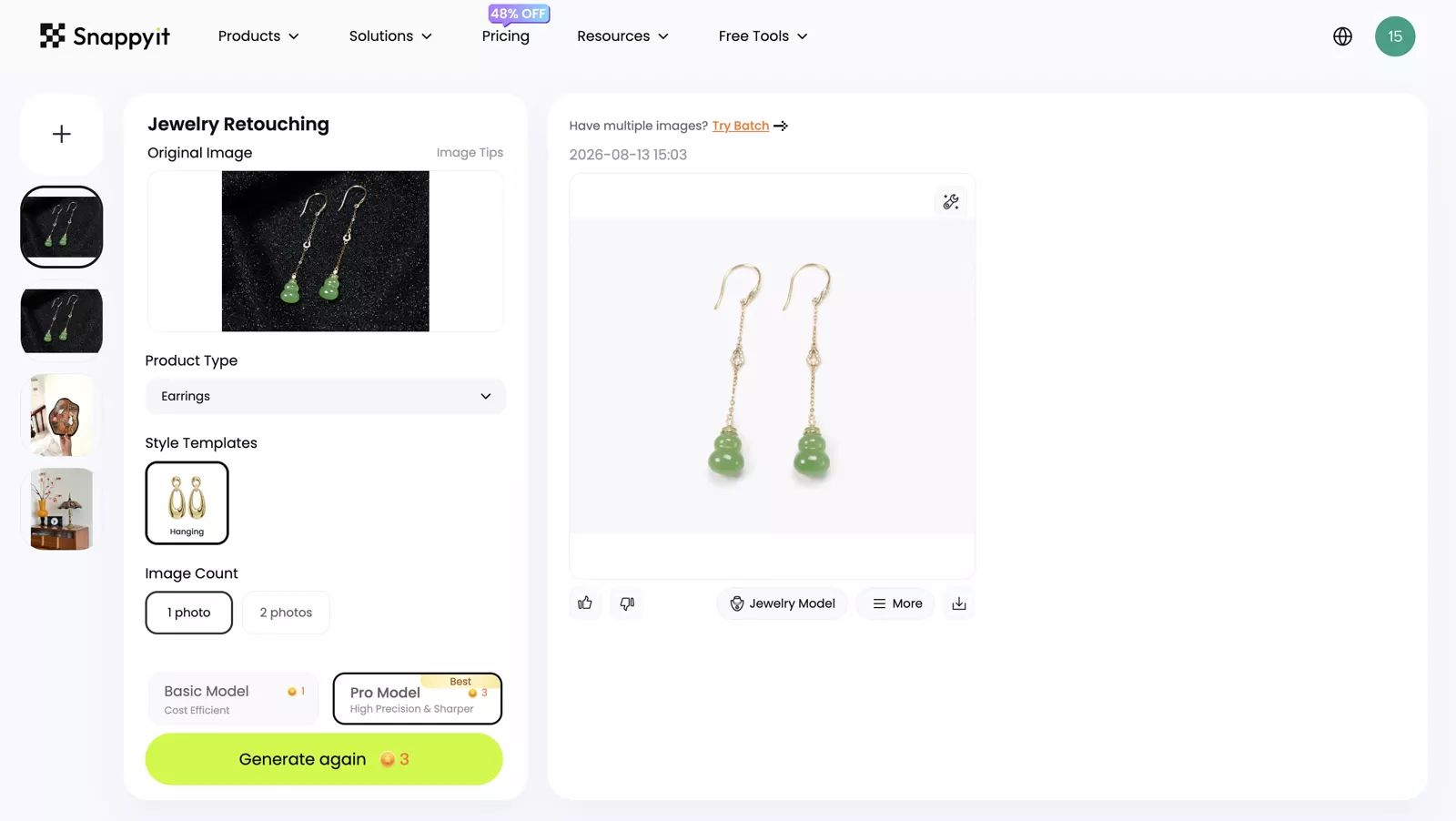
The ghost result creates a clean, conventional catalog silhouette. The jewelry result keeps the green stones, long chains, and basic item identity visible against a light background. Both are candidates for listing use, but merchants should still inspect branding, construction, hardware, stone count, and exact color.
In another reviewed example, the recolor workflow kept the plaid structure and folds readable, but the final shade differed slightly from the chosen target. The additional change-clothes example transferred the pink top onto a model instead of creating an unrelated outfit, which is useful when garment continuity matters.
Explore Snappyit product-image workflows →
2. Photoroom for Fast Dropshipping Product Editing
Best for: merchants who want an accessible general editor plus Shopify-oriented product workflows.
Outputs reviewed: recolor, Product Beautifier, and ghost mannequin results.
Watch for: the ghost output changed some garment details, so it needs a source-to-result check before listing.
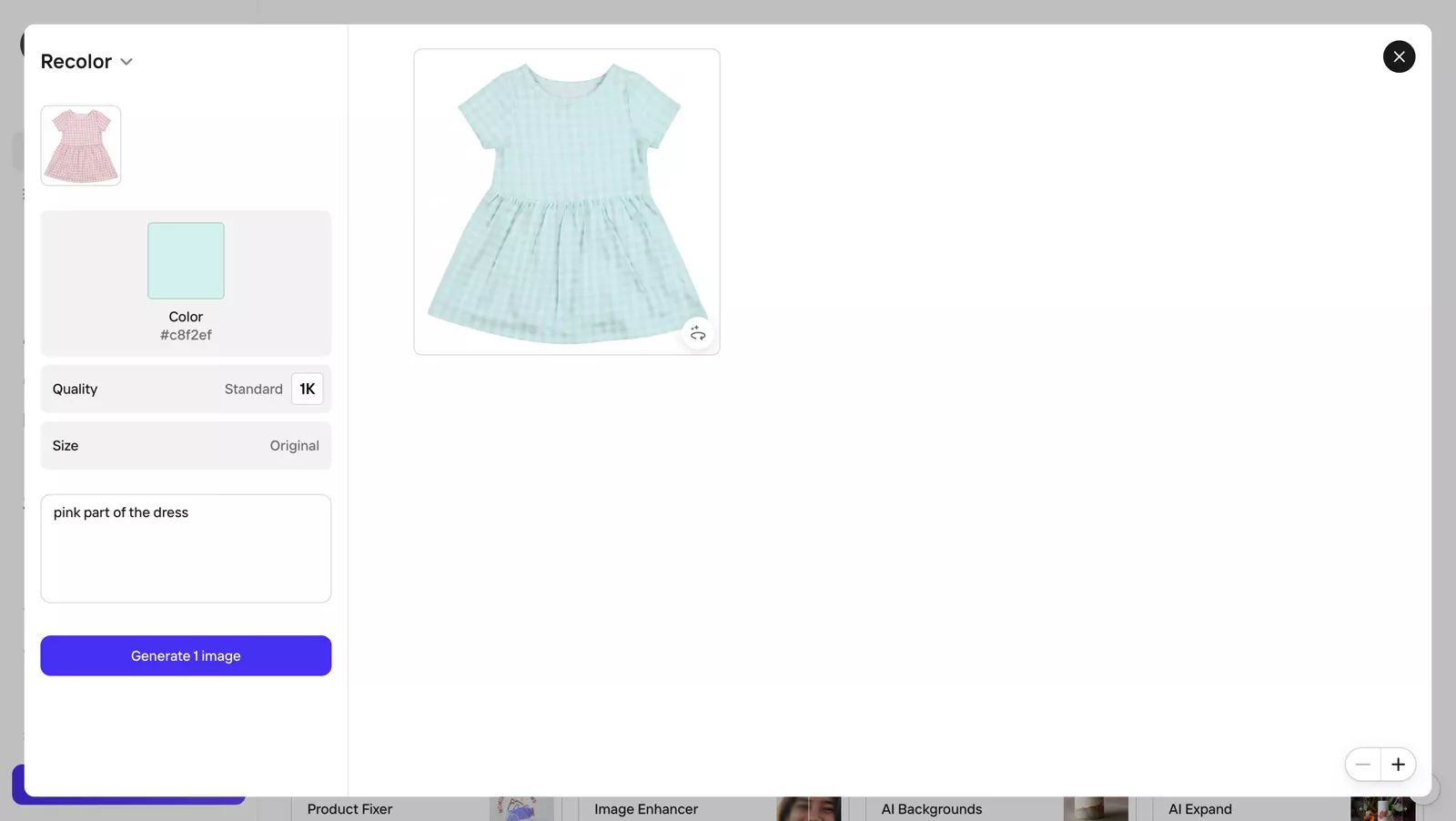
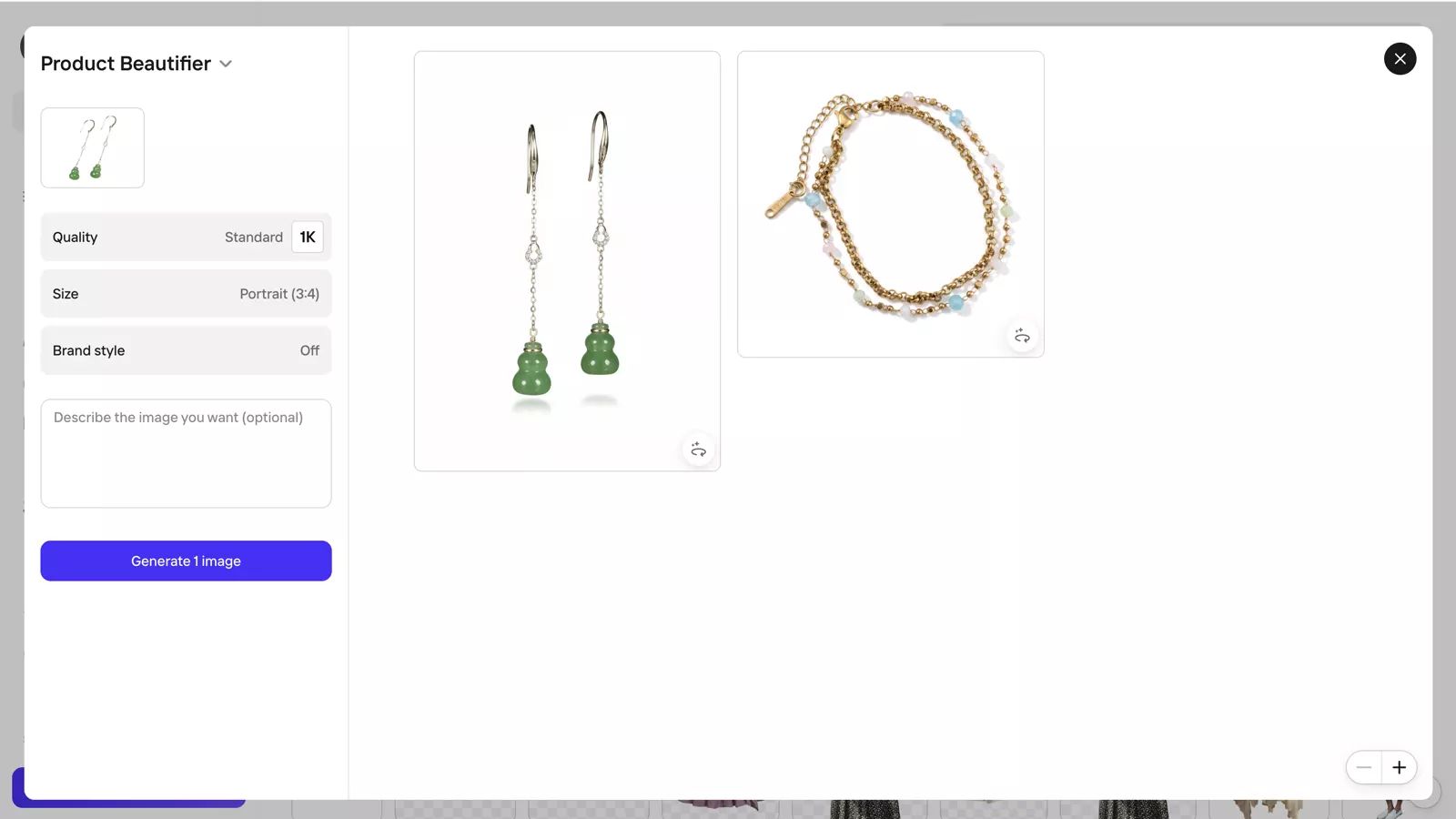
The recolor applied the selected shade evenly while retaining the visible folds and plaid structure. For the earrings, Product Beautifier produced a simple white-background composition that is easier to evaluate as a main listing candidate than a heavily styled scene.
An additional ghost mannequin example produced a useful silhouette, but some design details did not remain accurate. That makes Photoroom a practical shortlist for fast catalog editing, provided every generative result is checked against the product.
Check current Photoroom plans and allowances.
3. SellerPic for AI Models and Promotional Images
Best for: fashion sellers who want model variations, virtual try-on, product spotlights, and social-ready imagery.
Outputs reviewed: recolor, model, and jewelry spotlight results.
Watch for: the plaid recolor required manual area adjustment and still looked unnatural in the supplied result.
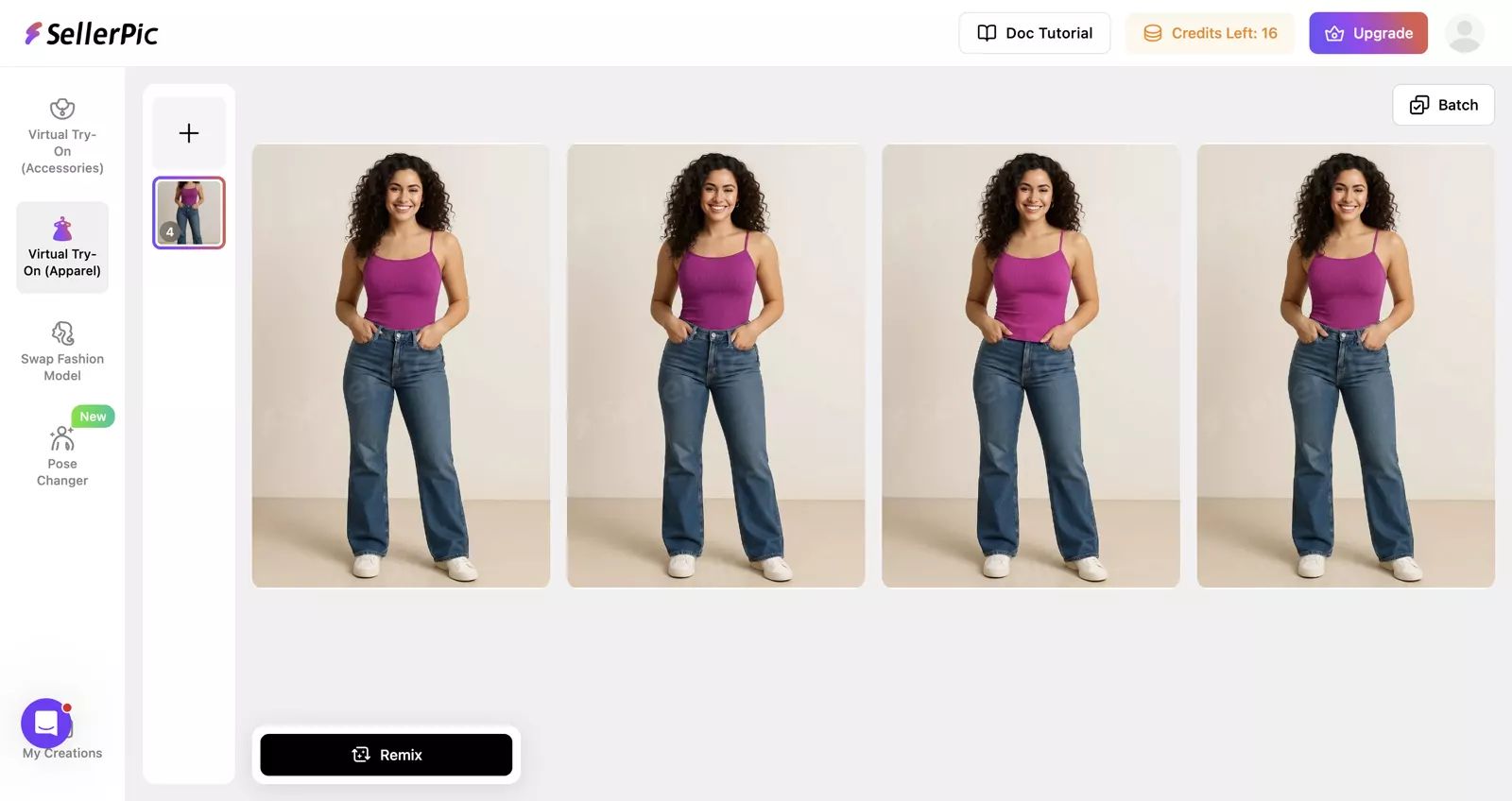
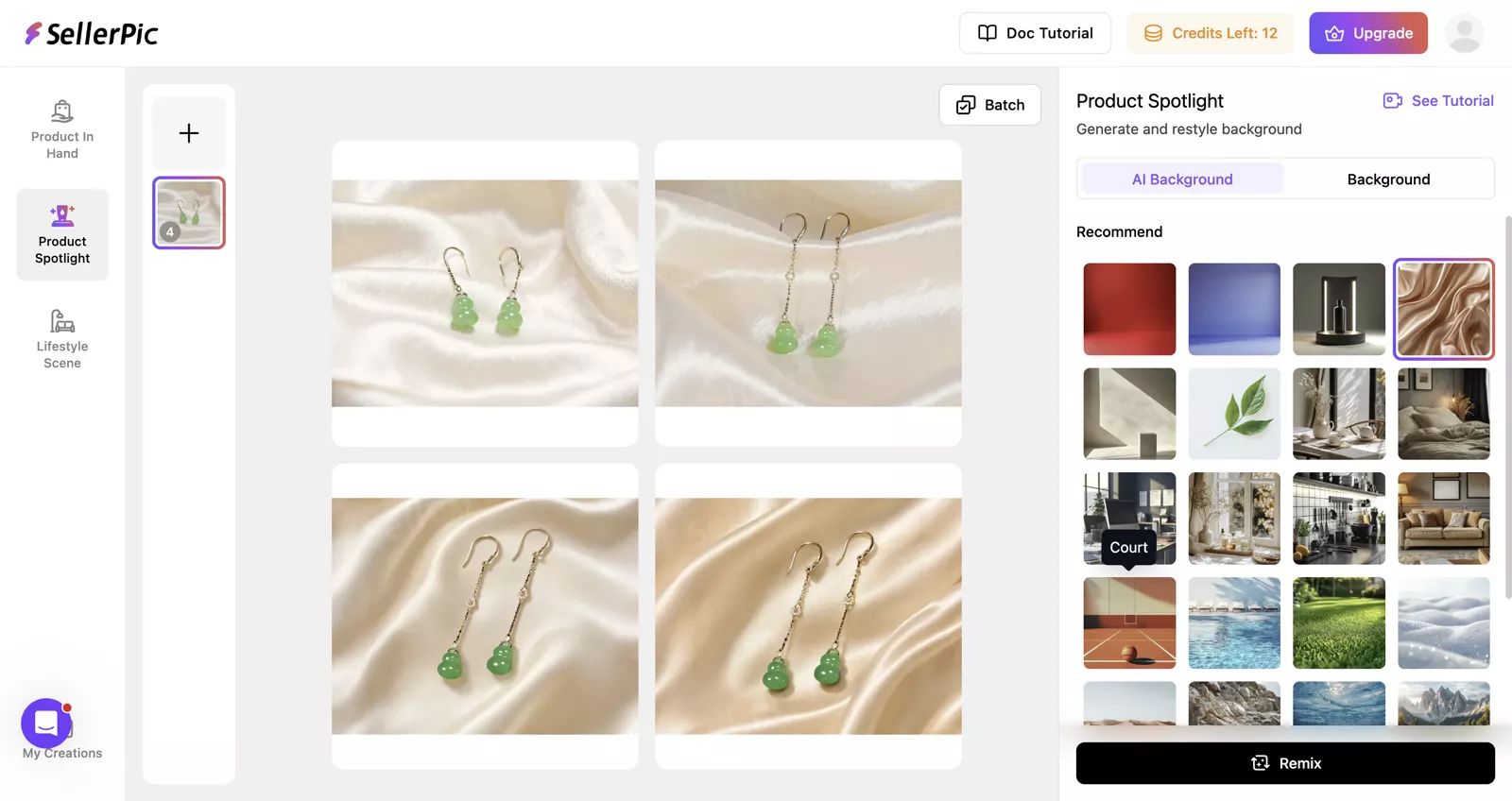
SellerPic generated complete model images based on the selected setup, with the pink top remaining identifiable across the visible variations. Product Spotlight placed the earrings into polished fabric scenes; those images look more suitable for secondary gallery slots, ads, or social content than a neutral marketplace main image.
In the additional recolor example, the patterned garment made manual selection difficult and the final treatment still looked unnatural. Merchants with patterned products should budget for masking, retries, or another recolor workflow.
Check current SellerPic plans and credits.
4. The New Black for Fashion Concepts
Best for: fashion merchants who value styling, concept development, and editorial-looking model imagery.
Outputs reviewed: ghost mannequin, recolor, and full model-image results.
Watch for: the presentation may be too concept-led for a strict catalog slot, and the recolor shade differed from the target.
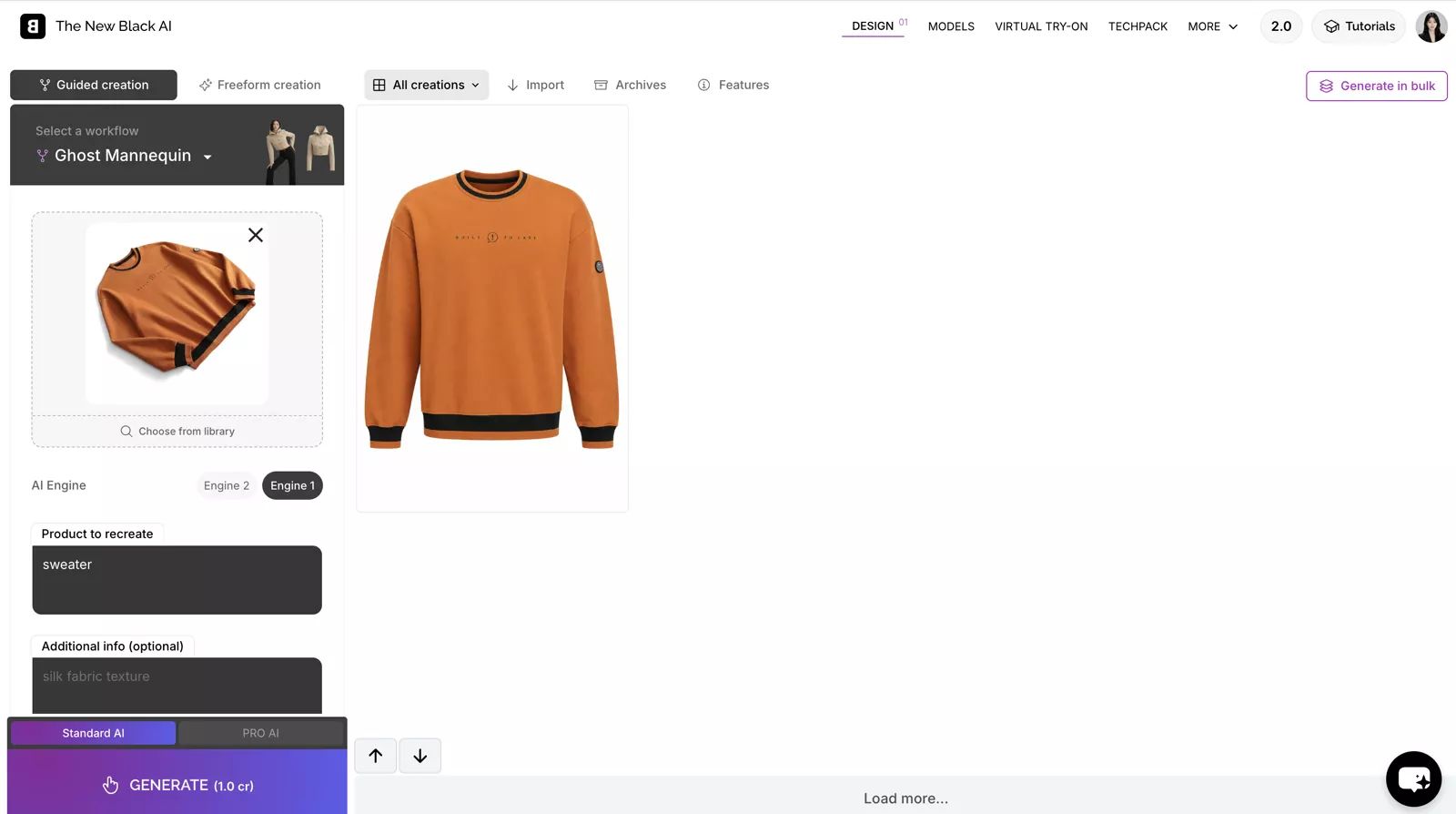
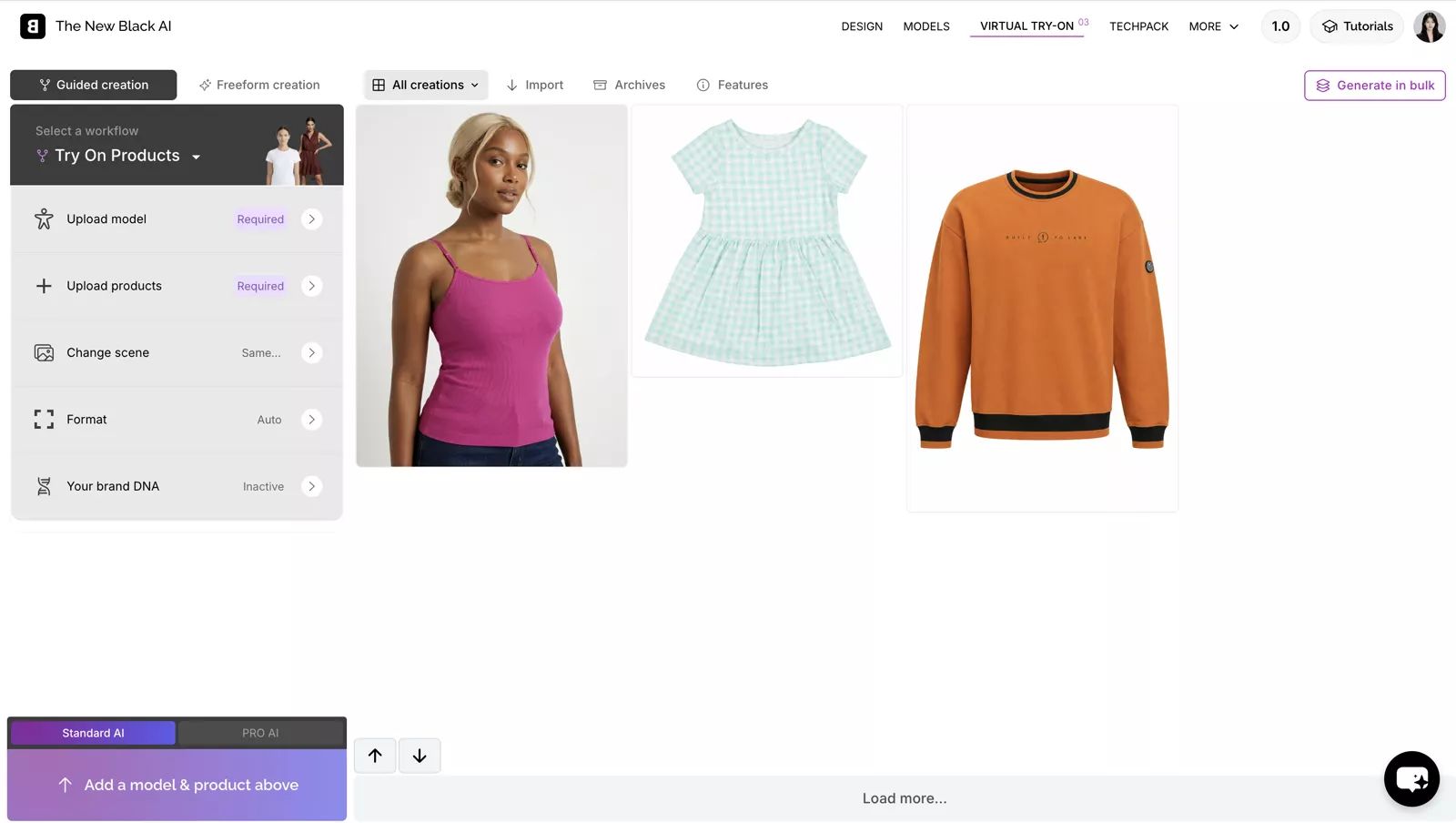
The ghost result communicates garment shape, although the visual feels more fashion-form than basic marketplace catalog. The model output gives the product a stronger editorial context. That can help a branded collection or campaign, but a merchant may still need a separate neutral main image. In the additional recolor example, the result differed from the selected target shade, so color variants need an extra check.
Check current The New Black pricing.
5. Claid.ai for Product Scenes and API Workflows
Best for: general merchandise, product-scene generation, creative editing, and teams considering API automation.
Outputs reviewed: recolor and jewelry lifestyle results.
Watch for: the earrings appeared to float in the supplied lifestyle result, reducing realism.
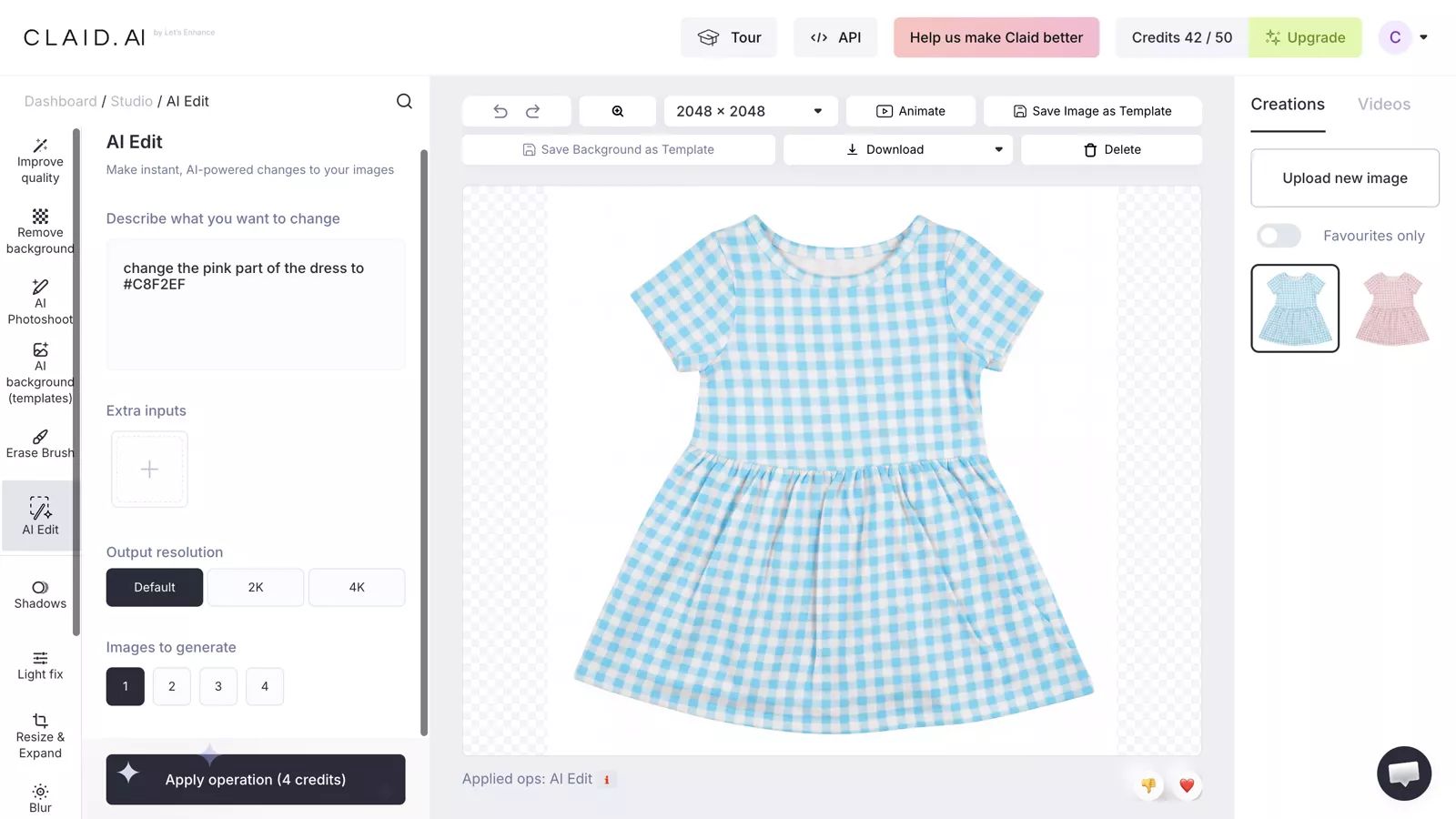
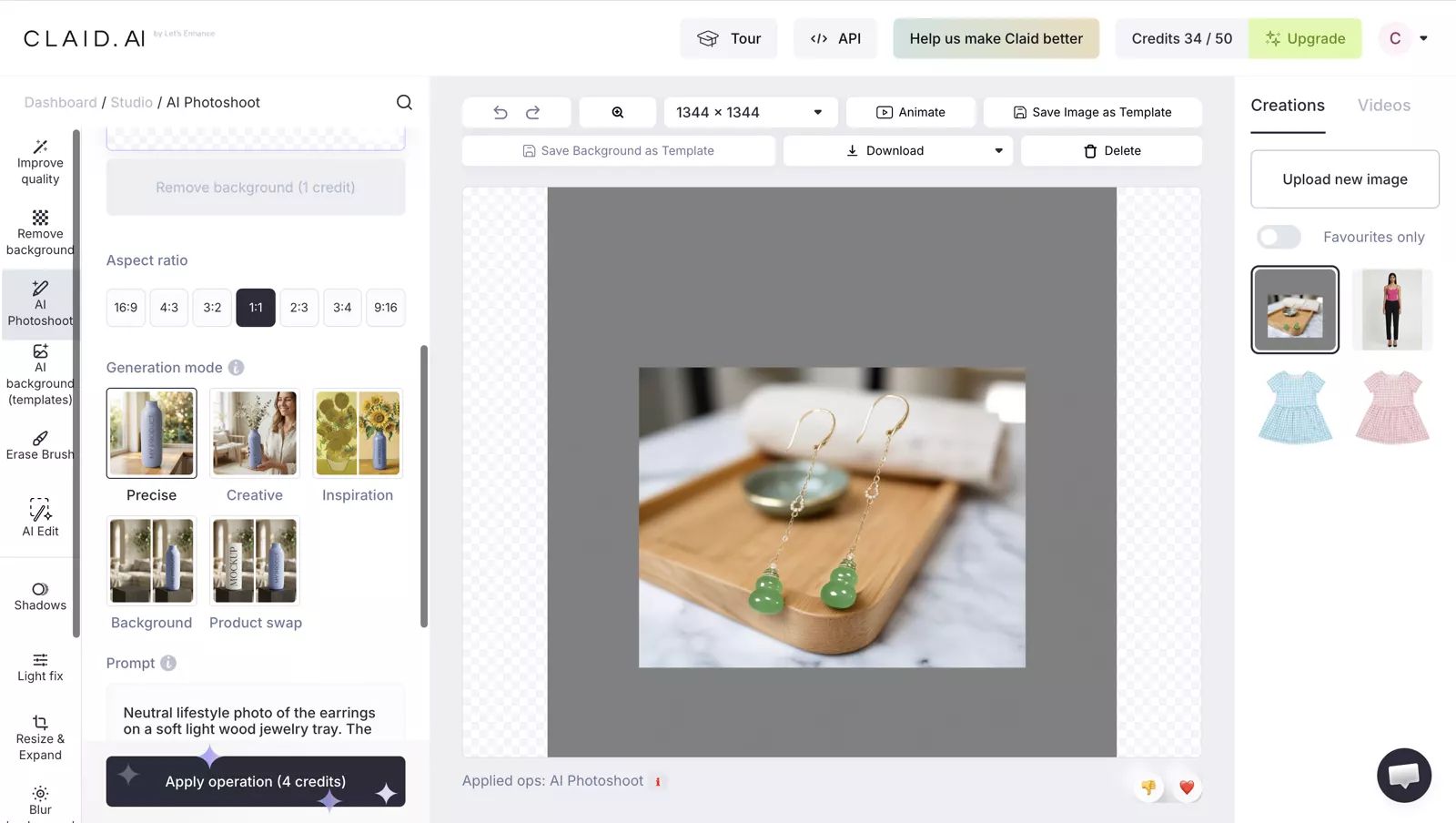
The recolor stayed inside the garment and retained visible pattern, texture, and shadow structure, though the final shade was not an exact target match. AI Photoshoot produced a more editorial scene for the earrings, but the product-to-surface relationship looked unnatural. That type of artifact matters for jewelry and accessories because shoppers inspect contact shadows and hardware closely.
We did not confirm a native Shopify integration on the official pages reviewed. Merchants should distinguish Claid's web and API capabilities from a direct storefront publishing connection.
Check current Claid plans and API terms.
6. Botika for On-Model Apparel Images
Best for: apparel sellers whose main need is on-model fashion imagery.
Output reviewed: a complete model image built around the supplied top.
Watch for: the result is less focused on the single product, and input-from-flat-lay does not equal standalone flat-lay output.
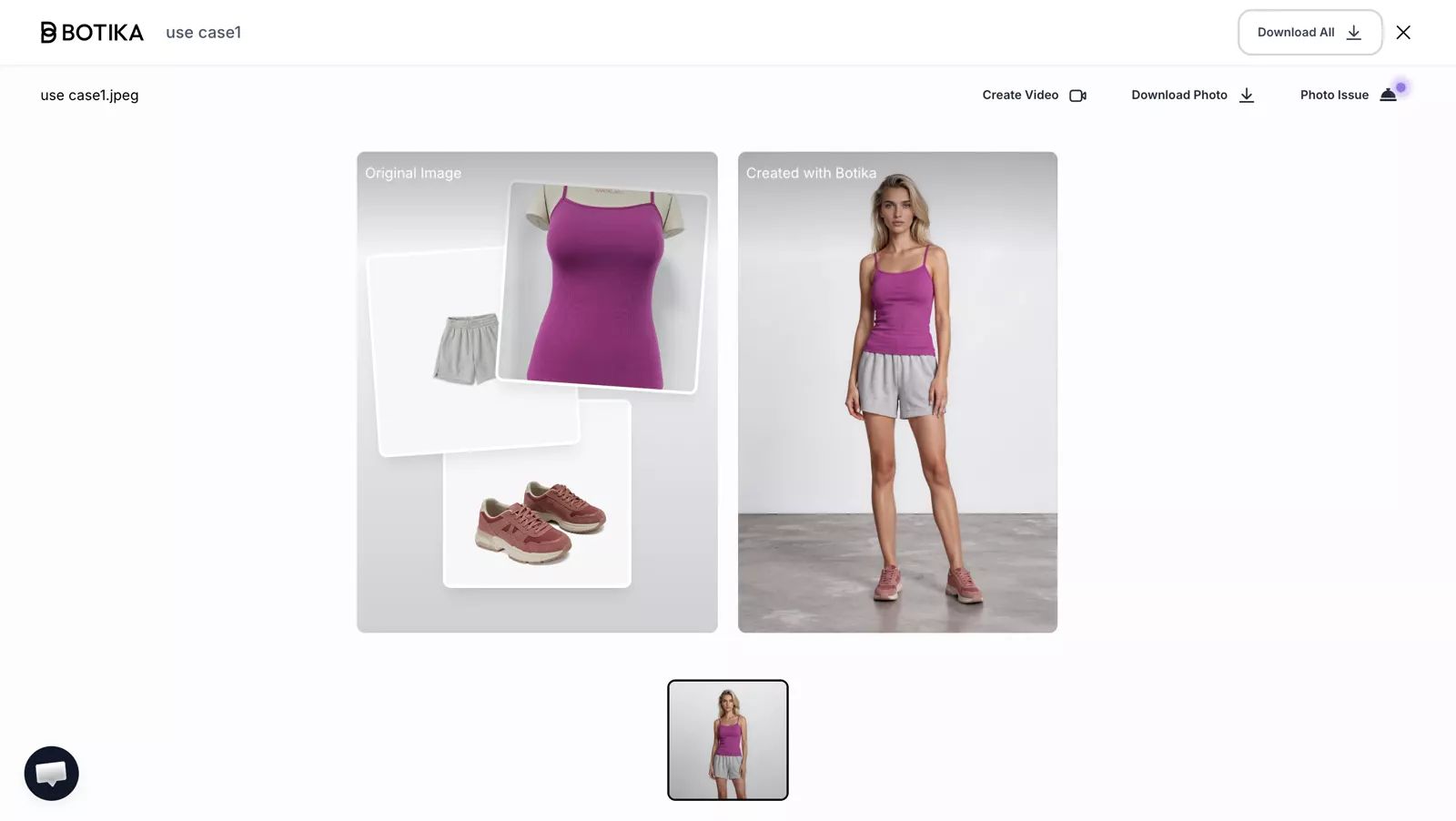
Botika created a complete model image and styled outfit around the supplied top. This gives the merchant a stronger campaign presentation, but it also introduces more generated elements that are not the product being sold. Check garment shape, color, print, layering, and whether added clothing distracts from the SKU.
Botika documents flat-lay-to-model and mannequin-to-model inputs. Those workflows support on-model generation; they should not be marked as standalone flat lay or ghost mannequin output without separate evidence.
Check current Botika pricing and image allowance.
A Four-Step AI Product Image Workflow for Dropshipping
- Confirm image rights and product facts. Obtain permission to use the supplier photos and record the real color, material, measurements, labels, construction, and available variants.
- Assign each image slot. Decide which image is the main catalog view, which shows scale or fit, which covers variants, and which can be a lifestyle or social image.
- Run a three-product pilot. Start with one patterned or branded garment, one reflective or detailed accessory, and one product with several color variants. Use only the workflows that match the image slots you need.
- Review, correct, and publish. Compare each candidate with the source or physical item, check current marketplace rules, and retain real detail photos that support the buying decision.
Track four numbers during the pilot: credits used, minutes spent, retries required, and publishable images approved. Those figures are more useful than subscription price alone.
AI Product Image Quality Control Before Publishing
- Product identity: correct item, variant, front or back orientation, and item count.
- Construction: neckline, sleeve, seams, hem, pockets, closures, straps, and proportions.
- Surface details: logos, text, prints, plaid alignment, labels, stones, hardware, and damage.
- Color and material: compare with a trustworthy reference; do not approve from memory or a stylized screen preview.
- Scene realism: contact shadows, scale, hand or body interaction, floating objects, and added accessories.
- Marketplace fit: background, crop, resolution, category rules, image slot, and product accuracy.
When a result fails, regenerate from a clearer input, use a different workflow, correct it manually, or keep a real product photo. The goal is a more useful listing—not maximum AI usage.
AI Product Image FAQ for Dropshippers
What is the best AI product image tool for a clothing dropshipping store?
Choose by the image slots you need most. Snappyit covers several of the apparel workflows reviewed here, while Photoroom is a practical general editor. Botika focuses on on-model fashion images, and The New Black is oriented toward fashion-led concepts. Test your own garments before paying because logos, patterns, seams, and color can change.
What is the best AI product image tool for jewelry and accessories?
For a clean catalog image, consider Snappyit's Jewelry Retouch or Photoroom's Product Beautifier. SellerPic and Claid offer workflows for styled scenes, secondary gallery images, or social creative. Compare shape, stone count, hardware, text, and color with the real item before publishing.
How much do AI product image tools for dropshipping cost?
Costs vary by billing term, credits, export limits, and retries. The comparison table lists the official entry prices we could confirm on August 17, 2026; Photoroom and Claid should be checked live. For a store, the more useful figure is cost per approved image after retries and review—not the headline monthly fee.
Can AI fix a low-quality AliExpress or Alibaba supplier photo?
AI can improve a small but reasonably clear supplier photo by enlarging it, reducing compression noise, and sharpening visible edges. It cannot reliably restore text, stitching, logos, hardware, or texture that is already missing or blurred. Start with the largest source file available, ask the supplier for a higher-resolution original when needed, and compare every edited result with the real product before publishing.
Can I legally edit supplier photos for a dropshipping listing?
Confirm that the supplier or rights holder permits you to use and modify the images, then check the target marketplace's current policies. AI editing does not create permission that you did not already have. Keep generated images accurate to the product you will ship, and retain real detail photos for materials, labels, measurements, and variations.
How many product images should a dropshipping listing include?
Use enough images to answer the buyer's main questions rather than targeting one universal number. A practical set often includes a compliant main image, front and back views, on-model or scale context, color variants, and close-ups of texture, labels, closures, measurements, or defects. Requirements differ by marketplace, category, and image slot, so check the current rules before publishing.
Official Sources for AI Product Image Features and Pricing
- Snappyit: product workflows and batch and plan allowances.
- Photoroom: official pages for Ghost Mannequin, Recolor, Virtual Model, Batch, and plans and Shopify publishing allowance.
- SellerPic: official Color Changer, Product Spotlight, Virtual Try-On, and Shopify app pages.
- The New Black: official AI design features and AI-generated models pages.
- Claid.ai: official clothes color changer, fashion face swap, and on-model AI pages.
- Botika: official on-model product page, flat-lay-to-model workflow, and Shopify app guide.
- Feature availability was reviewed on August 17, 2026. A dash in the table means we did not confirm that workflow as a standalone output on the official pages reviewed.
- Snappyit Pricing, Photoroom Pricing, SellerPic Pricing, The New Black Pricing, Claid Pricing, and Botika Pricing. Official pricing and plan pages checked on August 17, 2026.
- Amazon Seller Central, Product Image Requirements. Use the current page for Amazon-specific main-image and category guidance.
- The output observations in this guide come from the supplied workspace screenshots. Different source images, settings, plans, model versions, and retries can produce different results.







