



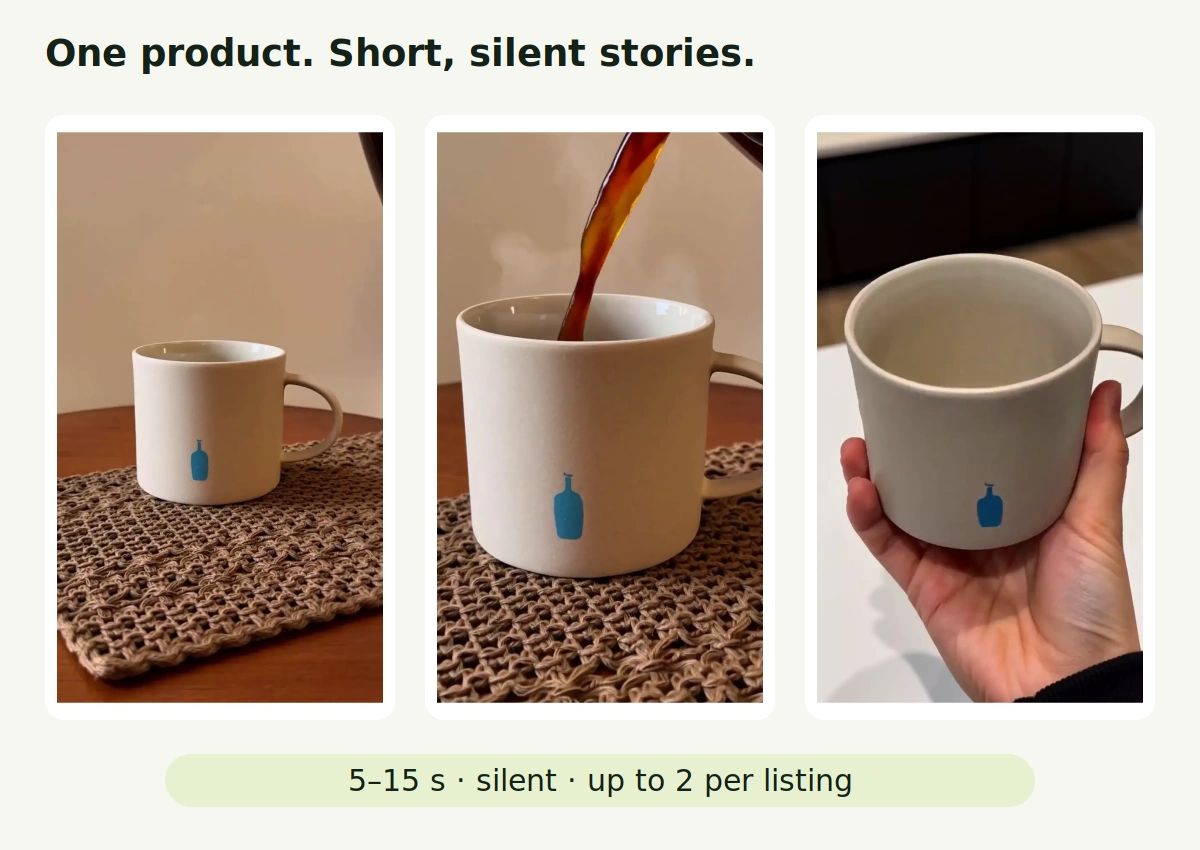

Etsy lets you add up to two videos per listing, with a maximum file size of 100 MB each and no sound after upload. Aim for 5–15 seconds: Etsy's video help page allows 3–15 seconds, but its listing guide sets a five-second minimum. Using the overlap avoids that conflict.
A useful clip answers something the photos leave unclear: how a necklace moves, how large a cup feels in a hand, or where a vintage item shows wear. Start there, then export to the specifications below.
Key takeaways
- Use the two video slots for different questions, such as movement and scale.
- Keep each export within 5–15 seconds and 100 MB. Plan the message without audio.
- Match the video's orientation to your main photo and keep the whole item clear of the edges.
- Show the item buyers will receive. Check handmade details, personalization and signs of wear before publishing.
Etsy listing video requirements at a glance
Etsy listing videos can occupy two slots per listing; the current upload guide sets a 100 MB file limit and removes audio. The table separates its specifications from our recommended export choices.
| Specification | Current Etsy guidance | Source |
|---|---|---|
| Videos per listing | Up to 2 | Video help |
| Length | Video help: 3–15 seconds; listing guide: 5–15 seconds. Aim for 5–15 seconds. | Video help, listing guide |
| Audio | Removed after upload | Video help |
| Maximum file size | 100 MB per video | Video help |
| Listed file types | MP4, MOV, FLV, AAC, AVI, 3GP and MPEG | Video help |
| Resolution | Minimum 500px; at least 1080px is ideal | Video help |
| Aspect ratio | Etsy's wording is “2:1 or 1:2”; see the export examples below | Video help |
| Upload methods | Etsy.com and the Etsy Seller app | Video help |
Specifications checked November 10, 2026. These help pages do not display a revision date. Use the current two-video allowance rather than older instructions that describe one slot. Although AAC appears in Etsy's file-type list, an audio-only file cannot show your product; MP4 is a practical video export choice.
For titles, tags and the rest of the listing, use the separate Etsy listing guide.
How long can an Etsy listing video be?
Keep an Etsy listing video between 5 and 15 seconds to fit both of Etsy's published length ranges.
The video help page says “3-15 seconds,” while the listing guide says “5-15 seconds.” A four-second clip fits the first range but falls outside the second. There is little reason to build around that discrepancy when a slightly longer shot works for both.
As an editing suggestion, 8–12 seconds gives a simple action room to finish: tilt a glazed cup, fasten a clasp or open a small pouch. This is a planning choice, not an Etsy requirement. Hold the final view briefly so shoppers can inspect it.
Trim the export yourself rather than relying on the upload process. Etsy's smartphone filming guide says videos exceeding the upper limit will be clipped. Your own edit lets you preserve the detail or finished action that matters.
Etsy video size, resolution and aspect ratio
Etsy sets a minimum resolution of 500px and calls 1080px or more ideal; for composition, follow its aspect-ratio guidance and match your primary listing photo.
What “2:1 or 1:2” means for your export
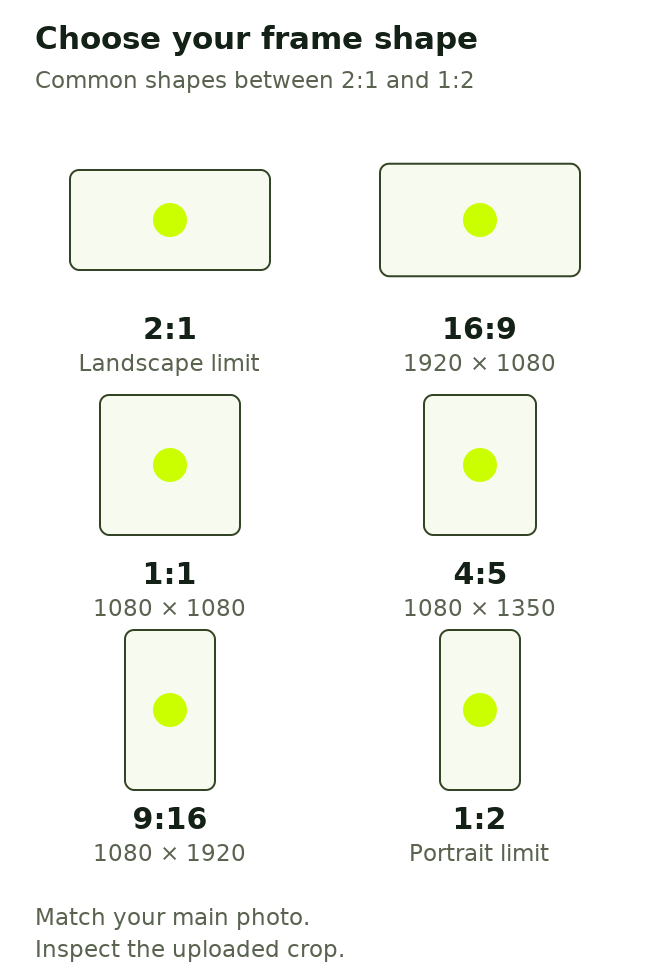
Aspect ratio describes width compared with height. A 2:1 frame is twice as wide as it is tall; a 1:2 frame is twice as tall as it is wide. Etsy uses those two ratios in its help page. These common export shapes fall numerically between the endpoints:
| Shape | Example dimensions | Width divided by height |
|---|---|---|
| 16:9 landscape | 1920 × 1080px | 1.78 |
| 1:1 square | 1080 × 1080px | 1.00 |
| 4:5 portrait | 1080 × 1350px | 0.80 |
| 9:16 portrait | 1080 × 1920px | 0.56 |
Square and 4:5 are useful starting layouts when you have room to reframe the product. Etsy's help page does not list each of these as a separate preset, so check the actual uploaded result before publishing. Keep handles, chains and other projecting parts away from the crop edges.
Match your first photo
Use the same orientation as your primary photo so the gallery feels consistent. A tall clip may leave a small product hard to inspect when viewed in a wider space.
For still-photo preparation and crop choices, see image sizes for each marketplace. Preview both the still and the video on a phone; matching orientation does not guarantee identical crops in every view.
Keep the file under 100 MB
Trim unused footage before reducing quality. A short H.264 MP4 is a sensible compatibility choice, although Etsy does not name H.264 as a requirement. Check the saved file's size, dimensions and playback rather than judging the editor's preview alone.
For future iPhone recordings, Settings → Camera → Formats → Most Compatible selects H.264 video, according to Apple Support. That setting affects new recordings; it does not convert a clip you already made. Export an existing clip through your editor if conversion is needed.
How to add a video to an Etsy listing
You can upload listing videos through Etsy.com or the Etsy Seller app, using the listing's Photo and video area.
On desktop
- Sign in to Etsy.com and open Shop Manager.
- Choose Listings, then open the item you want to edit or create a new listing.
- Go to Photo and video.
- Drag in the files, or select Upload and choose them.
- Let the upload finish, review the media and save your listing changes. For a new listing, choose Publish only when the whole listing is ready.
In the Etsy Seller app
- Open Listings and choose the item.
- Select Listing to see its details.
- Tap the plus sign under Photo and video, or choose View all → Add a video.
- Select the files, review them and save the changes.
These paths follow Etsy's upload instructions. The seller app is the relevant app here. After saving, inspect the listing as a shopper would; the upload guide does not specify a fixed display position for the second video.
How to make an Etsy video that works without sound
An Etsy video needs to explain the product through the picture alone, because its audio is removed after upload.
Start on the product
Make the opening frame useful even before anything moves. Show the complete item against a simple background, then move toward the detail. An empty tabletop or a long logo intro uses time that could answer a buyer's question.
Put the key action near the beginning. For a handmade cup, that could be a gentle tilt revealing the glaze. For earrings, it might be a small turn that shows their length and how they hang. Do not depend on narration to explain what changed.
Give each video one job
Use one clip to show movement or material, and the other to show scale or use. A slow turn can reveal a pendant's edges; a separate clip worn on a person can give context for its size. A ruler or stated measurements still matters when the exact size is important.
Two near-identical turns use both slots without answering a second question. Write a short brief for each clip before filming: “show the texture” and “show how it fits in a hand” are clear enough.
Make the repeat easy to watch
If you want the clip to loop smoothly, begin and end with similar framing. Move slowly, finish the action and return to a stable pose. Avoid a sudden zoom or a hand crossing the lens at the final frame.
This is an editing suggestion rather than a promise about autoplay. Review the clip from start to finish and watch the transition when it repeats.
What to film for handmade and vintage items
- Texture: move light across stitching, wood grain, glaze or metal without changing its apparent color.
- Scale: hold the item, wear it or place it beside a familiar object.
- Use: open the lid, fasten the clasp or show how the piece sits in a room.
- Personalization: show a finished example with legible engraving or custom work.
- Condition: include chips, fading, repairs or other relevant wear on a vintage item.
Etsy's listing-video ideas recommend showing use, scale and details, including wear on vintage pieces. A clear view of a flaw is more useful than a camera move that hides it.
Make an Etsy listing video from your product photos
Product photos can provide the starting material for a short video, but the finished clip must still represent what the buyer will receive.
Start with sharp photos of the actual item. Include the views that the motion will reveal, especially a clasp, handle or reverse side. For jewelry, the photography guide covers preparing details that are easy to lose in an image.
The two mug examples below were made in Snappyit's AI Image & Video Editor, where we animated each product photo with MiniMax H3, using an 8-second duration and the 9:16 setting. The tabletop photo was the input for the pouring clip; the hand-held photo was the input for the brewing clip. Each example used one photo.
For your own version, keep the movement simple and prepare a 5–15 second export in the orientation you chose for the listing. Inspect the generated clip and edit it before use.
Two mug examples
Compare each input photo with its output frames and the full clip below. Look at the rim, handle, proportions and printed mark as the camera and setting change.
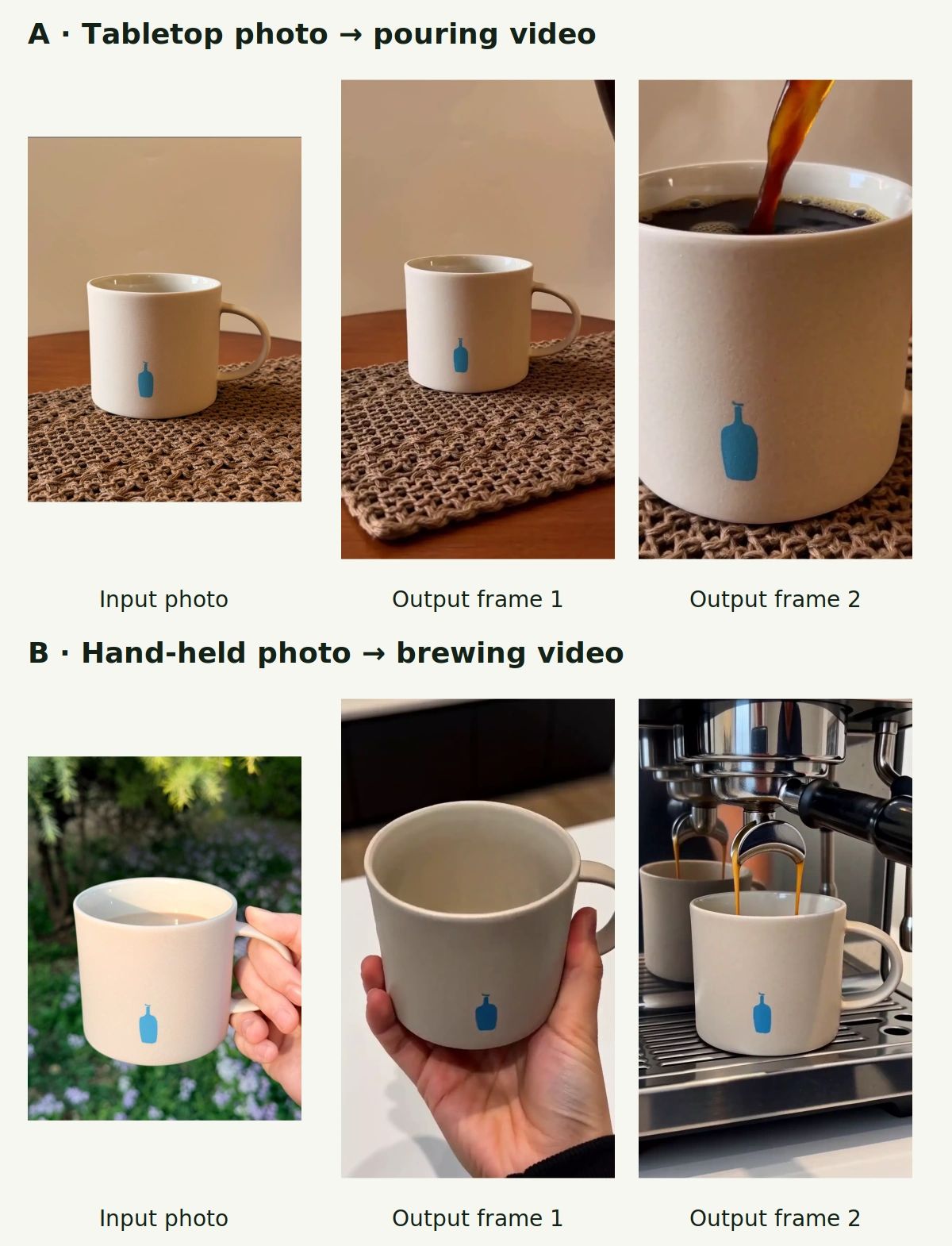
Tabletop and pouring. This clip starts with the whole cup, then moves closer as coffee is poured.
Grip and brewing. This clip starts with a hand holding the cup, then cuts to an espresso machine and latte art.
Both supplied clips are 8 seconds at 768 × 1344px. They exceed the published minimum resolution but fall below the 1080px quality target. Use a higher-resolution original for a sharper final listing. These playback copies have their audio removed; no Etsy upload test was performed.
The pouring clip ends with a floating product shot, a creative way to finish the sequence. Check that the cup's shape, handle and printed mark stay accurate. Pair stylized motion with a tabletop or hand-held view when buyers need to judge scale or use. Both clips end on different compositions from their opening frames; if you want a smooth loop, adjust the final edit to bring the ending back toward the opening view.
Check shape, color, lettering, stone settings and the number of parts throughout the clip. Reject frames that change the product.
Keep original product photos and footage. For a one-off vintage item's condition or a handmade detail that must be exact, film the real item.
The jewelry seller workflow offers related photo preparation ideas.
Etsy video upload problems and fixes
When an Etsy video upload fails or looks wrong, check the saved file against the limits before changing your whole filming setup.
The file will not upload
Check that it is within 100 MB and uses a listed video format. If necessary, trim or compress it and export an MP4. Try the original saved file rather than a copy compressed by a messaging app.
The ending is missing
Check whether the file exceeds 15 seconds. Etsy's filming guide describes clipping beyond that limit. Export your own shorter edit so the final action stays intact.
The result looks blurry
Inspect the file's actual dimensions and focus. Start from the original capture, keep the light steady and aim for Etsy's recommended resolution. If fine texture is already missing in the original, a larger export will still look soft.
The sound disappeared
This is expected: Etsy removes audio. Replace a spoken explanation with a visible action, or keep the necessary information in the listing description.
Part of the product is cropped
Recheck the frame shape, leave more space around the item and inspect the uploaded version. Matching the main photo's orientation helps presentation, but it cannot prevent every crop across devices.
Etsy listing video checklist
Before saving, check the export and the listing preview together:
- Each video answers a different buyer question.
- Both clips fall within 5–15 seconds.
- Each file is within 100 MB and uses a listed video format.
- Resolution meets Etsy's minimum, with at least 1080px as the quality target.
- The frame follows Etsy's ratio guidance and matches the main photo's orientation.
- The product is clear in the opening frame and understandable without sound.
- The edit ends cleanly and repeats smoothly if you choose a loop.
- Materials, personalization, size cues and condition match the actual item.
Frequently asked questions
Do Etsy listing videos have sound?
No. Etsy removes audio when a video is uploaded to a listing. Make the action understandable without narration or music. Show the product clearly and keep essential written information in the listing description. To start from a photo, create a short product video.
How many videos can you add to an Etsy listing?
You can add up to two videos per listing. Both the current video help page and the listing creation guide state this allowance. Give each video a separate purpose, such as showing a material in motion and showing the item's size in use.
What is the best aspect ratio for an Etsy video?
Match the orientation of your primary listing photo. Square or 4:5 can be useful editing choices, but Etsy does not name one universal best ratio. Its help page gives “2:1 or 1:2” as its guidance. Inspect the uploaded crop before publishing.
Can I add a video from the Etsy app?
Yes, through the Etsy Seller app. Open Listings, choose the item and select Listing. Then use the plus sign under Photo and video, or View all followed by Add a video. Select your files, review the media and save the listing changes.
Do videos help Etsy search?
Etsy's video help page says listing videos can help improve how listings appear in search. That is not a guarantee of higher rankings or more orders, and the cited help page gives no percentage increase. Make the clip useful to shoppers and follow our Etsy listing guide for titles, tags and supporting photos.
Prepare a short video that answers one question
A useful Etsy listing video shows something buyers need to see: movement, texture, scale or condition. Keep the export within 5–15 seconds, plan it without sound and use the second slot for another clear purpose.
If you already have suitable product photos, explore a short listing video from those photos, then inspect every visible detail against the real item. Use original footage when accuracy depends on showing the exact piece.
References
- Etsy Help: How to Add Listing Videos — upload limits, formats, audio and upload paths.
- Etsy Help: How to Create a Listing — current video allowance and the alternative minimum length.
- Etsy Seller Handbook: How to Take Listing Videos With Your Smartphone — filming, trimming and color accuracy.
- Etsy Seller Handbook: 3 Types of Listing Videos That Online Shoppers Love — scale, use and vintage condition.
- Apple Support: Transfer photos from your iPhone or iPad — Most Compatible recording setting.