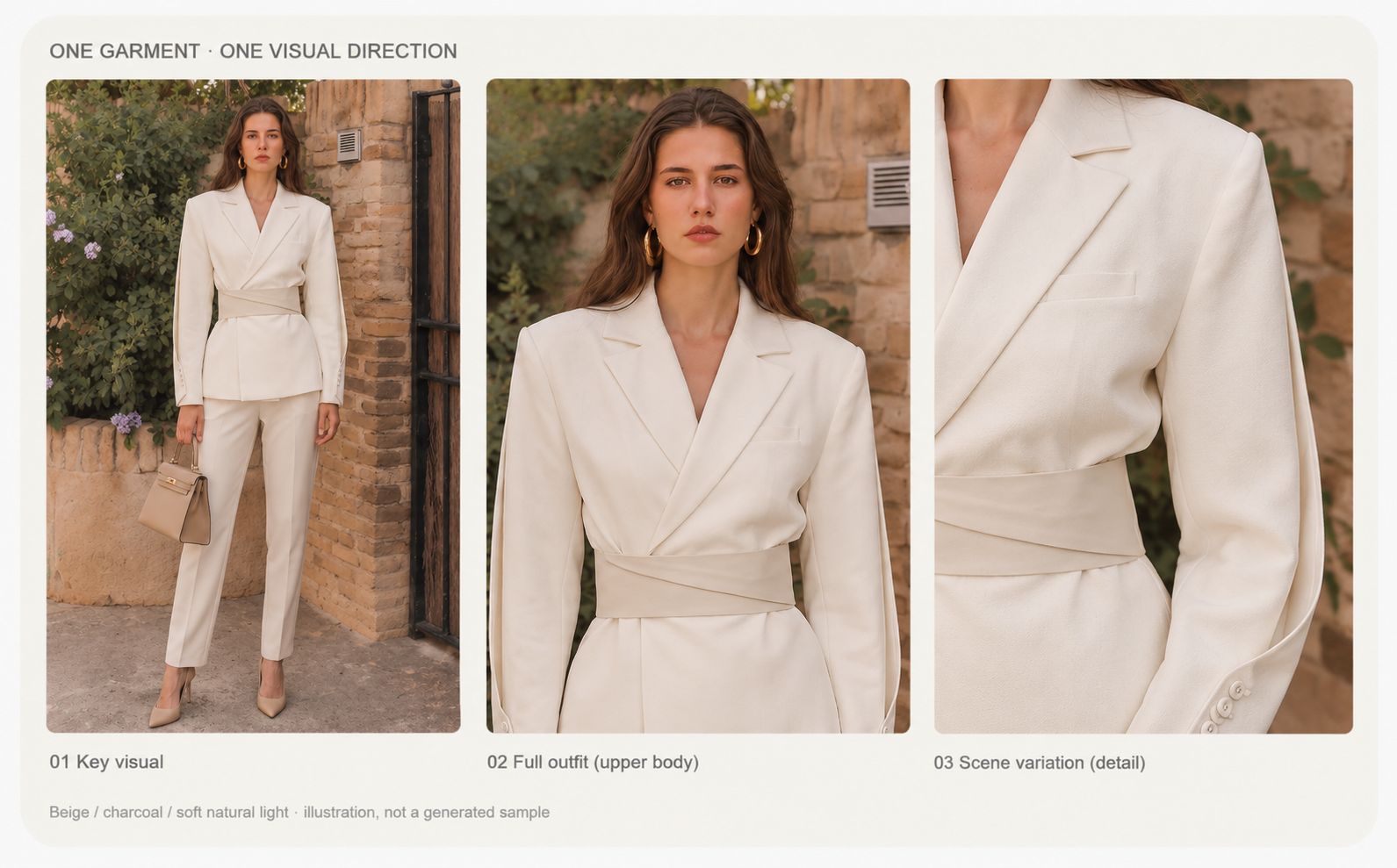
A useful AI fashion lookbook should help customers see how garments work together and how each look expresses the collection’s style. The same garment should retain its key details across images, while models, settings, lighting, and color follow a consistent visual direction.
This guide uses an ivory jacket as a running example, taking you from source photos and a visual brief to the first reference image, a complete image set, and final review and layout. It focuses on a repeatable workflow and the decisions you need to make at each stage.
For fashion brands, independent designers, resellers, and content teams, the practical question is: how can you use existing assets to create a lookbook that is ready to publish and accurately represents the real garments?
What Is an AI Fashion Lookbook?
What Is a Fashion Lookbook, and Where Is It Used?
A fashion lookbook is a curated set of images showcasing a clothing collection, styling ideas, and a brand’s visual identity. It helps readers understand how individual pieces relate to one another and how the collection can be worn.
Where you plan to use the lookbook will shape both its content and production requirements:
| Use | Content focus | Production requirements |
|---|---|---|
| Collection launch | Collection theme and complete looks | Consistent visuals and a coherent image sequence |
| Ecommerce website | Styling inspiration and product discovery | Clear garment presentation and links to featured products |
| Social media | An immediate impression of the collection’s style | Placement-specific formats and mobile readability |
| Email marketing | Selected looks and campaign information | Lightweight files and a clear call to action |
| Wholesale presentation | Collection overview and product selection | Clear styles, product codes, and product information |
These different uses call for different content and formats, so start by defining the lookbook’s purpose. Then decide on image count, model count, aspect ratios, scene complexity, and the level of product detail to include.
How Does AI Help Create a Fashion Lookbook?
AI can help create on-model images, replace models or backgrounds, explore different settings, and produce variations in composition. The available options depend on the tool you choose and the source images you provide.
A typical workflow follows this sequence:
Real clothing photos → visual planning → AI-assisted image creation → human review → layout → publication
What Makes a Successful AI Fashion Lookbook?
A successful AI fashion lookbook should meet three criteria: accurate garment details, a cohesive collection theme across outfits and images, and content suited to the intended channel.
Reference images can guide the style, but garment accuracy still requires human review.
Why Use AI to Create a Fashion Lookbook?
Reduce the Budget and Coordination Needed for a Full Photoshoot
A traditional photoshoot involves coordinating models, photographers, locations, styling, and post-production. By working with existing clothing photos, AI can reduce the need for some location shoots and reshoots, making lookbook production more accessible to teams with limited budgets.
Explore Visual Directions and Update Content More Easily
The same garment can be used to explore different settings and visual directions. Once a direction is approved, the team can create additional looks or channel-specific versions with less need to organize a new photoshoot for every update.
Measure efficiency by the content that passes review.
Prepare Your Clothing Assets
Before generating images, put together a source package you can use to check the results. Areas that are unclear or hidden in the original photos are more likely to be reinterpreted during generation.
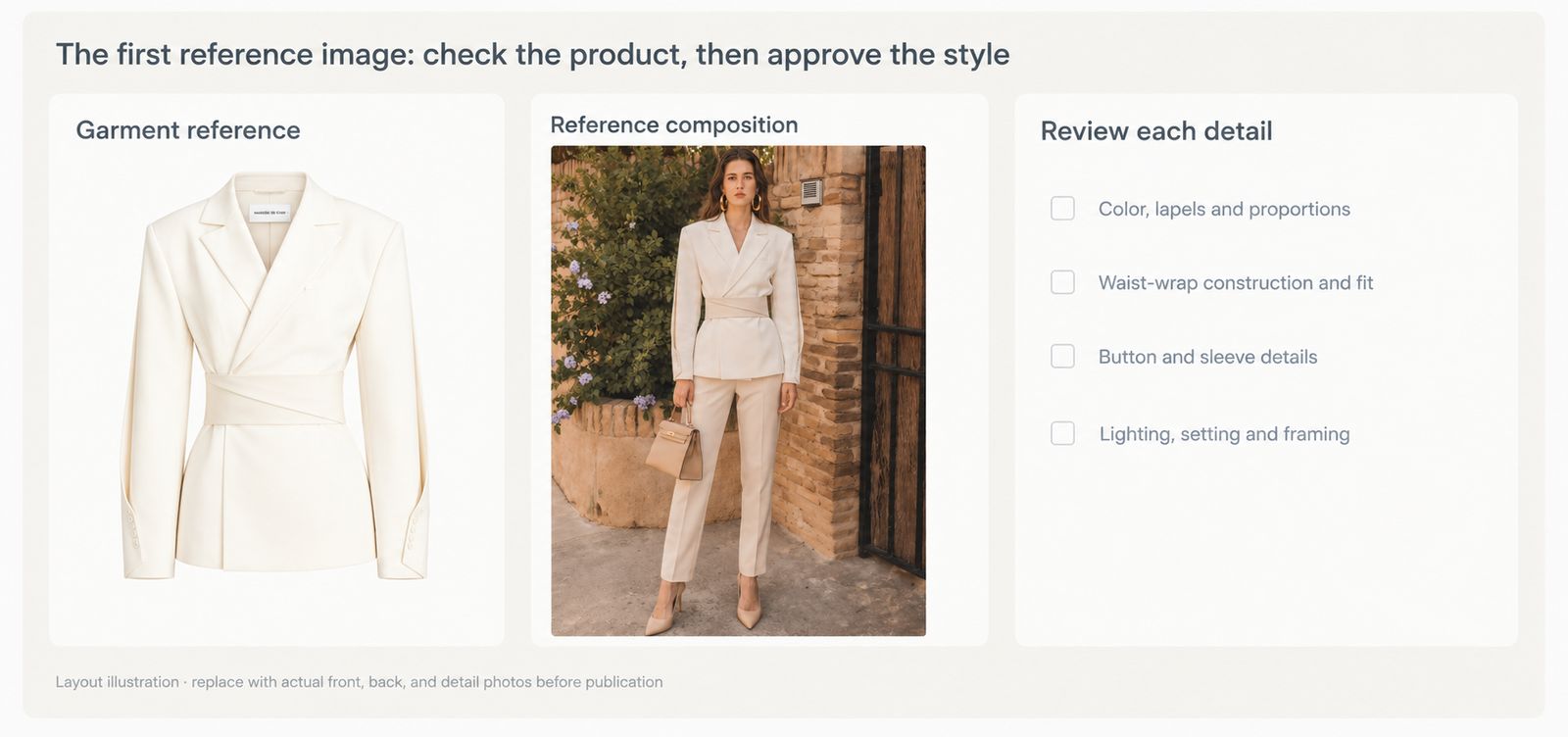
Evidence note: the two workflow graphics in this article are planning illustrations. They do not document an actual generation test. For a real product, use your own front, back, detail, and condition photos as the accuracy reference.
Organize Your Assets in Four Steps
- Collect front and back photos. Show the entire garment where possible, keeping hangers, arms, and other objects away from the neckline, cuffs, and hem. Side views or existing on-model photos can provide additional information about its construction.
- Add close-ups of key details. Photograph the fabric, prints, buttons, zippers, pockets, and labels. Avoid editing that removes the garment’s natural texture or conceals the actual condition of a secondhand item.
- Record product and styling information. Note the style, color, size, and material. Confirm the trousers, footwear, and accessories used in each outfit, distinguishing products for sale from styling props.
- List the details that must remain unchanged. Turn the garment’s defining features into a review checklist. Check every generated image against the original assets.
For the ivory jacket shown here, focus on its notched lapels, cross-wrap waist construction, sleeve buttons, and hem length. Build your checklist from the actual garment rather than assuming that every jacket has the same details.
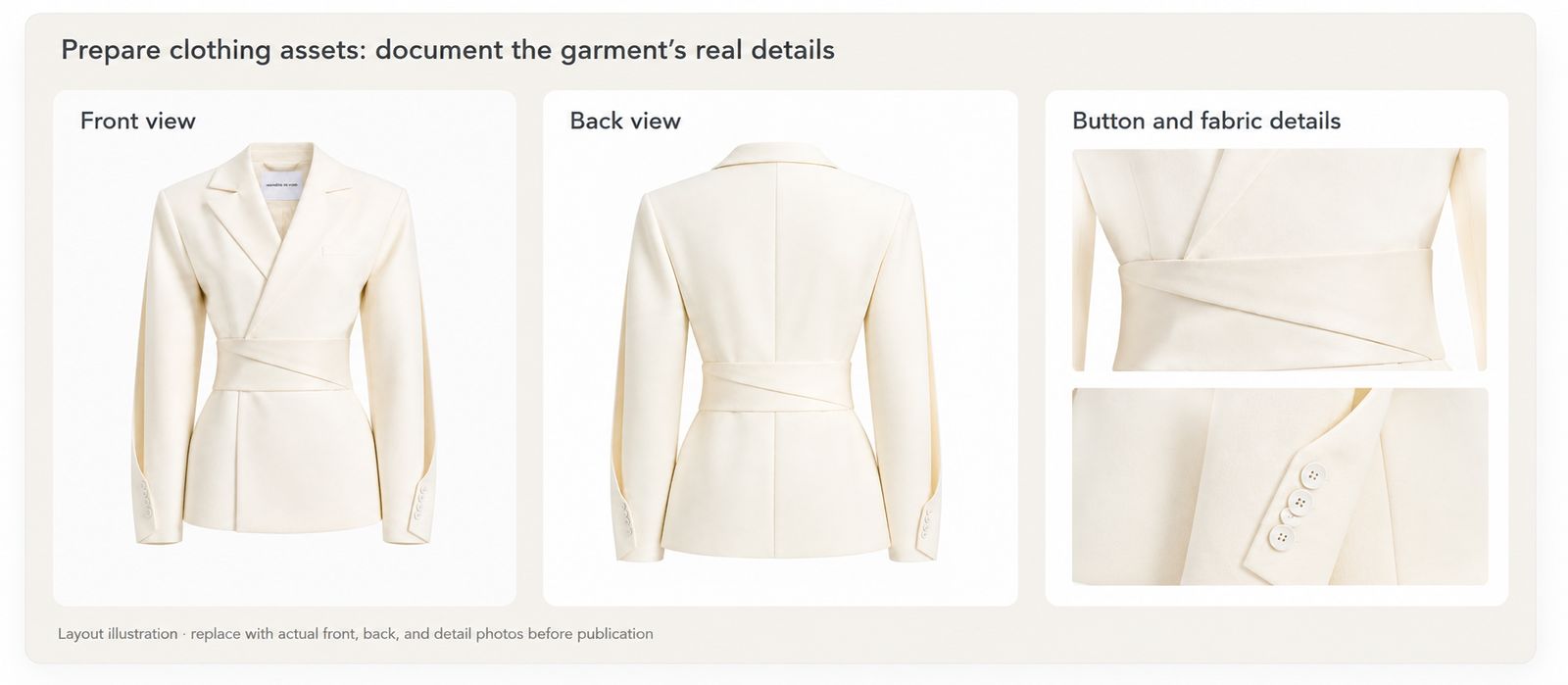
Keep the original photos unchanged. A generated image may look cleaner or sharper, but it should not replace the source material used to verify the product.
Create a Consistent Visual Direction
A concise visual brief helps you decide whether each new image belongs in the same collection. Define the direction before selecting models and settings.
Here is a sample brief for the ivory jacket:
| Element | Example choice |
|---|---|
| Purpose | Collection webpage and social carousel |
| Target customer | Customers who prefer simple everyday styling |
| Collection theme | Relaxed tailoring in a sunlit courtyard |
| Color palette | Ivory, warm stone, muted green, and tan |
| Setting | Stone walls, wooden gates, and courtyard greenery |
| Lighting | Warm natural light, with consistent garment color |
| Model direction | Natural, relaxed, and understated |
| Poses | Standing and seated poses, keeping the garment visible |
| Framing | Full-length and medium shots, with the garment as the focus |
| Deliverables | Six editorial images, supported by real detail photos |
Next, distinguish the elements that should stay fixed from those that can vary.
Keep consistent: garment identity, the main outfit, color palette, lighting direction, and model style.
Allow variation: poses, framing, and background positions within the same visual setting.
A shift from a sunlit courtyard to a neon night scene can make the collection feel disconnected. Change only a few variables at a time so that inconsistencies are easier to trace.
Visual references guide the mood. Real clothing photos verify the product. Keep these roles separate.
Choose Your Workflow and Create the First Reference Image
Choose the workflow based on the assets you already have.
| Workflow | Required assets | Best suited to | Main risk |
|---|---|---|---|
| Real garment + AI model | Clear garment photos, with on-model references where needed | Adding on-model and styling views | Changes to proportions, drape, or details |
| Existing on-model photo + background replacement | An existing photo of someone wearing the garment | Exploring new settings and moods | Inconsistent edges, lighting, or shadows |
| Full AI generation | Visual references and a concept description | Exploring collection concepts | Clothing that differs from the real product |
If you only have photos of the jacket itself, start with a tool that supports real garment inputs for on-model image creation. If you already have a suitable on-model photo, replacing the background may reduce the need to regenerate the relationship between the clothing and the body.
Test One Image First
- Upload the source assets. Confirm that they show the correct style and color.
- Select the available model, pose, and setting controls. Follow the visual brief.
- Create a composition that is easy to review. Start with a front-facing pose or slight turn, avoiding arms or hair that obscure key details.
- Compare the source and generated images side by side. Check the product before judging the visual treatment.
- Revise and approve the reference image. Record the assets, settings, and version used.
If the first image captures the courtyard mood but changes the jacket’s cross-wrap waist into a conventional buttoned front, revise it before using it as the reference.
Build a Complete Image Set Around the Reference
The reference establishes a shared direction; the image plan determines whether the set is useful. Give each image a specific job before generating it.
| Image | Purpose | What can vary | What should stay consistent |
|---|---|---|---|
| Cover | Establish the collection’s first impression | Pose and negative space | Jacket, palette, and lighting |
| Jacket view | Highlight the jacket from head to upper thigh | Framing and gaze | Lapels, waist construction, sleeves, and hem |
| Reference look | Show how the jacket works in a complete outfit | Pose and position | Garment proportions and styling relationships |
| Alternative look | Show another way to wear the jacket | Trousers, inner layers, or accessories | Jacket identity and collection style |
| Details | Show material and construction | Crop | Details verified against the actual product |
| Closing image | End the sequence with a memorable pose | Composition and gaze | Collection mood and jacket identity |
For additional side or back views, supply corresponding source photos rather than relying on AI to infer hidden construction.
Work from the approved assets and settings, using the tool’s supported reference features. When introducing a second outfit, specify what has changed and review the new overlaps and garment construction.
Generate a small set first, then assess it together before adding more images.
Keep separate folders for source assets, generated candidates, and approved images. Record the garment, outfit, image purpose, and version rather than relying on memory when selecting downloads.
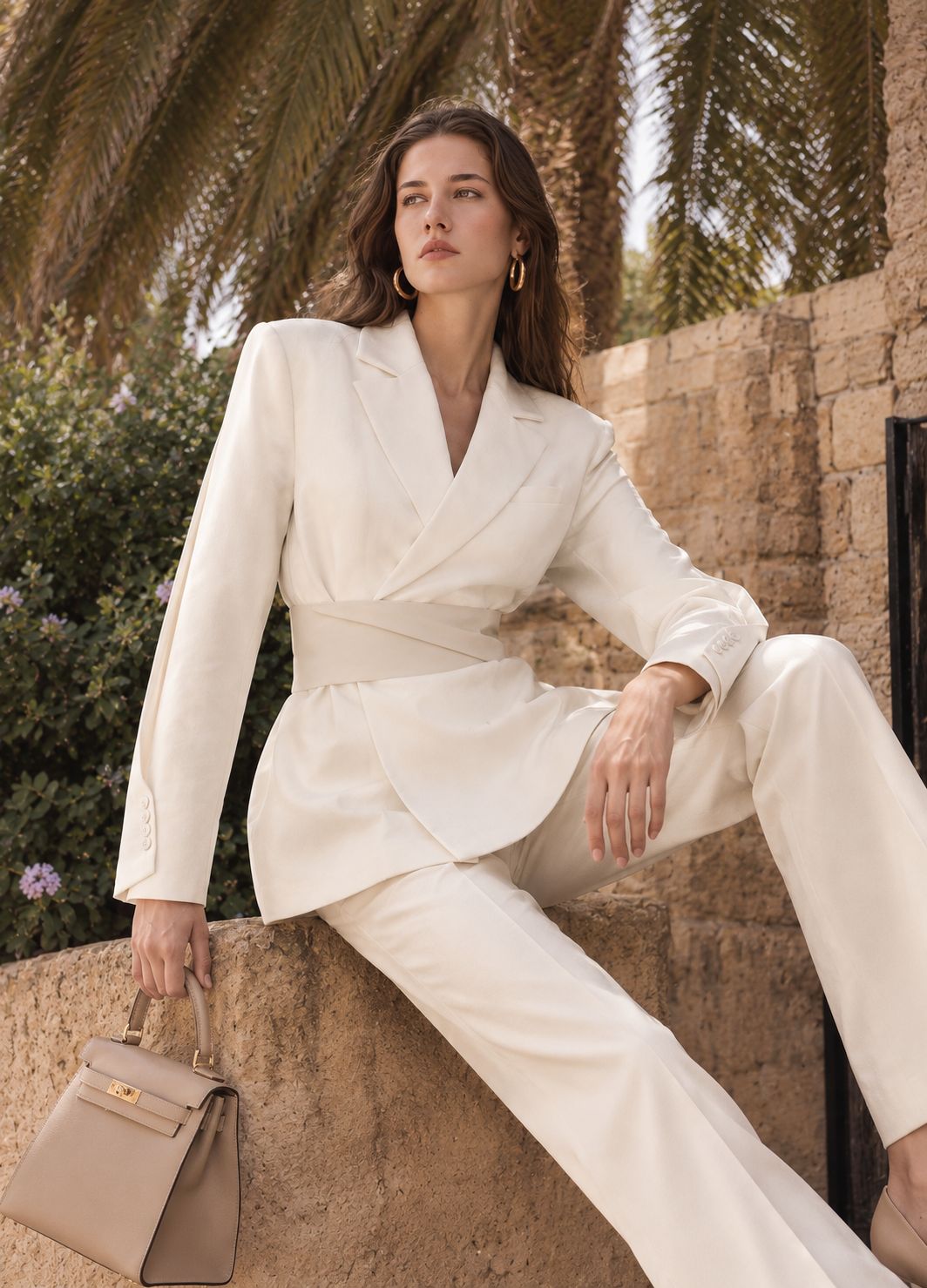
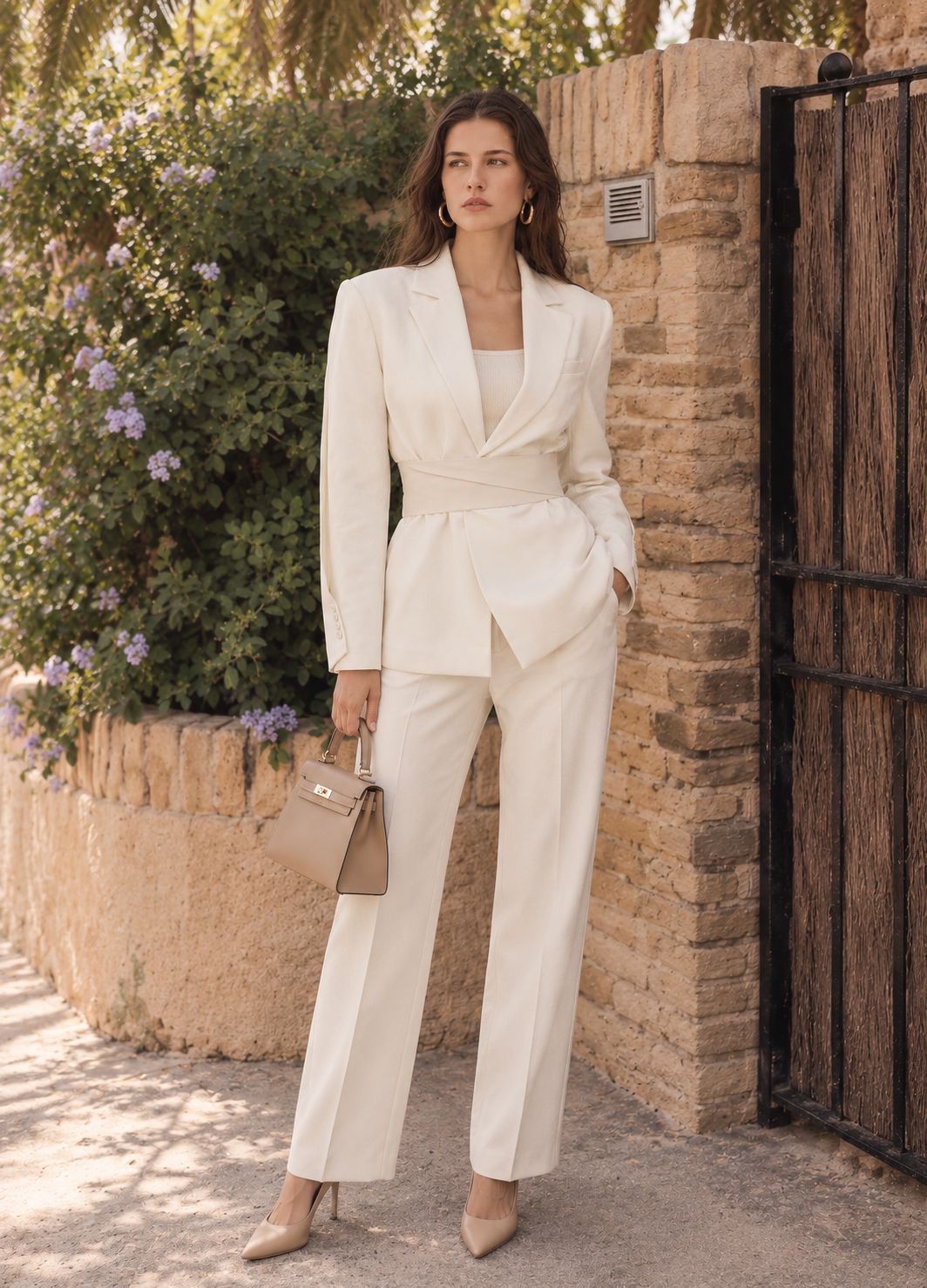
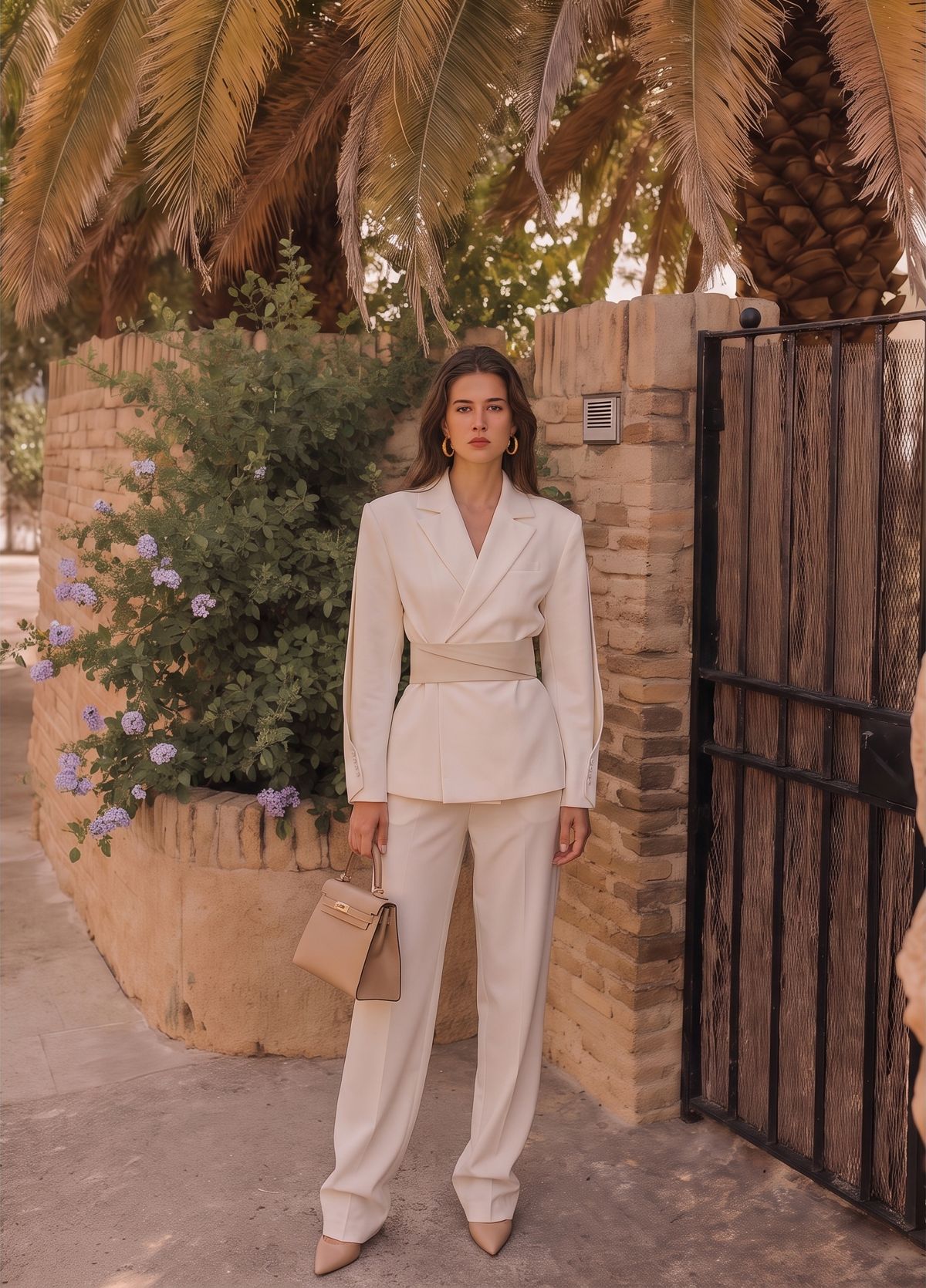
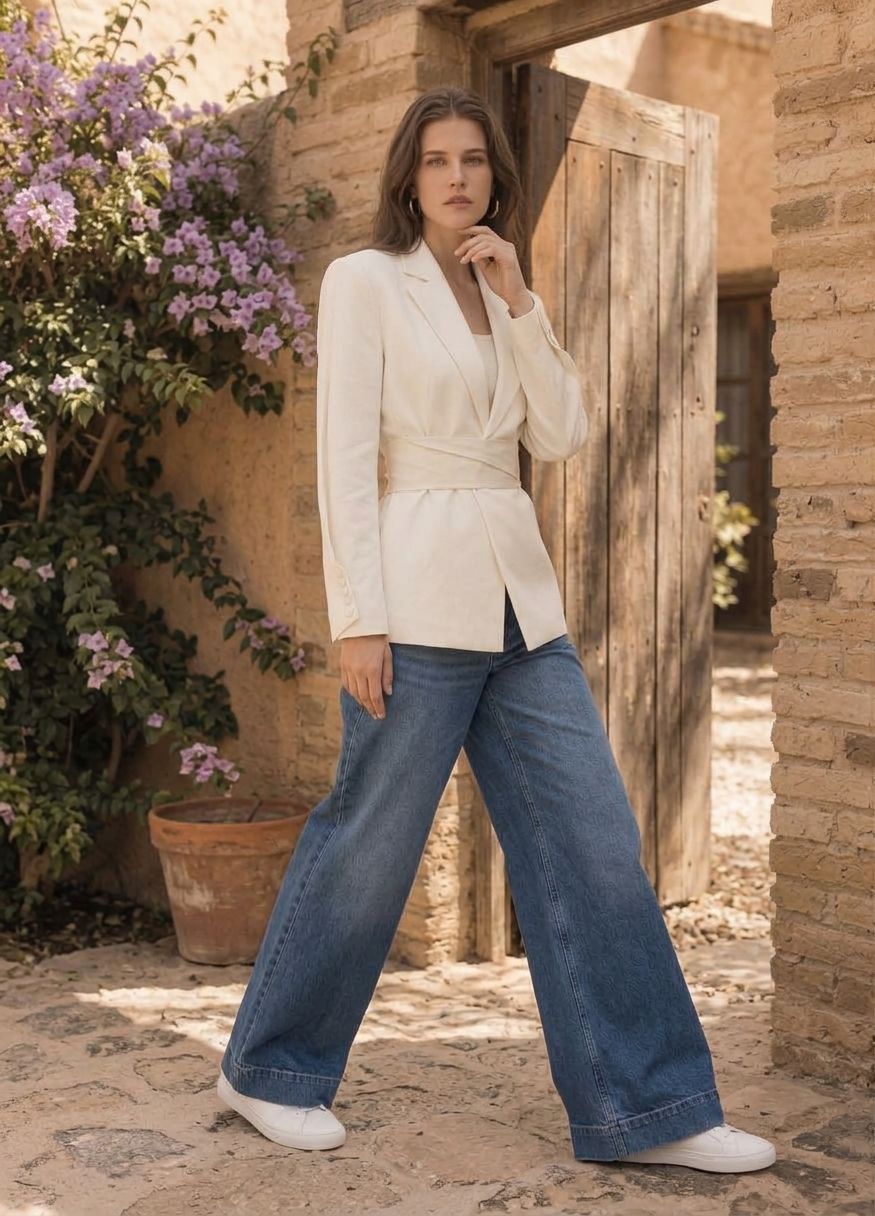
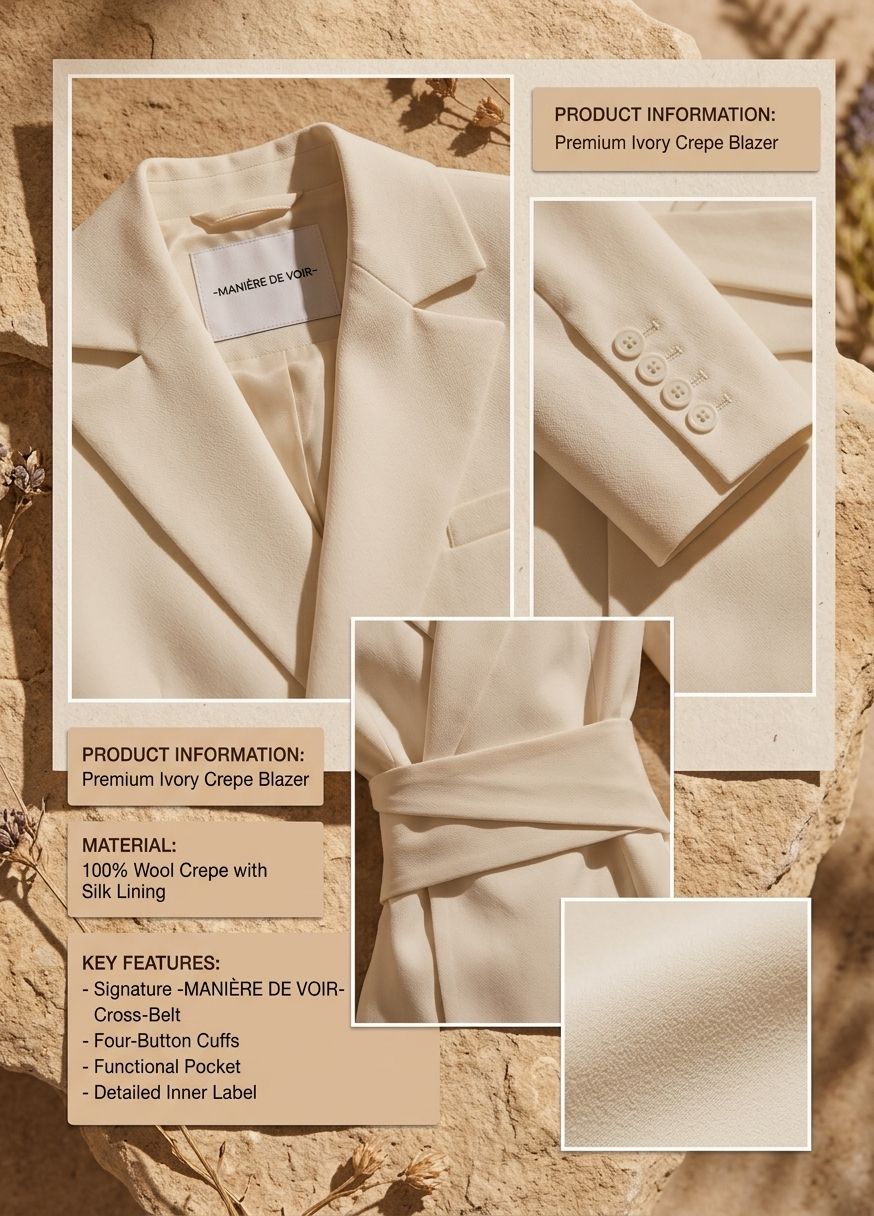
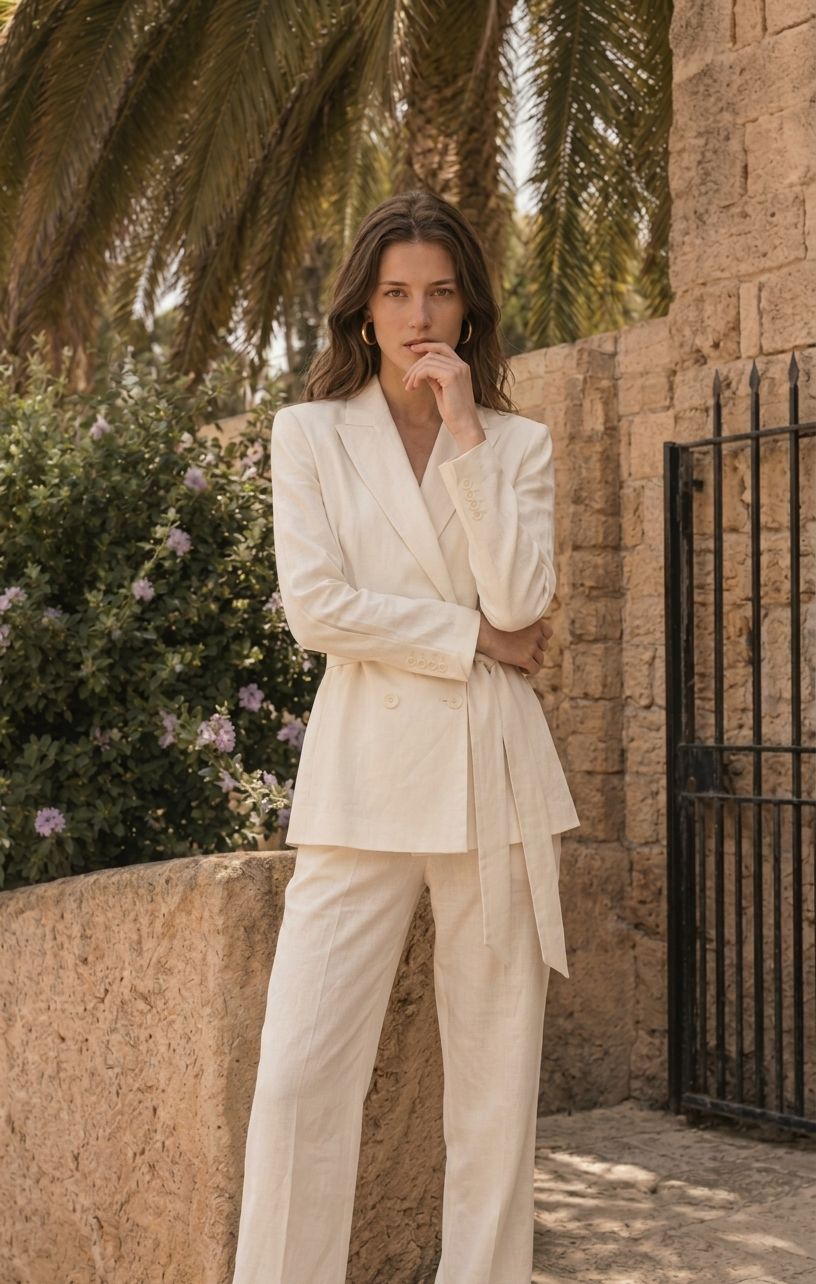
AI-assisted editorial examples: the jacket is the featured product. Trousers, footwear, and accessories illustrate styling and are not included. This sequence is not a substitute for real product-detail and condition photos.
Create Your AI Lookbook with Fashion Model →
Review Garment Accuracy and Visual Consistency
Use the garment checklist from the first-image test to review every new output. Then place the shortlisted images together and make a final collection-level check:
- Continuity: the garment and model remain recognizable across views.
- Visual direction: lighting, palette, and backgrounds feel like one series.
- Coverage: each image adds a useful angle, styling idea, or detail instead of repeating another.
| Decision | Action |
|---|---|
| Keep | Approve images that pass both garment and collection review. |
| Revise | Identify the specific issue, correct it, and review the new version. |
| Reject | Remove images with incorrect construction or a visual direction that does not fit. |
Editorial lookbook images allow creative settings and poses. Product listing images require closer adherence to the real item; support sizing, fit, and material claims with real photos, measurements, and product data.
Assemble and Publish Your Lookbook
Begin the layout after the images pass review. The sequence should introduce the collection, then lead readers through the outfits and product details.
Start with this structure:
Cover → jacket view → reference look → alternative look → details → closing image and CTA
One image can serve more than one purpose, so you do not need a new generation for every page. Remove repetitive images so that each page adds useful information.
Adapt the Lookbook for Each Channel
| Channel | Adaptation | Final checks |
|---|---|---|
| Website | Framing and space suited to the actual placement | Desktop and mobile crops, loading, and product links |
| Instagram / Pinterest | Aspect ratios suited to the placement | Garment visibility and readable text |
| A small selection of compressed images | Mobile width, loading, and clickable links | |
| Consistent pages and clear product information | Zoomed viewing, links, and file size | |
| Files prepared to the printer’s specifications | Resolution, bleed, color, and proofs | |
| Product detail page | Lookbook images used as styling context | Real product and detail photos included |
Do not change the jacket’s color to make the palette more consistent, or crop out unresolved product errors.
Turn Your Clothing Photos into AI Model Images →
FAQ: Creating a Fashion Lookbook With AI
1. Can AI Create a Complete Fashion Lookbook?
AI can assist with image creation, but a complete lookbook also requires planning, selection, layout, and publication. Shopify defines a digital lookbook as a curated collection of photos and multimedia, so generating images is only one part of the process. [1]
2. How Should I Choose AI Tools for a Fashion Lookbook?
Choose tools around your assets and tasks: do you need on-model images, background editing, or page layout? Check reference features, export quality, and commercial-use terms. Shopify’s guide distinguishes asset design, PDF layouts, and shoppable webpages; these jobs may require different tools. [1]
3. How Do I Keep the Same Garment Consistent Across AI Images?
Use the same source assets, visual brief, and reusable settings, then review every image against the real garment. Adobe’s documentation explains that style references can help maintain a consistent look across generated assets. This does not guarantee accurate product details, so visual consistency and garment accuracy require separate checks. [2]
4. Can I Use AI Models for Ecommerce Fashion Photos?
Reviewed AI model images can provide styling and on-body context, but suitability depends on the platform and image placement. Google Merchant Center, for example, requires accurate product representation and specifies source metadata for generative AI images. Those requirements apply to its product data, rather than serving as a universal rule for every platform. [3]
5. What Should I Include in a Fashion Lookbook?
Include a collection theme, complete outfits, relevant details, and product information or links, adjusting the content to its purpose. Shopify’s guide starts with defining the purpose and audience. A cover, outfit views, detail images, alternative styling, and a closing page provide a useful starting structure for this workflow. [1]
6. How Many Images Should a Lookbook Have?
There is no fixed image count that suits every project. For a first trial with one garment, the example in this guide plans six editorial images supported by real detail photos. This is a production suggestion, not an industry standard. Expand larger collections according to their outfits and viewing needs, avoiding repetitive images.
7. Can I Create a Lookbook From Existing Clothing Photos?
Yes, if the existing photos clearly show the garment and are suitable for the chosen workflow. Use actual front, back, detail, and condition images as references, keep the originals, and check every edited or generated result against them. Existing photos that hide construction or show inaccurate color should be replaced before you begin.
8. Do I Need Photography or Design Experience?
Professional experience is not essential, but you need to assess garment accuracy and layout readability. Shopify’s guide includes layout tools and templates for teams without dedicated design resources. Start with simple settings and a small image set to make the process easier to learn and review. [1]
9. Are There Free AI Tools I Can Try?
Some tools offer limited trials or generative credits. Adobe’s official documentation, for example, describes a credit system for free plans; check your current account and plan for availability. Review download quality, usage limits, and revision needs before deciding whether the trial is sufficient. Free generation does not mean the entire lookbook costs nothing to produce. [4]
10. Can AI Replace a Traditional Lookbook Photoshoot?
AI can reduce some location work, reshoots, and visual adaptation, but it is not a universal replacement. Real photography remains useful when you need to document actual fit, fabric behavior, or product condition. Shopify’s guide also recommends considering lifestyle or fashion photography experience for editorial lookbook shoots. [1]
Turn Your Clothing Photos Into a Publishable Set
Start from accurate garment photos, create the views you need, and review every result before it reaches a listing or campaign.
More Resources
References
The numbered citations in the FAQ refer to the following official sources.
- Shopify — Digital Lookbook: Create One Onlinehttps://www.shopify.com/blog/lookbooks-how-to-use-high-quality-lifestyle-photos-to-boost-sales
- Adobe Firefly — Style Image Referencehttps://developer.adobe.com/firefly-services/docs/firefly-api/guides/concepts/style-image-reference/
- Google Merchant Center — Image link [image_link]https://support.google.com/merchants/answer/6324350?hl=en
- Adobe — Generative credits FAQhttps://helpx.adobe.com/creative-cloud/apps/generative-ai/generative-credits-faq.html
Original Image Source
The blazer design depicted in the planning illustrations and AI-assisted sequence was referenced from the Manière De Voir — Marie Twist Sleeve Tailored Blazer with Belt, Off White product page. Attribution identifies the reference; it does not imply permission, endorsement, or that these illustrations are original product photographs.