



A useful AI product photography workflow has to do more than generate one polished image. It should clean and standardize the source, create the right presentation for the product category, preserve SKU details, work at catalog scale, and turn one reliable image into channel-ready campaign and social assets.
To keep this guide grounded in real output, I reviewed five fashion product photography workflows in Snappyit: flat lay, ghost mannequin, product recolor, fashion model, and image to video. The examples were generated between February 10 and July 14, 2026; each figure below shows its actual generation date. I compared the source and generated assets for product shape, color, fabric details, model artifacts, and whether the files were practical for a listing or social workflow. These are five workflows within one platform, not a multi-vendor ranking.
For an ecommerce merchant, the useful question is therefore not simply “Can AI create a product image?” It is “Can my team turn the same real product into an accurate listing set and a week of on-brand content without losing the SKU, changing product details, or adding another production bottleneck?” This guide shows how to build a small AI product photography stack, add it to the current listing process, and reuse product images for social media. The aim is not to replace every photoshoot. It is to publish more products and more creative assets while keeping the catalog trustworthy.
Test note: The five labeled test conclusions below are qualitative visual assessments of one example per workflow. They are not a multi-sample benchmark. Credit counts in those test records are historical observations from the original test dates, not current pricing; confirm the amount shown in the tool before generating. Newer workflow sections are based on current product capabilities and are clearly separated from the hands-on tests.
What Is AI Product Photography?
For ecommerce merchants, AI product photography is a production layer that turns real product inputs into the image formats needed for listings, campaigns, and social channels. It includes simple editing as well as category-specific work that once required a studio or a long retouching queue. For teams building an ecommerce product photography workflow, VistaCreate can handle the editing and adaptation layer around approved product images—from background cleanup and resizing to branded campaign and social formats. The goal is to reuse a trusted product asset across channels without rebuilding each visual from scratch.
In practice, that can mean:
- removing a distracting background, improving clarity, or resizing an approved source for a sales channel;
- creating studio-style backgrounds, lighting, and shadows for general merchandise;
- turning an apparel photo into a consistent flat lay;
- creating a ghost-mannequin view that shows garment structure;
- removing distracting clothing creases while retaining intentional fabric texture;
- retouching jewelry or placing clothing, accessories, and jewelry on an appropriate AI model;
- generating color variants while preserving material details;
- building channel-specific lifestyle scenes and campaign formats;
- producing crops, aspect ratios, and localized creative variants from an approved master asset.
The important part is what happens around the generation. A useful AI setup keeps the product connected to its SKU and exports the right file for the right channel.
Product source → task-specific AI transformation → master asset → listing or social media derivative → channel delivery
Keep three versions of product truth
Do not let every new AI image become an unofficial “master.” Keep three clear asset layers so the listing team and marketing team always know what they can trust and what they can change.
| Asset layer | Purpose | Typical examples | Product-truth rule |
|---|---|---|---|
| Source assets | Record what the real product actually looks like | Raw front, back, side, label, texture, hardware, and color-reference photos | Must remain linked to the physical SKU and should never be overwritten |
| Listing assets | Help a shopper evaluate the exact item being sold | White-background hero image, flat lay, ghost mannequin, model view, detail crop, color variant | Must accurately represent the SKU and pass channel-specific review |
| Social media derivatives | Adapt an approved product for a channel, campaign, or audience | Lifestyle scene, ad creative, social crop, short video, seasonal background, localized post | May be more creative, but must inherit the approved product representation and claims |
This separation solves a common merchant problem: a lifestyle image looks great in an ad, then quietly becomes the reference for the product page even though the color, fit, hardware, or construction has changed. Approve the listing representation first. Let marketing create from that approved asset rather than starting again from an old supplier photo.
Build a small stack around repeatable jobs
You do not need the longest software list. You need a dependable tool for each job that repeatedly slows down your catalog or content calendar.
| Stack layer | Job in the workflow | Possible outputs |
|---|---|---|
| Capture and asset layer | Collect, identify, and store real product inputs | Raw photos, mobile captures, SKU folders, shot lists, product attributes |
| Accuracy layer | Clean and standardize while preserving the item | Background removal, upscaling, wrinkle cleanup, lighting correction, consistent framing |
| Category-production layer | Create views that require knowledge of the product type | Flat lays, ghost mannequin, apparel and accessory models, jewelry retouching and models, recolors |
| Creative layer | Adapt approved products for campaigns and channels | Product Studio scenes, lifestyle concepts, ad variations, model localization, video |
| Delivery layer | Version, export, and publish | Batch status, rejection reason, resizing, file naming, channel-ready files, DAM/PIM records |
One platform may cover several layers, while a specialist may be much better at a difficult category task. Your best stack might be three tools connected by one simple SOP. What matters is that every recurring job has a clear input, owner, and destination.
The Three Reasons AI Product Photography Fails for Ecommerce
In an ecommerce workflow, three recurring failure modes are: merchants rely on prompt-heavy general AI, receive files that are not ready for their sales channels, or add one isolated tool without fixing the full production workflow.
1. General AI tools depend too much on prompts
General image generators can make impressive pictures, but getting a usable ecommerce result often requires repeated prompt writing, regeneration, and manual correction. That may be acceptable for one campaign concept, but it can be difficult to scale consistently across a large catalog.
The most common problems are:
- product details such as stitching, logos, hardware, prints, or proportions are changed;
- lighting, framing, models, and backgrounds vary from one SKU to the next;
- a prompt that works once does not reliably reproduce the same result for the rest of the catalog.
Ecommerce production needs repeatable presets and category-aware tools, not a new prompt experiment for every product.
2. The output is not ready for ecommerce or social platforms
An AI image can look good and still be impossible to publish. Listing and social channels each have their own requirements for background, crop, aspect ratio, resolution, file size, text placement, and video format.
For example, a marketplace main image may need a clean product-only view, while Instagram Reels and TikTok short-form placements commonly prioritize vertical creative with important content inside safe areas [3][4]. Other placements support different formats, so teams should check the current specification for the exact placement. AI video also needs stable product details, logos, and text from the first frame to the last.
Use tools designed for ecommerce production. They should help the team preserve product accuracy and create channel-ready listing images, social ratios, and video formats without rebuilding every asset by hand.
3. One AI tool does not improve the whole team workflow
A single tool may make one editing task faster, but the team can still lose time finding source files, renaming downloads, checking product details, requesting missing variants, and exporting the same image again for different channels.
The larger efficiency gain comes from connecting the right tools into one repeatable stack:
SKU source photos → category-specific AI tools → product QA → listing and social exports → publish
The goal is not to find one tool that does everything. It is to give each recurring job the right tool and connect those tools to the team's existing approval and publishing process.
How to Build an AI Product Photography Workflow for Ecommerce Listings
Listing images have one commercial job: help shoppers understand the exact product well enough to buy it. For the merchant, they also need to arrive in a predictable set that can be reviewed and published for every SKU.
Do not judge listing AI by how dramatic the first result looks. Judge it by whether the image is consistent, accurate, accepted by the sales channel, and easy to repeat across the catalog.
Prepare the source first. When generation is not needed, use the free background remover, product photo upscaler, or image resizer for simple cleanup and channel-ready exports.
| Requirement | What it means in practice | Workflow rule |
|---|---|---|
| Consistency | Products use predictable angles, framing, scale, backgrounds, shadows, and gallery order | Define image templates by category and channel before generation |
| Accuracy | Color, silhouette, fabric, construction, print, hardware, and proportions match the real SKU | Compare every generated asset with the source-of-truth package |
| Platform compliance | Each image fits the rules of its marketplace, storefront, and image slot | Store channel specifications in the export preset and review checklist |
| Scalable production | The team can repeat the process across a large catalog without uncontrolled manual work | Use standardized inputs, batchable tasks, naming rules, approval states, and rejection reasons |
An attractive image that fails one of these checks is still a draft, not a listing asset.
Plan the gallery before generating anything
Plan each image around its channel, shopper question, export specification, product details that must not change, and approver. Use only the views your SKU actually needs.
| Listing job | Shopper question | Recommended AI capability | What to protect |
|---|---|---|---|
| Source preparation | Is the real product clear enough to use? | Background Remover, Product Photo Upscaler, or Image Resizer | Edges, text, logos, transparent areas, output dimensions |
| Product-only hero | What exactly is the product? | Product-only Product Studio output, AI flat lay, AI ghost mannequin, or Jewelry Retouch | Product accuracy, framing, and the channel's current background rule |
| Context or on-body view | How can shoppers visualize it in use? | Product Studio, AI Fashion Model, Product-to-Model, or Jewelry Model | Product identity, scale, placement, generated props, model artifacts |
| Color-variant image | What does this exact variant look like? | AI recolor | Verified color, texture, print, stitching, hardware |
| Detail evidence | Are the material and construction trustworthy? | Original close-up or accuracy-preserving retouching | Labels, seams, fasteners, texture, condition |
AI Product Studio: Create Studio-Style Images for More Product Categories
AI Product Studio turns an existing product photo into a more polished ecommerce presentation by refining the background, lighting, and shadows. It extends this workflow beyond fashion to categories such as bags, shoes, beauty products, packaged goods, and homeware.
Best for: merchants who have a clear product source but need a consistent studio look or campaign-ready setting without building a new physical set for every SKU.
If you only need to remove the existing background or replace it with white, without regenerating the product image, use the free product background remover instead.
For a listing hero, use only a product-only output that satisfies the destination channel's current background and image rules. Reserve generated settings, props, and lifestyle context for secondary gallery images, campaigns, and social content unless the channel explicitly permits them.
Approve the product cutout and category brief before generating scene variations. Then check:
- product outline, proportions, labels, text, packaging, and included accessories;
- whether the contact shadow and surface make physical sense;
- reflections and transparency on glass, metal, glossy packaging, and polished products;
- whether generated props imply a size, quantity, use, or feature that the real product does not have;
- crop, negative space, and aspect ratio for the intended listing or campaign placement.
Product Studio changes presentation, not product truth. Keep real detail images in the gallery and reject any scene that changes the item or creates a misleading usage claim.
AI Flat Lay: Standardize Product Photos from Any Source
AI flat lay is a practical starting tool for apparel when product inputs arrive from different suppliers, phones, studios, or team members. It turns that mixed source material into a repeatable overhead catalog view.
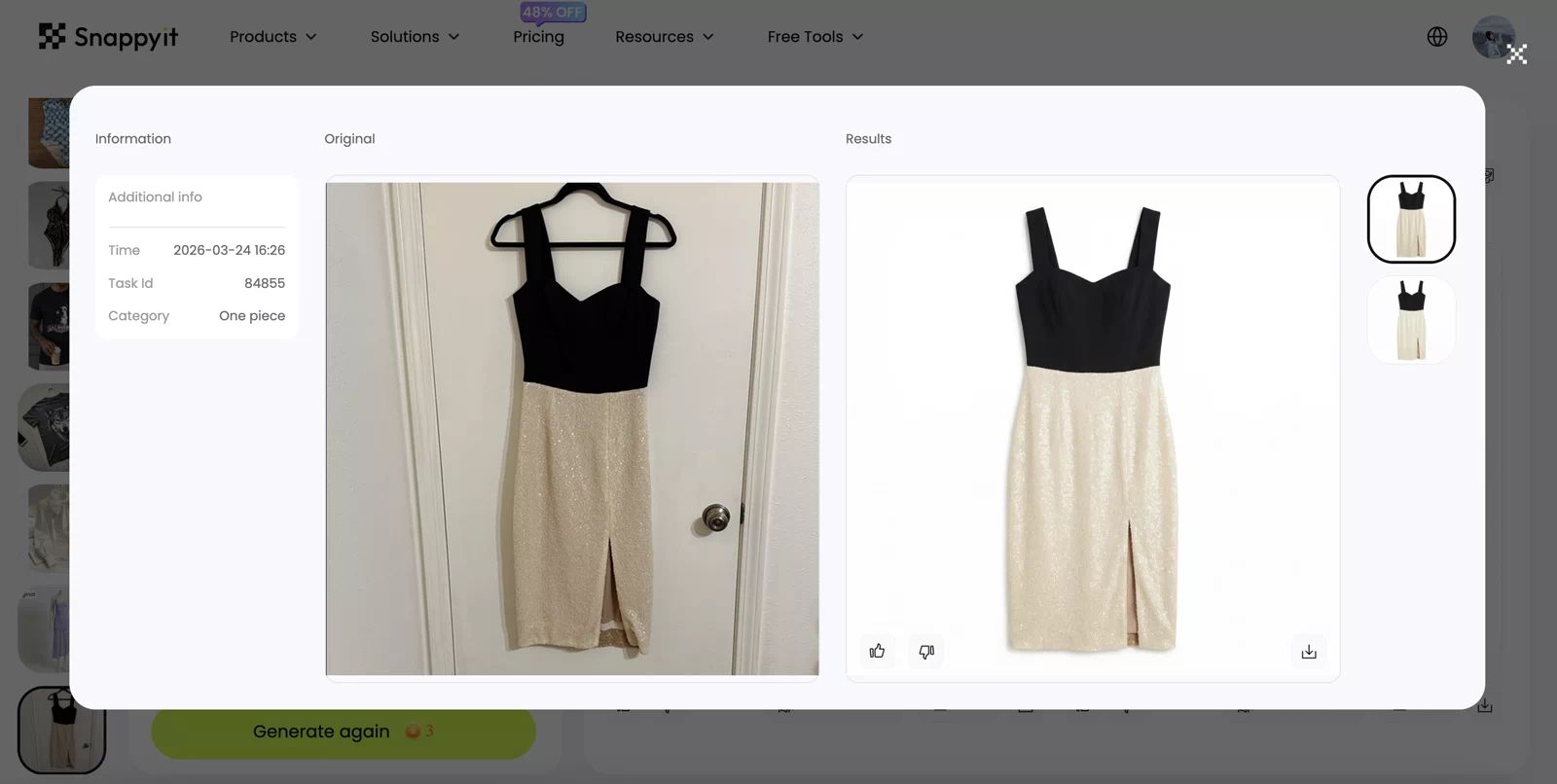
Product fidelity: Good. The black bodice, champagne skirt, straps, and front slit remain recognizable. The neckline, edge symmetry, and sequin texture are visibly cleaned, so those details still need source comparison.
Image clarity: High. The product has clean separation and sharp catalog edges, although some fine fabric texture appears smoothed.
Realism: Medium-high. The white studio presentation is believable, but the shadowing and symmetry look more polished than a natural capture.
Original test credit use: 3 credits.
Best for: apparel sellers, resellers, and high-SKU stores that need a consistent hero or supporting image without reshooting every item.
Use it to:
- isolate the product from a distracting source background;
- normalize the top-down angle and placement;
- create consistent spacing and framing;
- normalize lighting and overall presentation;
- produce a reusable base image for the gallery or downstream transformations.
If you want to keep the original photographed setting and only remove garment creases, use Remove Clothes Wrinkles instead.
Compare the result with the real item around hems, straps, collars, pockets, prints, and asymmetrical details. A cleaner presentation should never become a redesigned product.
AI Ghost Mannequin: Show Garment Shape Without a Model
AI ghost mannequin helps apparel shoppers understand silhouette and structure while keeping the image focused on the garment. It is useful when a flat lay looks shapeless but a full model image would distract from the product.
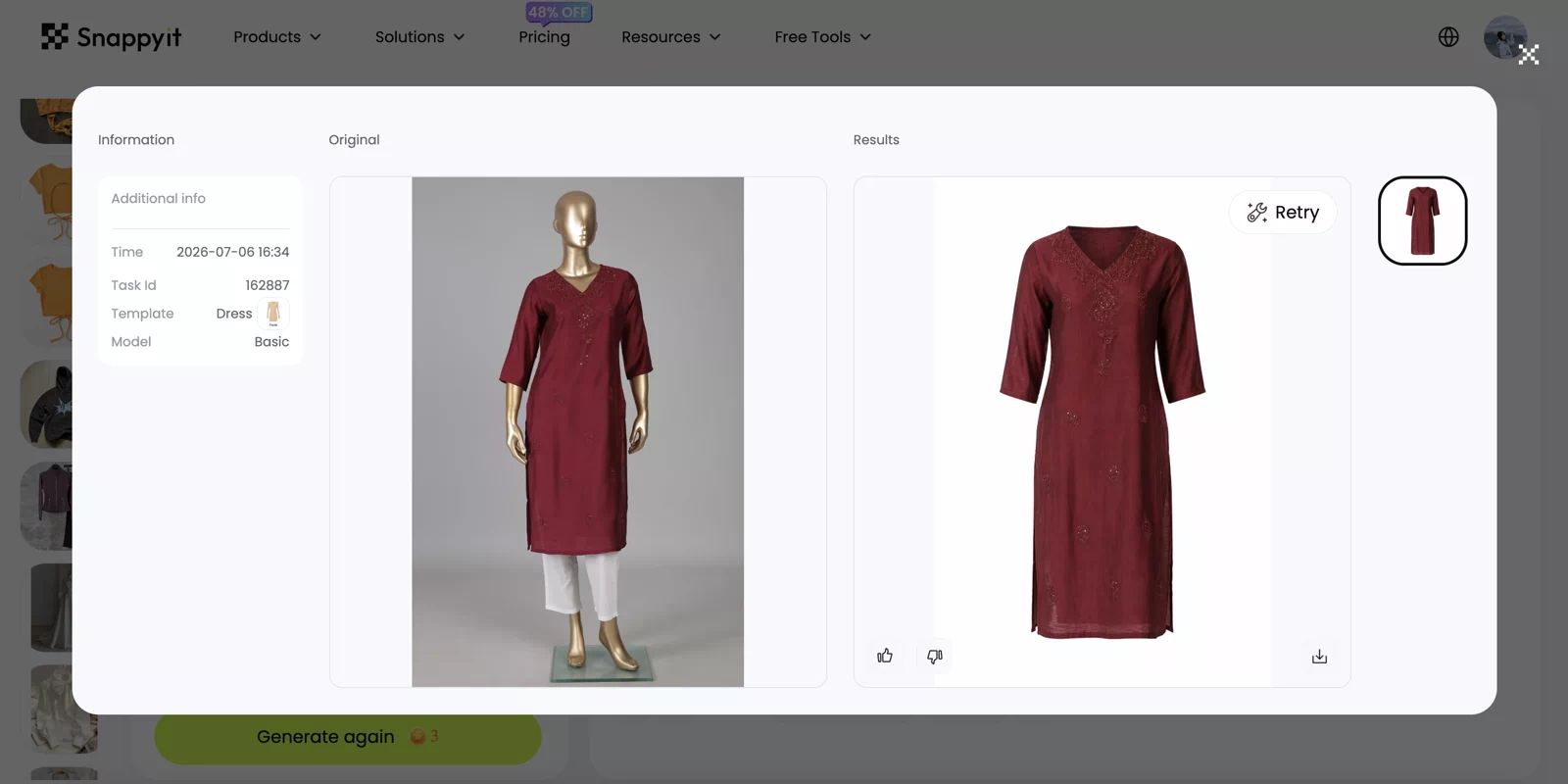
Product fidelity: Good overall. The burgundy color, V-neck embroidery, sleeve length, and long tunic silhouette remain identifiable. Because the AI reconstructs drape and hidden areas after removing the mannequin, width, hem, and inner-neckline details need review.
Image clarity: High. The garment edge and major embroidery remain easy to inspect against the clean background.
Realism: Medium-high. It works as a clean ghost-mannequin catalog view, although the hollow neckline and reconstructed drape can look slightly synthetic.
Original test credit use: 3 credits.
Best for: dresses, shirts, jackets, knitwear, and other garments where neckline, volume, openings, and drape affect the purchase decision.
This is more than background removal because the AI reconstructs a worn shape. Compare the neckline, collar, sleeves, openings, hem, closures, and layered areas with the source, and reject invented fabric or impossible folds.
Depending on the channel, use the approved result as the clean main view or as a supporting image next to the original detail shots.
AI Product Recolor: Create Color Variants Without Reshooting
AI product recolor lets a merchant create a consistent image set for multiple colorways from one approved master. It can reduce a launch delay when the construction is identical but photography for every variant is not ready.
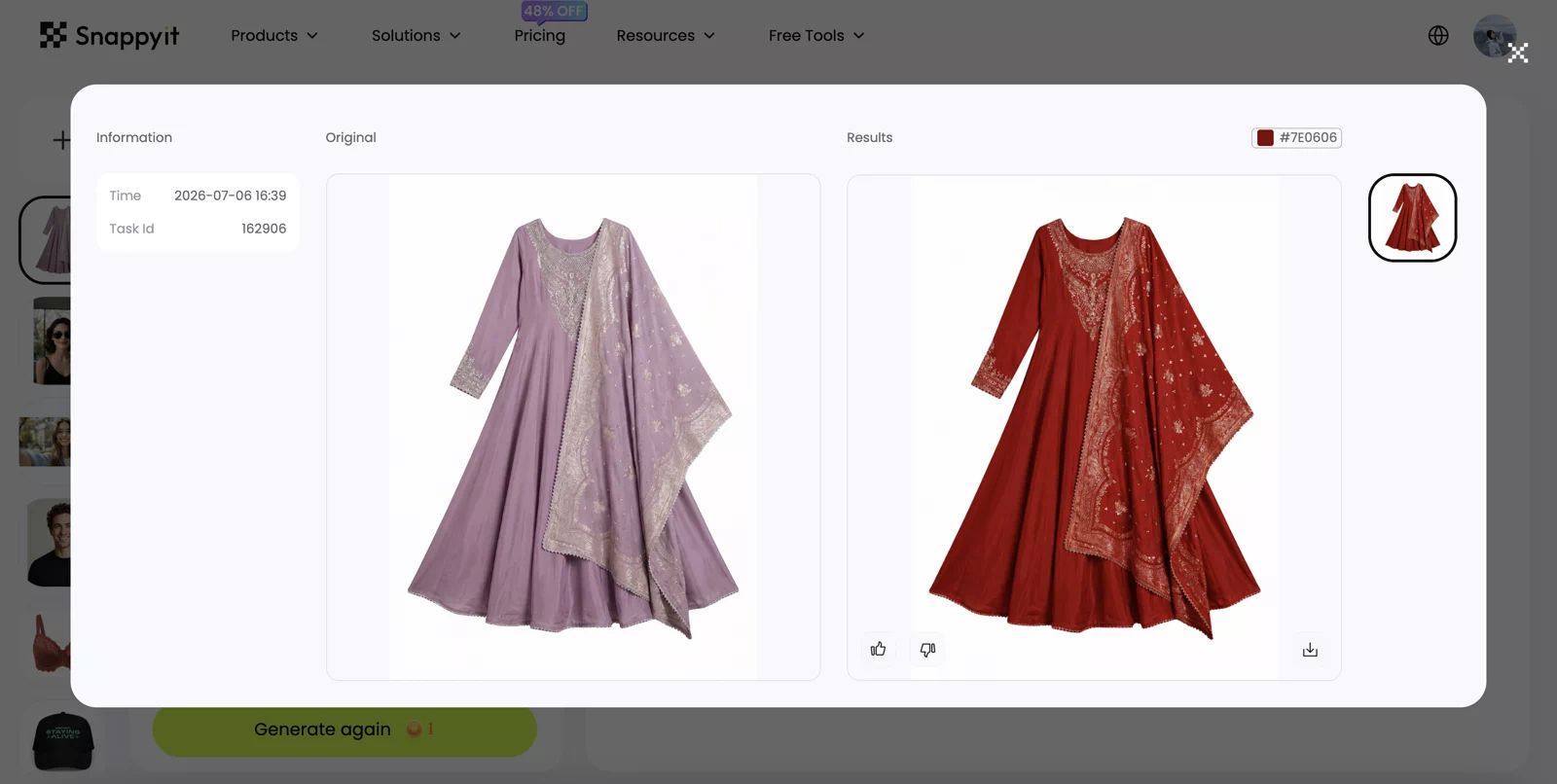
Product fidelity: Good for silhouette and embroidery placement. The target color is applied consistently, but color accuracy cannot be verified from a screenshot or HEX value alone; gold accents and fabric texture should be checked against a physical swatch or calibrated reference.
Image clarity: High. Construction and decorative details remain visible, with some tonal compression in the deepest red areas.
Realism: High as a catalog visualization. Whether the red matches the physical colorway remains unproven until color QA is completed.
Original test credit use: 1 credit.
Best for: products sold in many verified colors, especially when the base material, construction, and trim stay the same.
Start with product data, not a creative color prompt. The workflow needs:
- an approved base image;
- the exact variant/SKU relationship;
- a physical swatch, calibrated reference photo, or verified color value;
- rules for elements that must not change, such as buttons, metal, labels, prints, or contrast stitching;
- a side-by-side color and texture review before publishing.
Do not use recolor to invent a color you do not sell or to hide real material differences between colorways. Each output must stay attached to the correct variant SKU.
AI Jewelry Retouch and Jewelry Model: Treat Small Details as Product Data
Jewelry needs a different review standard from apparel. Small changes to a stone, prong, clasp, chain link, engraving, reflection, or metal edge can turn a polished image into the wrong product.
Use AI Jewelry Retouch when the goal is a cleaner product-only presentation with improved backgrounds and more controlled detail. Use the AI Jewelry Model workflow when a shopper needs wearing context for a ring, necklace, earring, or bracelet.
Best for: jewelry sellers who need both an accurate catalog image and a secondary on-model view without arranging a new shoot for every design.
Review the two outputs differently:
- Retouched product image: compare stone count and shape, prongs, settings, links, clasps, engraving, metal color, finish, and surface reflections with the real item.
- On-model image: also check physical scale, placement, orientation, chain length, contact with skin or clothing, matching pairs, and whether hair, hands, or ears hide important details.
Keep measurements, real close-ups, and product-only images as the primary evidence of size and construction.
AI Fashion Model: Add On-Body Context at Catalog Scale
AI fashion model shows how a garment may look on a person without booking a new shoot for every SKU. Use it after the product-only master is approved, usually as a secondary PDP image or styling view.
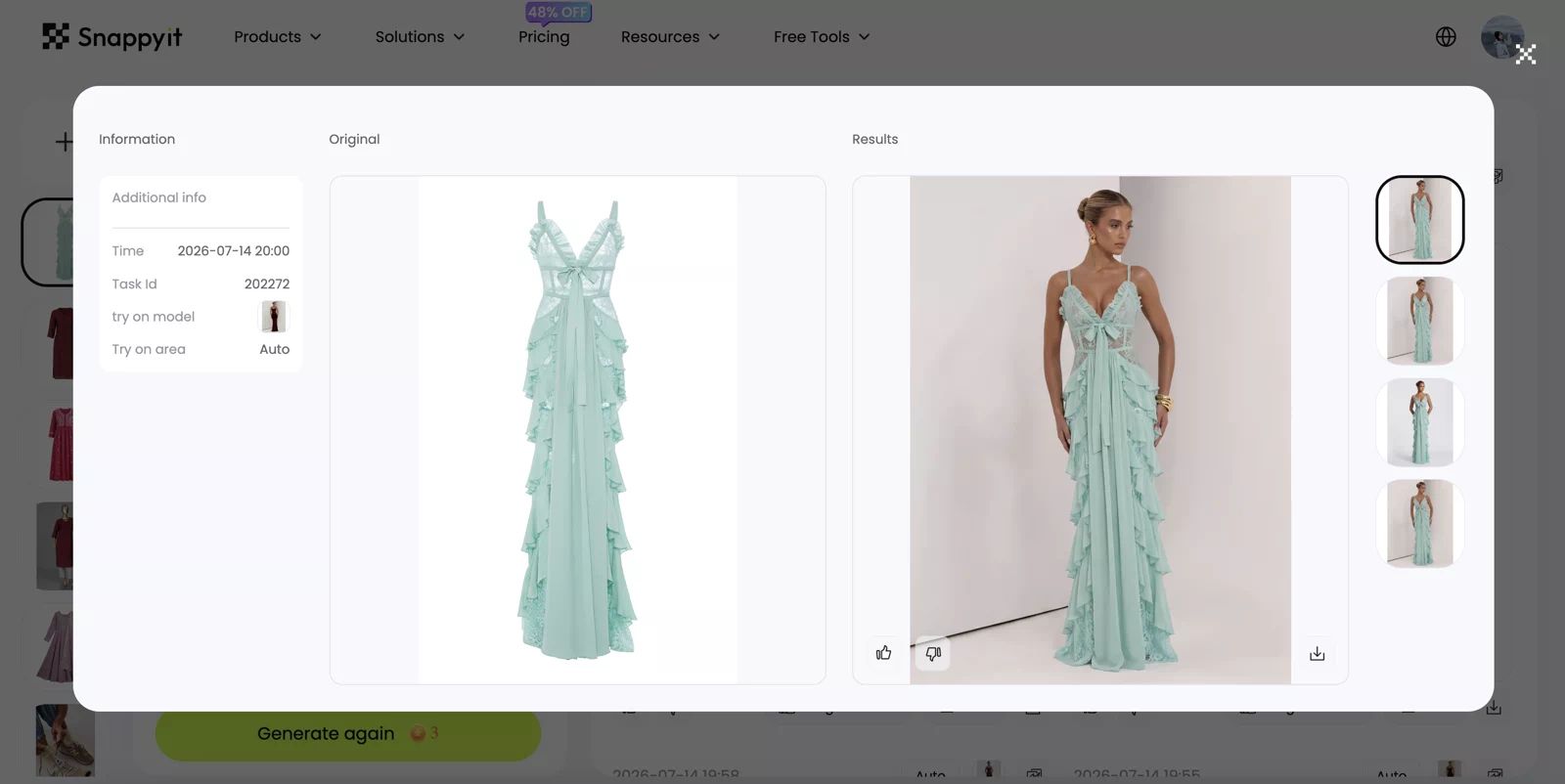
Product fidelity: Good overall. The mint color, ruffles, front bow, and long silhouette remain recognizable. The neckline, layer overlap, apparent length, and drape are reconstructed and should not be treated as evidence of actual fit.
Image clarity: High. The dress is sharp enough for a PDP secondary view, although lace, thin straps, and other fine details should be checked at full resolution.
Realism: High at normal viewing size. The model and studio lighting look convincing; hands, skin-to-garment contact, and overlapping fabric remain the priority areas for zoomed QA.
Original test credit use: 3 credits.
Best for: fashion stores that need visual styling and approximate on-body context across frequent drops or multiple target audiences. Generated model images are not evidence of actual garment fit or sizing.
Create a small set of reusable model profiles instead of choosing a new face, body, pose, and environment every time. A controlled model library can make the catalog feel more consistent and give reviewers a repeatable approval baseline.
Find inspiration in our AI product photography gallery.
Choose Product-to-Model for a wider product range
The AI fashion model generator workflow extends on-model presentation beyond a standard garment flow. It can be considered for apparel and accessories such as jewelry, hats, and shoes when the product category, source image, and intended wearing context match the available workflow. Continue to use a specialist jewelry workflow when fine settings, chains, clasps, or physical scale are the main purchase evidence.
Use Face Swap only with clear rights and consent
AI Face Swap can adapt an approved fashion image to a different model face while retaining the outfit, pose, and background. This can support a controlled localization or model-consistency workflow, but it is not a substitute for consent or rights clearance. Use only source and model imagery that the merchant is authorized to edit, follow current disclosure and platform rules, and inspect facial anatomy, skin tone transitions, hairlines, earrings, glasses, shadows, and every area where the face meets the original image.
AI model photography adds context; it should not be the only evidence of what the customer will receive. Keep product-only and detail images in the gallery.
Model images help shoppers picture the style, but they still leave the most common fashion question open: Which size should I order? An AI shopping assistant can answer that on the product page. For example, Zipchat’s AI size and fit advisor uses your size charts, measurements and product details to recommend a size in chat, and passes harder cases to your team. Let the model image sell the look, and let verified size data answer the fit question.
Fit the AI Product Photography Tools into Your Listing Workflow
The tools start saving time only when the outputs move through the same launch process as the rest of the SKU. A merchant-friendly sequence looks like this:
- Create the SKU brief. Record category, variant, target channels, required image slots, launch date, and owner.
- Capture the product-truth package. Include clear front, back, side, label, texture, construction, hardware, and verified color references as needed.
- Choose the master listing view. Use Product Studio, AI flat lay, AI ghost mannequin, or Jewelry Retouch according to the category and channel. Approve this representation before creating downstream variants.
- Generate the remaining listing set. Add wrinkle cleanup, validated recolors, jewelry or apparel model views, and other secondary assets only where the image matrix requires them.
- Approve for product and channel. Compare the output with the source, then confirm image-slot rules, background, crop, resolution, format, overlays, and current marketplace requirements.
- Name, version, and attach the assets. Preserve the SKU, variant, channel, image slot, and approval version in the file or asset record.
- Publish and record rework. Use consistent rejection codes so recurring failures improve capture guidance, presets, tool selection, and review rules.
The workflow can be summarized as:
SKU brief → source-of-truth photos → approved master view → required AI derivatives → product and channel approval → export → publish
How to scale without scaling mistakes
Scaling does not mean sending the entire catalog through one setting. Batch products only when they share meaningful characteristics, such as category, construction, input type, output template, and review criteria.
Useful production controls include:
- one image matrix per category and sales channel;
- fixed source-capture checklists;
- reusable flat-lay, ghost-mannequin, recolor, and model presets;
- a small, approved model library;
- automatic file dimensions, format, compression, and naming checks;
- rejection codes such as wrong color, altered construction, lost detail, inconsistent crop, model artifact, or channel failure;
- version history connecting the raw source, generated result, approved master, and published asset.
The Batch Product Photo Editor can reduce repetitive setup when many products need the same supported workflow. Build each batch from products that share the same input type, category, output template, and acceptance rule. Confirm the total credit amount before generating, then assess every result against its own SKU; a completed batch does not guarantee accuracy.
Measure the system with first-pass approval rate, rework rounds, time from SKU intake to publication, and cost per approved asset. Generation speed matters only when the results are publishable.
Choose mobile or web for the job
Use the Snappyit mobile app when source photos are already in the camera roll or staff are capturing inventory on location. Use the browser for larger-screen comparison, file-heavy catalog work, and batch production. The same Snappyit account can be used across web, iPhone, and Android, with subscription credits shared across those surfaces; billing changes are managed through the channel where the subscription was purchased.
How to Use AI Product Photography for Social Media
Start with an approved product master, then vary the scene, crop, model, copy, or motion for each campaign. Social assets can be more creative than listing images, but they must still represent the same product accurately.
Build a reusable social kit
Define the brand colors, typography, preferred scenes, model style, product details that must not change, and required formats such as 1:1, 4:5, and 9:16. Use that brief for every campaign instead of inventing a new visual direction for each post.
Turn one approved product into a content set
- Create a small set of stills from the approved master.
- Change only one or two variables at a time, such as the hook, scene, model, or message.
- Reject any result that changes the product or breaks the brand brief.
- Adapt approved creative into channel-specific crops, captions, and short videos, then track which variations perform.
Build short videos from approved visual modules
Use Image to Video when an approved model or product image should become a short moving clip. Use the AI Fashion Video Generator when the source is a clothing product image and the goal is a modeled fashion sequence.
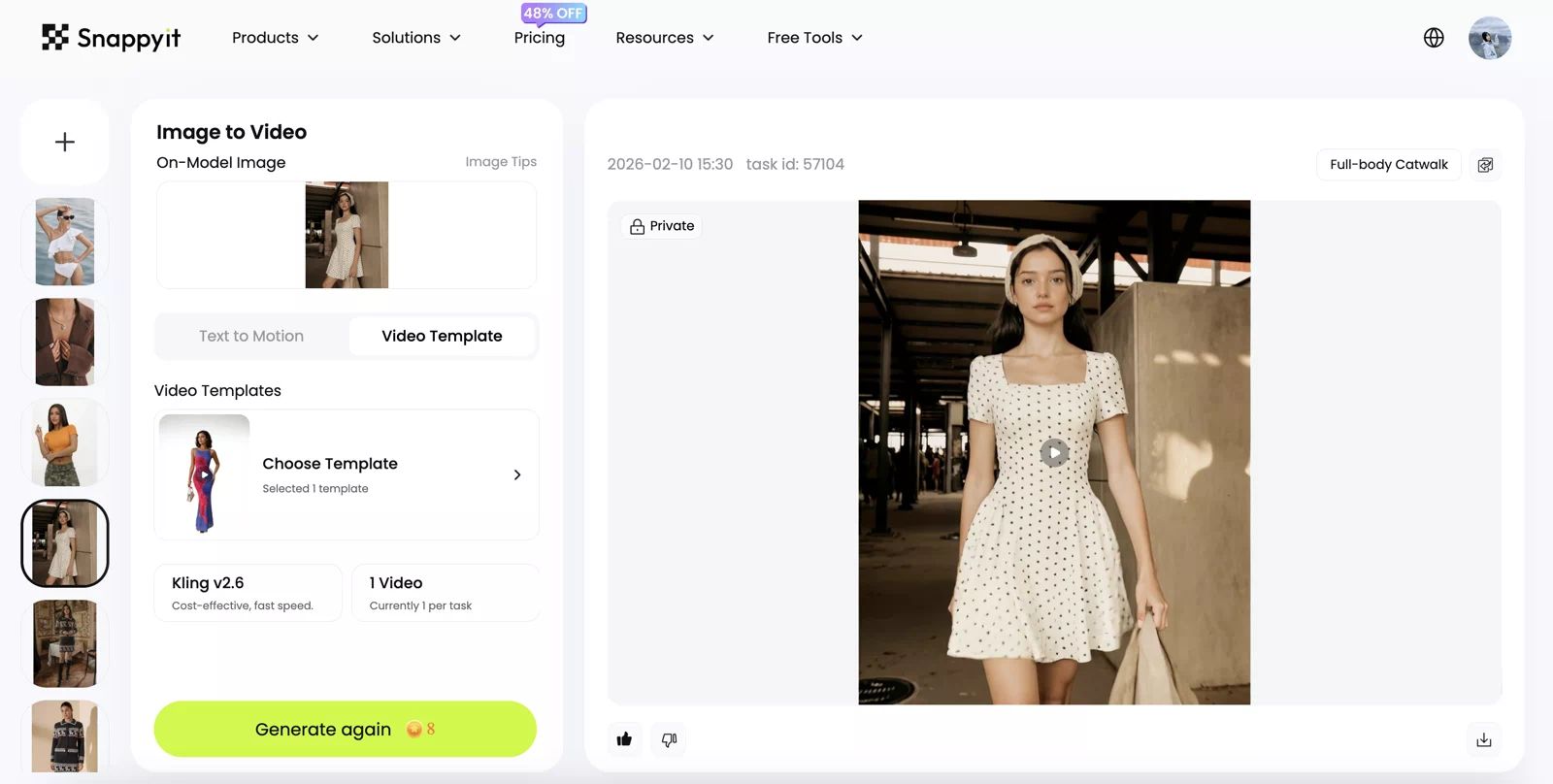
Product fidelity: Good in the sampled frames. The dot pattern, square neckline, short sleeves, and skirt shape remain stable. Hands, the carried item, waist contact, and moving hem are the highest-risk areas for frame-by-frame QA.
Image clarity: High. The original export is 1268 × 1632, H.264, and 24 fps, with good garment detail in the reviewed frames. The embedded delivery copy is optimized to 900 × 1158.
Realism: Medium-high. The walking motion and camera framing look natural in sampled frames, but the complete 5.04-second clip should still be checked for temporal warping or detail drift.
Original test credit use: 8 credits.
Original export: 5.04 seconds, 1268 × 1632, H.264, 24 fps. Embedded copy optimized to 900 × 1158 for web delivery.
Review video frame by frame for product shape, color, logos, text, hands, body contact, fabric motion, and temporal artifacts. Keep every derivative linked to the approved product master so social creativity does not weaken catalog accuracy.
FAQ: AI Product Photography
1. What is the best AI product photography tool?
There is no single best tool for every product photography job. The best choice is a dependable, task-specific tool for the step that slows down your workflow. Choose according to the job: source preparation, product-only presentation, on-model or lifestyle context, verified variants, or catalog-scale delivery. Judge the result by product accuracy, first-pass approval, channel readiness, and repeatability—not by one dramatic demo.
2. Can AI create product photos for ecommerce stores?
Yes. Depending on the source and product category, AI can create clean product-only views, category-specific catalog presentations, on-model or lifestyle context, verified color variants, campaign crops, and short videos. For ecommerce use, generation is only one step: each output should remain connected to the correct SKU and be exported for the right channel and image slot.
3. Is AI product photography good for Shopify stores?
Yes. Shopify merchants control their storefront, theme, and product gallery, so AI images can support flat lays, model views, color variants, and campaign assets when they accurately represent the SKU. There is no single marketplace-style main-image rule for every Shopify store. Check the active theme's media behavior, crop and aspect-ratio choices, image quality, and accessibility text before publishing [2].
4. Is AI product photography suitable for Amazon listings?
It can be, but acceptance depends on the Amazon marketplace, product category, image type, and current requirements. Do not assume that a flat lay, ghost-mannequin image, model image, or overlay is permitted in the main-image slot. Check Amazon's current product image requirements for the exact listing before publishing [1]. An attractive image that fails a channel rule is still a draft.
5. Can AI generate product photos with models?
Yes. Use AI Fashion Model for apparel, AI fashion model generator for a wider set of apparel and accessories, or Jewelry Model when fine jewelry detail and physical scale require specialist review. Treat each result as visual styling and approximate wearing context—not proof of actual fit, sizing, or dimensions. Keep product-only images, real detail photos, measurements, and size information as the primary evidence of what the buyer will receive.
6. How should merchants review AI product images before publishing?
Start by confirming that the merchant has the right to use and edit the source material, then review Snappyit's current terms for the intended commercial use. Compare every output with the verified source package linked to the physical SKU, and check product integrity, brand rules, copy, claims, disclosure obligations, and the destination platform's policy. This operational checklist is not legal advice; when rights or regulatory obligations are unclear, obtain appropriate legal review.
7. Is AI product photography better than hiring a photographer?
No. AI is best for repeatable catalog work, missing variants, channel adaptations, and social derivatives. Use traditional capture when real fit, material behavior, construction, or condition must be documented directly, and keep verified source photos for every generated workflow.
8. Do I need design or photography skills to use AI product photography tools?
No specialist training is required. Start with accurate source photos, define the image slot and channel specifications, and state which product details must not change. A reusable brief matters more than inventing a new prompt for every SKU.
9. Can AI improve existing product photos?
Yes. Start with the smallest non-generative preparation step that solves the problem, such as background cleanup, upscaling, or resizing. Use a specialist generative workflow only when you need to reconstruct presentation, and compare the result with the source so an improvement does not redesign the product.
10. Are there free AI product photography tools?
Yes, but distinguish free utilities from free generative credits. Snappyit offers free preparation utilities for background removal, upscaling, and image resizing. At this October 2026 update, Snappyit also advertises six free credits for newly registered users and no credit card requirement for trying its generative tools. Free access, credit allowances, and plan terms can change, so check the current pricing page before generation.
11. Can I edit product photos in batches or on my phone?
Yes. Use batch editing for products that share the same input and output requirements, and use the mobile app for camera-roll or on-location work. See how to fit batch, mobile, and web tools into the listing workflow before choosing where each job should run.






